
Dowinx Gaming Chair
Dowinx Heated Massage Gaming Chair Instruction Manual
Model: Gaming Chair
Product Overview
The Dowinx Heated Massage Gaming Chair is designed for adults, offering an ergonomic and comfortable seating experience for gaming, office work, reading, or relaxing. It features a dual-mode heated Shiatsu massage lumbar support, a breathable pocket spring cushion, adjustable ergonomic support with a reclining backrest, and a retractable footrest. The chair is constructed with a reinforced steel frame for durability and stability.
Important Safety Information
- Assembly may require tools and safety precautions. Always follow the included assembly instructions carefully.
- Do not exceed the maximum weight recommendation of 300 pounds (136 kg) to prevent damage or injury.
- Ensure all screws and connections are securely tightened before use. Periodically check and re-tighten as necessary.
- Keep children and pets away from the chair during assembly.
- Avoid standing on the chair or using it as a step stool.
- When using the heated massage function, ensure the power cord is not pinched or damaged. Discontinue use if any damage is observed.
Setup and Assembly
Your Dowinx Gaming Chair includes comprehensive assembly instructions. Please refer to the detailed guide provided in the packaging for step-by-step instructions. All necessary tools and hardware are included. Some screws may be pre-installed on the chair components; remove these before beginning assembly as indicated in the manual.
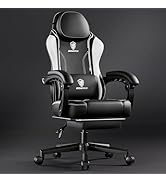
Image: All components of the Dowinx Gaming Chair laid out, including the backrest, seat, armrests, base, wheels, and cushions, with key dimensions labeled.
Operating Instructions
1. Dual-Mode Heated Massage
The lumbar support features Shiatsu massage technology with slow heating. Connect the USB cable from the lumbar pillow to a power source (e.g., power bank, computer USB port, or wall adapter). The dual-sided design adapts to work or relaxation modes. A 5-minute auto-shutoff feature prevents overheating.

Image: A diagram illustrating the counter-clockwise and clockwise rotation of the 3D Shiatsu massage nodes and the soothing heat function within the lumbar pillow.

Image: A four-step visual guide showing how to activate massage and heating, change rotation direction, switch off heating, and switch off massage using a single button.
2. Reclining Backrest
The backrest can recline up to 135 degrees. Use the recline lever located on the side of the seat to adjust the angle. Lean back to your desired position and release the lever to lock it in place. To return to an upright position, pull the lever and lean forward.

Image: A visual representation of the chair reclining from 90 degrees (Game) to 110 degrees (Read) and up to 135 degrees (Relax).
3. Adjustable Armrests
The padded armrests offer enhanced ease of use with a 2.36-inch lift adjustment. Use the button or lever on the side of the armrest to raise or lower them to your preferred height.

Image: A close-up of the chair's padded armrest, illustrating the lift adjustment mechanism and indicating a 2.36-inch range of motion.
4. Retractable Footrest
For added comfort during relaxation, the chair includes a retractable footrest. Pull the footrest out from under the seat and flip it up to support your legs. Push it back in when not in use.

Image: A graphic detailing the chair's key components: a gas cylinder for height adjustment, a sturdy base for stability, and a retractable footrest for leg support.
5. Height Adjustment and Swivel
The chair features a gas cylinder for smooth height adjustment. Use the lift lever (typically on the right side under the seat) to raise or lower the seat. The 5-wheel base allows for full 360-degree swivel and easy mobility.
6. Breathable Pocket Spring Cushion
The seat cushion is constructed with independent pocket springs and high-density foam, designed to adapt to your body weight, distribute pressure evenly, and enhance airflow to reduce heat buildup.

Image: A cutaway diagram revealing the internal pocket springs within the cushion, highlighting features like precise support, durability, and high resilience for improved ventilation and comfort.
Maintenance
For general cleaning, follow dry clean instructions. Regularly wipe down the PU leather surfaces with a damp cloth to remove dust and spills. Avoid harsh chemicals or abrasive cleaners that could damage the material. Periodically check all bolts and screws and tighten them if necessary to ensure the chair's stability and safety.
Troubleshooting
- Chair not adjusting height: Ensure the lift lever is fully engaged and there is no obstruction. If the issue persists, check the gas cylinder for proper installation.
- Massage/heating not working: Verify that the USB cable is securely connected to a functioning power source. Check for any damage to the cable.
- Chair feels unstable: Inspect all assembly bolts and screws to ensure they are tightly fastened. Refer to the assembly instructions to confirm all parts are correctly installed.
- Footrest not extending/retracting smoothly: Check for any obstructions in the sliding mechanism. Ensure the footrest is aligned correctly.
Specifications
| Feature | Detail |
|---|---|
| Brand | Dowinx |
| Color | Black White |
| Product Dimensions | 32.2"D x 22.4"W x 10.4"H |
| Size | Oversize |
| Back Style | Solid Back |
| Special Features | Adjustable Backrest, Adjustable Headrest, Adjustable Height, Arm Rest, Heated |
| Product Care Instructions | Dry Clean |
| Recommended Uses | Gaming, Office, Reading, Relaxing |
| Material | Leather (PU Leather) |
| Max Load | 300 lbs |
| Reclining Position Count | 2 (up to 135 degrees) |
| Furniture Base Movement | Swivel |
Warranty and Support
For warranty information and customer support, please refer to the documentation included with your product or contact Dowinx directly. The manufacturer is committed to providing assistance for any product-related inquiries.
Related documentsGaming Chair


Ask a question about this manual
Ask about setup, troubleshooting, compatibility, parts, safety, or missing instructions. Manuals+ will review the question and use this page’s manual context to help answer it.