
1. Introduction
The Bolisila TPS-C3010 is a high-performance, adjustable DC power supply designed for laboratory, research, and industrial applications. It provides stable and precise control over output voltage and current, featuring an intuitive encoder adjustment, memory storage functions, and a clear digital display. This model delivers up to 30 Volts and 10 Amperes, with a maximum power output of 300 Watts.
2. Safety Precautions
To ensure safe operation and prolong the life of your power supply, please observe the following safety guidelines:
- Always connect the power supply to a grounded AC power outlet.
- Do not operate the device in wet or damp conditions. Avoid exposure to liquids.
- Ensure adequate ventilation around the unit to prevent overheating. Do not block ventilation openings.
- Do not open the casing of the power supply. There are no user-serviceable parts inside. Refer all servicing to qualified personnel.
- Verify that the input voltage matches the power supply's requirements before connecting to the mains.
- Disconnect the power supply from the AC outlet before making any connections to the output terminals or performing maintenance.
3. Product Overview
The Bolisila TPS-C3010 features a user-friendly front panel with a digital display and various controls for precise operation.
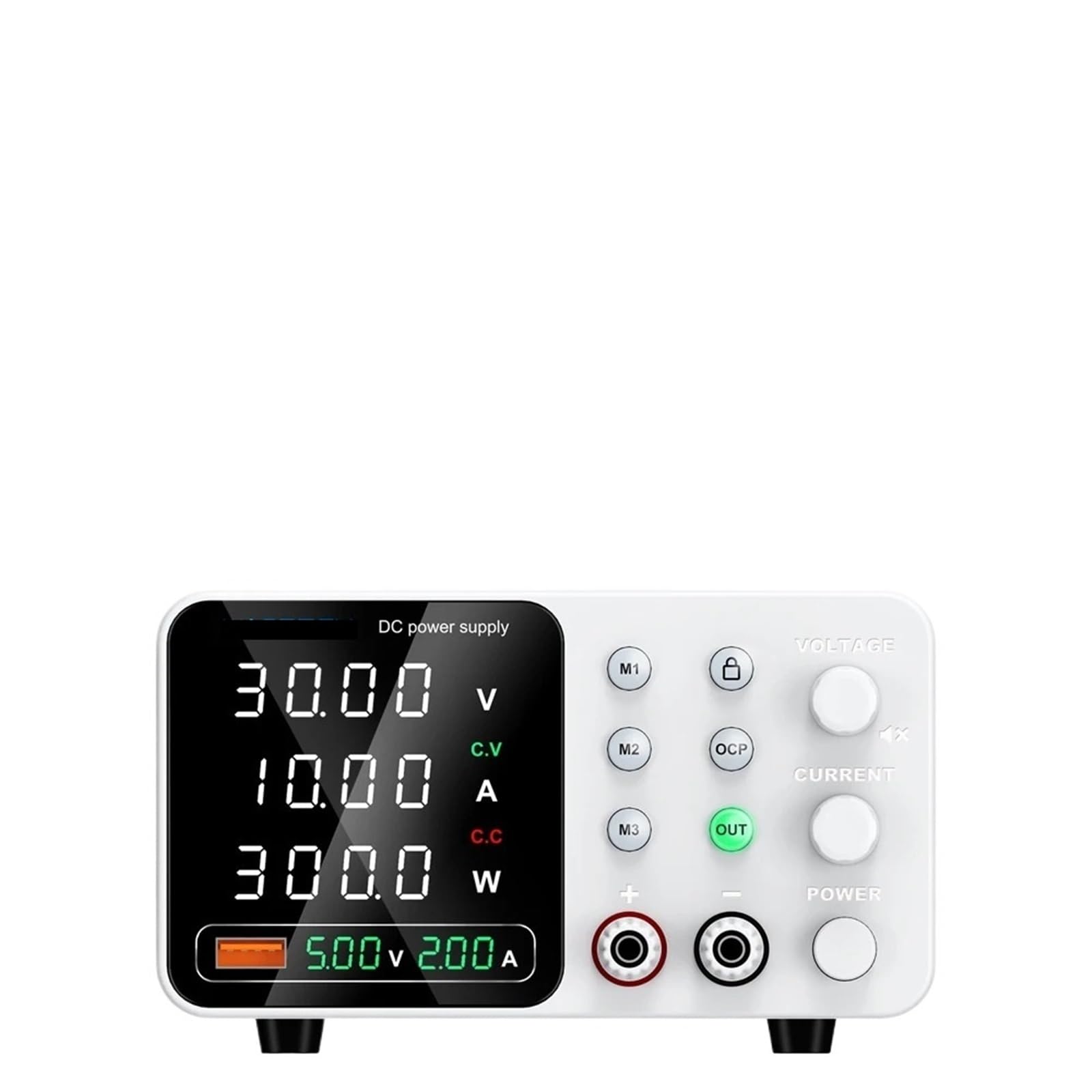
Figure 1: Front panel of the Bolisila TPS-C3010 DC Power Supply.
Front Panel Components:
- Digital Display: Shows real-time Voltage (V), Current (A), and Power (W) output. Includes indicators for Constant Voltage (C.V) and Constant Current (C.C) modes.
- M1, M2, M3 Buttons: Memory preset buttons to save and recall frequently used voltage and current settings.
- Lock Button (Padlock icon): Locks the control panel to prevent accidental changes to settings.
- OCP Button (Over Current Protection): Activates or deactivates the Over Current Protection function.
- OUT Button (Green): Enables or disables the power output to the terminals.
- VOLTAGE Knob: Encoder for adjusting the output voltage.
- CURRENT Knob: Encoder for adjusting the output current limit.
- POWER Button: Main power switch for the unit.
- Output Terminals (+ and -): Connect your load to these terminals. The red terminal is positive (+), and the black terminal is negative (-).
4. Setup
- Unpacking: Carefully remove the power supply from its packaging. Inspect the unit for any signs of damage during transit. Retain the packaging for future storage or shipping.
- Placement: Place the power supply on a stable, level surface. Ensure there is sufficient space around the unit for proper ventilation, especially at the rear and sides.
- AC Power Connection: Connect the provided AC power cord to the power input socket on the rear of the unit, then plug the other end into a grounded AC power outlet.
- Load Connection: Before powering on, connect your load to the output terminals. Connect the positive (+) terminal of your load to the red output terminal and the negative (-) terminal of your load to the black output terminal. Ensure connections are secure.
5. Operating Instructions
5.1 Powering On/Off
- Press the POWER button on the front panel to turn the unit on. The display will illuminate.
- Press the POWER button again to turn the unit off.
5.2 Setting Voltage and Current
- Ensure the output is disabled (OUT button is not lit).
- Rotate the VOLTAGE knob to adjust the desired output voltage. The display will show the set voltage.
- Rotate the CURRENT knob to set the maximum current limit. This acts as a protective measure for your load. The display will show the set current limit.
- Once voltage and current limits are set, press the OUT button to enable the output. The OUT indicator will light up, and power will be supplied to the terminals.
- The display will show the actual output voltage and current being drawn by the load. If the load draws less current than the set limit, the unit operates in Constant Voltage (C.V) mode. If the load attempts to draw more current than the set limit, the unit will switch to Constant Current (C.C) mode, and the output voltage will drop to maintain the set current.
5.3 Using Memory Presets (M1, M2, M3)
- To Save a Setting: Set the desired voltage and current. Press and hold one of the memory buttons (M1, M2, or M3) for approximately 3 seconds until a confirmation beep or indicator appears. The current settings are now saved to that memory slot.
- To Recall a Setting: Briefly press the desired memory button (M1, M2, or M3). The saved voltage and current settings will be loaded.
5.4 Over Current Protection (OCP)
- Press the OCP button to enable or disable the Over Current Protection function. When enabled, if the output current exceeds the set limit, the power supply will automatically shut down its output to protect the connected load and the unit itself.
- To reset after an OCP trip, disable the output (press OUT), resolve the overcurrent condition, and then re-enable the output.
5.5 Panel Lock Function
- Press the Lock button (padlock icon) to lock the front panel controls. This prevents accidental changes to voltage, current, and other settings during operation.
- Press the Lock button again to unlock the panel.
6. Maintenance
- Cleaning: Disconnect the power supply from the AC outlet before cleaning. Use a soft, dry cloth to wipe the exterior of the unit. Do not use abrasive cleaners or solvents.
- Ventilation: Regularly check that the ventilation openings are clear of dust and debris to ensure proper airflow.
- Storage: When not in use for extended periods, store the power supply in a cool, dry environment, away from direct sunlight and extreme temperatures.
7. Troubleshooting
- No Power/Display:
- Check if the AC power cord is securely connected to both the unit and the wall outlet.
- Ensure the wall outlet has power.
- Verify the POWER button is pressed.
- No Output Voltage/Current:
- Ensure the OUT button is pressed and its indicator light is on.
- Check if the output terminals are correctly connected to the load.
- Verify that the voltage and current limits are set above zero.
- If OCP is enabled and tripped, resolve the overcurrent condition and reset the output.
- Output Voltage Drops Unexpectedly:
- This indicates the power supply is operating in Constant Current (C.C) mode because the load is drawing the maximum set current. Increase the current limit if more current is required, or reduce the load.
- Controls Unresponsive:
- Check if the Lock button (padlock icon) is active. Press it to unlock the controls.
8. Specifications
| Model | TPS-C3010 |
| Brand | Bolisila |
| Output Voltage | 0-30V |
| Output Current | 0-10A |
| Output Power | 300W |
| Item Weight | 2.2 pounds (1 kg) |
| Package Dimensions | 0.39 x 0.39 x 0.39 inches (1 x 1 x 1 cm) (Note: These are likely package dimensions, not device dimensions.) |