
QNGEE S5-32GB-US
QNGEE S5-32GB-US MP3 Player User Manual
Model: S5-32GB-US
1. Introduction
Thank you for choosing the QNGEE S5-32GB-US MP3 Player. This device is designed for portable music playback and offers additional features such as Bluetooth 5.0 connectivity, FM radio, voice recording, and an e-book reader. Its compact, clip-on design makes it suitable for various activities.
2. Package Contents
Please verify that all items are present in your package:
- 1 x QNGEE S5-32GB-US Bluetooth MP3 Player
- 1 x Silicone Case
- 1 x Type-C Charging Cable
- 1 x Wired Earphone
- 1 x User Manual (this document)
3. Product Overview
Familiarize yourself with the device's components and controls.

Image 3.1: Front and side view of the QNGEE S5-32GB-US MP3 Player. The device is orange with a black screen, showing a colorful fish image. The side view highlights the clip-on design.
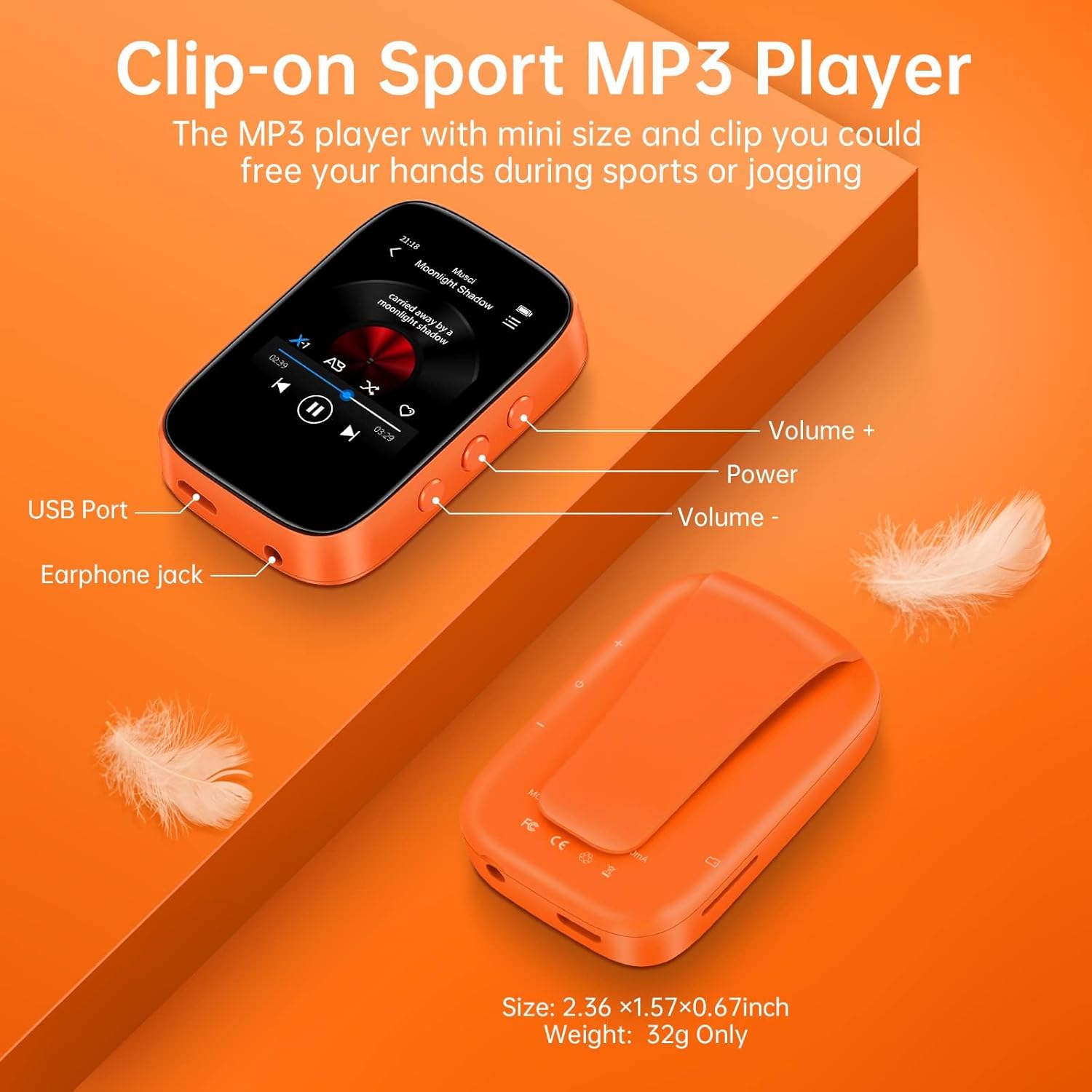
Image 3.2: Top-down view of the MP3 player with key features labeled. These include the USB Port, Earphone Jack, Volume + button, Power button, and Volume - button. The clip-on mechanism is visible on the back.
4. Setup
4.1 Charging the Device
Before first use, fully charge the MP3 player. Connect the provided Type-C charging cable to the device's USB port and the other end to a USB power adapter (not included) or a computer's USB port. The battery indicator on the screen will show charging status.
4.2 Memory and Storage
The device comes with 32GB of internal storage. For additional storage, a Micro SD card (up to 512GB, not included) can be inserted into the designated slot.

Image 4.1: Illustration of the MP3 player connected to a charging cable, with a Micro SD card next to it, indicating 32GB built-in memory and support for up to 128GB TF card (note: product specifications state up to 512GB support).
4.3 Transferring Music and Files
Connect the MP3 player to your computer using the Type-C charging cable. The device will appear as a removable disk. You can then drag and drop music files (MP3, WMA, APE, FLAC, WAV, DRM, ACELP, etc.) and other supported files into the appropriate folders on the device or inserted Micro SD card.
5. Operating Instructions
5.1 Power On/Off
- Power On: Press and hold the Power button on the side of the device until the screen illuminates.
- Power Off: Press and hold the Power button until the power-off prompt appears, then confirm.
5.2 Navigation
The QNGEE S5-32GB-US features a full-touch screen for navigation. Swipe left/right or tap icons to move between menus and select options.
5.3 Music Playback
From the main menu, select the 'Music' icon. You can browse your music library by artist, album, genre, or folder. Tap a song to begin playback.
- Supported Formats: MP3, WMA, APE, FLAC, WAV, DRM, ACELP.
- Playback Modes: Shuffle, repeat one, repeat all, A-B repeat.

Image 5.1: The MP3 player screen showing the music playback interface with album art, song title, progress bar, and playback controls.
5.4 Bluetooth Connectivity
The device supports Bluetooth 5.0 for connecting to Bluetooth headphones or speakers. It cannot be paired with mobile phones.
- From the main menu, select the 'Bluetooth' icon.
- Ensure your Bluetooth headphones or speaker are in pairing mode.
- The MP3 player will scan for available devices. Select your device from the list to pair.
- Once paired, music will play through the connected Bluetooth device.

Image 5.2: The MP3 player screen displaying the Bluetooth icon and interface, indicating its Bluetooth 5.0 capability for connecting to headphones and speakers.
5.5 FM Radio
To use the FM radio function, connect the wired earphones as they act as the antenna.
- From the main menu, select the 'Radio' icon.
- Perform an automatic search for stations or manually tune to a frequency.

Image 5.3: The MP3 player screen displaying the FM radio interface with a radio icon and frequency range.
5.6 Other Functions
The QNGEE S5-32GB-US MP3 Player includes several other functions accessible from the main menu:

Image 5.4: The MP3 player screen displaying various function icons including Music, Video, E-Book, Folder, Record, Radio, Bluetooth, Tools, and Settings.
- Voice Record: Select the 'Record' icon to start and manage voice recordings.
- E-Book: Read text files by selecting the 'E-Book' icon.
- Calendar & Alarm: Access these tools via the 'Tools' or 'Apps' menu.
- Settings: Customize device preferences such as language, display, and time.
6. Maintenance
- Keep the device dry. Avoid exposure to moisture or liquids.
- Clean the screen and body with a soft, dry cloth. Do not use abrasive cleaners.
- Avoid extreme temperatures.
- Do not attempt to disassemble or repair the device yourself. This may void the warranty.
- Store the device in a safe place when not in use to prevent damage.
7. Troubleshooting
- Device does not power on: Ensure the battery is charged. Connect the device to a charger for at least 10 minutes before attempting to power on again.
- Cannot connect to Bluetooth device: Ensure the Bluetooth device is in pairing mode and within range. Verify that the MP3 player's Bluetooth is enabled. Remember, the MP3 player cannot pair with mobile phones.
- No sound: Check the volume level on the MP3 player and connected headphones/speakers. Ensure headphones are properly plugged in or Bluetooth is correctly paired.
- Files not recognized: Ensure the music files are in a supported format (MP3, WMA, APE, FLAC, WAV, DRM, ACELP). Verify that files are placed in the correct folders on the device or Micro SD card.
- Screen unresponsive: Try restarting the device by holding the power button. If the issue persists, allow the battery to fully discharge and then recharge.
8. Specifications
| Feature | Detail |
|---|---|
| Model Name | S5-32GB-US |
| Brand | QNGEE |
| Product Dimensions | 2.76 x 1.95 x 0.35 inches |
| Item Weight | 1.13 ounces |
| Memory Storage Capacity | 32 GB (expandable up to 512GB via Micro SD card) |
| Connectivity Technology | Bluetooth 5.0, USB |
| Screen Size | 1.8 Inches |
| Special Feature | Built-In Speaker (Note: Primary audio output is via headphones/Bluetooth) |
| Compatible Devices | Bluetooth Headphones, Personal Computer, Wired Earphones |
| Media Type | MP3 Player |
| Batteries | 1 Nonstandard Battery (included) |
9. Warranty and Support
For warranty information and customer support, please refer to the documentation provided with your purchase or contact QNGEE customer service through their official channels. Specific warranty terms may vary by region and retailer.
Related documentsS5-32GB-US

Ask a question about this manual
Ask about setup, troubleshooting, compatibility, parts, safety, or missing instructions. Manuals+ will review the question and use this page’s manual context to help answer it.