
Trucozie T550US
Trucozie T550 Cordless Stick Vacuum Cleaner User Manual
Model: T550US
1. Introduction
Thank you for choosing the Trucozie T550 Cordless Stick Vacuum Cleaner. This manual provides essential information for the safe and efficient operation, maintenance, and troubleshooting of your new appliance. Please read it thoroughly before first use and keep it for future reference.
2. Safety Instructions
To reduce the risk of fire, electric shock, or injury, always follow basic safety precautions when using an electrical appliance.
- Read all instructions before using the appliance.
- Do not use outdoors or on wet surfaces.
- Do not allow to be used as a toy. Close attention is necessary when used by or near children.
- Use only as described in this manual. Use only manufacturer’s recommended attachments.
- Do not use with damaged cord or plug. If appliance is not working as it should, has been dropped, damaged, left outdoors, or dropped into water, return it to a service center.
- Do not pull or carry by cord, use cord as a handle, close a door on cord, or pull cord around sharp edges or corners. Do not run appliance over cord. Keep cord away from heated surfaces.
- Do not unplug by pulling on cord. To unplug, grasp the plug, not the cord.
- Do not handle plug or appliance with wet hands.
- Do not put any object into openings. Do not use with any opening blocked; keep free of dust, lint, hair, and anything that may reduce air flow.
- Keep hair, loose clothing, fingers, and all parts of body away from openings and moving parts.
- Turn off all controls before unplugging.
- Use extra care when cleaning on stairs.
- Do not use to pick up flammable or combustible liquids, such as gasoline, or use in areas where they may be present.
- Do not pick up anything that is burning or smoking, such as cigarettes, matches, or hot ashes.
- Do not use without dust cup and/or filters in place.
- Prevent unintentional starting. Ensure the switch is in the off-position before connecting to battery pack, picking up or carrying the appliance.
- Recharge only with the charger specified by the manufacturer.
3. Package Contents
Your Trucozie T550 Cordless Stick Vacuum Cleaner package includes the following items:
- Cordless Vacuum Cleaner x1
- 7x2200mAh Battery Pack x1
- Adjustable Extension Tube x1
- Removable Dust Cup x1
- Floor Brush with Long Beam Green LED Light x1
- 2-in-1 Crevice Tool x1
- Sofa Brush x1
- HEPA Filter x2
- Sponge Filter x2
- Metal Filter x1
- Charger x1
- Wall Hanger x1

Figure 3.1: All components included in the Trucozie T550 package.
4. Setup
4.1 Assembly
- Insert the adjustable extension tube into the main vacuum body until it clicks securely.
- Attach the floor brush to the other end of the extension tube, ensuring it locks into place.
- Install the battery pack into the designated slot on the main vacuum body. Ensure it is fully inserted.

Figure 4.1: The Trucozie T550 vacuum cleaner fully assembled.
4.2 Wall Mount Installation
The wall hanger allows for convenient storage of your vacuum and accessories. Use the provided screws and wall anchors to attach the wall hanger to a suitable height on the wall.
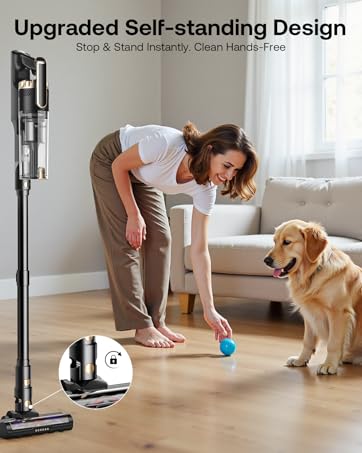
Figure 4.2: Wall mount for convenient storage of the vacuum and its accessories.
4.3 Initial Charging
Before first use, fully charge the battery pack using the original Trucozie T550 charger. The battery indicator will show charging status.
Video 4.1: Official operation guide for the Trucozie T550 Stick Vacuum, demonstrating assembly and initial use.
5. Operating Instructions
5.1 Powering On and Suction Modes
Press the On/Off button to start the vacuum. The Trucozie T550 offers three power modes for various cleaning needs:
- Energy-saving Mode: Up to 50 minutes runtime, ideal for light cleaning.
- Mid Mode: Up to 30 minutes runtime, suitable for daily cleaning.
- Max Mode: Up to 18 minutes runtime, for powerful suction on stubborn dirt.
Adjust the suction level using the dedicated button on the display.
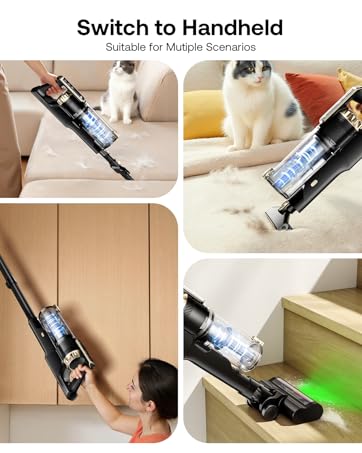
Figure 5.1: The LED display indicates battery level, suction mode, and roller status.
5.2 Green LED Headlight and Maneuverability
The upgraded green LED headlight on the floor brush illuminates hidden debris under furniture and in dark areas, offering superior dust visibility. The wide swivel steering allows for easy navigation around obstacles and under low furniture.

Figure 5.2: The green LED headlight enhances visibility of dust and debris.
5.3 Self-Standing Design
The vacuum features a self-standing design, allowing you to pause cleaning at any time without needing to lean it against walls. To unlock from the standing position, gently step on the floor brush with your foot and bend the extension tube by hand.

Figure 5.3: The self-standing feature provides convenience during cleaning breaks.
5.4 Multi-Accessory Versatility
The lightweight design allows for easy conversion into a handheld vacuum. Utilize the 2-in-1 brush and sofa brush for cleaning upholstery, car interiors, and hard-to-reach areas.

Figure 5.4: Demonstrating the versatility of the vacuum in handheld mode with different tools.
6. Maintenance
6.1 6-Layer Advanced Filtration System
The sealed filtration system captures 99.97% of micro-dust and particles as small as 0.1 microns. Regular cleaning of the filters is crucial for optimal performance.

Figure 6.1: Illustration of the vacuum's 6-layer advanced filtration system.
6.2 Dust Cup and Filter Cleaning
To maintain suction power, empty the dust cup after each use. The dust cup and filters are washable.
- Press the release button to detach the dust cup.
- Empty the contents into a trash bin.
- Remove the HEPA filter and metal filter from the dust cup.
- Rinse the dust cup, HEPA filter, metal filter, and sponge filters under running water.
- Allow all parts to air dry completely for at least 24 hours before reassembling. Do not use the vacuum with wet filters.

Figure 6.2: Easy one-touch dust cup emptying.

Figure 6.3: Filters can be rinsed under running water for thorough cleaning.
6.3 Brush Roller Cleaning
The anti-tangle design helps prevent hair from wrapping around the roller, but occasional cleaning may be necessary. If the 'Roller Tangled' indicator flashes, clean the roller brush.
- Turn off the vacuum and detach the floor brush.
- Release the roller brush from the floor head.
- Use the provided cleaning tool to remove any tangled hair or debris.
- Rinse the roller brush under running water if necessary and allow it to dry completely before reinstallation.
Video 6.1: Troubleshooting guide demonstrating how to clean the dust cup, air inlet, and roller brush.
7. Troubleshooting
Refer to the following common issues and solutions. If the problem persists, please contact customer service.
- Cannot Turn on the T550 vacuum cleaner after charging the battery for 4-5 hours?
1. Please install the battery pack on the vacuum cleaner, the vacuum should work with the battery installed.
2. Unplug the power cord to turn it on. The vacuum cleaner cannot turn on while it's charging.
3. If the vacuum cleaner still cannot work, please record a video and contact Customer Service. - Why won't the battery charge?
1. Ensure you are using the original charger, which has a Trucozie T550 logo on the label, and the charger is properly plugged in.
2. Check the charger and the cable for any damages.
3. Check whether the battery indicator blinks white or red.
4. Record a video of battery charging and contact Customer Service. - Why the vacuum stops picking up debris?
1. Please take out the HEPA filter and the metal filter, and check if they are dirty. If the filters haven't been cleaned for a long time, please follow the manual to clean them.
2. Re-install the filters properly.
3. Check the extension tube for any blockages.
4. If the issue persists, please record a video of the problem and contact Customer Service. - Why does the floor brush stop rotating?
1. Take off the brush roller, and re-install it to make sure the roller is installed correctly.
2. Check whether the dust cup is installed tightly.
3. If the issue still exists, please record a video and contact Customer Service.

Figure 7.1: Common troubleshooting questions and solutions.
8. Specifications
| Feature | Detail |
|---|---|
| Brand | Trucozie |
| Model Name | T550US |
| Special Features | 18-50 mins Runtime, 6 Layers High-efficiency Filtration, 8-in-1 Lightweight, Self-Standing Design, Upgraded Long Beam Green LED Light |
| Filter Type | HEPA Filter |
| Is Cordless? | Yes |
| Capacity | 0.6 Liters |
| Recommended Uses | Hard Floor; Low Pile Carpets; Tile; Hardwood Floor; Furniture; Car Interior |
| Form Factor | Stick |
| Color | Glod |
| Product Dimensions | 5"L x 5"W x 5"H |
| Battery Life | 50 minutes |
| Number of Speeds | 3 |
| Portable | Yes |
| Indoor/Outdoor Usage | Indoor |
| Item Weight | 6 pounds |
| Batteries | 7 Lithium Ion batteries required. (included) |
9. Warranty and Support
Each Trucozie battery-powered vacuum cleaner comes with a 12-month protection plan. For any problems or inquiries, please contact our 24/7 customer service via message. We are committed to providing prompt assistance and ensuring your satisfaction.
Related Documents - T550US
 |
INSE N5T Cordless Stick Vacuum Cleaner User Manual Comprehensive user manual for the INSE N5T Cordless Stick Vacuum Cleaner, covering assembly, operation, maintenance, troubleshooting, and safety. Learn about its features like 6-in-1 versatility and 45-minute runtime. |
 |
INSE S6T/S6P Pro Cordless Vacuum Cleaner Quick-start Guide A quick-start guide for the INSE S6T and S6P Pro cordless vacuum cleaners, covering product components, assembly, maintenance tips, and company information. |
 |
Britech Premier Series Stick Vacuum User Manual - Product Guide Comprehensive user manual for the Britech Premier Series Stick Vacuum cleaner, covering safety instructions, package contents, technical specifications, assembly, operation, and troubleshooting. |
 |
Airpher AW-2 Stick Vacuum Cleaner Instruction Manual Comprehensive instruction manual for the Airpher AW-2 stick vacuum cleaner, covering safety instructions, product overview, components, assembly, operation, maintenance, specifications, troubleshooting, and warranty information. |
 |
EICOBOT A10 Cordless Vacuum Cleaner User Manual Comprehensive user manual for the EICOBOT A10 cordless stick vacuum cleaner, detailing setup, operation, maintenance, troubleshooting, and technical specifications. |
 |
EIOEIR HC-20G Stick Vacuum Cleaner User Manual Comprehensive user manual for the EIOEIR HC-20G cordless stick vacuum cleaner. Includes safety instructions, setup, operation, maintenance, and troubleshooting guides for optimal performance. |
Ask a question about this manual
Ask about setup, troubleshooting, compatibility, parts, safety, or missing instructions. Manuals+ will review the question and use this page’s manual context to help answer it.