
1. Introduction
The Zeadio All-in-One Smartphone Camera Stabilizer Kit Pro Kit is designed to enhance your mobile videography and photography experience. This comprehensive kit provides a stable platform for various devices, including smartphones, cameras, and action cameras, along with essential accessories like an RGB video light and a microphone. It is suitable for a wide range of applications, from vlogging and live streaming to capturing professional-looking videos.
2. What's in the Box
Verify that all components are present in your Zeadio All-in-One Smartphone Camera Stabilizer Kit Pro Kit:
- 1 x Handheld Stabilizer (Video Rig)
- 1 x Phone Cage
- 1 x RGB Video Light
- 1 x Microphone
- 1 x Adapter for Action Camera
- 1 x Furry Windscreen for Microphone
- 1 x Shock-Mount for Microphone
- 1 x Adapter for iPhone (Lightning to 3.5mm)
- 1 x Adapter for Android Smartphone (USB-C to 3.5mm)
- 1 x TRS Camera Cable
- 1 x TRRS Smartphone Cable
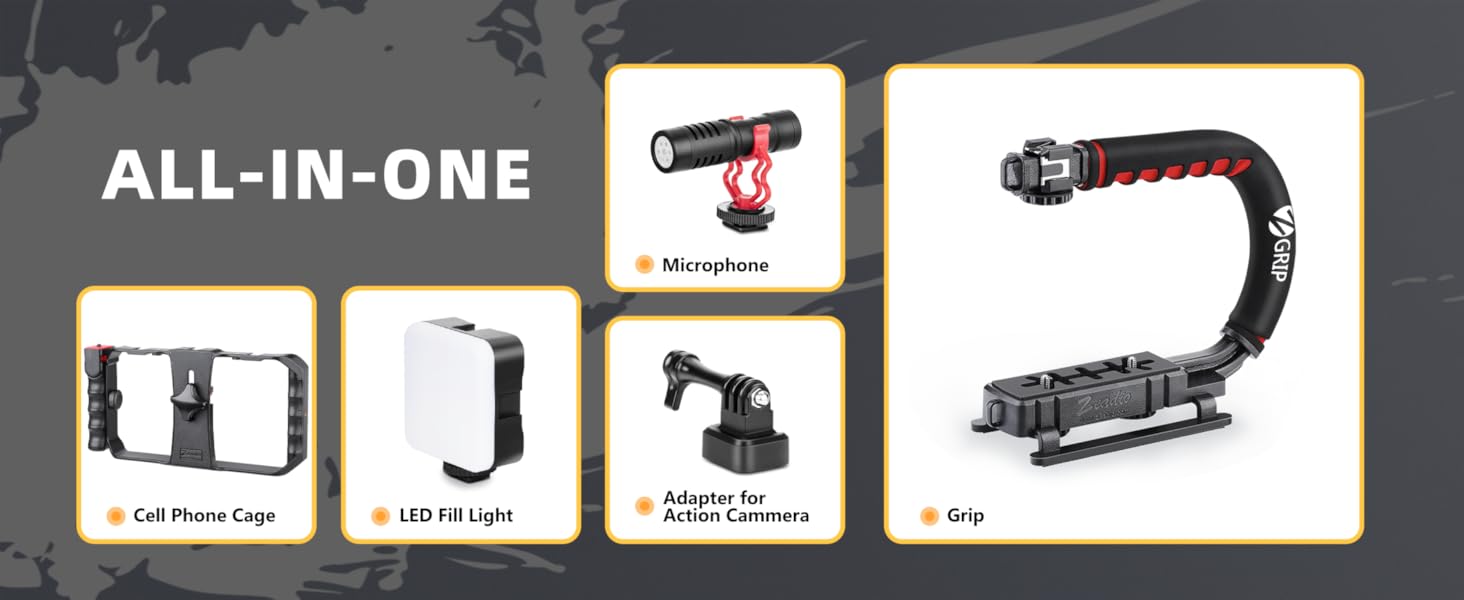
Image: Overview of the kit components including the phone cage, LED fill light, adapter for action camera, microphone, and grip.
3. Setup Instructions
Follow these steps to assemble and configure your Zeadio Stabilizer Kit:
3.1 Assembling the Video Rig and Phone Cage
- Attach the Phone Cage to the main handheld stabilizer (video rig) using the 1/4" screw mounts. Ensure it is securely tightened.
- Insert your smartphone into the Phone Cage. The cage is designed to fit all smartphones, with or without a case. Adjust the clamps to firmly hold your device.
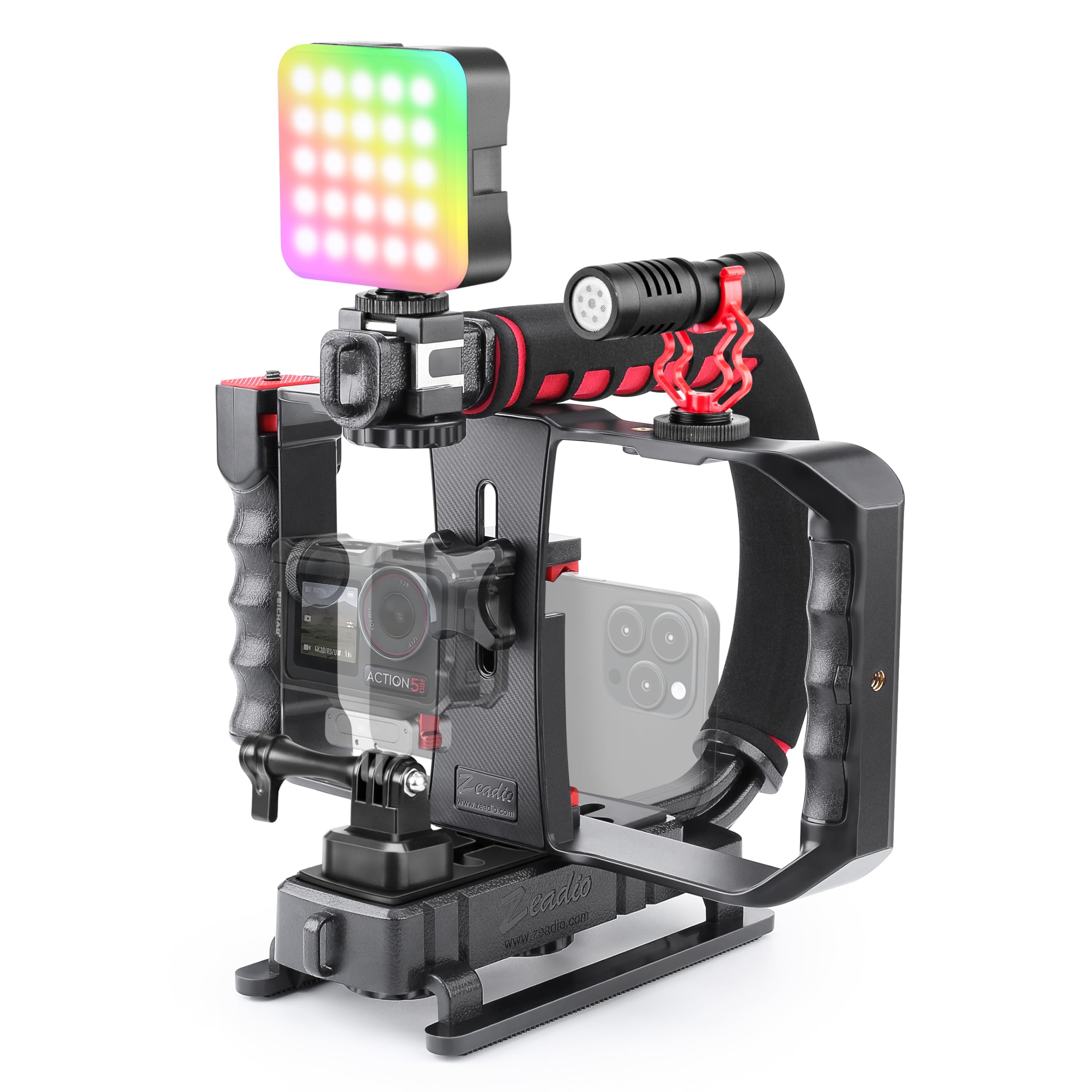
Image: The Zeadio Stabilizer Kit with a smartphone mounted in the phone cage, ready for use.
3.2 Attaching the RGB Video Light
- Locate one of the cold shoe mounts on the video rig or phone cage.
- Slide the RGB Video Light's cold shoe adapter into the chosen mount until it clicks into place.
- Tighten the locking knob on the cold shoe mount to secure the light.

Image: The RGB Video Light mounted on the stabilizer rig, demonstrating its placement.
3.3 Connecting the External Microphone
- Attach the microphone to a cold shoe mount on the rig using its shock-mount.
- For smartphones: Use the provided TRRS Smartphone Cable. If your smartphone lacks a 3.5mm jack, use the appropriate adapter (Lightning for iPhone, USB-C for Android). Connect the 'L' end of the TRRS cable to the microphone and the other end (or adapter) to your smartphone's audio input.
- For cameras/camcorders: Use the provided TRS Camera Cable. Connect one end to the microphone and the other to your camera's microphone input.
- For optimal audio quality, attach the furry windscreen to the microphone, especially when recording outdoors.
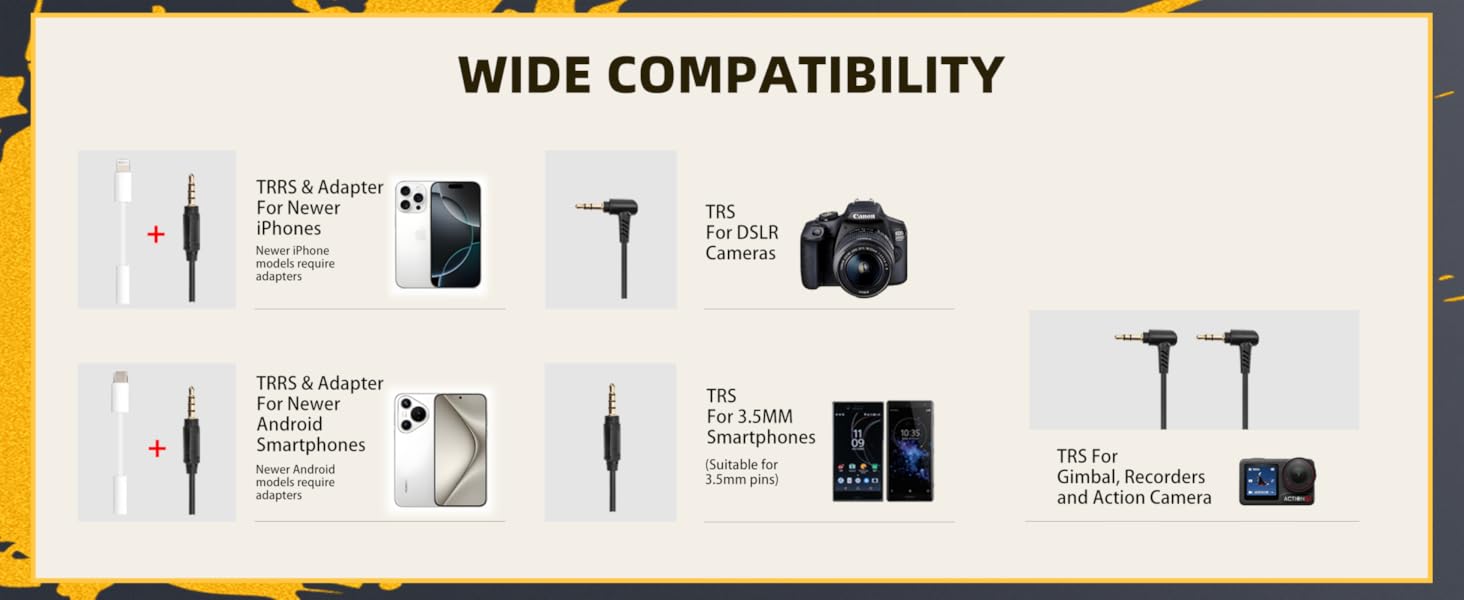
Image: Detailed view of the microphone, shock-mount, furry windscreen, and various audio cables for different devices.
3.4 Using the Action Camera Adapter
- If using an action camera, attach the Action Camera Adapter to a 1/4" screw mount on the video rig.
- Mount your action camera onto the adapter.

Image: The Zeadio Stabilizer Kit demonstrating a setup with both an action camera and a smartphone, along with the microphone and LED light.
4. Operating Instructions
4.1 Using the RGB Video Light
- Power On/Off: Press and hold the power button to turn the light on or off.
- Brightness Adjustment: Use the designated buttons to adjust the brightness from 10% to 100%.
- Color Temperature/RGB Mode: Cycle through different modes to select white light (3000K-7000K) or various RGB colors.
- Charging: If the light does not turn on, ensure it is charged using the provided charging cable.

Image: Demonstrates the adjustable color temperature (3000K-7000K) and brightness (10%-100%) of the RGB Video Light.
4.2 Using the Microphone
- Ensure the microphone is securely connected to your recording device using the correct cable (TRRS for smartphones, TRS for cameras).
- For smartphones, verify that your device recognizes the external microphone. Some phone camera apps may require specific settings to enable external audio input.
- Position the microphone appropriately to capture desired audio. Use the furry windscreen to minimize wind noise in outdoor environments.
4.3 Stabilizer Usage
- The handheld stabilizer is designed to reduce camera shake, providing smoother footage. Hold the rig firmly with both hands for maximum stability.
- The 1/4" threaded hole at the bottom allows for mounting the entire rig onto a tripod, monopod, or slider for stationary or tracking shots.
- The detachable handle grip offers flexibility for different shooting angles and improved ergonomics.

Image: A user demonstrating how to hold the Zeadio Stabilizer Kit to minimize camera shake during recording.
5. Compatibility
The Zeadio All-in-One Smartphone Camera Stabilizer Kit is widely compatible with a variety of devices:
- Smartphones: Compatible with all iPhone and Android smartphones, including newer models (may require specific adapters for audio).
- Cameras: DSLR cameras, mirrorless cameras, camcorders.
- Action Cameras: Including models like AKASO Brave 4, AKASO Brave 7, AKASO EK7000, GoPro HD Hero2, DJI OSMO ACTION.
- Other Devices: Tablets, laptops (for microphone use), gimbals, recorders.

Image: Visual guide illustrating the compatibility of TRRS and TRS cables with newer iPhones, Android smartphones, DSLR cameras, 3.5mm smartphones, gimbals, recorders, and action cameras.
6. Maintenance
To ensure the longevity and optimal performance of your Zeadio Stabilizer Kit, follow these maintenance guidelines:
- Cleaning: Wipe down the components with a soft, dry cloth after each use. Avoid using harsh chemicals or abrasive materials.
- Storage: Store the kit in a cool, dry place away from direct sunlight and extreme temperatures.
- Battery Care (RGB Light): For the RGB Video Light, ensure it is fully charged before extended storage to maintain battery health.
- Cable Care: Handle cables gently to prevent damage. Avoid sharp bends or excessive pulling.
7. Troubleshooting
If you encounter issues with your Zeadio Stabilizer Kit, refer to the following common solutions:
- RGB Video Light Not Turning On: Ensure the RGB Video Light is fully charged. Connect it to a power source using the charging cable and allow sufficient time for charging.
- Microphone Not Recording Audio:
- Verify that the correct audio cable (TRRS for smartphones, TRS for cameras) is being used.
- Ensure the 'L' end of the TRRS cable is connected to the microphone for proper function.
- If using a smartphone, check your phone's audio settings or camera app settings to confirm that an external microphone is selected as the input source.
- Test the microphone with another device if possible to rule out a device-specific issue.
- Unstable Footage: Ensure all components, especially the phone cage and any mounted accessories, are securely tightened. Hold the rig with both hands for maximum stability.
- Accessories Not Fitting: Confirm that you are using the correct mounting points (cold shoe mounts for lights/mics, 1/4" threaded holes for other accessories/tripods). Do not force components.
8. Specifications
| Brand | Zeadio |
| Model | B0F664T5TN (Pro Kit) |
| Color | Black |
| Item Weight | 713 Grams |
| Compatible Devices | Action camera, Camcorder, Camera, Cellphone, etc. |
| Compatible Camcorder Models | AKASO Brave 4, AKASO Brave 7, AKASO EK7000, GoPro HD Hero2, DJI OSMO ACTION |
| RGB Video Light | 102 LEDs (30 RGB + 72 high-CRI LED), 800lm, 120° beam angle, CRI95+, 10%-100% dimming, 3000K-7000K color temperature |
| Microphone | External shotgun microphone with shock-mount and furry windscreen |
| Phone Cage | Variable, fits all smartphones, 3 cold shoe mounts, 5 x 1/4" threaded holes, detachable handle grip |
| Image Stabilization | Yes (via stabilizer design) |
| Audio Recording | Yes (via external microphone) |
| Water Resistance Level | Not Water Resistant |
9. Warranty and Support
The Zeadio All-in-One Smartphone Camera Stabilizer Kit Pro Kit comes with a 1-Year Warranty from the date of purchase. This warranty covers manufacturing defects and ensures the product is free from defects in materials and workmanship under normal use.
For technical support, warranty claims, or any questions regarding your product, please contact Zeadio customer service through the retailer where you purchased the item or visit the official Zeadio website for contact information.
