
TOPPING E30 II - Black
TOPPING E30 II DAC User Manual
Model: E30 II - Black
1. Introduction
The TOPPING E30 II is a high-fidelity Digital-to-Analog Converter (DAC) designed to deliver exceptional audio performance. Featuring dual AK4493S DAC chips, it provides rich detail and clarity for a superior HiFi audio experience. It supports versatile input options including USB, coaxial, and optical (Toslink), making it compatible with various audio sources such as PCs, game consoles, and digital turntables. The E30 II incorporates a low-noise 5V power supply and offers customizable sound through multiple filter modes, including a Pure DAC mode for direct DSD playback. For user convenience, it includes a preamp mode with remote volume control and an auto on/off function.

2. What's in the Box
Please check the package contents upon unboxing to ensure all items are present:
- 1 x TOPPING E30 II DAC
- 1 x Remote control
- 1 x USB cable
- 1 x DC cable
- 1 x User Manual
- 1 x TOPPING card
Note: A 5V power adapter is not included and must be supplied by the user (e.g., PC USB port, phone charger, or power bank).

3. Product Overview and Interface
Familiarize yourself with the front and rear panels of the E30 II DAC:

| No. | Component | Description |
|---|---|---|
| 1 | LED screen | Displays current input, sample rate, and DSD status. |
| 2 | Remote control receiver | Receives signals from the included remote control. |
| 3 | Multifunction touch button | Used for power on/off and input selection. |
| 4 | Right channel single-ended RCA output | Right channel analog audio output. |
| 5 | Left channel single-ended RCA output | Left channel analog audio output. |
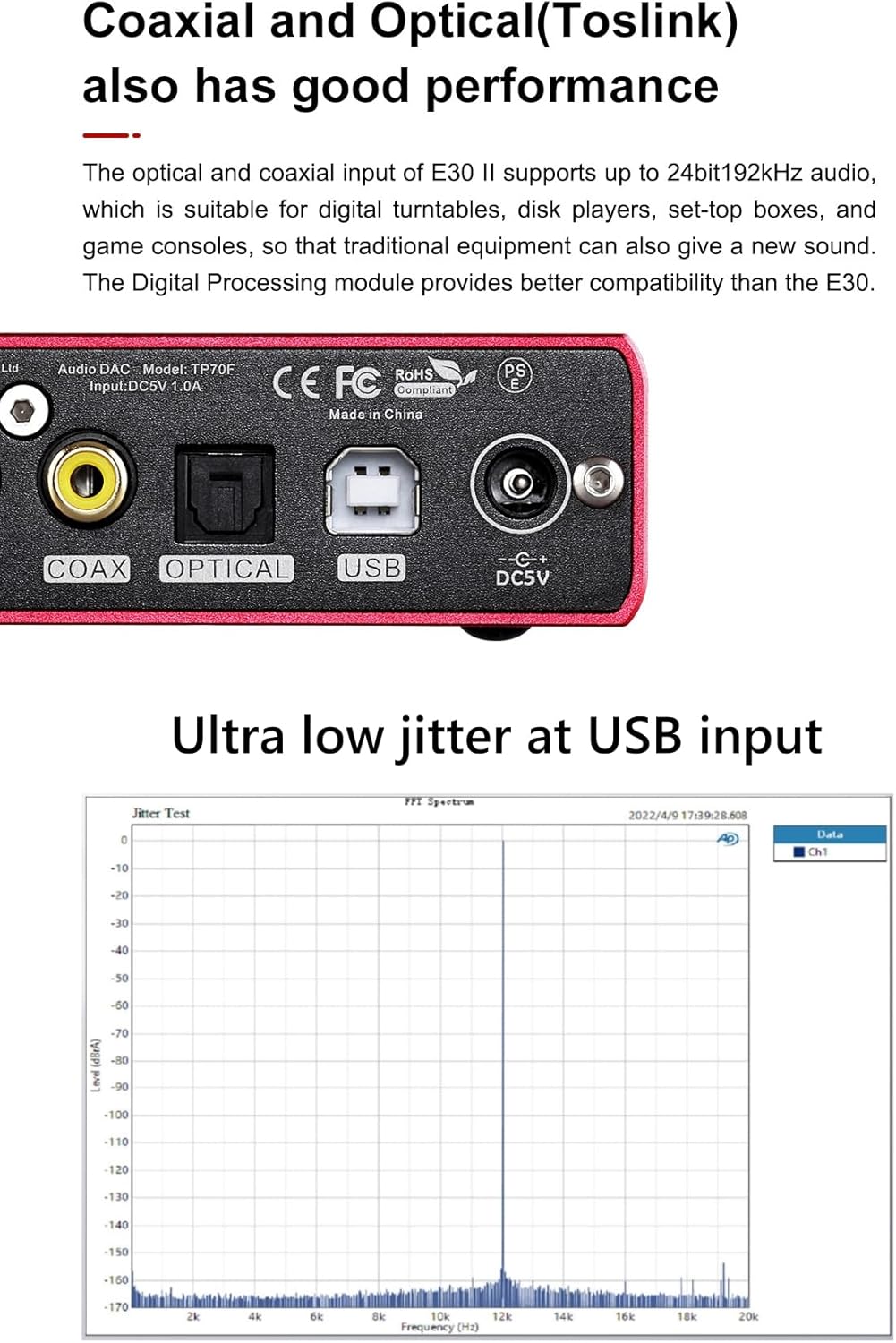
| 6 | Coaxial SPDIF input | Digital audio input via coaxial cable. |
| 7 | Optical SPDIF input | Digital audio input via optical (Toslink) cable. |
| 8 | USB input | Digital audio input via USB cable (Type B). |
| 9 | Power input (DC5V/1A) | Power supply connection. |
4. Setup Guide
4.1 Power Connection
The E30 II DAC requires a 5V DC power supply. You can power it using a USB port from a PC, a standard phone charger, or a power bank. The device features a built-in protection circuit to prevent damage from incorrect power input.
4.2 Audio Connections
Connect your audio sources to the E30 II using the appropriate input ports:
- USB Input: For connecting to a computer (PC, Mac, Linux), smartphone, or tablet.
- Coaxial Input: For connecting to digital audio sources like CD/DVD players, game consoles, or digital turntables with a coaxial output.
- Optical (Toslink) Input: For connecting to digital audio sources like TVs, game consoles, or media players with an optical output.
Connect the E30 II's RCA outputs (Right channel 'R ch' and Left channel 'L ch') to your amplifier, active speakers, or headphone amplifier using RCA cables.

4.3 Driver Installation (for USB Input)
For Windows operating systems (Windows 10, Windows 11), an ASIO driver is required for optimal performance. This driver is based on XMOS XU208 and Thesycon custom driver. For other operating systems like Mac, Linux, iOS, and Android, the E30 II is typically plug-and-play and does not require specific driver installation.

5. Operating Instructions
5.1 Power On/Off and Auto On/Off
The E30 II can be powered on or off by pressing and holding the multifunction touch button (3) on the front panel. It also features an auto power-on function: when a signal is detected on the active input, the device will automatically turn on.
5.2 Input Selection
To switch between USB, Coaxial, and Optical inputs, short press the multifunction touch button (3) on the front panel or use the 'SEL' button on the remote control.
5.3 Volume Control and Preamp Mode
The E30 II includes a built-in preamp mode, allowing you to control the output volume directly. Use the volume up/down buttons on the remote control to adjust the volume. This feature is particularly useful when connecting directly to active speakers or a power amplifier without a separate preamplifier.
5.4 Filter Modes and Pure DAC Mode
The E30 II offers various digital filter modes to customize the sound to your preference:
- PCM Filters: Six different filter modes are available for PCM audio playback. These can be cycled through using the remote control.
- DSD Modes: Two DSD modes are available.
- Pure DAC Mode: This mode allows for direct DSD playback, bypassing certain internal processing to deliver an unaltered, high-resolution audio experience.

6. Maintenance
To ensure the longevity and optimal performance of your TOPPING E30 II DAC, follow these maintenance guidelines:
- Cleaning: Use a soft, dry cloth to wipe the exterior of the device. Avoid using liquid cleaners, aerosols, or abrasive materials, as they may damage the finish or internal components.
- Placement: Place the DAC on a stable, flat surface away from direct sunlight, heat sources, and excessive moisture. Ensure adequate ventilation around the unit.
- Handling: Handle the device with care. Avoid dropping it or subjecting it to strong impacts.
- Power Off: If the device will not be used for an extended period, it is recommended to disconnect it from the power supply.
7. Troubleshooting
If you encounter issues with your E30 II DAC, please refer to the following common problems and solutions:
- No Power:
- Ensure the 5V DC power cable is securely connected to both the DAC and a working power source (e.g., USB port, phone charger).
- Verify the power source is active and providing 5V.
- No Sound Output:
- Check if the correct input source (USB, Coaxial, Optical) is selected on the E30 II. The LED screen should display the active input.
- Ensure the RCA output cables are securely connected to your amplifier/active speakers and the E30 II.
- Verify that your amplifier/active speakers are powered on and set to the correct input.
- If using USB input, ensure the correct audio output device (TOPPING E30 II) is selected in your computer's sound settings and that the necessary drivers are installed (for Windows).
- Check the volume level on the E30 II and your connected audio equipment.
- Distorted Sound / Poor Audio Quality:
- Ensure all cables are securely connected and not damaged.
- Try a different audio source or cable to rule out external issues.
- Verify the sample rate displayed on the E30 II matches the source audio.
- If using USB, ensure the computer's audio settings are configured correctly (e.g., bit depth and sample rate).
- Remote Control Not Responding:
- Check if the remote control's battery needs replacement.
- Ensure there are no obstructions between the remote and the DAC's remote control receiver (2).
If the problem persists after trying these steps, please contact TOPPING customer support for further assistance.
8. Specifications
Key technical specifications for the TOPPING E30 II DAC:
| Feature | Specification |
|---|---|
| Brand | TOPPING |
| Model Number | E30 II - Black |
| DAC Chips | Dual AK4493S |
| Interface Type | USB, Coaxial, Optical (Toslink) |
| Maximum Supply Voltage | 5 Volts (DC) |
| Minimum Supply Voltage | 5 Volts (DC) |
| Number of Channels | 2 |
| Product Dimensions | 4.9"L x 3.9"W |
| Material | Aluminum, Plastic |
| Item Weight | 1.35 pounds |
| Manufacturer | TOPPING |
| THD+N | 0.00015% |
| SINAD | 119dB @1kHz |
| Dynamic Range (DR) | 123dB @1kHz |
| Signal-to-Noise Ratio (SNR) | 123dB @1kHz |
| PCM Support | Up to 32bit 768kHz |
| DSD Support | Up to DSD512 native, DSD Direct Mode |

9. Warranty and Support
9.1 Warranty Information
This product is typically covered by a manufacturer's warranty. Please refer to the warranty card included in your package or visit the official TOPPING website for detailed warranty terms and conditions. Protection plans may also be available for purchase, offering extended coverage.
9.2 Customer Support
For technical assistance, troubleshooting beyond this manual, or warranty claims, please contact TOPPING customer support. You can usually find contact information on the TOPPING official website or through the seller from whom you purchased the product (e.g., Toppingaudio on Amazon).
Related documentsE30 II - Black


Ask a question about this manual
Ask about setup, troubleshooting, compatibility, parts, safety, or missing instructions. Manuals+ will review the question and use this page’s manual context to help answer it.