
Introduction
This manual provides essential information for the safe assembly, operation, and maintenance of your Halitaa Vanity Desk. It is designed to help you maximize the functionality and lifespan of your product. Please retain this manual for future reference.
Safety Information
- Always follow the assembly instructions carefully to prevent injury or damage to the product.
- Do not overload drawers or shelves. Distribute weight evenly.
- Keep electrical components (LED lights, charging station) away from water or excessive moisture.
- Ensure all connections for the charging station are secure before use.
- This product is intended for indoor use only.
- Keep small parts and packaging materials away from children.
Package Contents
Before beginning assembly, verify that all components listed in the separate assembly guide are present and undamaged. If any parts are missing or damaged, please contact customer support.

Image: Overview of the vanity desk with labeled dimensions and components for assembly.
Setup & Assembly
Your Halitaa Vanity Desk requires assembly. Please refer to the detailed step-by-step assembly instructions provided in the separate manual included with your product. Ensure you have all necessary tools and a clear workspace.
Key Assembly Points:
- Frame Construction: Assemble the main desk frame and drawer units first.
- Mirror and Shelving Unit: Attach the mirror and integrated shelving unit securely to the main desk.
- Drawer Installation: Install the six drawers into their respective slides, ensuring smooth operation.
- Charging Station Integration: Connect the power cord for the built-in charging station.
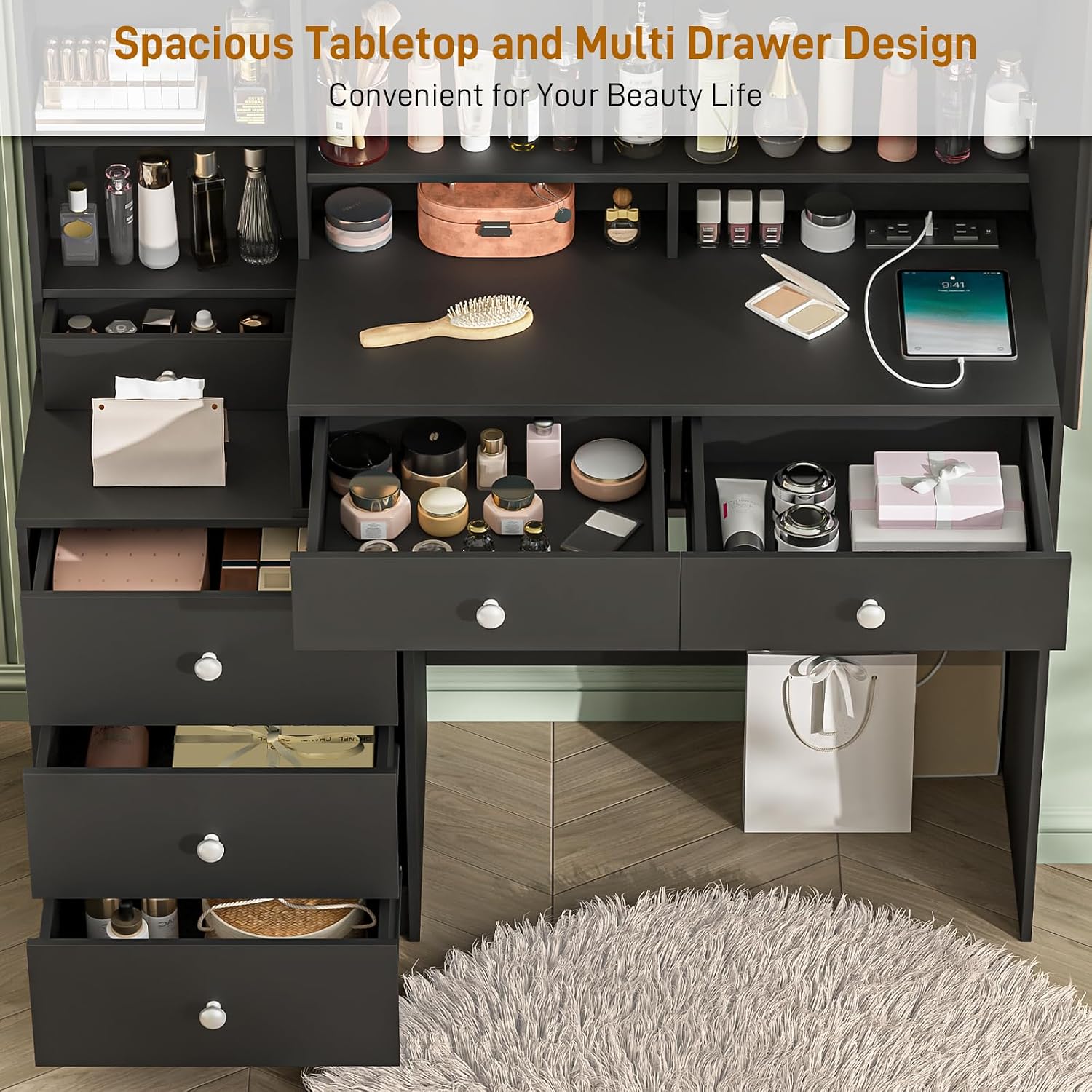
Image: The vanity desk featuring a spacious tabletop and multiple drawers, highlighting its storage capacity.

Image: A close-up view of the vanity desk drawers, demonstrating the smooth drawer slides and potential for organized storage of cosmetics and accessories.
Operating Instructions
LED Mirror Lighting
The vanity mirror features integrated LED lights with three adjustable lighting modes. To operate:
- Power On/Off: Locate the touch sensor button on the mirror surface. Tap once to turn the lights on or off.
- Change Light Mode: With the lights on, tap the touch sensor button repeatedly to cycle through the three lighting modes: White Light, Warm Light, and Neutral Light.
- Adjust Brightness: Press and hold the touch sensor button to dim or brighten the lights. Release when the desired brightness is achieved.

Image: The vanity mirror demonstrating the three adjustable LED lighting modes: Warm Yellow, Warm White, and Cold White.
Integrated Charging Station
The vanity desk includes a built-in charging station for convenience.
- Power Connection: Ensure the desk's main power cord is securely plugged into a standard wall outlet.
- AC Outlets: Use the two standard plug sockets to power devices such as hair dryers, curling irons, or other small appliances.
- USB Ports: Use the two USB ports to charge mobile phones, tablets, or other USB-powered devices.

Image: A detailed view of the integrated charging station, showing two AC outlets and two USB ports for convenient device charging.
Storage Features
The vanity desk offers various storage options:
- Drawers: Utilize the six drawers for organized storage of cosmetics, jewelry, and personal items.
- Open Shelves: The multiple open shelves provide easy access and display space for frequently used items.
- Hidden Storage: A hidden compartment behind the mirror offers discreet storage for valuables.
- Hooks: Integrated hooks on the storage shelves are suitable for hanging necklaces and earrings.
Maintenance & Care
- Cleaning: Wipe surfaces with a soft, damp cloth. Avoid harsh chemicals or abrasive cleaners that may damage the finish.
- Mirror Care: Clean the mirror with a glass cleaner and a lint-free cloth. Do not spray cleaner directly onto the mirror to prevent liquid from seeping into the LED components.
- Drawer Slides: Periodically check drawer slides for smooth operation. If needed, apply a small amount of silicone lubricant.
- Electrical Components: Ensure the charging station and LED light wiring are free from damage. Do not attempt to repair electrical components yourself.
- Avoid Direct Sunlight: Prolonged exposure to direct sunlight may cause fading or damage to the desk's finish.
Troubleshooting
- LED Lights Not Turning On:
Solution: Check if the power cord is securely plugged in. Ensure the touch sensor is clean and unobstructed. If the issue persists, contact customer support. - Charging Station Not Working:
Solution: Verify the main power cord is connected. Test with different devices and outlets. If no power is supplied, discontinue use and contact customer support. - Drawers Sticking or Not Closing Smoothly:
Solution: Check for obstructions in the drawer slides. Ensure drawers are correctly aligned on their tracks. Apply silicone lubricant if necessary. - Desk Wobbles:
Solution: Ensure all assembly screws are tightened. Check that the desk is on a level surface.
Specifications
| Feature | Specification |
|---|---|
| Model Number | JY9 |
| Brand | Halitaa |
| Product Dimensions (L x W x H) | 43.3" x 15.8" x 57" (15.8"D x 43.3"W x 57"H) |
| Frame Material | Wood |
| Color | Black |
| LED Light Modes | 3 (White, Warm, Neutral) |
| Charging Station | 2 AC Outlets, 2 USB Ports |
Image: Technical drawing with precise measurements of the vanity desk components.
Official Product Video
Video: An overview of a vanity desk with a mirror, LED lights, and power outlets. Note: The desk shown in this video is white, but the features demonstrated are applicable to your black Halitaa Vanity Desk.
Warranty & Support
This product comes with a standard manufacturer's warranty. For specific warranty details, please refer to the documentation included with your purchase or contact Halitaa customer service.
If you encounter any issues or have questions regarding your Halitaa Vanity Desk, please do not hesitate to contact our customer support team. We are committed to ensuring your satisfaction.
Customer Service: Please refer to your purchase receipt or the Halitaa official website for contact information.