
1. Important Safety Information
Please read all instructions carefully before using your microwave oven. Keep this manual for future reference. Improper use may result in fire, electric shock, or injury.
- Do not operate the oven when empty.
- Ensure proper ventilation around the unit.
- Do not heat sealed containers or baby bottles with nipples, as pressure buildup can cause them to explode.
- Always use microwave-safe cookware.
- Do not attempt to service or repair the oven yourself. Contact qualified service personnel.
2. Product Overview
The Smad FBA-DMD70-20LBMGU(B7) is a compact 0.7 cubic feet countertop microwave oven with 700 watts of cooking power, designed for efficient and convenient meal preparation.

Image: Front view of the Smad 0.7 Cu. Ft. 700 Watts Countertop Microwave Oven.
3. Setup
3.1 Unpacking
- Remove all packaging materials from inside and outside the microwave oven.
- Check the oven for any damage, such as dents or a misaligned door. Do not operate if damaged.
- Ensure the glass turntable and turntable ring assembly are present.
3.2 Placement
- Place the microwave oven on a flat, stable surface capable of supporting its weight.
- Allow at least 4 inches (10 cm) of space on the top, back, and sides for proper ventilation.
- Do not block any ventilation openings.

Image: The microwave oven displaying its compact dimensions, suitable for small spaces.
3.3 Turntable Installation
- Place the turntable ring on the oven cavity floor.
- Position the glass turntable securely on top of the turntable ring, ensuring it sits properly on the center hub.

Image: The interior of the microwave oven, highlighting the 9.6-inch glass turntable for even cooking.
4. Operating Instructions
4.1 Control Panel Overview
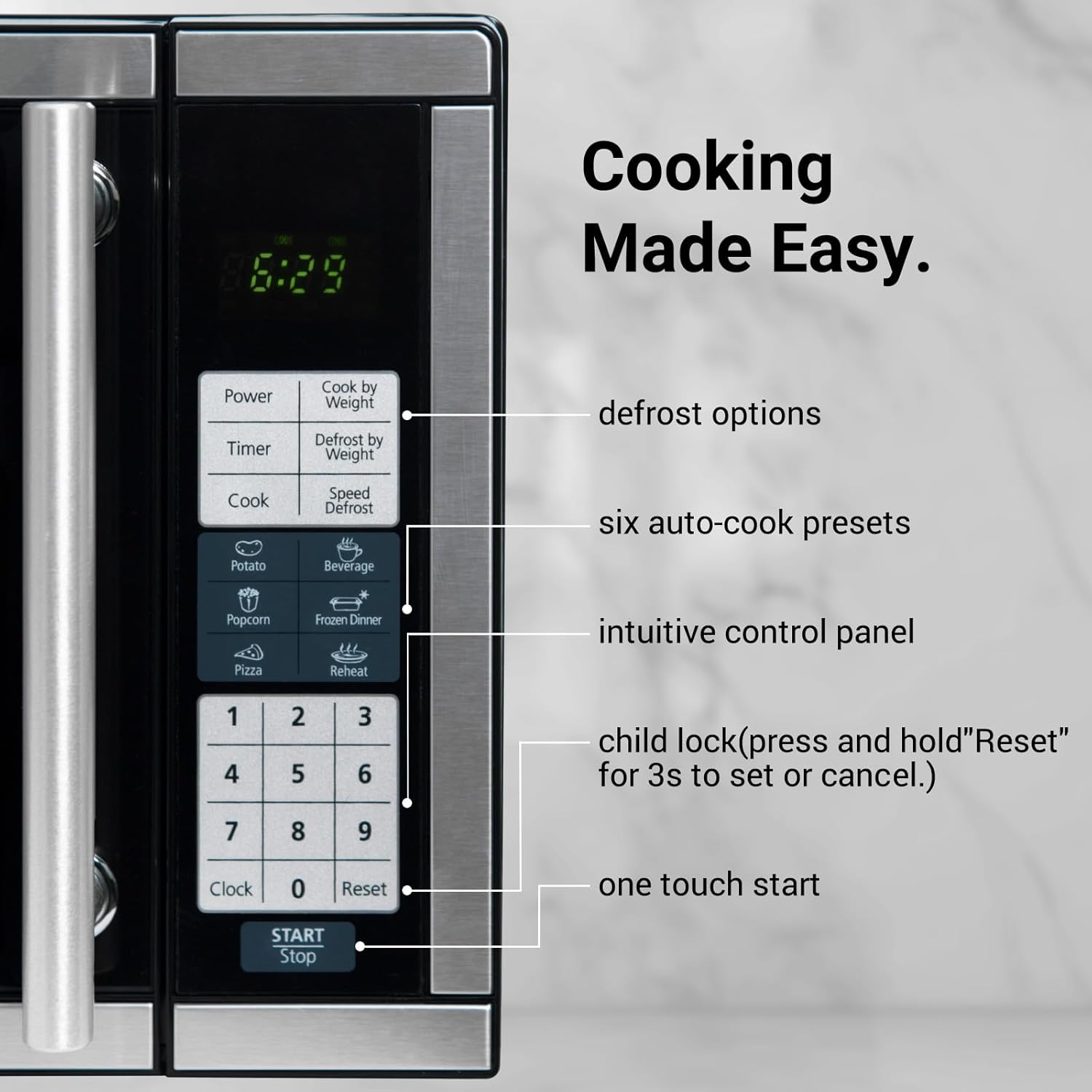
Image: The intuitive control panel featuring defrost options, six auto-cook presets, and a child lock function.
4.2 Basic Cooking
- Time Cook: Enter desired cooking time using the number pad, then press 'Start'.
- Power Levels: Adjust power levels (1-10) by pressing the 'Power' button repeatedly before starting or during cooking.
- Quick Start: Press the 'Start +30 Sec.' button to immediately begin cooking for 30 seconds at full power. Each additional press adds 30 seconds.
4.3 Quick-Start Presets
The microwave features 6 one-touch options for common foods:
- Popcorn
- Potato
- Pizza
- Beverage
- Frozen Dinner
- Reheat
Simply press the corresponding button for automatic cooking.
4.4 Defrost Options
- Defrost by Weight: Select this option and enter the weight of the food for automatic defrosting.
- Defrost by Time: Select this option and enter the desired defrosting time.
- Speed Defrost: A quick defrost option for smaller items.
4.5 Child Safety Lock
To activate the child lock, press and hold the 'Reset' button for 3 seconds. The display will show 'LOC'. To deactivate, press and hold 'Reset' again for 3 seconds.

Image: The child safety lock feature prevents unintended operation, ensuring household safety.
4.6 Official Product Videos
Video: An overview of the Smad Compact Microwave Oven, highlighting its features and compact design.
Video: A demonstration of the 0.7 cu.ft Microwave Oven, showcasing its capacity and ease of use.
5. Maintenance
5.1 Cleaning the Interior
The microwave oven features an easy-to-clean interior. For optimal performance and hygiene, clean the interior regularly.
- Wipe the interior cavity with a damp cloth and mild detergent after each use.
- The glass turntable can be removed and washed with warm soapy water or in a dishwasher.
- For stubborn stains, place a bowl of water with lemon slices inside and microwave for a few minutes to loosen residue, then wipe clean.

Image: Demonstrating the easy-to-clean interior of the microwave oven.
5.2 Cleaning the Exterior
- Wipe the exterior surfaces with a soft, damp cloth.
- Avoid abrasive cleaners or scouring pads that could scratch the finish.
6. Troubleshooting
If you encounter issues with your microwave oven, refer to the following common troubleshooting steps:
| Problem | Possible Cause | Solution |
|---|---|---|
| Oven does not start | Door not closed properly; Power cord unplugged; Fuse blown or circuit breaker tripped. | Ensure door is securely closed; Plug in power cord; Check household fuse/circuit breaker. |
| Food not heating | Incorrect cooking time/power level; Microwave-safe cookware not used. | Adjust time/power; Use appropriate cookware. |
| Turntable not rotating | Turntable not correctly placed; Debris under turntable. | Re-position turntable; Clean under turntable. |
| Unusual noise during operation | Food container touching oven walls; Turntable not centered. | Ensure proper clearance; Re-center turntable. |
7. Specifications
| Feature | Detail |
|---|---|
| Brand | Smad |
| Model Number | FBA-DMD70-20LBMGU(B7) |
| Capacity | 0.7 Cu. Ft. (20 Liters) |
| Wattage | 700 Watts |
| Voltage | 120 Volts (AC) |
| Item Weight | 23.3 Pounds |
| Product Dimensions | 14"D x 17.9"W x 10.4"H |
| Installation Type | Countertop |
| Material Type | Stainless Steel (Exterior), Glass (Inner) |
| Special Features | Speed Defrost, LED Display, Timer/Clock, Interior Lighting, Child Safety Lock |
| Included Components | Microwave Oven, Glass Turntable |
8. Warranty Information
This product comes with a standard manufacturer's warranty. For specific details regarding warranty coverage, duration, and claims process, please refer to the warranty card included in your product packaging or contact Smad customer support.
9. Customer Support
For any questions, technical assistance, or service requests, please contact Smad customer support. Contact information can be found in your product documentation or on the official Smad website.