
DBEIXIWEI ATS25X2 Aluminum WiFi Full Band Radio Receiver User Manual
Model: ATS25X2
1. Introduction
This manual provides detailed instructions for the operation and maintenance of your DBEIXIWEI ATS25X2 Aluminum WiFi Full Band Radio Receiver. The ATS25X2 is a versatile radio receiver featuring a 2.4-inch color touchscreen, support for multiple reception modes (FM, AM, LSB, USB, SSB), and WiFi connectivity for network configuration and time synchronization. It is designed for clear and stable radio signal reception across various bands.
2. Package Contents
Before beginning, please verify that all items are present in your package:

Image: The ATS25X2 radio receiver shown with its accessories, including antennas, charging cable, touch pen, and cleaning cloth.
- 1 x Mainframe (DBEIXIWEI ATS25X2 Radio Receiver)
- 1 x WIFI antenna
- 1 x Trolley antenna
- 1 x Touch pen
- 1 x Type-C charging data cable
- 1 x Screen wiping cloth
- 4 x Machine corner pads
3. Product Features
- 2.4-inch color touchscreen for intuitive operation and data display.
- Integrated high-capacity lithium battery for extended portable use.
- TYPE-C interface for charging, software updates, and data transfer.
- 3.5mm stereo audio output for headphones and FM antenna functionality.
- 2.4G external antenna interface for enhanced signal reception.
- Multiple reception modes: FM, AM, LSB, USB, SSB.
- Features include radio frequency spectrum scanning, backlight brightness adjustment, battery status display, and FM RDS information.
- High-precision rotating encoder knob for tuning.
- WiFi network configuration via mobile app and automatic time synchronization.
4. Setup
4.1 Antenna Connection

Image: Detailed view of the BNC antenna connector and the WiFi antenna connector on the ATS25X2 radio.
- For general reception, connect the provided trolley antenna to the ANT BNC connector on the back of the receiver.
- For WiFi functionality, connect the small WiFi antenna to the gold-colored SMA connector on the side of the receiver.
- For enhanced FM reception, the 3.5mm audio output jack can also function as an FM antenna input when headphones are not connected.
4.2 Powering On
Press and hold the POWER OFF/ON button located on the back panel to turn the device on.
5. Operating Instructions
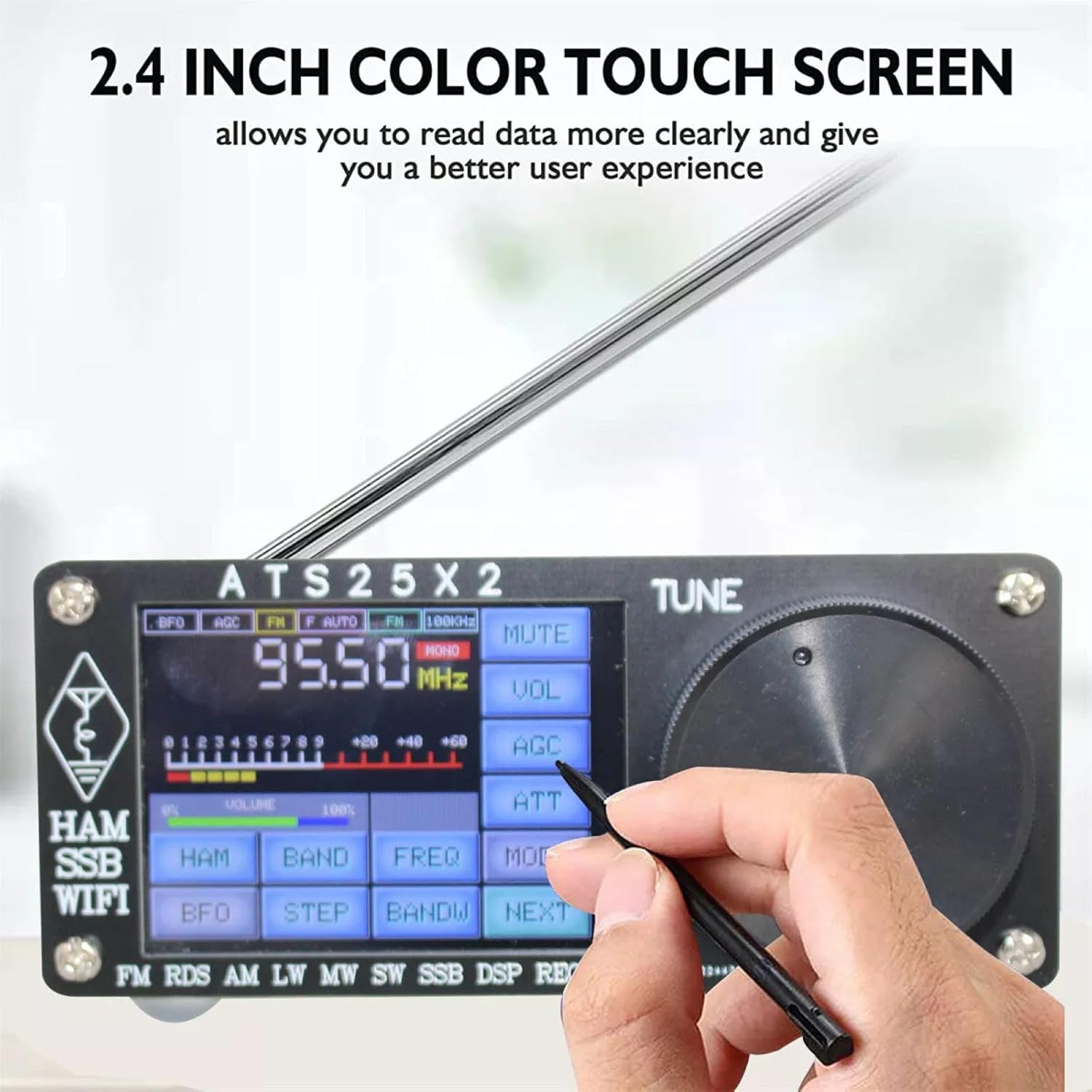
Image: A user interacting with the 2.4-inch color touchscreen of the ATS25X2 radio using the provided touch pen.
5.1 Power On/Off
Press and hold the POWER OFF/ON button on the rear panel to power the device on or off.
5.2 Touchscreen Interface
The 2.4-inch color touchscreen allows direct interaction with the radio's functions. Use the included touch pen or your finger for navigation and selection.
5.3 Tuning
Use the large rotating encoder knob on the front panel to adjust frequency. Fine-tuning can often be done via touchscreen controls.
5.4 Mode Selection
Select desired reception modes (FM, AM, LSB, USB, SSB) via the touchscreen interface.
5.5 Volume Control
Adjust audio output volume using the dedicated volume control on the touchscreen.
5.6 Additional Features
- Spectrum Scanning: Utilize the radio frequency spectrum scanning feature to visualize active frequencies.
- Backlight Adjustment: Adjust screen backlight brightness for optimal viewing in various lighting conditions.
- Battery Display: Monitor the battery voltage and percentage displayed on the screen.
6. Connectivity

Image: The front panel with touchscreen and tuning knob, and the rear panel with antenna connectors, USB-C port, and audio jack.
6.1 WiFi Network Configuration
- Ensure the WiFi antenna is connected.
- Access the WiFi settings through the touchscreen menu.
- Use a mobile application (refer to product packaging or manufacturer's website for app name) to configure the radio's WiFi network settings.
- Once connected, the radio will automatically synchronize its time with the network.
6.2 External Antennas
The 2.4G BNC external antenna interface allows connection of various external antennas to improve signal reception, especially for shortwave bands.
6.3 Audio Output
Connect standard 3.5mm headphones to the phone head jack for private listening. This jack also supports FM antenna functionality.
7. Charging and Battery
The ATS25X2 features a built-in 3.7V/2000mAh lithium battery.
- To charge, connect the provided Type-C charging data cable to the USB charge download port on the back panel and to a 5V/2A power adapter (not included).
- The led charge indicator will illuminate during charging.
- The maximum charging current is 1.5A.
8. Maintenance
- Cleaning: Use the provided screen wiping cloth to clean the touchscreen. For the aluminum casing, use a soft, dry cloth. Avoid abrasive cleaners or solvents.
- Storage: Store the radio in a cool, dry place away from direct sunlight and extreme temperatures.
- Firmware Updates: The radio supports firmware updates via the Type-C interface. Note that firmware upgrades may require a separate paid key authorization. Refer to the manufacturer's instructions for details on obtaining and applying updates.
9. Troubleshooting
- No Power:
- Ensure the battery is charged. Connect the Type-C cable to a power source.
- Verify the POWER OFF/ON button is pressed and held correctly.
- Poor Reception:
- Check antenna connections. Ensure the trolley antenna or an external antenna is securely attached.
- Adjust antenna position.
- Try different reception modes or frequencies.
- Ensure the correct external antenna is used for the desired frequency band.
- Touchscreen Unresponsive:
- Ensure the screen is clean.
- Restart the device by powering it off and on.
- Use the included touch pen for precise input.
- WiFi Connection Issues:
- Ensure the WiFi antenna is connected.
- Verify WiFi network settings via the mobile app.
- Check if the radio is within range of the WiFi network.
10. Specifications

Image: The ATS25X2 radio with its dimensions labeled: 11cm (4.33in) length, 10.3cm (4.06in) width, and 4.7cm (1.85in) height.
| Feature | Detail |
|---|---|
| Model | ATS25X2 |
| Color | Black |
| Dimensions (L x W x H) | 11cm (4.33in) x 10.3cm (4.06in) x 4.7cm (1.85in) |
| Display Size | 2.4 inches |
| Speaker Size | 3 inches |
| Case Material | Aluminum Alloy |
| Built-in Lithium Battery | 3.7V/2000mAh |
| Charging Interface | Type-C (5V/2A input, max 1.5A charging current) |
| Audio Output Interface | 3.5mm Stereo (supports headphones and FM antenna) |
| External Antenna Interface | 2.4G BNC |
| Reception Modes | FM, AM, LSB, USB, SSB |
| WIFI | Supported |
| FM Frequency Range | 64 - 108 MHz (with RDS function) |
| LW Frequency Range | 153 - 500 kHz |
| MW Frequency Range | 520 - 1710 kHz |
| SW Frequency Range | 1730 - 30000 kHz |
| SSB Frequency Range | 1730 - 30000 kHz |
11. Warranty and Support
Information regarding product warranty and specific support contacts is not provided within this manual. Please refer to your purchase documentation, the manufacturer's official website (DBEIXIWEI), or contact your retailer for warranty details and customer support.