
1. Introduction
This manual provides essential instructions for the safe and effective use of your Hello Kitty Kuromi Wireless Bluetooth Earbuds. Please read this manual thoroughly before using the product and retain it for future reference.
2. Package Contents
Verify that all items are present in the package:
- Hello Kitty Kuromi Wireless Bluetooth Earbuds (2)
- Rotating Charging Case
- USB Cable
- User Manual (this document)
3. Product Overview
3.1 Components
The Hello Kitty Kuromi Wireless Bluetooth Earbuds system consists of two earbuds and a rotating charging case. The charging case features a unique flip-face design, allowing you to change Kuromi's expression.
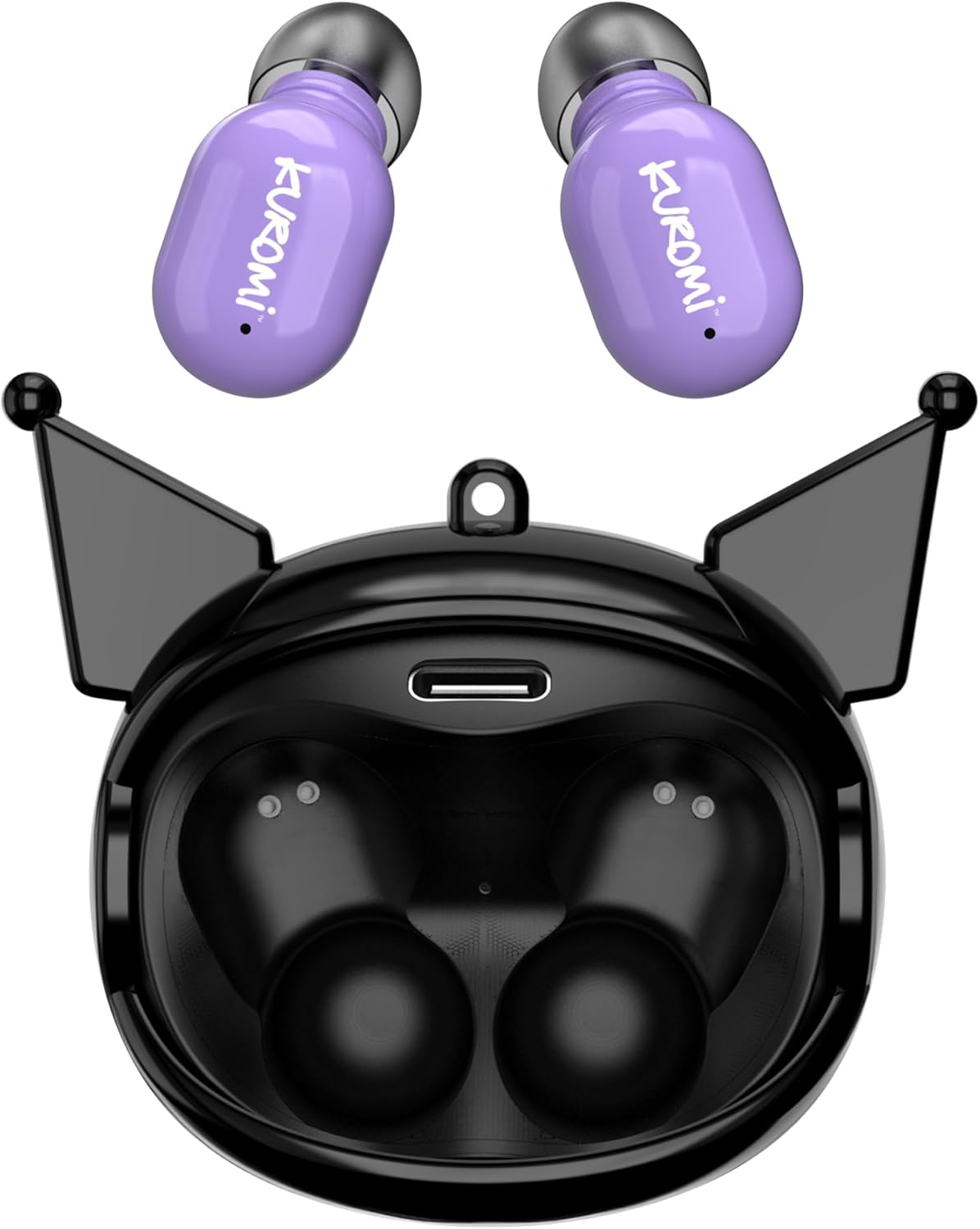
This image displays the two purple Kuromi wireless earbuds positioned above their open black charging case. The charging case features the Kuromi character design with pointed ears and an open compartment for the earbuds, revealing the charging contacts and a USB-C port.

The closed black charging case is shown, featuring Kuromi's default facial expression with a pink skull on her forehead and a neutral mouth.

The closed black charging case displays Kuromi's winking facial expression, with one eye closed and a small pink heart near her mouth.

The closed black charging case features Kuromi's heart-eyes facial expression, with two pink hearts replacing her eyes and an open-mouthed smile.
3.2 Controls
The earbuds feature touch controls for various functions. Specific touch gestures may vary; refer to the 'Operating Instructions' section for details.
4. Setup
4.1 Initial Charging
Before first use, fully charge the earbuds and the charging case.
- Connect the provided USB cable to the charging port on the case and to a compatible USB power source.
- Place both earbuds into the charging case. Ensure they are properly seated.
- The charging indicator lights (if present) will illuminate to show charging status. A full charge typically takes approximately 1 hour.
4.2 Bluetooth Pairing
To connect your earbuds to a device:
- Ensure the earbuds are charged and removed from the charging case. They should automatically enter pairing mode.
- On your device (smartphone, tablet, etc.), enable Bluetooth.
- Search for available Bluetooth devices.
- Select "HKTWSRKU" or a similar name from the list of devices.
- Once connected, the earbuds will indicate successful pairing (e.g., a voice prompt or LED change).
- The earbuds will automatically reconnect to the last paired device when removed from the case, if Bluetooth is enabled on the device.
5. Operating Instructions
5.1 Power On/Off
- Power On: Remove the earbuds from the charging case. They will power on automatically.
- Power Off: Place the earbuds back into the charging case. They will power off and begin charging automatically.
5.2 Music Playback
Use the touch controls on the earbuds:
- Play/Pause: Tap once on either earbud.
- Next Track: Double-tap the right earbud.
- Previous Track: Double-tap the left earbud.
- Volume Control: Volume is typically controlled via your connected device.
5.3 Call Management
The built-in microphone allows for hands-free calling:
- Answer Call: Tap once on either earbud when a call comes in.
- End Call: Tap once on either earbud during a call.
- Reject Call: Press and hold either earbud for approximately 2 seconds.
5.4 Flip-Face Feature
The charging case features a rotating mechanism to change Kuromi's facial expression. Gently rotate the front panel of the case to cycle through the available expressions.
6. Charging
6.1 Charging the Earbuds
Place the earbuds into the charging case. They will automatically begin to charge from the case's internal battery.
6.2 Charging the Case
When the charging case battery is low, connect it to a power source using the provided USB cable. The case's indicator lights will show charging status. A full charge for the case typically takes about 1 hour.
7. Maintenance and Care
- Cleaning: Use a soft, dry cloth to clean the earbuds and charging case. Do not use harsh chemicals or abrasive materials.
- Storage: Store the earbuds in their charging case when not in use to protect them and keep them charged. Avoid extreme temperatures.
- Water Exposure: These earbuds are not waterproof. Avoid exposure to water or excessive moisture.
- Impact: Handle the earbuds and case with care to prevent damage from drops or impacts.
8. Troubleshooting
If you encounter issues, refer to the following table:
| Problem | Possible Solution |
|---|---|
| Earbuds not pairing | Ensure earbuds are charged. Turn off and on Bluetooth on your device. Forget the device in your Bluetooth settings and re-pair. |
| No sound from earbuds | Check device volume. Ensure earbuds are connected. Try playing different audio. |
| Earbuds not charging | Ensure earbuds are correctly seated in the case. Check if the charging cable is securely connected to the case and power source. |
| Microphone not working | Ensure earbuds are properly connected. Check microphone permissions on your device. |
9. Specifications
Key technical details for the Hello Kitty Kuromi Wireless Bluetooth Earbuds:
| Feature | Detail |
|---|---|
| Model Name | Wireless Earbuds (HKTWSRKU) |
| Connectivity Technology | Bluetooth 5.3 |
| Battery Life (Playtime) | Up to 4 Hours per charge |
| Charging Time | Approximately 1 Hour |
| Control Method | Touch |
| Ear Placement | In Ear |
| Special Feature | Rotating Charging Case with Flip-Face Feature |
| Included Components | Rotating Charging Case, USB Cable, User Manual |
| Manufacturer | Southern Telecom |
| Item Weight | 3.52 ounces |
10. Warranty Information
For warranty details, please refer to the documentation included with your purchase or contact the retailer where the product was acquired. Warranty terms and conditions may vary by region and retailer.
11. Support
If you require further assistance or have questions not covered in this manual, please contact the manufacturer or your retailer's customer support. Keep your purchase receipt and product model number (HKTWSRKU) available when seeking support.


