
Introduction
Thank you for choosing the Trevi XF 3150 KB Portable Karaoke Speaker. This powerful 130W speaker is designed to deliver high-quality audio with a Bass Reflex system, two 8-inch speakers, and a 1-inch tweeter. It features wireless audio connectivity, USB/SD card playback, AUX input, and dedicated inputs for microphones and guitars. Enjoy the integrated multicolor LED disco lights and the True Wireless Stereo (TWS) function for an enhanced audio experience. The speaker operates on an integrated rechargeable battery or via the included power adapter, offering versatility for any occasion. This manual provides essential information for safe and efficient use of your device.

Front view of the Trevi XF 3150 KB portable karaoke speaker, showcasing its design and active multicolor LED lights.
Setup and First Use
1. Unboxing and Components
Carefully remove all components from the packaging. Ensure the following items are included:
- Trevi XF 3150 KB Portable Karaoke Speaker
- Microphone
- Remote Control
- Power Cable
- Warranty Card
2. Powering On and Charging
The speaker can be powered by its internal rechargeable 7.4V battery or by connecting it to a power outlet using the included power adapter. For first use, it is recommended to fully charge the battery.
- Charging: Connect the power cable to the DC IN port on the rear panel of the speaker and then to a power outlet. The charging indicator will illuminate.
- Power On/Off: Press and hold the POWER button on the control panel or remote control to turn the speaker on or off.
3. Control Panel Overview
Familiarize yourself with the main controls located on the top panel of the speaker.

Detailed view of the speaker's control panel, showing various input and sound adjustment knobs, along with function buttons.
4. Remote Control Functions
The included remote control allows convenient operation from a distance.

The remote control for the Trevi XF 3150 KB speaker, featuring buttons for mute, mode, record, playback, volume, channel selection, scan, EQ, and power.
5. Wireless (Bluetooth) Connection
Connect your smartphone, tablet, or laptop wirelessly to the speaker.
- Turn on the speaker.
- Press the MODE button until "BLUE" appears on the display, indicating Bluetooth mode.
- Enable Bluetooth on your device and search for "Trevi XF 3150 KB".
- Select the speaker to pair. A confirmation sound will indicate a successful connection.

Illustration of connecting a smartphone to the speaker via Bluetooth for wireless music streaming.
6. TWS (True Wireless Stereo) Function
For an enhanced stereo experience, you can connect two Trevi XF 3150 KB speakers wirelessly.
- Ensure both speakers are turned on and in Bluetooth mode.
- On one speaker (the primary), press and hold the TWS/REP button.
- The primary speaker will search for and connect to the secondary speaker. A confirmation sound will indicate successful pairing.
- Once connected, pair your device to the primary speaker via Bluetooth as described above.

Diagram illustrating the True Wireless Stereo (TWS) function, allowing two speakers to connect for a wider soundstage.
7. USB/SD Card Playback
Play audio files directly from a USB flash drive or micro-SD card.
- Insert a USB flash drive into the USB port or a micro-SD card into the SD slot on the rear panel.
- Press the MODE button to select USB or SD mode.
- Playback will start automatically. Use the playback controls (Play/Pause, Next/Previous Track) on the control panel or remote.
8. AUX Input
Connect external audio devices using a 3.5mm audio cable.
- Connect one end of a 3.5mm audio cable to the AUX IN port on the speaker and the other end to the audio output of your external device.
- Press the MODE button to select AUX mode.
- Control playback and volume from your external device.
9. Microphone and Guitar Inputs
Connect the included microphone or a guitar for karaoke or live performances.
- Connect the microphone to the MIC IN port (6.3mm jack) or a guitar to the GUITAR IN port (6.3mm jack) on the rear panel.
- Adjust the microphone volume using the MIC VOL knob and guitar volume using the GUITAR VOL knob on the control panel.
- Use the MIC BASS, MIC TREBLE, ECHO, and DELAY knobs to fine-tune the microphone sound.
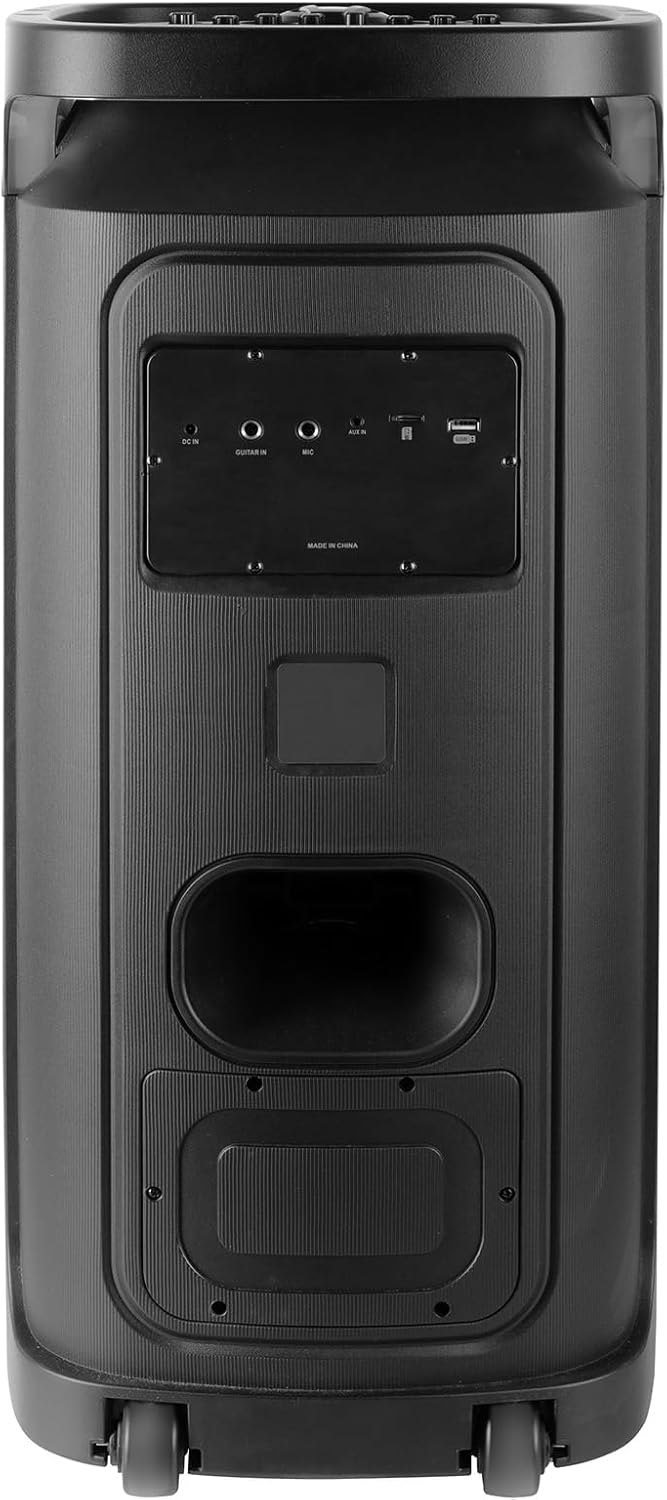
Rear panel of the Trevi XF 3150 KB speaker, displaying the various input ports including DC IN, AUX IN, MIC IN, GUITAR IN, USB, and SD card slot.
Operating Instructions
1. Basic Audio Playback
Once an audio source is connected (Bluetooth, USB, SD, AUX), use the following controls:
- Volume: Adjust the main volume using the large central knob or the VOL+ / VOL- buttons on the remote.
- Play/Pause: Press the PLAY/PAUSE button.
- Next/Previous Track: Use the NEXT and PREVIOUS buttons.
- Equalization: Press the EQ button on the remote to cycle through preset equalization modes (e.g., Pop, Rock, Jazz, Classic, Flat).
- Bass/Treble: Use the BASS and TREBLE knobs on the control panel for manual sound adjustment.
- Extra Bass: Press the EXTRA BASS button for enhanced bass output.
2. Karaoke Function
Utilize the included microphone and dedicated controls for karaoke sessions.
- Connect the microphone as described in the Setup section.
- Adjust MIC VOL to your desired level.
- Use ECHO and DELAY knobs to add vocal effects.
- The PRI (Microphone Priority) button can be pressed to lower the music volume automatically when speaking into the microphone.
3. Disco Light Effects
Enhance your listening experience with dynamic multicolor LED lights.
- Press the LED button on the control panel to turn the disco lights on or off.
- The lights will cycle through various colors and patterns automatically.

The Trevi XF 3150 KB speaker displaying its dynamic multicolor LED disco light effects, creating a party atmosphere.
Maintenance
1. Cleaning
To maintain the appearance and functionality of your speaker:
- Always disconnect the power cable before cleaning.
- Use a soft, dry cloth to wipe the exterior surfaces.
- Do not use abrasive cleaners, waxes, or solvents as they may damage the finish.
- Avoid getting moisture into any openings.
2. Battery Care
To prolong the life of the integrated rechargeable battery:
- Fully charge the battery before first use.
- Avoid completely draining the battery frequently.
- If storing the speaker for an extended period, charge the battery to approximately 50% and recharge every few months.
- Do not expose the speaker to extreme temperatures, as this can affect battery performance.
Troubleshooting
If you encounter issues with your Trevi XF 3150 KB speaker, refer to the following common problems and solutions:
| Problem | Possible Cause | Solution |
|---|---|---|
| Speaker does not power on. | Battery is depleted or power cable is not connected. | Connect the power cable and charge the battery. Ensure the power button is pressed correctly. |
| No sound output. | Volume is too low, incorrect input mode, or audio source issue. | Increase the volume. Press the MODE button to select the correct input. Check the audio source device. |
| Bluetooth device cannot pair. | Speaker is not in Bluetooth mode, device is too far, or already paired to another device. | Ensure speaker is in Bluetooth mode. Move device closer. Disconnect from other devices and try again. |
| Microphone is not working. | Microphone not connected properly, MIC VOL is low, or microphone is faulty. | Ensure microphone is securely plugged into the MIC IN port. Increase MIC VOL. Test with another microphone if available. |
| TWS connection fails. | Speakers are too far apart, or one speaker is not in Bluetooth mode. | Ensure both speakers are in Bluetooth mode and within close proximity. Repeat the TWS pairing steps. |
Specifications
| Model Name | XF 3150 KB |
| Brand | Trevi |
| Output Power | 130W (Max) |
| Speaker Size | 2 x 8-inch woofers, 1 x 1-inch tweeter |
| Connectivity Technology | Bluetooth, USB, SD, AUX |
| Wireless Communication Technology | Bluetooth |
| Power Source | Battery, Corded Electric (7.4V rechargeable battery) |
| Special Features | Built-in Microphone, Wireless Connectivity, Disco Lights, TWS Function |
| Product Dimensions | 34D x 32.6W x 74H cm |
| Item Weight | 1 Kilogram |
| Control Method | Remote |
| Audio Output Mode | Stereo |
| Mounting Type | Floor Standing |
| Recommended Uses | For smartphones or tablets, For computers, For home parties, For karaoke |
| Compatible Devices | Smartphone, Tablet, Laptop, MP3 Player, Computer, Karaoke System |
Warranty Information
This product comes with a Limited Warranty. Please refer to the included warranty card for detailed terms and conditions, including coverage period and claim procedures. Keep your proof of purchase for warranty service.
Support
For further assistance, product information, or to explore other Trevi products, please visit the official Trevi brand store:


