
Introduction
This manual provides comprehensive instructions for the PERFASCIN RMF-TX600U Voice Replacement Remote Control. This remote is designed to be directly compatible with various Sony LCD LED Bravia OLED 4K Ultra HD Smart TV models, offering a seamless replacement for your original remote.
The RMF-TX600U remote control features direct access buttons for popular streaming services and voice control functionality, enhancing your television viewing experience.
Setup
1. Battery Installation
To begin using your remote control, you must first install two AAA batteries (not included).
- Locate the battery compartment cover on the back of the remote control.
- Slide the cover downwards to open the compartment.
- Insert two AAA batteries, ensuring the positive (+) and negative (-) terminals align correctly with the markings inside the compartment.
- Slide the battery compartment cover back into place until it clicks securely.

Image: Back of the remote control with the battery compartment open for battery insertion.
2. Initial Use and Pairing
The PERFASCIN RMF-TX600U remote control is designed for direct use with compatible Sony TVs without requiring complex programming. Simply install the batteries, and the remote should function immediately for basic TV controls.
For voice control functionality, your TV may require a one-time pairing process. Refer to your Sony TV's user manual for specific instructions on pairing a new voice remote. Typically, this involves navigating to the TV's settings menu (e.g., Remote & Accessories or Bluetooth settings) and following the on-screen prompts to pair the remote.
Operating Instructions
This section details the primary functions of the buttons on your RMF-TX600U remote control.

Image: Front view of the RMF-TX600U remote control with all buttons clearly visible.
- Power Button (Green Circle with Line): Turns the TV on or off.
- Number Buttons (0-9): Directly select channels or input numbers.
- APPS Button: Accesses the TV's applications menu.
- Google Play Button: Launches the Google Play Store.
- Netflix Button: Directly launches the Netflix application.
- Color Buttons (Yellow, Blue, Red, Green): Used for specific functions within certain applications or menus, as indicated on-screen.
- Microphone Button (Microphone Icon): Activates voice control for search and commands.
- Input Button: Cycles through available input sources (HDMI, AV, etc.).
- Settings Button (Gear Icon): Opens the TV's settings menu.
- Directional Pad (Up, Down, Left, Right) and Enter Button: Navigates menus and confirms selections.
- BACK Button: Returns to the previous screen or menu.
- HOME Button: Returns to the TV's home screen.
- TV Button: Switches to the live TV input.
- VOL +/- Buttons: Adjusts the volume level.
- CH +/- Buttons: Changes the TV channel.
- MUTE Button: Mutes or unmutes the TV audio.
- AUDIO Button: Selects audio tracks or modes.
- SUBTITLE Button: Toggles subtitles on or off.
- CC (Closed Caption) Button: Toggles closed captions on or off.
- HELP Button: Accesses the TV's help menu.
- Playback Controls (REC, Rewind, Play, Pause, Fast Forward, Display): Controls media playback functions.
Voice Control Functionality
To use the voice control feature, press and hold the Microphone Button. Speak clearly into the remote control. Release the button when you are finished speaking. The TV will process your command or search query.
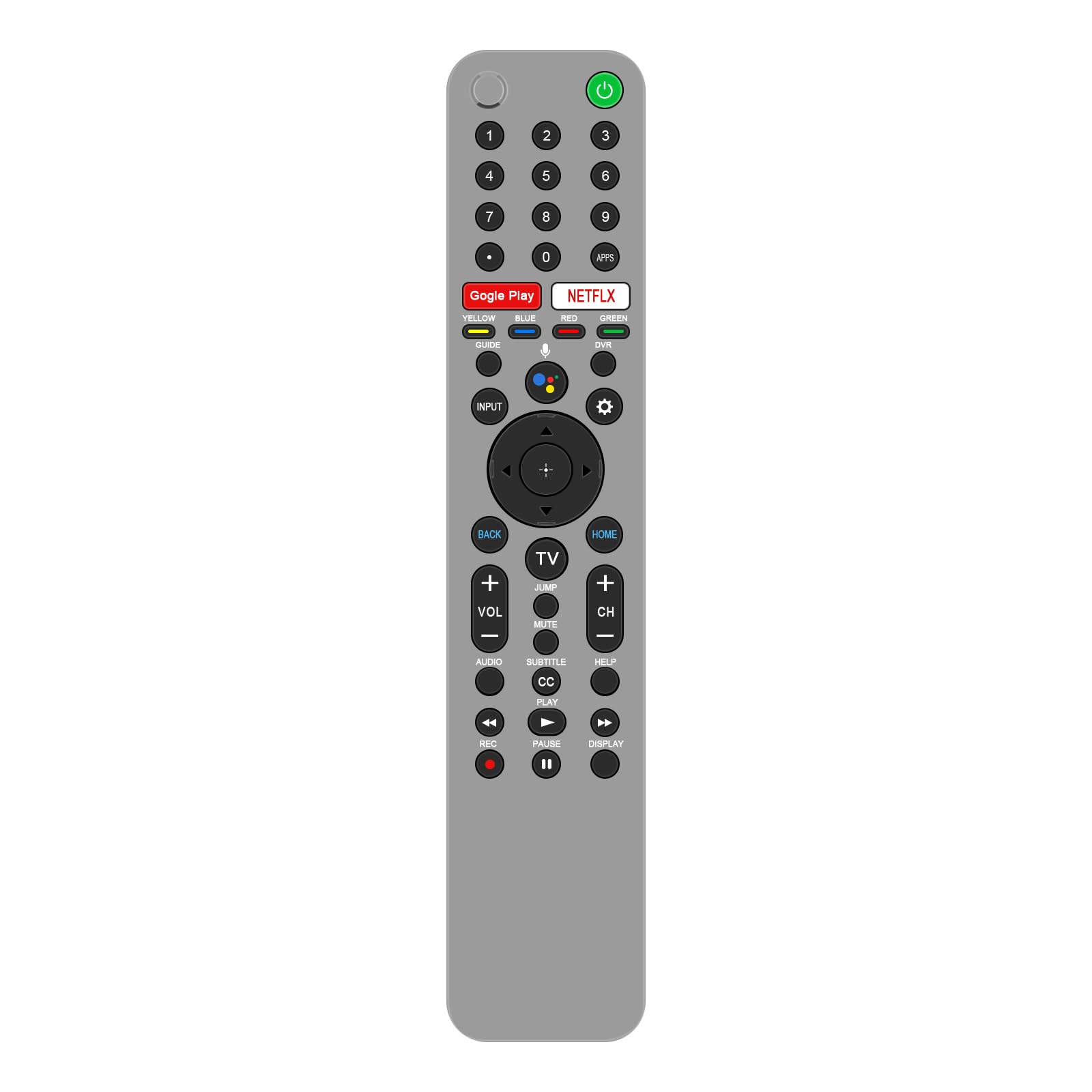
Image: Remote control highlighting the microphone button and its association with voice assistant functionality.
Maintenance
Cleaning the Remote Control
To maintain the remote control's appearance and functionality, clean it regularly:
- Use a soft, dry cloth to wipe the surface of the remote.
- For stubborn dirt, slightly dampen the cloth with water or a mild, non-abrasive cleaner. Avoid excessive moisture.
- Do not use harsh chemicals, solvents, or abrasive cleaning pads, as these can damage the remote's finish or internal components.
Battery Replacement
Replace the batteries when the remote control's response becomes sluggish or stops working. Always replace both batteries at the same time with new AAA batteries. Do not mix old and new batteries, or different types of batteries.
Storage
If the remote control will not be used for an extended period, remove the batteries to prevent leakage and potential damage to the remote.
Troubleshooting
If you encounter issues with your PERFASCIN RMF-TX600U remote control, refer to the following common problems and solutions:
- Remote is not responding:
- Check if the batteries are installed correctly with the correct polarity.
- Replace the batteries with fresh AAA batteries.
- Ensure there are no obstructions between the remote control and the TV's infrared receiver.
- Point the remote directly at the TV.
- Voice control is not working:
- Ensure the remote control is properly paired with your Sony TV. Refer to your TV's manual for pairing instructions.
- Check your TV's internet connection, as voice commands often require online processing.
- Speak clearly and hold the microphone button while speaking.
- Specific buttons are not working:
- This may indicate a compatibility issue with your specific TV model or a faulty remote.
- Verify your TV model is listed as compatible.
If these steps do not resolve the issue, please contact PERFASCIN customer support for further assistance. Provide your product model (RMF-TX600U) and a detailed description of the problem.
Specifications
| Model Number | RMF-TX600U |
| Product Dimensions | 6 x 3 x 0.5 inches (approximately 15.24 x 7.62 x 1.27 cm) |
| Item Weight | 1.9 ounces (approximately 53.86 grams) |
| Special Feature | Voice Search |
| Compatible Devices | Sony LCD LED Bravia OLED 4K Ultra HD Smart Televisions |

Image: Remote control with labeled dimensions.
Support
For any questions, concerns, or issues regarding your PERFASCIN RMF-TX600U Voice Replacement Remote Control, please contact PERFASCIN customer support. If the remote control is damaged or not functioning as expected upon receipt, a satisfactory solution will be provided.
When contacting support, please have your product model number (RMF-TX600U) and a description of the issue ready to facilitate a quicker resolution.