
1. Introduction and Overview
The BOSGAME P2 Mini PC is a compact and powerful desktop computer designed for a variety of applications including office work, home theater, and industrial control. It features a 12th generation Intel Core i5-12450H processor, 16GB of DDR4 RAM, and a 512GB NVMe SSD, offering robust performance in a small form factor.

Image 1.1: Front and rear views of the BOSGAME P2 Mini PC, highlighting its compact design and various ports.
2. What's in the Box
Upon unboxing your BOSGAME P2 Mini PC, please verify that all the following items are included:
- 1x Bosgame P2 Neo Mini PC
- 1 x VESA Mount with Screws
- 1 x Power Adapter
- 1 x HDMI cable
- 1 x User Manual

Image 2.1: All accessories included with the BOSGAME P2 Mini PC, neatly arranged for inspection.
3. Product Features and Overview
The BOSGAME P2 Mini PC is engineered with advanced components to deliver efficient performance:
- Processor: Equipped with the 12th generation Intel Core i5-12450H processor (8 cores, 12 threads, Turbo Boost up to 4.4GHz).
- Memory: 16GB DDR4 RAM (8GB x Dual Channel), expandable up to 64GB.
- Storage: Dual PCIe 3.0x4 NVMe SSD slots, initially configured with a 512GB SSD.
- Graphics: Integrated Intel Iris Xe Graphics supporting triple 4K display output.
- Connectivity: Dual 2.5G LAN ports, Triple-band Wi-Fi 6E, and Bluetooth 5.2.
- Ports: 2x USB 3.2 Gen 2 Type-A, 1x Full Function USB-C (front), 2x USB 3.2 Gen 2 (rear), 1x HDMI, 1x DisplayPort.

Image 3.1: Detailed view of the Intel Core i5-12450H processor and its key specifications.

Image 3.2: Visual representation of the 16GB DDR4 RAM and 512GB NVMe SSD, highlighting speed and capacity.

Image 3.3: The Mini PC's capability to support three independent 4K displays simultaneously for enhanced productivity.

Image 3.4: Comprehensive view of the rich interfaces on the front and rear panels of the Mini PC.
4. Setup Instructions
Follow these steps to set up your BOSGAME P2 Mini PC:
- Connect to Power: Plug the power adapter into the DC-in port on the rear of the Mini PC, then connect it to a power outlet.
- Connect to Display: Connect your monitor(s) using the HDMI, DisplayPort, or Full Function USB-C ports. The PC supports up to three 4K displays.
- Connect Peripherals: Plug in your keyboard and mouse to the available USB ports.
- Network Connection: For wired internet, connect an Ethernet cable to one of the Dual 2.5G LAN ports. For wireless, ensure Wi-Fi 6 is enabled.
- Power On: Press the power button on the front panel to start the Mini PC.
- Initial Windows Setup: The PC comes pre-installed with Windows 11 Pro. Follow the on-screen instructions to complete the initial setup. It is recommended to perform a fresh, clean install of Windows and update all drivers for optimal performance.
Video: User Setup of Windows 11 Pro
Video 4.1: A step-by-step guide on how to perform the initial Windows 11 Pro setup on your Mini PC.
5. Operating Instructions
The BOSGAME P2 Mini PC is designed for user-friendly operation:
- Power On/Off: Use the power button on the front panel for normal startup and shutdown procedures.
- Display Management: Utilize the HDMI, DisplayPort, or USB-C outputs to connect up to three monitors. Configure display settings within Windows for extended or mirrored desktop modes.
- Network Access: Connect to the internet via the Dual 2.5G LAN ports for high-speed wired connections or use the integrated Triple-band Wi-Fi 6E for robust wireless connectivity.
- Bluetooth Devices: Pair Bluetooth 5.2 compatible devices such as headphones, speakers, or other peripherals through Windows Bluetooth settings.
- Smart Functions: The Mini PC supports Wake-on-LAN (WOL) for remote wake-up and power-on self-start functions, allowing for convenient remote management.

Image 5.1: Illustration of the Mini PC's versatile wireless connectivity options with multiple devices.
6. Maintenance
To ensure optimal performance and longevity of your BOSGAME P2 Mini PC, consider the following maintenance options:
- Storage Expansion: The Mini PC features dual PCIe 3.0x4 NVMe SSD slots. You can easily upgrade the existing 512GB SSD or add an additional PCIe3.0x4 NVMe 2280 SSD for increased storage capacity, configurable up to 4TB (additional SSD not included).
- RAM Upgrade: The 16GB DDR4 RAM (8GBx Dual Channel) can be expanded up to 64GB. Consult the user manual for specific instructions on accessing and replacing RAM modules.
- Cleaning: Regularly clean the exterior of the Mini PC with a soft, dry cloth. Ensure ventilation openings are free from dust and debris to maintain proper airflow and cooling.

Image 6.1: Visual guide to the expandable storage options for the Mini PC.
7. Troubleshooting
If you encounter issues with your BOSGAME P2 Mini PC, consider these common troubleshooting steps:
- No Display: Ensure all display cables (HDMI, DisplayPort, USB-C) are securely connected to both the Mini PC and the monitor(s). Verify that the monitor is powered on and set to the correct input source.
- No Power: Check that the power adapter is correctly plugged into the Mini PC and a working power outlet. Try a different outlet if necessary.
- Network Connectivity Issues: For wired connections, check the Ethernet cable and router status. For Wi-Fi, ensure the Wi-Fi adapter is enabled in Windows settings and try restarting your router.
- Slow Performance: Close unnecessary applications. Check Task Manager for high CPU or RAM usage. Consider upgrading RAM or SSD if performance remains consistently slow.
- Operating System Issues: The PC supports changing the OS to Windows 10 Pro or Linux. If experiencing OS-specific problems, consider reinstalling the OS or contacting support.
8. Specifications
Detailed technical specifications for the BOSGAME P2 Mini PC:
| Feature | Specification |
|---|---|
| Processor | Intel Core i5-12450H (12th Gen, 8-Core, 12 Threads, up to 4.4GHz) |
| RAM | 16GB DDR4 (8GBx Dual Channel), expandable up to 64GB |
| Memory Speed | 3200 MHz |
| Hard Drive | 512GB NVMe SSD (Dual PCIe 3.0x4 slots, expandable up to 4TB) |
| Graphics Coprocessor | Integrated Intel Iris Xe Graphics |
| Max Screen Resolution | 3840x2160 (4K) |
| USB 3.0 Ports | 4 (2x front USB 3.2 Gen 2 Type-A, 2x rear USB 3.2 Gen 2) |
| USB-C Ports | 1 (Full Function USB-C on front panel) |
| LAN | Dual 2.5G Gigabit Ethernet |
| Wireless Connectivity | Wi-Fi 6E, Bluetooth 5.2 |
| Operating System | Windows 11 Pro (Supports Win/Ubuntu/Linux) |
| Item Weight | 2.59 pounds |
| Package Dimensions | 6.54 x 6.46 x 4.09 inches |
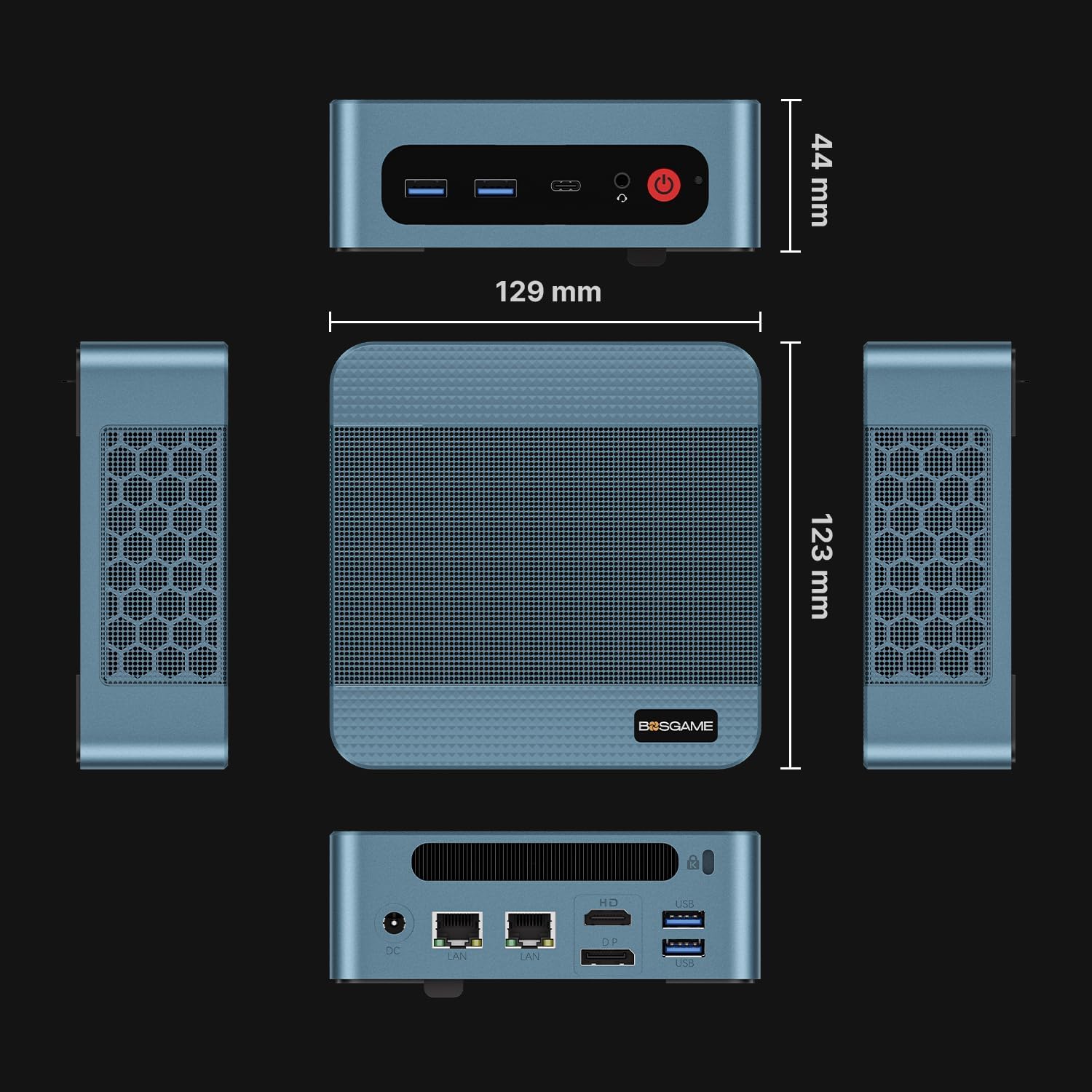
Image 8.1: Physical dimensions of the BOSGAME P2 Mini PC.
9. Warranty and Support
BOSGAME provides comprehensive customer support for your Mini PC:
- Operating System: Pre-installed with Windows 11 Pro OS, with support for changing to Windows 10 Pro or Linux.
- Technical Support: Professional technical department offers 24h/7d after-sales service and lifetime technical support.
- Contact: Please do not hesitate to contact the BOSGAME Support Center if you require assistance.


