
Introduction
This manual provides detailed instructions for the Goolsky Flysky FS-ST16 16-channel 2.4GHz RC Transmitter and its compatible FS-SR8 receiver. Designed for RC cars, boats, and airplanes, this system offers precise control and advanced features. Please read this manual thoroughly before operating the device to ensure safe and optimal performance.

Image: The Goolsky Flysky FS-ST16 RC Transmitter, showcasing its ergonomic design and integrated screen.
What's in the Box
Carefully unpack all items and ensure the following components are present:
- 1 x FS-ST16 Transmitter
- 1 x FS-SR8 Receiver
- 1 x Receiver Flex Cable
- 1 x Data Cable
- 1 x Protective Film
- 1 x Manual (this document)
- 1 x Adhesive Tape
- 1 x Throttle Ratchet Component
- 1 x Foam Storage Box
Note: TF card and batteries (18650*2PCS/2S LiPo) are not included and must be purchased separately.
Setup
1. Battery Installation
The FS-ST16 transmitter requires two 18650 batteries or a 2S LiPo battery (not included). Locate the battery compartment on the back of the transmitter. Insert the batteries according to the polarity indicators. Ensure the compartment cover is securely closed.

Image: Close-up of the FS-ST16 showing the battery balance connector and the multi-functional Type-C interface.
2. Receiver Connection (FS-SR8)
Connect the FS-SR8 receiver to your RC model's electronic speed controller (ESC) and servos. The receiver supports PWM, PPM, i-BUS, and S.BUS data output. Refer to your model's specific wiring diagram for correct connections.
3. Binding the Transmitter and Receiver
To establish communication between the FS-ST16 transmitter and the FS-SR8 receiver, follow these binding steps:
- Ensure both the transmitter and receiver are powered off.
- Press and hold the binding button on the FS-SR8 receiver while powering it on. The receiver's LED should flash rapidly, indicating it's in binding mode.
- Power on the FS-ST16 transmitter. Navigate to the 'Bind Set' menu on the transmitter's IPS screen.
- Select the desired RF System (ANT 2 Way) and binding mode (Routine or Fast).
- Initiate the binding process from the transmitter. The receiver's LED will turn solid when binding is successful.
- Power cycle both the transmitter and receiver to confirm the binding.
4. Initial Power-On
After battery installation and receiver binding, power on the transmitter. The 3.5-inch IPS screen will display the main interface, showing telemetry data such as transmitter voltage, stick positions, and timer.
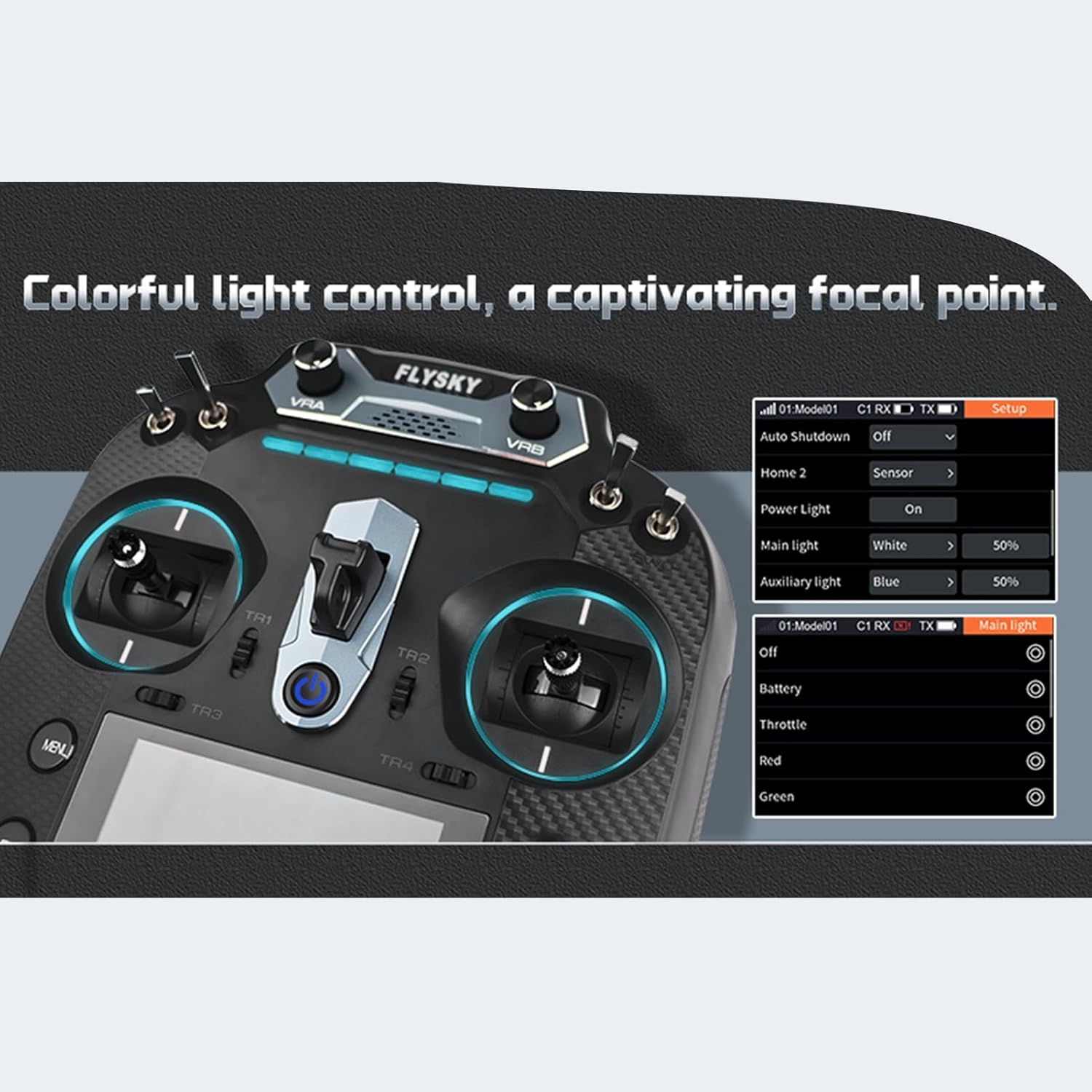
Image: The 3.5-inch IPS screen of the FS-ST16 displaying operational data.
Operating Instructions
1. Ergonomic Design and Controls
The FS-ST16 features a lightweight design (665g) and an ergonomic grip with a textured Kevlar pattern for comfortable extended use. The left-hand throttle configuration provides intuitive control for compatible models.

Image: Close-up of the FS-ST16's ergonomic grip with classic Kevlar texture.
2. Screen Navigation and User Interface
The 3.5-inch 320x480 full-color IPS screen provides a clear display even in outdoor conditions. Navigate through menus using the scroll wheel and buttons to access various settings and functions. The system supports both Flysky and open-source firmware (EdgeTX), offering flexibility and customization.

Image: The FS-ST16's high-brightness IPS display and support for open-source firmware like EdgeTX.
3. Advanced Control Features
- High-Precision Hall Sensor Gimbals: The transmitter is equipped with 4096-grade Hall sensor gimbals, ensuring smooth and accurate control with less than 0.15% linearity error.
- Adjustable Trigger: The trigger features adjustable return force and position for personalized comfort and control.
- Customizable Controls: Abundant control types including scroll wheels, knobs, and button switches are available, adaptable to various model functions.
- 16 Channels: Supports up to 16 channels, meeting the demands of multi-channel model applications.

Image: Detailed view of the FS-ST16's high-precision Hall sensor gimbals and various control options.
4. Connectivity and Power
- USB Type-C Port: The multi-functional Type-C port supports firmware updates, model data backup, 2S LiPo battery charging, and USB simulator functions.
- Dual Antennas: Features two antennas (one built-in and one external folding antenna) for reliable 2.4GHz ISM RF communication over distances up to 1500m (air distance without interference).
- Multi-Color LED Lighting: Customizable multi-color LED controls enhance visibility and provide visual feedback.

Image: The FS-ST16 with its multi-functional hook, suitable for control straps and phone holders.
5. Official Product Video
Video: An official overview of the Flysky FS-ST16 RC Transmitter with FS-SR8 Receiver, highlighting its key features and design.
Maintenance
1. Cleaning
Regularly clean the transmitter with a soft, dry cloth. Avoid using harsh chemicals or solvents that could damage the screen or casing. Keep the gimbals free from dust and debris.
2. Battery Care
Charge the batteries using the Type-C port or an external charger as needed. For long-term storage, ensure batteries are charged to approximately 50% to prolong their lifespan. Do not expose batteries to extreme temperatures.
3. Firmware Updates
Periodically check the official Flysky website for firmware updates. Use the Type-C port and the provided data cable to update the transmitter's firmware, ensuring you have the latest features and bug fixes. Always back up your model data before performing a firmware update.
Troubleshooting
- No Power: Ensure batteries are correctly installed and charged. Check the power button for proper function.
- Binding Failure: Re-attempt the binding process, ensuring both transmitter and receiver are in binding mode. Verify that the receiver is compatible with the ANT protocol.
- Loss of Signal: Check the distance between the transmitter and receiver. Ensure no major obstructions or strong interference sources are present. Verify antenna connections on both devices.
- Incorrect Control Response: Calibrate the gimbals and check channel assignments in the transmitter's settings. Ensure servos are correctly connected to the receiver.
For further assistance, refer to the official Flysky support resources or community forums.
Specifications
| Feature | Transmitter (FS-ST16) | Receiver (FS-SR8) |
|---|---|---|
| Compatible RC Types | Airplanes, cars, boats | Helicopters, Gliders, Delta-wing airplanes, Multicopters, Engineering Vehicles, Robots, Cars, Boats |
| Number of Channels | 16 | 8 |
| RF | 2.4GHz ISM | 2.4GHz ISM |
| RF Protocol | ANT | ANT |
| Resolution | 4096 | N/A |
| Data Connector | USB Type-C, 3.5mm Audio Jack (DSC), SD card slot | N/A |
| Input Power | 6-9V/DC; 18650*2PCS/2S LiPo (not included) | 3.5-8.4V |
| Distance | No less than 1500m (Air distance without interference) | >1000m (Air Distance without Interference) |
| Antenna | Two antennas (One built-in, one external folding) | Dual Antenna |
| Display | 3.5 inch 320*480 full dot color non-touch IPS screen | N/A |
| Online Update | Yes | Yes |
| Temperature Range | -10℃ ~ +60℃ | -10℃ ~ +60℃ |
| Humidity Range | 20% ~ 95% | 20% ~ 95% |
| Charging Jack | Yes (Type-C Port) | N/A |
| Weight | 665g | N/A |
| Dimensions (Transmitter) | 224.1*180*101.3mm | N/A |
| Size (Receiver) | N/A | 44.8*26.6*11.3mm |
Warranty and Support
Goolsky products are covered by a manufacturer's warranty. For specific warranty terms, please refer to the documentation included with your purchase or visit the official Goolsky website. If you encounter any issues or require technical support, please contact Goolsky customer service through their official channels. Ensure you have your product model (FS-ST16) and purchase details available when seeking support.