
Introduction
This manual provides detailed instructions for the setup, operation, maintenance, and troubleshooting of your Vacqueen 10L Smart Pet Water Fountain. This device is designed to provide fresh, filtered water for your pets, featuring a 10L capacity, 304 food-grade stainless steel construction, multi-layer filtration, and smart app control. Please read this manual thoroughly before use to ensure proper function and longevity of your product.

Image: The Vacqueen 10L Smart Pet Water Fountain, shown with its included filters and sponges. The fountain features a stainless steel top and a clear reservoir for water level visibility.
Package Contents
- Smart Pet Water Fountain x 1
- Charging Cable Set x 1
- User Manual x 1
- Filter Set x 1 (8 filters & 8 sponges)
- Cleaning Brush x 1

Image: A visual representation of all items included in the product package: the smart pet water fountain, charging cable, user manual, filter set, and cleaning brush.
Setup Instructions
- Prepare the Filter: First, soak the filter in water for 5 minutes before installation.
- Install Filter Components: Place the blue polymer sponge upwards into the filter box, then add the non-woven fabric, activated carbon, and ion exchange resin layers.
- Assemble Filter Box: Align the assembled filter box and snap it into place within the fountain's base.
- Position Host: Cover the stainless steel tray and place the host (pump unit) into its designated slot.
- Power On and Connect: Plug in the charging cable. Long press the button on the host for 5 seconds to turn on the device and connect to your 2.4GHz Wi-Fi network via the app.

Image: A visual guide illustrating the four steps for installing the filter and assembling the Vacqueen pet water fountain, including soaking the filter, placing components, assembling the unit, and connecting power/Wi-Fi.
App Installation
Download the "Tuya Smart" or "Smart Life" app from the Apple App Store or Google Play Store. This device supports 2.4GHz Wi-Fi networks only.

Image: A screenshot showing the Tuya Smart app interface for controlling the Vacqueen Smart Pet Water Fountain, with options for monitoring water discharge and filter life.
Operating Instructions
Filtration System
The Vacqueen Smart Pet Water Fountain utilizes a Tri-Pure Multi-Layer Filtration system to ensure clean and fresh water for your pet. This system includes:
- Polymer Sponge: Blocks hair and larger debris.
- Non-woven Fabric: Intercepts hair and dust particles.
- Activated Carbon: Absorbs odors and impurities.
- Ion Exchange Resin: Softens water.
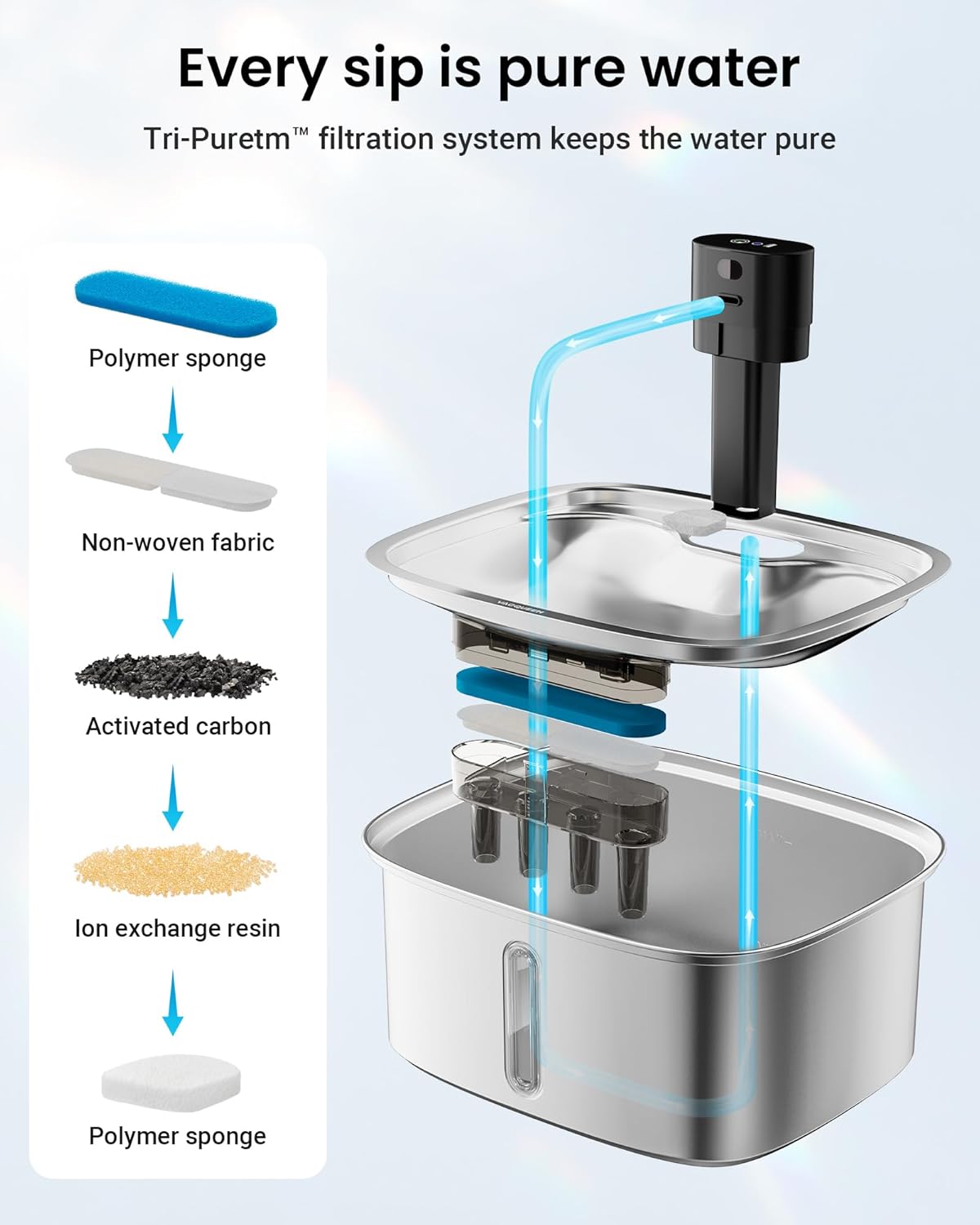
Image: A detailed view of the multi-layer filter components, showing the polymer sponge, non-woven fabric, activated carbon, and ion exchange resin layers.
Smart App Control
- Monitor water status and pet hydration remotely.
- Control InfraFlow mode or Interval mode settings.
- Receive real-time hydration alerts.
- Check pet's drinking amount and customize water outlet mode.
Power Supply Modes
- Plug-in Mode: For daily use, powered by the charging cable.
- Battery-powered Mode: Provides up to 30 days of standby power during outages. The Wi-Fi function automatically disables when battery power is below 35% to conserve energy.

Image: A visual comparison of the fountain operating in plug-in mode (connected to power) and battery-powered mode (showing a 30-day battery life indicator).
Water Level Monitoring
The fountain features a 360° visible window to check the water level. When water is low, the main pump automatically shuts down, and the "Anti-Dry Guard" protection activates to prevent overheating. The app will also send a water shortage reminder.

Image: An illustration demonstrating the real-time water level monitoring, showing the visual window on the fountain and a corresponding low water alert on the mobile app.
Maintenance
Filter Replacement
It is recommended to replace the filter within 30 days to maintain clean and healthy drinking water. The app can be used to set a reminder for filter replacement.
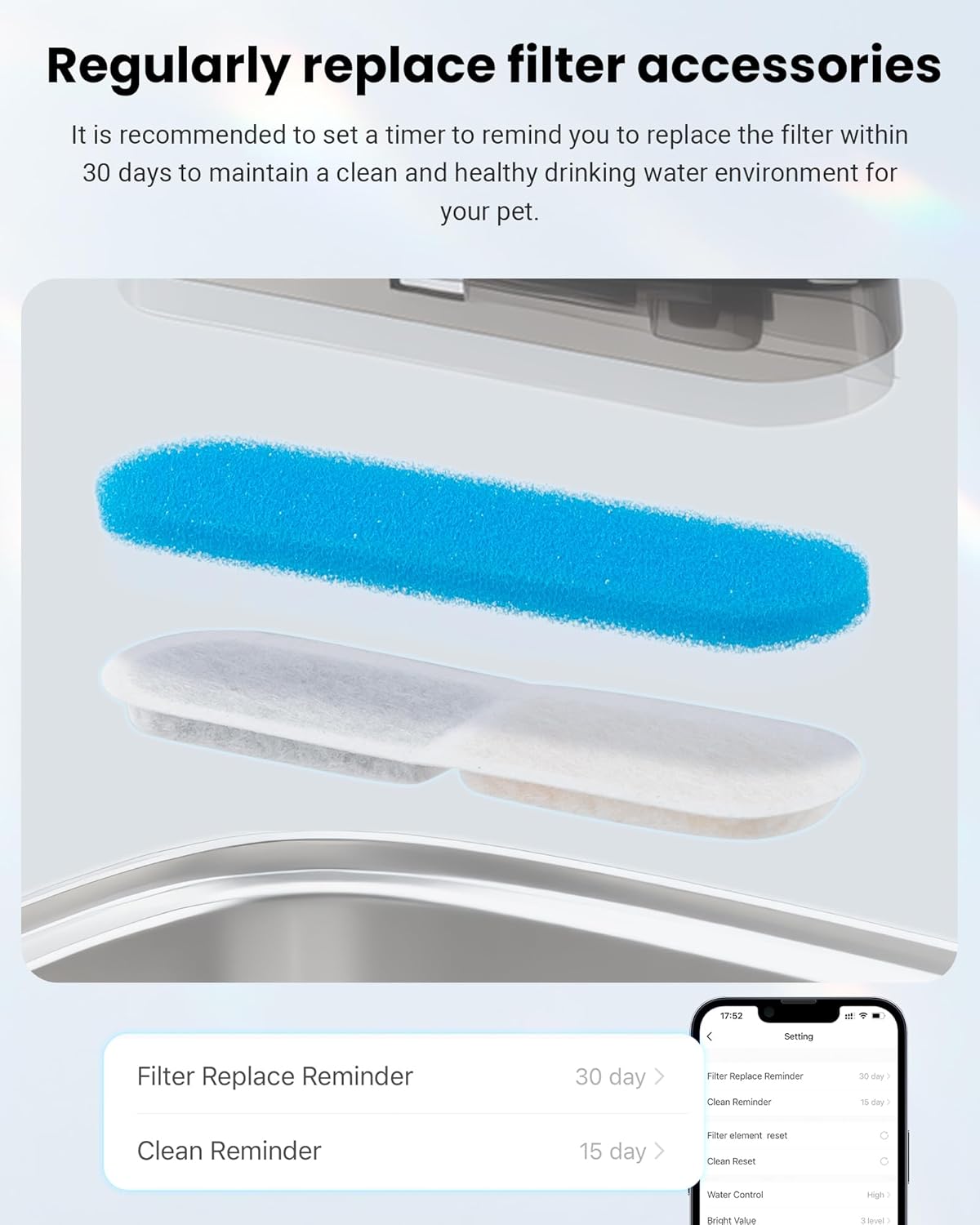
Image: A close-up of the filter components and a screenshot of the app's settings, showing options for "Filter Replace Reminder" (30 days) and "Clean Reminder" (15 days).
Cleaning Instructions
The fountain features a 3-step quick clean design for easy maintenance.
- Disassemble the pump, filter box, and filter for hand washing. No tools are needed.
- Wipe the dog water bowl pump instead of rinsing directly to maintain performance.
- For the health of your pet, clean the sponge and the electric rotor of the electric pump regularly every 7 days. The main unit panel should not be exposed to water.

Image: A four-step visual guide demonstrating how to clean the pump: take out the sponge, disassemble the pump body, clean the water rotor with a brush, and reinstall.

Image: A woman cleaning the stainless steel tray of the Vacqueen pet water fountain in a kitchen sink, highlighting the ease of cleaning.
Troubleshooting
Refer to the table below for common issues and their solutions.
| No. | Fault Phenomenon | Possible Causes | Inspection Method | Solutions |
|---|---|---|---|---|
| 1 | Red light flashes slowly but no water is coming out |
|
|
|
| 2 | Red light flashes quickly but the device shuts down | Motor damaged (overcurrent protection) | Flash red quickly after turning on and turning off. | Contact us to replace the electric pump host. |
| 3 | Infrared sensing distance is shortened | The host is placed in a place with too high temperature. (The difference between animal body temperature and ambient temperature is too small, and it may not be sensed.) | After taking it to a cool place, the sensing distance will increase. | Put the host in a cooler place. |
| 4 | No response when charging |
|
|
|
| 5 | Low water volume |
|
|
|
| 6 | No response when touching |
| After cleaning the pump cover, is there still no touch? |
|
| 7 | Short standby time |
| The battery capacity becomes smaller. | Contact us to replace the electric pump host. |
Specifications
| Brand | Vacqueen |
| Model Number | BEVPW01010102US |
| Capacity | 10 Liters (2.64 Gallons / 338 Oz) |
| Material | 304 Food-Grade Stainless Steel |
| Dimensions (Pump) | 5.91 x 1.57 x 0.79 inches |
| Item Weight (Pump) | 0.08 Pounds |
| Connectivity | 2.4GHz Wi-Fi |
| Power Supply | Plug-in or Battery Backup (up to 30 days standby) |
| Filtration System | Tri-Pure Multi-Layer (Sponge, Non-woven fabric, Activated carbon, Ion exchange resin) |
| Safety Features | PumpFree water-electricity separation, Anti-Dry Guard automatic shut-off |
| Certifications | FCC, ROHS, UL |
Warranty and Support
Warranty Information
This product comes with a 2-year manufacturer's warranty. Please retain your proof of purchase for warranty claims.
Customer Support
For any product inquiries, technical assistance, or warranty claims, please contact Vacqueen customer service. Responsive support from our expert customer service team is available to assist you.
Contact details are typically found on the product packaging or the official Vacqueen website.

