
Introduction
The AULA WIN60 HE MAX is a 60% wired mechanical gaming keyboard designed for high-performance and customizable user experience. It features advanced Hall Effect magnetic switches, offering adjustable actuation and a rapid trigger mode for enhanced precision and speed. With an 8000 Hz polling rate and 16.8 million customizable RGB colors, this keyboard is engineered for competitive gaming and efficient typing.
Setup
Package Contents
Before beginning, ensure all items are present in the package:
- Keyboard x 1
- USB-C Cable x 1
- Keycap Puller x 1
Connection
- Locate the USB-C port on the left side of the AULA WIN60 HE MAX keyboard.
- Connect one end of the provided USB-C cable to the keyboard's USB-C port.
- Connect the other end of the USB-A cable to an available USB port on your computer.
- The keyboard will automatically be recognized by your Windows PC. (Note: Not compatible with PlayStation 5/4 (PS5/PS4) and Xbox.)

The AULA WIN60 HE MAX keyboard, showcasing its compact design and key layout.

The AULA WIN60 HE MAX keyboard positioned on a desk, illustrating its space-saving 60% layout.
Operating Instructions
Basic Functions
The AULA WIN60 HE MAX functions as a standard 60% mechanical keyboard. Due to its compact layout, some functions are accessed via the 'Fn' key combinations.
RGB Lighting Control
The keyboard features 16.8 million customizable RGB colors. Adjustments can be made using the following key combinations:
- FN + \|: Turn off keyboard lighting effect
- FN + [: Light brightness increases
- FN + ]: Left Alt light speed increase
- FN + Tab: Switch light effect mode
- FN + ;: Light brightness decreases
- FN + ': Right Alt light speed decreases
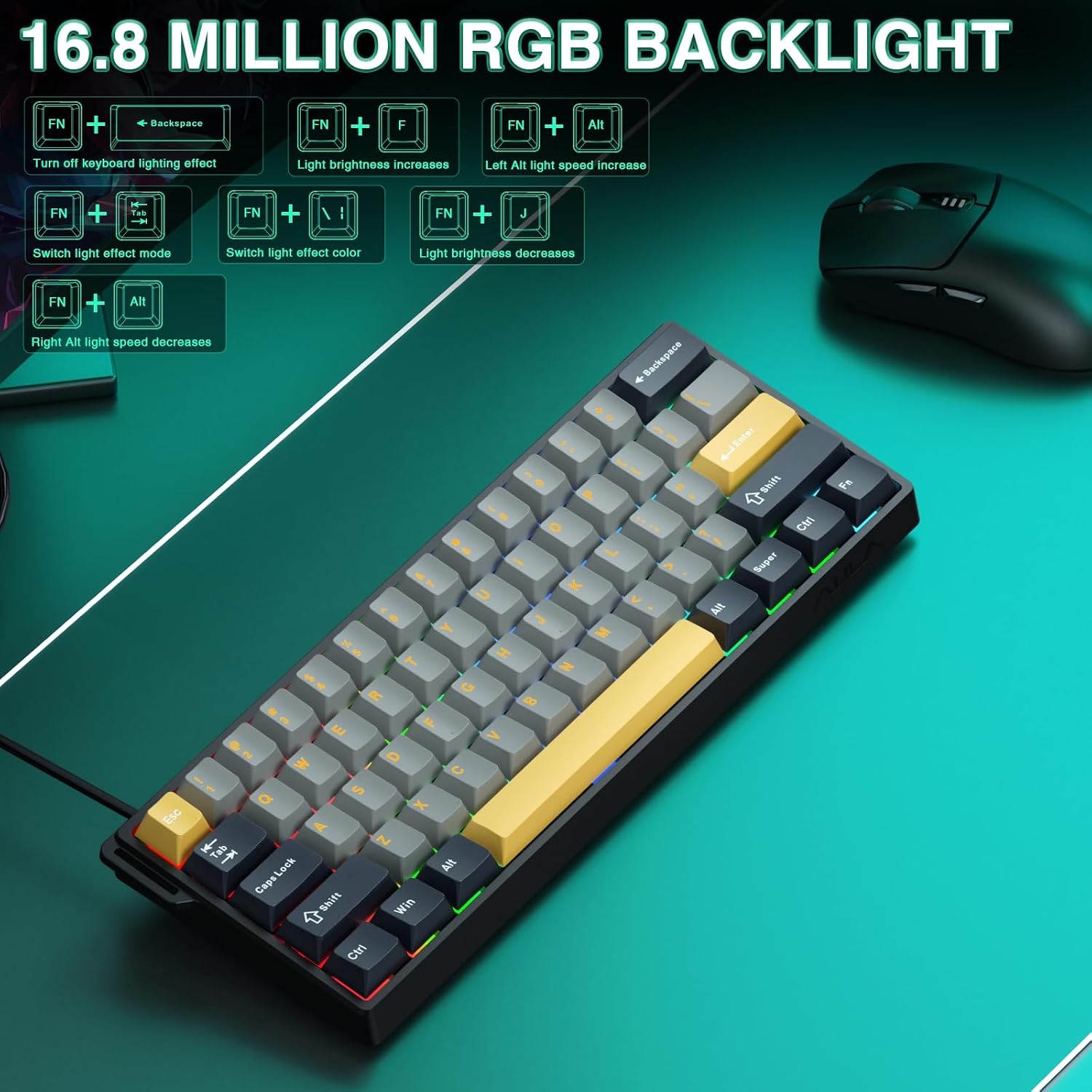
Visual guide for RGB backlight control key combinations.
Web-Based Driver Customization
The keyboard features an easy-to-use web-based driver for advanced customization. This driver allows you to:
- Remap keys
- Create and edit macros
- Customize RGB lighting effects
- Adjust magnetic switch performance, including actuation and rapid trigger settings.
Access the web-based driver from any device with an internet connection. No software downloads are required. (Note: The driver currently only supports Windows operating systems.)

Screenshot of the web-based driver interface, showing options for custom shortcut keys, trigger travel set, DKS/MT/TGL custom, macro recording & editing, and 16 million RGB backlight customization.
Rapid Trigger Mode
The rapid trigger mode is designed for competitive gaming, particularly FPS titles. It allows for ultra-low RT step distance of just 0.01mm, ensuring lightning-fast response times for actions like rapid shooting and complex combos. This feature significantly enhances accuracy and positioning by enabling faster peeking and quick-stop shooting.

Diagram illustrating the difference between a regular switch and rapid trigger mode, highlighting faster reset and activation for gaming.
Maintenance
Cleaning
To maintain the keyboard's performance and appearance, regularly clean it using a soft, dry cloth. For deeper cleaning, use the provided keycap puller to remove keycaps and clean underneath with compressed air or a small brush. Avoid using harsh chemicals or abrasive materials.
Hot-Swappable Magnetic Switches
The AULA WIN60 HE MAX features hot-swappable magnetic switches, allowing for easy replacement or customization without soldering. Use the keycap puller to remove keycaps, and then carefully pull the switch directly upwards to remove it. Insert a new compatible magnetic switch by aligning it with the socket and pressing down gently until it clicks into place.
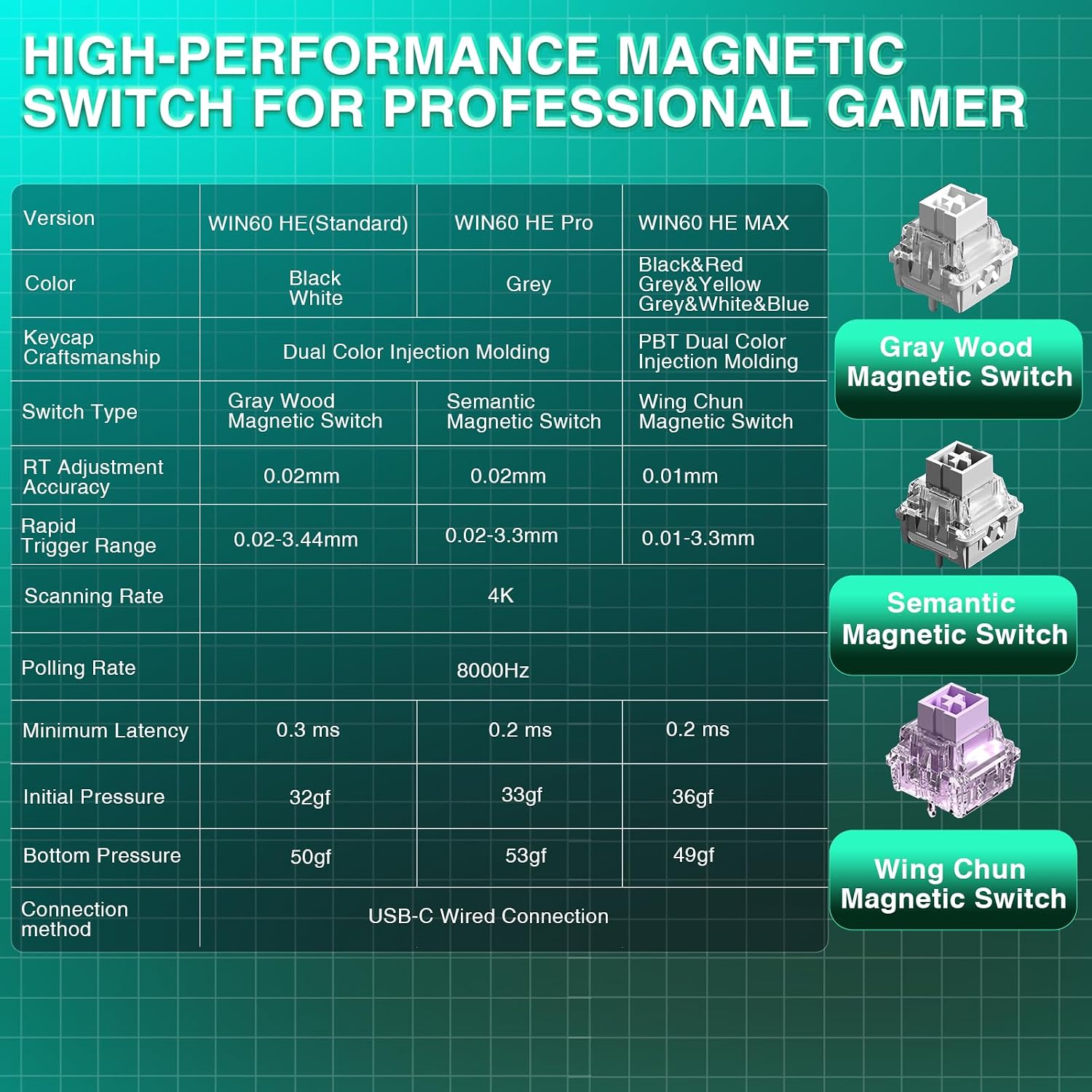
Table comparing different versions of AULA magnetic switches, including Wing Chun Magnetic Switch used in the HE MAX model.
Troubleshooting
Input Lag or Unresponsive Keys
- Ensure the USB-C cable is securely connected to both the keyboard and the computer.
- Try connecting the keyboard to a different USB port on your computer.
- Restart your computer or device. This can often resolve temporary input issues.
- Verify that the web-based driver is up-to-date and correctly configured for your desired settings.
RGB Lighting Issues
- Ensure the keyboard is properly powered.
- Use the FN key combinations (as described in the Operating Instructions section) to cycle through lighting effects and adjust brightness.
- Check the web-based driver settings for any custom lighting profiles that might be overriding default settings.
Specifications
| Feature | Detail |
|---|---|
| Product Dimensions | 11 x 5 x 1.1 inches |
| Item Weight | 2.23 pounds |
| Manufacturer | AULA |
| Item Model Number | 60 HE |
| Connectivity Technology | USB, Wired Keyboard |
| Keyboard Description | Hall Effect Magnetic Switches Rapid Trigger Mechanical Gaming Keyboard |
| Recommended Uses | Everyday Use, Gaming, Programming |
| Special Features | Backlit, Hall Effect Keyboard, Hot-Swappable, Magnetic Switch, Rapid Trigger |
| Color | Black&Gray&Yellow (RGB Backlighting) |
| Number of Keys | 61 |
| Polling Rate | 8000 Hz |
| Magnetic Switch Actuation | Adjustable down to 0.01mm |
| Compatible Devices | Laptop, PC Windows |
Warranty and Support
For warranty information and technical support, please refer to the documentation included with your purchase or contact CORBOBO customer service directly. Details can typically be found on the manufacturer's official website or through your point of purchase.