
Introduction
This manual provides detailed instructions for the safe and efficient use of your realme 14x 5G Smartphone. Please read this manual thoroughly before using your device to ensure optimal performance and longevity.
Package Contents
Upon unboxing, verify that the following items are included:
- realme 14x 5G Smartphone
- USB Cable
- Quick Start Guide (may be separate)
- SIM Ejector Tool (may be separate)

Image: The realme 14x 5G Smartphone in Crystal Black, shown with its main features highlighted, including IP69 rating, 6000mAh battery, and 45W fast charge capability. This image represents the primary device and its key specifications.
Setup
1. Inserting the SIM Card
- Locate the SIM card tray on the side of the device.
- Insert the SIM ejector tool into the small hole next to the tray and press gently until the tray pops out.
- Place your Nano-SIM card(s) and/or microSD card into the tray with the gold contacts facing down.
- Carefully reinsert the tray into the device.
2. Initial Power On
- Press and hold the Power button until the realme logo appears.
- Follow the on-screen instructions to complete the initial setup, including language selection, Wi-Fi connection, and Google account setup.
Operating Your Device
Display and Visual Comfort
The realme 14x features a 6.67-inch display with a 120Hz refresh rate for smooth visuals. It includes 10 visual protection modes designed to reduce eye strain during prolonged use.
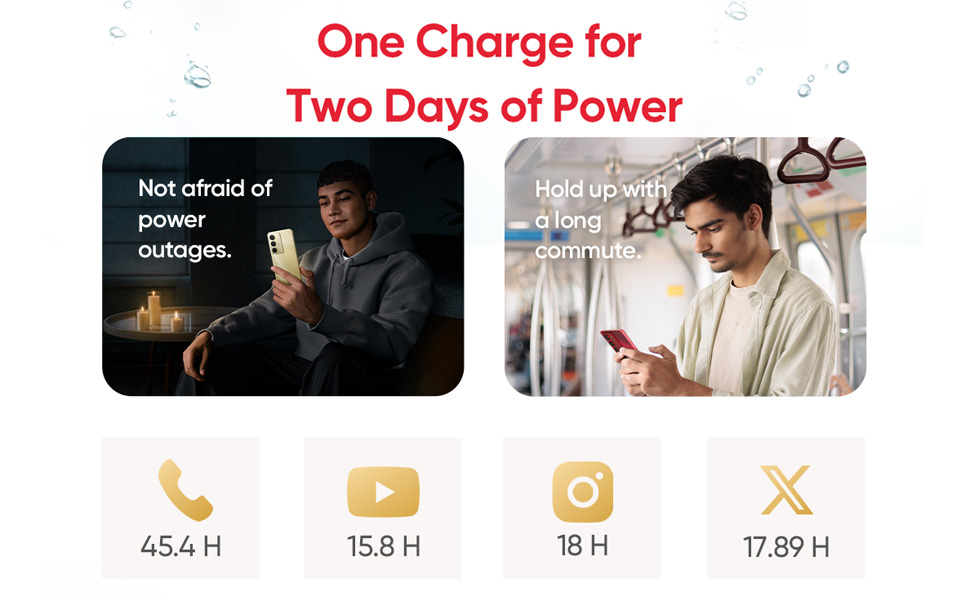
Image: A visual representation of the 120Hz Eye Comfort Display feature, highlighting the smooth motion and visual protection modes of the realme 14x 5G Smartphone.
Battery and Charging
Equipped with a 6000mAh battery, the device supports extended usage. It also features 45W fast charging technology for quick power replenishment.

Image: An illustration depicting the 6000mAh battery capacity and 45W fast charging capability of the realme 14x 5G Smartphone, showing estimated usage times for various activities.
Camera Features
The 80MP AI-enhanced camera system is designed to capture detailed images in various environments. It includes both front and rear camera functionalities.

Image: A close-up of the realme 14x 5G Smartphone's rear camera module, highlighting the 80MP AI camera system.
Performance and Connectivity
Powered by the MediaTek Dimensity 6300 5G chipset, the device offers efficient performance with clock speeds up to 2.4GHz. It supports Bluetooth, USB, and Wi-Fi connectivity.

Image: An illustration showcasing the MediaTek Dimensity 6300 5G chipset, emphasizing its 6nm advanced process, 8-core architecture, and performance enhancements.
Maintenance
Cleaning Your Device
- Use a soft, lint-free cloth to clean the screen and body.
- Avoid using harsh chemicals or abrasive materials.
Water and Dust Resistance
The realme 14x 5G Smartphone features an IP69 rating for water and dust resistance. While designed to withstand splashes and dust, it is not recommended for prolonged submersion or exposure to high-pressure water jets.

Image: The realme 14x 5G Smartphone being splashed with water, illustrating its IP69 water and dust resistance rating.
Physical Protection
The device incorporates ArmorShell™ protection and has passed military-grade impact resistance tests, offering enhanced durability against drops.

Image: A person's foot near a realme 14x 5G Smartphone on stairs, demonstrating its military-grade shock resistance and durability against accidental drops.
Troubleshooting
| Issue | Possible Solution |
|---|---|
| Device does not power on. | Ensure the battery is charged. Connect the device to the charger for at least 10 minutes, then try powering on again. |
| Poor network signal. | Check SIM card insertion. Move to an area with better network coverage. Restart the device. |
| Apps are slow or unresponsive. | Close background applications. Clear app cache. Restart the device. Ensure sufficient storage space. |
| Battery drains quickly. | Reduce screen brightness. Disable unnecessary features like GPS, Bluetooth, Wi-Fi when not in use. Close power-intensive apps. |
Specifications
| Feature | Detail |
|---|---|
| Model Number | RMX3940 |
| Operating System | Android 14 |
| Processor | MediaTek Dimensity 6300 5G (Octa-Core, up to 2.4 GHz) |
| RAM | 6 GB |
| Internal Storage | 128 GB |
| Display | 6.67-inch, 120Hz Refresh Rate, 720 x 1600 Resolution |
| Rear Camera | 80MP AI Camera |
| Front Camera | Yes |
| Battery Capacity | 6000mAh |
| Charging | 45W Fast Charging |
| Connectivity | Bluetooth, USB, Wi-Fi, 5G |
| Water & Dust Resistance | IP69 |
| Dimensions (LxWxH) | 16.57 x 7.62 x 0.79 cm |
| Weight | 100 g |
| Color | Crystal Black |
Warranty and Support
For warranty information and customer support, please refer to the warranty card included with your product or visit the official realme support website. Keep your proof of purchase for warranty claims.
You can find additional support and information on the realme Store on Amazon.