Introduction
This manual provides comprehensive instructions for the AODELAN BR-3 Wireless Remote Control, designed for use with compatible Fujifilm X-series cameras. It covers product overview, key features, setup, operating procedures, charging, compatibility, and troubleshooting to ensure optimal performance and user experience.
Product Overview
The AODELAN BR-3 is a compact and lightweight wireless remote control that offers enhanced control over your Fujifilm camera's functions, including shutter release, video recording, and zoom. It features an OLED display for clear status indication and a rechargeable battery for extended use.
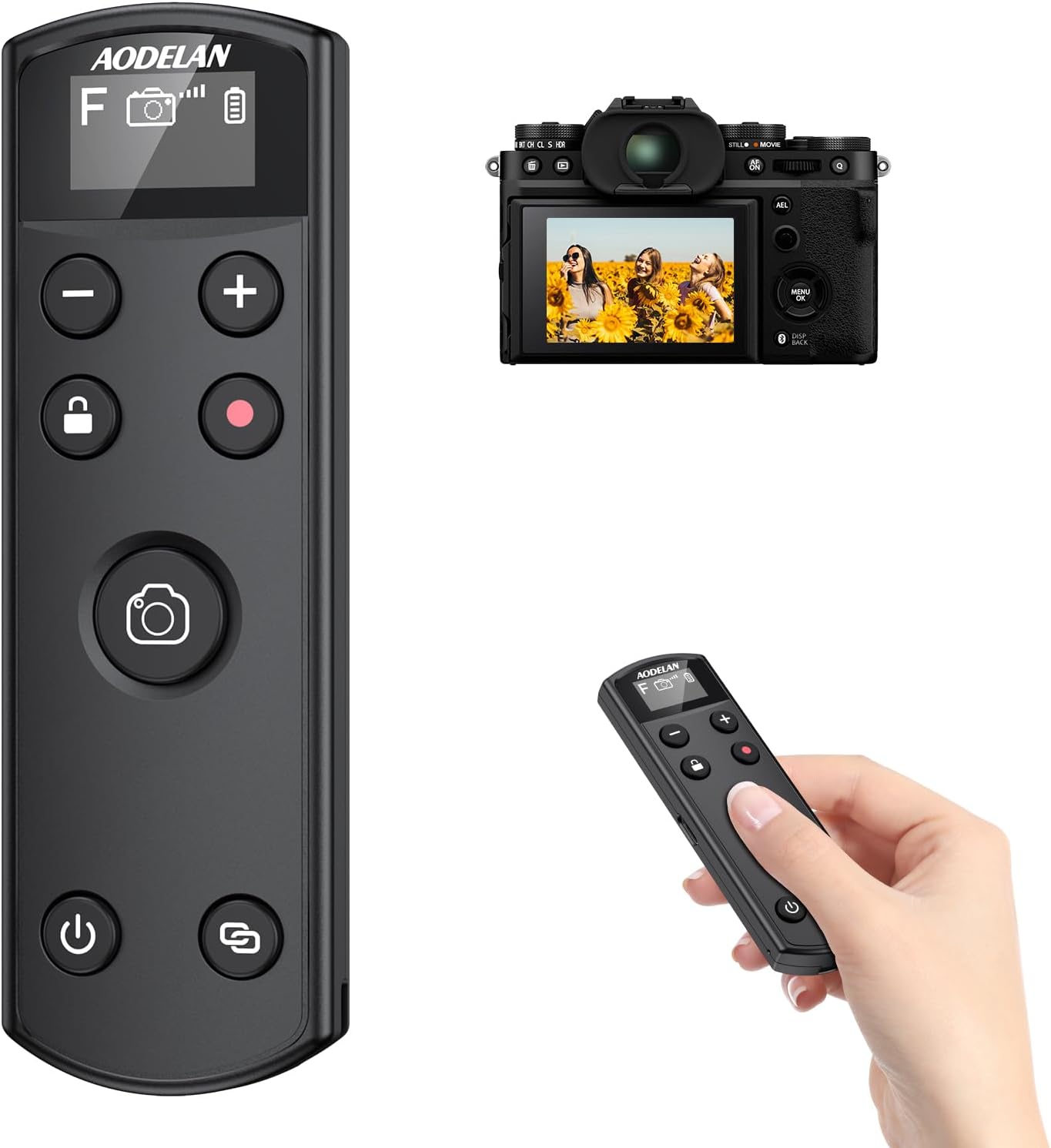
Image: The AODELAN BR-3 Wireless Remote Control shown alongside a Fujifilm camera, illustrating its compact design and the OLED display.
Key Features
- Rechargeable Battery: Integrated USB-C rechargeable battery provides approximately 10 hours of continuous operation on a single charge.
- OLED Screen Display: Visualizes operations and current status for clear and specific function settings.
- Still Photo and Video Shooting: Supports single shots, continuous shooting, Bulb mode, self-timer, and video recording.
- Focus/Zoom Control: Half-press for focus (camera in AF mode), full-press for shutter. Zoom function available with power zoom lenses.
- Lock Function: Disables control buttons to prevent unintentional operations.
- Wireless Range: Operates up to 10 meters (32.8 feet) away from the camera.
- Durable Design: Resistant to dust and moisture, suitable for various environmental conditions.

Image: An infographic illustrating the key features of the AODELAN BR-3 remote control, including its rechargeable nature, OLED screen, various shooting modes, focus/zoom capability, Bulb mode, and 10m range.
Compatibility
The AODELAN BR-3 Wireless Remote Control is compatible with the following Fujifilm camera models and their specified firmware versions:
- X Mirrorless Digital Cameras: X-H2S (Ver.3.00 or later), X-H2 (Ver.1.20 or later), X-T5 (Ver.1.00 or later), X-T4 (Ver.1.70 or later), X-T3 (Ver.4.50 or later), X-S20, X-S10 (Ver.2.60 or later), X-T50, X-T30 II (Ver.1.20 or later), X-T30 (Ver.1.50 or later), X-M5, X-E5.
- X Fixed Lens Cameras: X100VI.
Note: Remote zoom functionality is only available with power zoom lenses. The X-T30 II, X-T30, and X100VI models do not support remote zoom at this time, even with a compatible zoom lens.

Image: A visual representation of the compatible Fujifilm camera models and their required firmware versions for use with the AODELAN BR-3 remote control.
Setup: Pairing Instructions
Follow these steps to pair your AODELAN BR-3 remote control with your Fujifilm camera. The pairing procedure may vary slightly between camera models.
1. Prepare the Camera for Pairing (Example: Fujifilm X-T5)
- Turn on your Fujifilm camera.
- Press and hold the (Bluetooth) button on the camera for two seconds. Bluetooth options will be displayed.
- Navigate to MENU → CONNECTION SETTING → [Bluetooth/SMARTPHONE SETTING].
- Select [Bluetooth ON/OFF] → [ON].
- Select [Pairing] (or [PAIRING REGISTRATION]). The camera will initiate the pairing process, displaying "SEARCHING".
2. Pair the Remote Control
- Ensure the AODELAN BR-3 remote control is powered on. The OLED screen will display "Scanning".
- Press and hold the Pair button (bottom right button with a chain link icon) on the remote control for at least 2 seconds. The remote will enter pairing state, displaying "Pairing".
- Once the camera detects the remote, the remote's screen will display "OK!" and the camera screen will show "PAIRING COMPLETE".
- If the smartphone name is not correct, please try pairing again.

Image: A visual guide demonstrating the pairing process between the AODELAN BR-3 remote control and a Fujifilm X-T5 camera, showing menu navigation and remote button presses.

Image: An illustration of the connection settings menu on a Fujifilm X-S10 camera, detailing the steps to enable Bluetooth and initiate pairing with the remote control.
Operating Instructions
Once paired, the AODELAN BR-3 remote control allows you to operate various camera functions wirelessly.
1. Shutter Release for Still Photos
- Ensure your camera is set to the desired still photo mode.
- Press the Shutter Release button (large camera icon) halfway down to focus. The camera needs to be in AF (auto focus) mode.
- Press the Shutter Release button all the way down to take a photo.
- For Bulb shooting, press the Shutter Release button once to open the shutter, and press it again to close the shutter.
2. Video Recording
- Adjust your camera to the video recording mode.
- Press the Movie Recording button (red dot icon) to start recording a video.
- Press the Movie Recording button again to stop recording.

Image: Two scenarios demonstrating the use of the AODELAN BR-3 remote control for capturing still photos and initiating video recording, with a focus on the shutter and record buttons.
3. Focus and Zoom Function
- Focus: Half-press the Shutter Release button to activate autofocus.
- Zoom: Use the (+) and (-) buttons for zooming. The zoom speed is controlled by how far the button is pressed. A light press results in slow zoom, while a full press results in fast zoom. This function is only available with power zoom lenses and when the camera supports remote zoom.

Image: A split image showing a wide-angle and telephoto view, illustrating the zoom capability of the AODELAN BR-3 remote control with a compatible lens, along with its operating distance.
4. Lock Function
- Press and hold the Control Lock button (padlock icon) to disable all other control buttons on the remote. This prevents accidental operations. The OLED screen will display a padlock icon.
- To unlock, press and hold the Control Lock button again until the padlock icon disappears from the screen.
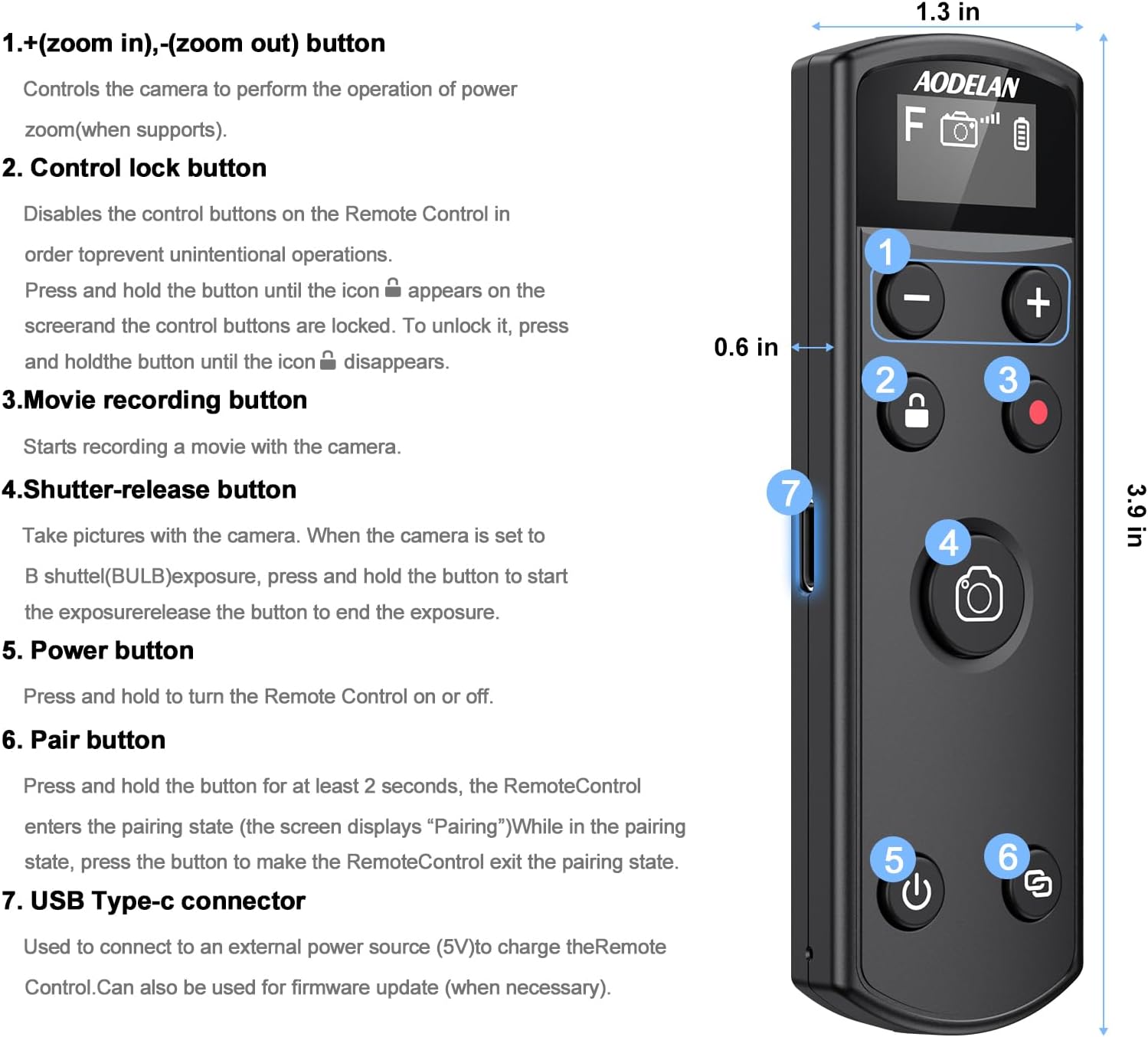
Image: A detailed diagram of the AODELAN BR-3 remote control, labeling each button and its corresponding function, including the zoom, control lock, movie recording, shutter release, power, pair, and USB Type-C connector.
Charging and Battery Life (Maintenance)
The AODELAN BR-3 remote control features a built-in rechargeable battery. To charge the device, connect it to a 5V external power source using the provided USB-C cable. A full charge typically takes approximately 1 hour and 30 minutes and provides up to 10 hours of continuous operating time. To conserve battery life, press the power button to shut down the remote when not in use.
The USB-C interface also supports firmware upgrades, which can help prevent incompatibility issues with future camera updates.

Image: The AODELAN BR-3 remote control connected to a laptop via its USB-C cable for charging, with text indicating approximate charging and operating times.
Troubleshooting
- Remote not pairing: Ensure both the camera and remote are powered on and in pairing mode. Check camera's Bluetooth settings. Ensure the remote's battery is charged.
- Remote not responding: Check if the remote's Lock Function is activated. Ensure the remote is within the 10m operating range. Verify the remote's battery level.
- Zoom function not working: Confirm that your camera is equipped with a power zoom lens and that the camera model supports remote zoom functionality. Refer to the compatibility section.
- Intermittent connection: Avoid obstructions between the remote and the camera. Ensure no other Bluetooth devices are causing interference.
Specifications
| Feature | Detail |
|---|---|
| Brand | AODELAN |
| Model Number | BR-3 |
| Item Weight | 2.39 ounces |
| Package Dimensions | 4.61 x 1.97 x 1.06 inches |
| Special Feature | Lightweight, OLED Screen |
| Max Number of Supported Devices | 1 |
| Compatible Devices | Fujifilm Cameras (X-series) |
| Connectivity Technology | Bluetooth |
| Power Source | Rechargeable USB-C |
Warranty and Support
For information regarding product warranty, technical support, or service, please refer to the documentation included with your purchase or visit the official AODELAN website. Contact details for customer service are typically available on the product packaging or the manufacturer's support page.


