
Introduction
The EGQINR H38 Smart Watch Fitness Tracker is designed to enhance your daily life by providing comprehensive health monitoring, activity tracking, and smart communication features. This manual will guide you through the setup, operation, and maintenance of your new device, ensuring you get the most out of its capabilities.
What's in the Box
- 1x EGQINR H38 Smart Watch
- 1x Instruction Manual
- 1x Charging Cable
- 1x Regular Silicone Strap
- 1x Extended Silicone Strap
Setup
1. Charging Your Smart Watch
Before initial use, fully charge your EGQINR H38 Smart Watch. Simply connect the magnetic USB cable to the charging points on the back of the watch and plug the USB end into a power source. A full charge typically takes about 2 hours and provides 3-7 days of heavy use or up to 30 days of standby time.

Image: The EGQINR H38 Smart Watch connected to its magnetic charging cable, displaying charging status.
Video: Demonstrates how to connect the magnetic charging cable to the smartwatch for charging.
2. App Download and Connection
To unlock the full potential of your smartwatch, download the FitCloudPro app from your smartphone's app store. The watch supports iOS 9.0 / Android 4.4 or above. Once installed, open the app and follow the on-screen instructions to pair your watch via Bluetooth. This will allow you to sync data, customize settings, and receive notifications.
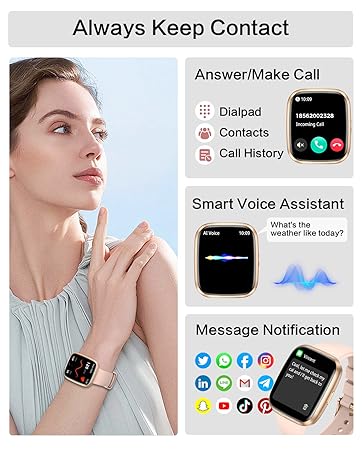
Image: A visual guide demonstrating the steps to download the FitCloudPro app and connect the smartwatch via Bluetooth.
Video: A seller-provided video demonstrating the process of connecting the EGQINR H38 Smartwatch to a smartphone via the companion app.
3. Strap Installation
Your smartwatch comes with two silicone straps (regular and extended) to ensure a comfortable fit for various wrist sizes. To attach a strap, align the pin on the strap with the hole on the watch casing and slide it into place. Repeat for the other side. Ensure both straps are securely fastened before wearing.

Image: The EGQINR H38 Smart Watch shown with its interchangeable silicone straps, highlighting the design.
Video: A seller-provided video demonstrating how to attach and detach the watch straps, as well as navigating the watch interface.
Operating the Smartwatch
1. Call and Message Notifications
With a single Bluetooth connection, you can make and answer calls directly from your watch, store contacts, and view call history. The smartwatch also provides vibration alerts for incoming calls, SMS texts, emails, and app messages (e.g., Facebook, Twitter, WhatsApp). The 1.57" HD display ensures clear readability of message content.

Image: The smartwatch screen showing an incoming call and various app notification icons.
2. Health Monitoring
The H38 Smart Watch features advanced sensors for accurate 24/7 monitoring of blood oxygen (SpO2), blood pressure, and heart rate. It also interprets sleep characteristics, analyzing deep sleep, light sleep, and awake times to provide insights into your sleep quality. All real-time and historical data can be viewed on the watch or within the FitCloudPro app.

Image: The smartwatch interface showing real-time heart rate, blood pressure, and SpO2 readings.
3. Sports Modes and Activity Tracking
Monitor your steps, distance, and calories burned throughout the day. The smartwatch supports over 114 sports modes, including running, cycling, walking, and yoga. During exercise, it accurately records your heart rate, steps, calorie consumption, distance, and duration, providing valuable data for your fitness plans.

Image: The smartwatch screen showing a selection of sports modes and a summary of daily activity data.
4. Other Practical Functions
The H38 Smart Watch integrates multiple smart features for daily convenience:
- Menstrual Cycle Reminder: Helps track and predict menstrual cycles.
- Breathing Training: Guided breathing exercises for relaxation.
- Drinking Water Reminder: Prompts you to stay hydrated.
- Sedentary Reminder: Alerts you to move after periods of inactivity.
- Voice Assistant: Control your watch and access information with voice commands.
- Weather: Get real-time weather updates.
- Music Control: Manage music playback on your connected smartphone.
- Stopwatch, Timer, Alarm, Calculator: Essential utility tools.
- Find Phone: Locate your misplaced smartphone.
- Camera Control: Remotely trigger your phone's camera.
- Do-Not-Disturb Mode: Silence notifications during specific times.

Image: The smartwatch interface showing icons for weather, music, voice assistant, and other practical functions.
5. Customization
Personalize your smartwatch with over 150 free watch faces available in the FitCloudPro app. You can also upload your favorite photos from your phone album to create custom watch faces, keeping your wrist display dynamic and unique.

Image: A collage of different customizable watch faces available for the smartwatch, including options to use personal photos.
Maintenance
The EGQINR H38 Smart Watch has an IP67 waterproof rating, making it resistant to water splashes, sweat, and light rain. You can confidently wear it during everyday activities like washing hands or light water-related tasks. However, it is not recommended for swimming, showering with hot water, or sauna use. To maintain its performance and appearance, regularly clean the watch and straps with a soft, dry cloth.

Image: The smartwatch being splashed with water, illustrating its IP67 waterproof feature for daily use.
Troubleshooting
- Watch not turning on: Ensure the watch is fully charged. Connect it to the charging cable for at least 30 minutes.
- Unable to connect to app: Make sure Bluetooth is enabled on your smartphone and the watch is within range. Restart both the watch and your phone, then try pairing again through the FitCloudPro app.
- Inaccurate health data: Ensure the watch is worn snugly on your wrist, not too tight or too loose. Keep the sensor clean. Note that this device is not a medical device and data is for reference only.
- Notifications not received: Check app settings to ensure notifications are enabled for the desired applications. Verify that the watch is connected to your phone via Bluetooth.
Specifications
| Operating System | Android & iOS |
| Special Features | Double Straps, Bluetooth Call, Text Notification, Heart Rate Monitor, Blood Pressure Monitor, Sleep Tracker, Activity Tracker, Calorie Tracker, Pedometer, Weather Information, Music, Camera, Alarm Clock, Calculator |
| Battery Capacity | 230 Milliamp Hours |
| Connectivity Technology | Bluetooth |
| Wireless Communication Standard | Bluetooth |
| Battery Cell Composition | Lithium Ion |
| GPS | GPS Via Smartphone |
| Shape | Rectangular |
| Screen Size | 1.57 Inches |
| Brand | EGQINR |
| Band Material Type | Silicone |
| Case Material Type | Aluminum |
| Water Resistance Level | Water Resistant |
| Waterproof Rating | IP67 |
| Model Number | 74eec534-74c3-4ecd-ae22-47fd3b5b763a |
Warranty and Support
Your EGQINR H38 Smart Watch comes with a 1-Year Limited Warranty. For any support needs, please refer to the contact information provided in your product packaging or visit the official EGQINR store on Amazon.
Amazon Store: Visit the EGQINR Store


