
1. Product Overview
The SEDETA 67" L Shaped Desk is designed for home office and gaming environments, offering a spacious work surface, integrated storage, and modern features like LED lighting and a power outlet. This desk features a reversible design, allowing for flexible configuration to suit various room layouts.
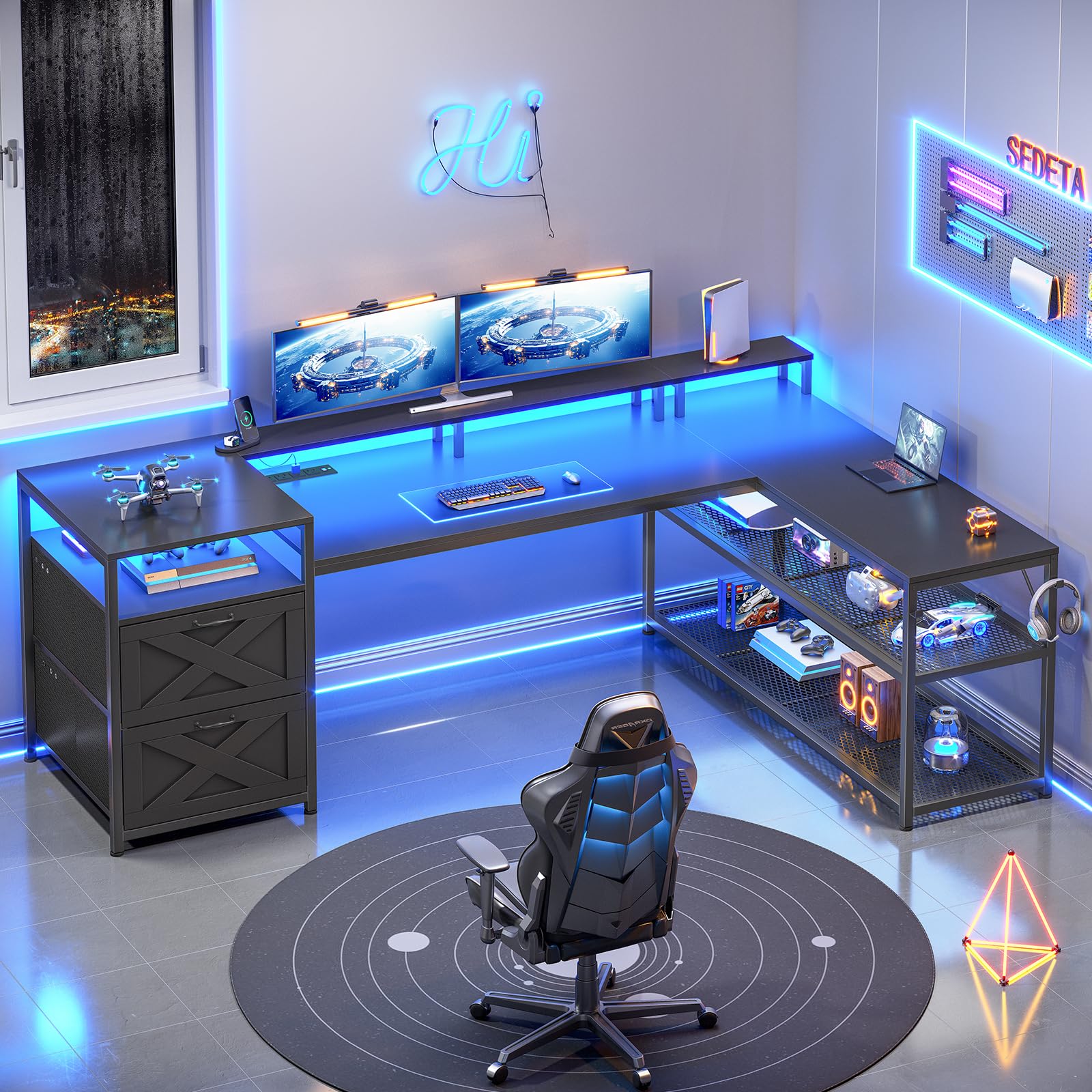
Figure 1: Overall view of the SEDETA 67" L Shaped Desk, showcasing its L-shape, integrated storage, and monitor shelf.
2. Package Contents
Before assembly, verify that all components listed in the included assembly guide are present and undamaged. If any parts are missing or damaged, please contact customer support for assistance.
- Desk panels (Engineered Wood)
- Metal frame components (Alloy Steel)
- 2 Fabric file drawers
- Power outlet with 4 AC outlets and 2 USB ports
- LED light strip with remote control
- 2 Headphone hooks
- Assembly hardware and tools
- Instruction manual
3. Setup and Assembly
Detailed assembly instructions are provided in the separate manual included with your product. Please follow these instructions carefully. The desk is designed for reversible configuration, allowing the L-shape to be set up on either the left or right side to best fit your space.
3.1. Pre-Assembly Checklist
- Ensure you have sufficient space for assembly.
- Lay out all parts and hardware, comparing them against the parts list.
- Have a Phillips head screwdriver and any other recommended tools ready.
3.2. Reversible Design
The desk's L-shaped configuration can be reversed during assembly. Refer to the specific steps in your assembly guide to choose the desired orientation (left or right).

Figure 2: The reversible design allows for left or right-hand L-shaped configurations.
3.3. Adjustable Feet
The desk is equipped with adjustable feet to ensure stability on uneven surfaces and protect your flooring. After assembly, adjust each foot by rotating it until the desk is level and stable.

Figure 3: Adjustable feet provide stability and floor protection.
4. Operating Instructions
4.1. Integrated Power Outlet
The desk includes a built-in power outlet with 4 AC outlets and 2 USB ports, providing convenient power access for your devices. It features an on/off switch for safe and easy power management.
- AC Outlets: 4 outlets, 120V/12A
- USB Ports: 2 ports, 5V/2A
- Power Cord: 5 feet long

Figure 4: The integrated power strip offers multiple charging options with a safety switch.
4.2. LED Lighting System
The desk features an RGB LED light strip that can be controlled via a mobile application. This allows for customization of colors and lighting modes.
- Color Options: Over 60,000 colors available.
- Modes: 29 flashing modes, music sync function with adjustable microphone sensitivity.
- Control: Remote control via dedicated APP.
To operate the LED lights:
- Connect the LED light strip to a power source.
- Download the specified mobile application (refer to the LED light manual for details).
- Pair your device with the LED light strip via Bluetooth.
- Use the app to select colors, modes, and adjust settings.

Figure 5: The LED light strip offers customizable lighting effects and app control.
4.3. Storage Features
The desk provides various storage solutions to help organize your workspace.
- Fabric File Drawers: Two fabric drawers are included, suitable for legal, letter, or A4 size documents. These can be positioned on either the left or right side of the desk.
- Adjustable Bookshelves: Three adjustable storage shelves are located under the desk, providing space for books, documents, and other supplies. The metal mesh shelves can be adjusted to accommodate larger items, such as a CPU tower.
- Headphone Hooks: Two headphone hooks are provided for convenient storage of headphones or backpacks.
- Monitor Shelf: An extra-long monitor shelf is designed to hold 2-3 monitors, elevating them to promote a correct sitting posture.

Figure 6: Fabric storage drawers for organizing documents.

Figure 7: The 3-tier adjustable bookshelf provides versatile storage.

Figure 8: Convenient iron hook for headphones or bags.

Figure 9: The monitor shelf helps maintain correct sitting posture.
5. Maintenance
5.1. Cleaning
- Wipe the desk surfaces with a soft, damp cloth.
- For stubborn marks, use a mild, non-abrasive cleaner. Avoid harsh chemicals that may damage the finish.
- Dust the metal frame and shelves regularly.
- The fabric drawers can be spot cleaned with a mild detergent and water. Allow to air dry completely.
5.2. General Care
- Periodically check all screws and fasteners to ensure they are tight. Retighten as necessary to maintain stability.
- Avoid placing excessively hot or cold items directly on the desk surface without protection.
- Do not overload the shelves or desk surface beyond the recommended weight capacity.
- Ensure the power cord for the integrated outlet is not pinched or damaged.
6. Troubleshooting
6.1. Desk Instability
- Issue: Desk wobbles or is uneven.
Solution: Adjust the leveling feet on the bottom of the desk legs until the desk is stable on all points. Check all assembly screws and tighten if loose.
6.2. Power Outlet Not Working
- Issue: Devices not charging or receiving power from the integrated outlet.
Solution: Ensure the desk's power cord is securely plugged into a functional wall outlet. Check that the on/off switch on the power strip is in the 'on' position. If the issue persists, try plugging another device into the wall outlet to confirm it is working.
6.3. LED Lights Not Functioning
- Issue: LED lights do not turn on or respond to the app.
Solution: Verify the LED light strip is properly connected to its power source. Ensure the mobile application is correctly installed and paired with the LED strip. Check for any loose connections in the LED wiring.
7. Specifications
| Feature | Detail |
|---|---|
| Brand | SEDETA |
| Model Number | 67" L Shaped Desk |
| Shape | L-Shape |
| Product Dimensions (D x W x H) | 18.5"D x 66.9"W x 29.6"H |
| Color | Black |
| Base Material | Alloy Steel |
| Top Material Type | Engineered Wood |
| Finish Type | Powder Coated |
| Maximum Weight Recommendation | 550 Pounds |
| Item Weight | 61 Pounds |
| Number of Drawers | 2 (Fabric File Drawers) |
| Number Of Shelves | 3 (Adjustable Bookshelves) |
| Power Outlet | 4 AC Outlets (120V/12A), 2 USB Ports (5V/2A), On/Off Switch |
| Special Features | Reversible Design, LED Lights, Monitor Shelf, Headphone Hooks, Adjustable Feet |
| Required Assembly | Yes |
Figure 10: Product dimensions for planning your space.
8. Warranty and Support
8.1. Warranty Information
This product comes with a Limited Warranty. Please refer to the warranty card included with your purchase for specific terms and conditions.
8.2. Customer Support
If your item arrives damaged, scratched, or with missing parts, please contact SEDETA customer service directly. We are committed to providing a free replacement or offering a partial refund as appropriate.
For further assistance or inquiries, please visit the official SEDETA store or contact their customer support channels as provided in your purchase documentation.
