
1. Introduction
This manual provides instructions for the safe and effective use of your PROTEAR E6850 Bluetooth 5.3 Hearing Protection Earmuffs. Please read this manual thoroughly before using the product and retain it for future reference.
Product Overview
The PROTEAR E6850 earmuffs combine certified hearing protection with Bluetooth 5.3 technology, allowing for wireless audio streaming and hands-free calls in noisy environments. They feature a Noise Reduction Rating (NRR) of 25dB and a Signal-to-Noise Ratio (SNR) of 30dB, meeting ANSI S3.19 and CE EN352-1 standards.
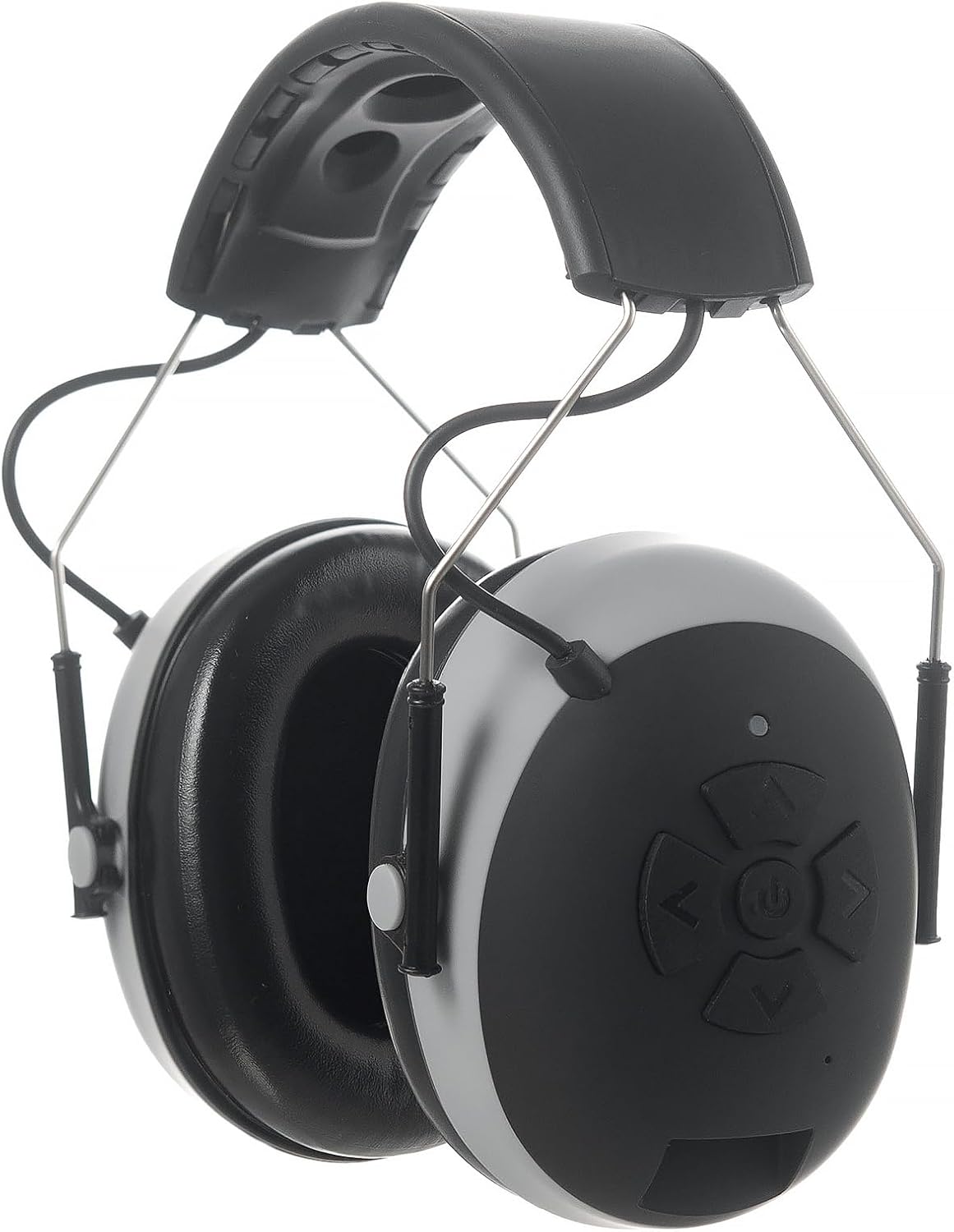
Figure 1: PROTEAR E6850 Bluetooth Hearing Protection Earmuffs (Gray model).
Package Contents
- PROTEAR E6850 Bluetooth Hearing Protection Earmuffs
- USB-C Charging Cable
- 3.5mm Audio Cable
- User Manual
2. Setup
2.1 Charging the Earmuffs
Before initial use, fully charge the earmuffs. The device is equipped with a 1200mAh rechargeable lithium polymer battery.
- Locate the USB-C charging port on the earmuff.
- Connect the provided USB-C cable to the earmuff and the other end to a USB power source (e.g., computer, power bank, or certified USB adapter).
- The LED indicator will illuminate during charging.
- Charging typically takes less than 2 hours for a full charge.
- Once fully charged, the LED indicator will change color or turn off (refer to LED indicator section for specific behavior).

Figure 2: Battery life and USB-C charging port. Bluetooth mode offers up to 48+ hours, AUX mode up to 120+ hours.
2.2 Powering On/Off
- To Power On: Press and hold the Power button (usually the center button on the control panel) for approximately 3 seconds until the LED indicator lights up and an audible prompt is heard.
- To Power Off: Press and hold the Power button for approximately 3 seconds until the LED indicator turns off and an audible prompt is heard.
2.3 Bluetooth Pairing
The earmuffs utilize Bluetooth 5.3 for a stable and efficient wireless connection.
- Ensure the earmuffs are powered off.
- Press and hold the Power button for approximately 5-7 seconds until the LED indicator flashes rapidly (typically blue and red alternately), indicating pairing mode.
- On your mobile device, enable Bluetooth and search for available devices.
- Select "PROTEAR E6850" from the list of found devices.
- Once paired, the LED indicator will typically flash blue slowly, and an audible confirmation will be heard.
- The earmuffs will automatically attempt to reconnect to the last paired device when powered on.

Figure 3: The earmuffs feature Bluetooth 5.3 for wireless connectivity and a built-in microphone for hands-free calling.
3. Operating Instructions
3.1 Control Buttons
The control buttons are located on the right earmuff for easy access, even when wearing gloves.

Figure 4: Overview of earmuff features, highlighting the wide headband, oversized control buttons, and AUX/Type-C charging port.
| Button | Function (Short Press) | Function (Long Press) |
|---|---|---|
| Power Button (Center) | Play/Pause music, Answer/End call | Power On/Off, Reject call, Enter pairing mode |
| Volume Up (+) | Increase volume | Next track |
| Volume Down (-) | Decrease volume | Previous track |
3.2 Audio Playback
- After successful Bluetooth pairing, audio from your connected device will stream to the earmuffs.
- Use the Volume Up/Down buttons to adjust the listening volume.
- Press the Power button to play or pause music.
- Long press Volume Up for the next track, and long press Volume Down for the previous track.
3.3 Hands-Free Calling
- When a call is received, the music will pause.
- To Answer a Call: Short press the Power button.
- To End a Call: Short press the Power button during a call.
- To Reject a Call: Long press the Power button when a call is incoming.
- The built-in microphone allows for clear communication.
3.4 Wired Connection (AUX Mode)
For devices without Bluetooth or to conserve battery, use the provided 3.5mm audio cable.
- Connect one end of the 3.5mm audio cable to the AUX port on the earmuff.
- Connect the other end to the audio output jack of your device.
- In AUX mode, audio controls (play/pause, track skip) on the earmuffs may not function, and volume control will primarily be managed by the connected device.
4. Hearing Protection Information
The PROTEAR E6850 earmuffs are designed to protect your hearing in noisy environments.
- Noise Reduction Rating (NRR): 25dB
- Signal-to-Noise Ratio (SNR): 30dB
- Certifications: ANSI S3.19 and CE EN352-1
These ratings indicate the level of noise reduction provided by the earmuffs when worn correctly. Always ensure a proper seal around your ears for optimal protection.

Figure 5: Illustration of 25dB NRR and a chart showing safe exposure times for various noise levels.
Proper Fit and Use
- Adjust the headband to ensure a snug fit over your head. The headband is wide and adjustable for universal fit.
- Position the earcups so they fully cover your ears, creating a complete seal.
- The soft, breathable ear cushions are designed for comfort during extended wear.
- Regularly inspect the ear cushions and headband for wear and tear, which can affect noise reduction performance.

Figure 6: The earmuffs are foldable for portability and feature an adjustable headband for a comfortable fit.
5. Maintenance
Cleaning
- Wipe the earmuffs with a soft, damp cloth.
- Do not use abrasive cleaners or solvents.
- Ensure the charging port and AUX port are dry before use or charging.
Storage
- Store the earmuffs in a clean, dry place away from extreme temperatures.
- The foldable design allows for compact storage.
Battery Care
- To prolong battery life, charge the earmuffs regularly, even if not in frequent use.
- Avoid fully discharging the battery for extended periods.
6. Troubleshooting
| Problem | Possible Cause | Solution |
|---|---|---|
| Earmuffs do not power on. | Low battery. | Charge the earmuffs using the provided USB-C cable. |
| Cannot pair with Bluetooth device. | Earmuffs not in pairing mode; Bluetooth disabled on device; device too far. | Ensure earmuffs are in pairing mode (rapid flashing LED). Enable Bluetooth on your device. Move device closer to earmuffs. |
| No sound or low volume. | Volume too low on earmuffs or connected device; earmuffs not properly paired. | Increase volume on both earmuffs and connected device. Re-pair the earmuffs. Ensure AUX cable is fully inserted if using wired connection. |
| Poor sound quality. | Weak Bluetooth signal; interference. | Move closer to the connected device. Avoid sources of strong electromagnetic interference. |
| Discomfort during long wear. | Improper fit; headband pressure. | Adjust the headband for a more comfortable fit. Ensure earcups are positioned correctly. Take breaks if needed. |
7. Specifications
| Feature | Detail |
|---|---|
| Model | E6850 |
| Bluetooth Version | 5.3 |
| Noise Reduction Rating (NRR) | 25dB |
| Signal-to-Noise Ratio (SNR) | 30dB |
| Certifications | ANSI S3.19, CE EN352-1 |
| Battery Capacity | 1200mAh Lithium Polymer |
| Charging Port | USB-C |
| Charging Time | Less than 2 hours |
| Playback Time (Bluetooth) | Up to 48+ hours |
| Playback Time (AUX) | Up to 120+ hours |
| Material | ABS, PU, PVC |
| Item Weight | 10.6 ounces (0.3 kg) |
8. Safety Information
Always follow these safety guidelines to prevent injury or damage to the product:
- Do not modify or disassemble the earmuffs.
- Keep the earmuffs away from water and excessive moisture.
- Avoid exposing the earmuffs to extreme temperatures or direct sunlight for prolonged periods.
- Use only the provided charging cable or a certified equivalent.
- Ensure the earmuffs are clean and dry before charging.
- Do not use the earmuffs if they are damaged.
- The effectiveness of hearing protection depends on proper fit and maintenance.
9. Warranty and Support
PROTEAR is committed to providing quality products and customer satisfaction. While specific warranty details are not provided in this manual, PROTEAR offers after-sales services to address customer concerns.
For support, troubleshooting assistance, or warranty inquiries, please contact PROTEAR customer service through the retailer where the product was purchased or visit the official PROTEAR brand store online.