
1. Introduction
Thank you for choosing the Moondrop ARIA 2 RED In-Ear Headphones. This manual provides essential information for the proper setup, operation, and maintenance of your new audio device. The ARIA 2 RED is designed to deliver high-fidelity audio performance with its advanced dynamic driver and durable construction.
Key features include:
- Advanced dynamic driver design with internal and external composite magnetic circuit.
- Composite independent brass cavity for enhanced acoustic foundation.
- Newly developed TiN ceramic-coated dome composite diaphragm for smooth treble and low distortion.
- Replaceable 0.78 2-pin cable with included 3.5mm and 4.4mm plugs for versatile connectivity.
- Durable zinc alloy cavity with electroplating technology for enhanced resistance to sweat and corrosion.
2. Package Contents
Please verify that all items listed below are present in your package:
- Moondrop Aria 2 In-Ear Headphones (1 pair)
- Detachable Cable with 0.78 2-pin connectors
- 3.5mm Single-Ended Plug
- 4.4mm Balanced Plug
- Storage Case
- User Manual (this document)
- Certificate
- Service Card

Image: The Moondrop ARIA 2 RED in-ear headphones, showcasing their vibrant red finish and design.
3. Setup Guide
3.1 Connecting the Cable
- Identify the left (L) and right (R) earpieces and cable connectors. The earpieces are marked with 'L' and 'R'.
- Align the 0.78 2-pin connector on the cable with the corresponding receptacle on each earpiece. Ensure the pins are correctly oriented.
- Gently push the connector straight into the earpiece until it is securely seated. Do not force the connection.

Image: Close-up view of the Moondrop ARIA 2 RED earpieces with the detachable cable connected, showing the 'L' and 'R' markings for proper orientation.
3.2 Changing Plugs (3.5mm / 4.4mm)
The ARIA 2 RED cable features interchangeable plugs for compatibility with various audio sources. To change the plug:
- Grasp the currently attached plug firmly and pull it straight out from the cable's termination point.
- Select the desired plug (3.5mm single-ended or 4.4mm balanced).
- Align the new plug with the cable's termination and push it firmly until it clicks into place. Ensure a secure connection.
3.3 Ear Tip Selection and Insertion
Proper ear tip selection is crucial for optimal sound quality and comfort. Experiment with the included ear tips of different sizes to find the best fit for your ears. A good seal will provide better bass response and passive noise isolation.
- Gently pull off the pre-installed ear tips from the nozzle of the earpiece.
- Select a new ear tip size.
- Push the new ear tip onto the nozzle, ensuring it is fully seated and secure.
- Insert the earpieces into your ears, rotating them slightly until they feel comfortable and form a good seal.
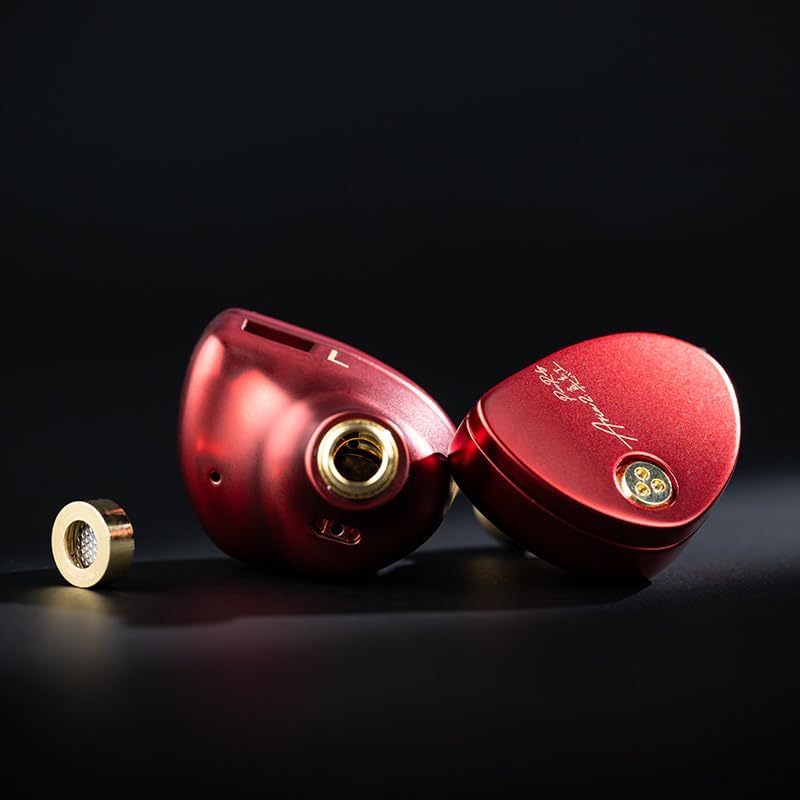
Image: A Moondrop ARIA 2 RED earpiece with its brass nozzle detached, illustrating the modular design for maintenance or customization.
4. Operating Instructions
4.1 Connecting to an Audio Source
Once the cable and desired plug are attached to your ARIA 2 RED headphones, connect the plug to the audio output jack of your device. The ARIA 2 RED is compatible with a wide range of devices, including:
- Laptops and Desktops
- Tablets and Smartphones
- Digital Audio Players (DAPs)
- Smart Speakers
- Televisions and Car Audio Systems (with appropriate adapters if needed)
Ensure the volume on your audio source is set to a low level before playing audio to prevent sudden loud sounds.
5. Care and Maintenance
5.1 Cleaning
- Earpieces: Wipe the earpieces with a soft, dry, lint-free cloth. For stubborn dirt, a slightly damp cloth can be used, but ensure no moisture enters the drivers or connectors.
- Ear Tips: Remove ear tips and wash them with mild soap and water. Rinse thoroughly and allow them to air dry completely before reattaching.
- Nozzles: Periodically check the earpiece nozzles for earwax buildup. Use a small, soft brush or a cleaning tool (if provided) to gently remove any debris. Do not use sharp objects that could damage the mesh filter.
- Cable: Wipe the cable with a soft, dry cloth. Avoid harsh chemicals or abrasive materials.
5.2 Storage
When not in use, store your Moondrop ARIA 2 RED headphones in the provided storage case to protect them from dust, dirt, and physical damage. Avoid storing them in extreme temperatures or high humidity.
5.3 Water Resistance
The Moondrop ARIA 2 RED headphones are rated as Water Resistant. This means they can withstand light splashes or sweat. They are not designed for submersion in water or use during heavy rain. Avoid exposing them to excessive moisture.
6. Troubleshooting
| Problem | Possible Cause | Solution |
|---|---|---|
| No sound from one or both earpieces. |
|
|
| Distorted or poor sound quality. |
|
|
| Cable connection feels loose. |
|
|
7. Product Specifications
| Feature | Detail |
|---|---|
| Product Name | MOONDROP Aria 2 |
| Model Name | ARIA2 RED |
| Sensitivity | 122dB/Vrms (@1kHz) |
| Impedance | 33Ω±15% (@1kHz) |
| Frequency Response Range | 16Hz-22kHz (IEC61094, Free Field) |
| Effective Frequency Response Range | 20Hz-20kHz (IEC60318-4, -3dB) |
| Earphone Jack | 0.78-2pin |
| THD+N | THD ≤0.05% (@1kHz) |
| Cavity Material | Zinc Alloy Cavity + Brass Nozzle |
| Plug Options | 3.5mm single ended, 4.4mm balanced |
| Connectivity Technology | Wired |
| Water Resistance Level | Water Resistant |
| Item Weight | 10.8 ounces |
8. Warranty and Support
Moondrop products are manufactured to high quality standards. For information regarding warranty coverage, please refer to the Service Card included in your package or visit the official Moondrop website. If you encounter any issues not covered in this manual or require further assistance, please contact Moondrop customer support or your authorized retailer.
For more information, you may visit the Moondrop Store on Amazon.


