
1. Introduction
Thank you for choosing the GOBOULT Astra Neo Bluetooth In-Ear Earbuds. This manual provides essential information for setting up, operating, and maintaining your earbuds to ensure optimal performance and longevity. Please read this manual thoroughly before use.
2. Safety Information
- Do not expose the earbuds or charging case to extreme temperatures, humidity, or liquids.
- Avoid dropping, impacting, or disassembling the device.
- Use only the provided charging cable or a certified Type-C cable for charging.
- Listen at moderate volume levels to prevent hearing damage.
- Keep out of reach of children and pets.
3. Package Contents
Verify that all items are present in your package:
- GOBOULT Astra Neo Earbuds (Left and Right)
- Charging Case
- Type-C Charging Cable
- Ear Cushions (various sizes)
- User Manual
- Warranty Card
4. Product Overview
The GOBOULT Astra Neo earbuds feature a sleek design with touch controls and a compact charging case. The case includes breathing LED lights for status indication.

Image: GOBOULT Astra Neo Earbuds and Charging Case. The image displays the black earbuds removed from their charging case, which features a glowing blue LED strip.

Image: GOBOULT Astra Neo Comfort Grip Case and Earbuds. This image highlights the textured surface of the charging case and earbuds, along with the breathing case lights.
5. Setup
5.1 Charging the Earbuds and Case
Before first use, fully charge the earbuds and charging case.
- Place the earbuds into the charging case. Ensure they are correctly seated.
- Connect the Type-C charging cable to the charging port on the case and to a power source.
- The LED indicator on the case will illuminate during charging and turn off or change color when fully charged.
A 10-minute charge provides approximately 100 minutes of playtime.

Image: GOBOULT Astra Neo Fast Charging Feature. This image illustrates the 70-hour playtime and the fast charging capability: 10 minutes of charge equals 100 minutes of playtime.
5.2 Pairing with a Device (Bluetooth 5.4)
The Astra Neo uses Bluetooth 5.4 with Blink & Pair technology for quick and stable connections.
- Open the charging case. The earbuds will automatically enter pairing mode.
- On your device (smartphone, tablet, laptop), enable Bluetooth.
- Search for available Bluetooth devices and select "GOBOULT Astra Neo" from the list.
- Once connected, a voice prompt will confirm successful pairing.

Image: GOBOULT Astra Neo Bluetooth 5.4 Pairing. This image shows a smartphone screen displaying a successful Bluetooth 5.4 connection to 'Astra Neo', emphasizing power efficiency and stable connection.
6. Operating Instructions
6.1 Touch Controls
The Astra Neo earbuds feature intuitive touch controls on each earbud:
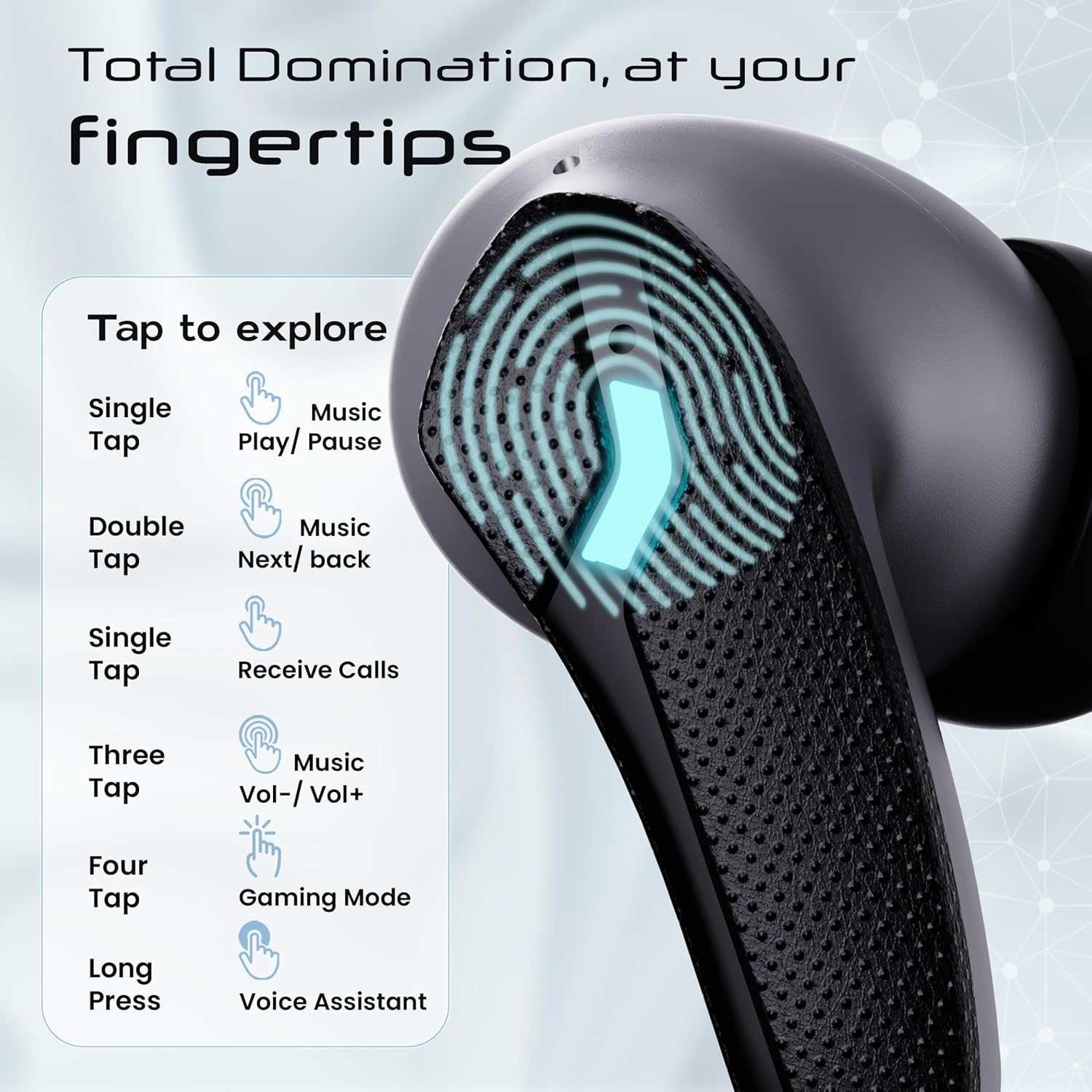
Image: GOBOULT Astra Neo Touch Controls Guide. This graphic details the various touch gestures for controlling music, calls, gaming mode, and voice assistant.
- Single Tap: Play/Pause music, Receive Calls.
- Double Tap: Music Next/Back (specific earbud for each function).
- Three Tap: Music Volume Up/Down (specific earbud for each function).
- Four Tap: Activate Gaming Mode.
- Long Press: Activate Voice Assistant (Google Assistant/Siri).
6.2 Gaming Mode (40ms Low Latency)
Activate Gaming Mode for a synchronized audio experience during gameplay, reducing audio delay to 40ms.
- To activate: Four tap on either earbud.
- To deactivate: Four tap again on either earbud.

Image: GOBOULT Astra Neo Gaming Mode with 40ms Low Latency. This image depicts a user playing a mobile game with the earbuds, highlighting the ultra-low latency feature for an immersive gaming experience.
6.3 ZEN Quad Mic ENC for Calls
The ZEN Quad Mic Environmental Noise Cancellation (ENC) system ensures clear voice calls by filtering out background noise.

Image: GOBOULT Astra Neo ZEN Quad Mic ENC Technology. This image illustrates the internal components and the function of the 4 microphones for clear in-game communication and crystal-clear calling with Acoustic Echo Cancellation (AEC).
6.4 EQ Modes
The Astra Neo earbuds support 4 EQ modes for customized audio experiences. Refer to the product packaging or official GOBOULT website for specific instructions on how to switch between these modes, as this functionality is typically managed via a companion app or specific touch gestures not detailed here.
7. Maintenance
7.1 Cleaning
- Gently wipe the earbuds and charging case with a soft, dry, lint-free cloth.
- Do not use harsh chemicals, cleaning solvents, or strong detergents.
- Clean the charging contacts on both the earbuds and the case regularly to ensure proper charging.
7.2 Water Resistance (IPX5)
The Astra Neo earbuds are IPX5 water-resistant, meaning they are protected against sweat, rain, and splashes. They are not designed for submersion in water.
- Do not intentionally submerge the earbuds in water.
- If exposed to sweat or rain, wipe them dry before placing them back in the charging case.

Image: GOBOULT Astra Neo IPX5 Water Resistance and Voice Assistant. This image highlights the earbuds' sweatproof, rainproof, and splashproof capabilities, along with compatibility with Google Assistant and Hey Siri.
7.3 Storage
When not in use, store the earbuds in their charging case to protect them and keep them charged.
8. Troubleshooting
- Earbuds not pairing: Ensure both earbuds are in the charging case, then open the lid to re-enter pairing mode. Check your device's Bluetooth settings and try reconnecting.
- Only one earbud working: Place both earbuds back in the case, close the lid, wait a few seconds, then open it again. This often re-syncs them.
- No sound: Check the volume level on both your device and the earbuds. Ensure the earbuds are properly connected to your device.
- Charging issues: Clean the charging contacts on the earbuds and inside the case. Ensure the charging cable is securely connected and the power source is active.
- Poor call quality: Ensure the microphones are not obstructed. Try moving to a quieter environment.
9. Specifications
Key technical specifications for the GOBOULT Astra Neo Earbuds:
| Feature | Specification |
|---|---|
| Model Name | Astra Neo |
| Bluetooth Version | 5.4 |
| Playtime | Up to 70 hours (with charging case) |
| Fast Charging | 10 mins charge = 100 mins playtime |
| Low Latency | 40ms (Gaming Mode) |
| Driver Size | 13mm BoomX Drivers |
| Microphone | ZEN Quad Mic ENC |
| Water Resistance | IPX5 |
| Control Method | Touch |
| Connectivity Technology | Bluetooth, Wireless |
| Headphones Jack | Type-C Fast Charging Jack |
| Item Weight | 47 Grams |
| Product Dimensions | 6.2 x 5.3 x 3.2 cm |
| Battery Type | Lithium Polymer |
| Bluetooth Range | 10 Metres |
| Impedance | 32 Ohm |

Image: GOBOULT Astra Neo 13mm BoomX Drivers. This image highlights the 13mm BoomX drivers, emphasizing crystal clear sound and support for MSBC, SBC, and AAC codecs.
10. Warranty and Support
The GOBOULT Astra Neo Earbuds come with a 1-year manufacturer warranty from the date of purchase. This warranty covers manufacturing defects. For warranty claims or technical support, please refer to the contact information provided on your warranty card or visit the official GOBOULT website.