
AIYIMA S600
AIYIMA S600 2.0 Active Bookshelf Speakers User Manual
Model: S600
Introduction
Thank you for purchasing the AIYIMA S600 2.0 Active Bookshelf Speakers. This manual provides detailed instructions for setup, operation, maintenance, and troubleshooting to ensure you get the best performance from your new audio system. Please read this manual thoroughly before use and retain it for future reference.
Product Overview
Package Contents
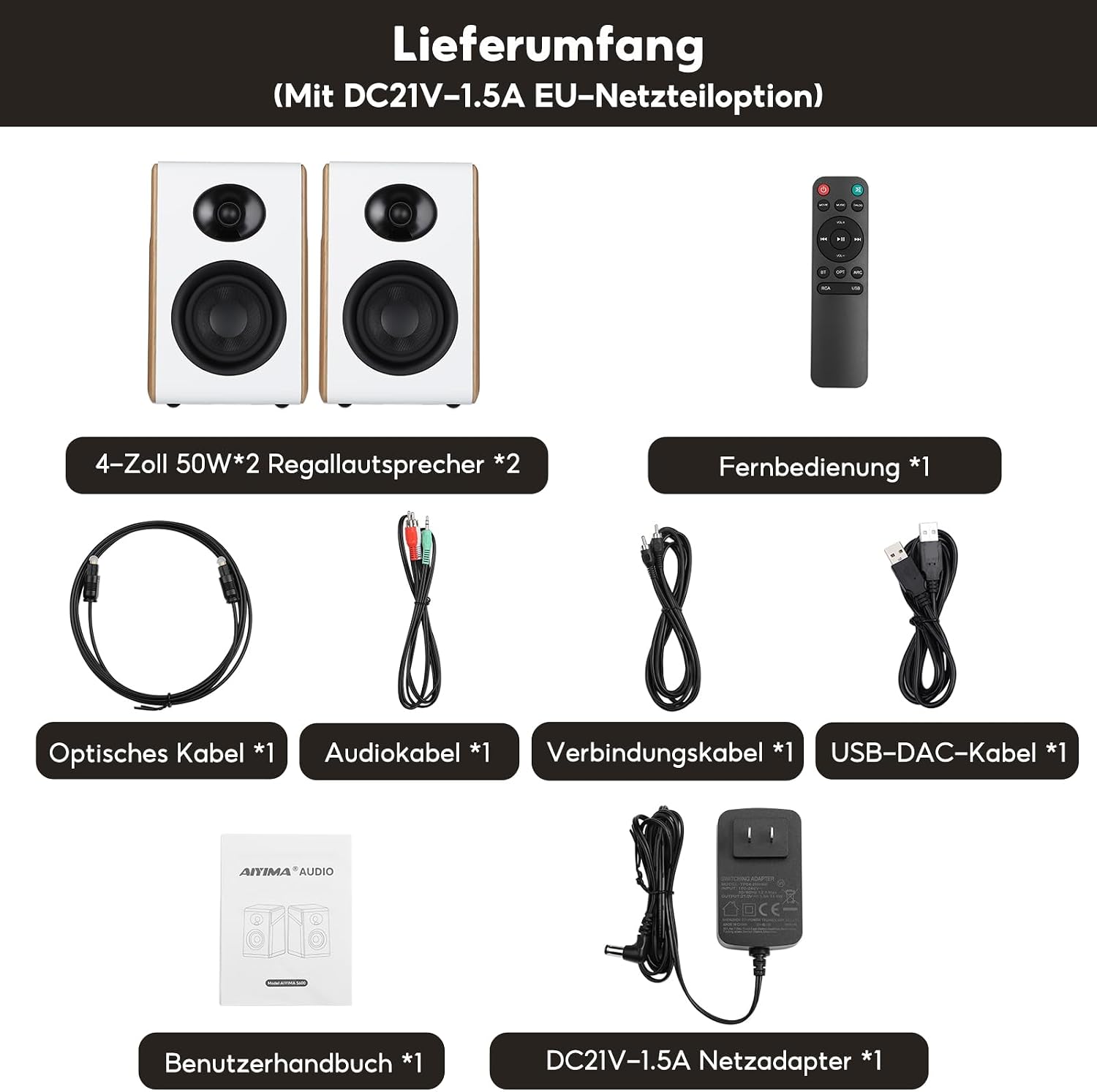
Verify that all items are included in the package:
- AIYIMA S600 Active Bookshelf Speakers (1 pair)
- Power Adapter (DC21V-1.5A EU-Netzteiloption)
- Remote Control
- DAC Audio Cable
- Optical Audio Cable
- Speaker Connection Cable
- USB-DAC Cable
- User Manual
Speaker Components and Controls
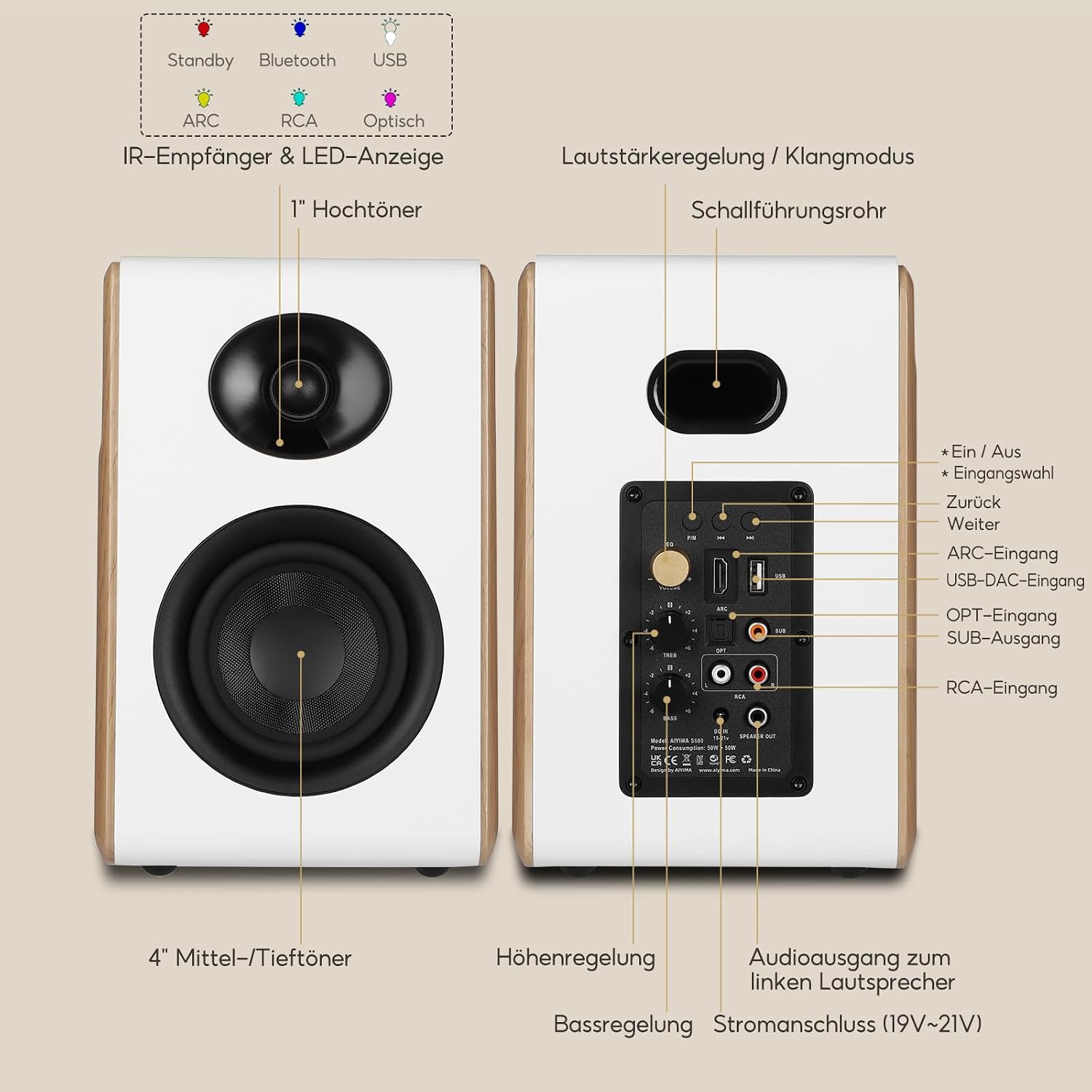
The AIYIMA S600 speakers feature a two-way design with dedicated drivers and a comprehensive rear panel for connections and adjustments.
- 1-inch Silk Dome Tweeter: Delivers clear and fine high-frequency performance.
- 4-inch Glass Fiber Mid-Woofer: Provides deep and powerful low-frequency output.
- Rear Panel Controls: Includes master volume, treble, and bass adjustment knobs.
- Input Ports: HDMI ARC, Bluetooth 5.3, Optical, RCA, USB (Sound Card), and Sub-Out.
- RGB LED Indicator: Clearly displays the current audio input status.


Key Features
- 2-Way Active Speaker System: Equipped with a 4-inch glass fiber mid-woofer and a 1-inch silk dome tweeter for balanced audio reproduction.
- 100W RMS HiFi Output: Two integrated AC3128A high-performance amplifiers deliver 50W RMS per channel, ensuring clear and distortion-free sound even at high volumes.
- Multiple Audio Inputs & DAC Decoding: Supports HDMI ARC, Bluetooth 5.3, Optical, RCA, and USB (Sound Card) inputs. Built-in DAC enhances audio resolution for purer sound quality.
- Memory Function & Personalized Sound Settings: Retains volume, audio source, and high/bass settings (except USB mode) after power off. Independent treble and bass controls on the main speaker.
- Scandinavian Design: Two-tone design (white matte panel + wood-colored cabinet) with an 84-degree tilted front panel for precise sound delivery to the listener's ears. Robust MDF+ABS cabinet structure reduces resonance.
- 2.1 Channel Output: Features a SUB-Out interface for connecting an external subwoofer, upgrading to a 2.1 system for an immersive listening experience.


Setup
1. Placement
Place the speakers on a stable, flat surface such as a bookshelf or speaker stands. For optimal sound imaging, position the speakers equidistant from your listening position and ensure they are at ear level. The 84-degree tilted front panel is designed to direct sound precisely towards the listener, so ensure the speakers are facing your primary listening area.

2. Connecting Speakers
Connect the active (main) speaker to the passive (secondary) speaker using the provided speaker connection cable. Ensure the polarity is correct (positive to positive, negative to negative) to avoid phase issues.
3. Power Connection
Connect the power adapter to the DC IN port on the rear of the main speaker, then plug the adapter into a wall outlet. The RGB LED indicator will light up.
Operating Instructions
1. Powering On/Off
Press the power button on the remote control or the main speaker to turn the speakers on or off. The RGB LED will indicate the power status.
2. Input Selection
Use the input selection button on the remote or the main speaker to cycle through available audio inputs: HDMI ARC, Bluetooth, Optical, RCA, and USB. The RGB LED will change color to indicate the selected input mode.
3. Bluetooth Pairing
- Select Bluetooth input mode on the speakers. The RGB LED will flash, indicating pairing mode.
- On your device (smartphone, tablet, computer), enable Bluetooth and search for "AIYIMA S600".
- Select "AIYIMA S600" to pair. Once connected, the RGB LED will stop flashing and remain solid.

4. Volume, Treble, and Bass Adjustment
Adjust the overall volume using the main volume knob on the speaker or the volume buttons on the remote. The treble and bass can be independently adjusted using their respective knobs on the rear panel of the main speaker to customize the sound to your preference.
5. Subwoofer Connection (2.1 System)
To enhance bass performance, connect an external active subwoofer to the SUB-Out port on the main speaker. This will upgrade your system to a 2.1 configuration, providing a more immersive audio experience.

6. Memory Function
The S600 speakers feature a power-off memory function. This means that the last used volume level, audio source, and treble/bass settings (excluding USB mode) will be retained when the speakers are powered off and on again, providing convenience for daily use.
Maintenance
To ensure the longevity and optimal performance of your AIYIMA S600 speakers, follow these maintenance guidelines:
- Cleaning: Use a soft, dry cloth to wipe the speaker surfaces. For stubborn marks, a slightly damp cloth can be used, but ensure no liquid enters the speaker grilles or ports. Avoid using abrasive cleaners, waxes, or solvents.
- Dust: Regularly dust the speakers, especially the drivers, to prevent accumulation that could affect sound quality.
- Placement: Keep the speakers away from direct sunlight, heat sources, and excessive humidity. Ensure adequate ventilation around the speakers.
- Handling: Avoid placing heavy objects on the speakers or subjecting them to strong impacts.
Troubleshooting
| Problem | Possible Cause | Solution |
|---|---|---|
| No sound |
|
|
| Distorted sound |
|
|
| Bluetooth pairing issues |
|
|
| Remote control not working |
|
|
Specifications
| Feature | Detail |
|---|---|
| Model Name | S600 |
| Brand | AIYIMA |
| Speaker Type | Active Bookshelf Speakers, 2.0 Channel (expandable to 2.1) |
| Output Power | 100W RMS (50W x 2) |
| Drivers | 4-inch Glass Fiber Mid-Woofer, 1-inch Silk Dome Tweeter |
| Frequency Response | 40 Hz (lower limit provided) |
| Connectivity Technology | RCA, Bluetooth 5.3, USB, HDMI ARC, Optical |
| Audio Output Mode | Stereo |
| Mounting Type | Tabletop |
| Product Dimensions | 45 x 25 x 25 cm (approx. 17.7 x 9.8 x 9.8 inches) |
| Weight | 5.74 Kilograms (approx. 12.65 lbs) |
| Power Input | DC 19V~21V |

Warranty and Support
AIYIMA products are designed and manufactured to the highest quality standards. For information regarding warranty coverage, please refer to the warranty card included with your product or visit the official AIYIMA website. If you encounter any issues or require technical assistance, please contact AIYIMA customer support through their official channels or the retailer from whom you purchased the product.
For further assistance, you may visit the AIYIMA Store on Amazon.
Related documentsS600


Ask a question about this manual
Ask about setup, troubleshooting, compatibility, parts, safety, or missing instructions. Manuals+ will review the question and use this page’s manual context to help answer it.