
Introduction
Thank you for choosing the EVIDA 64GB Digital Voice Recorder. This device is designed for high-quality audio recording, featuring voice activation, noise reduction, and MP3 playback capabilities. Its compact and discreet design makes it ideal for lectures, meetings, interviews, and personal notes. This manual provides detailed instructions to help you set up, operate, and maintain your new voice recorder.
Safety Information
- Do not expose the device to extreme temperatures, direct sunlight, or high humidity.
- Avoid dropping or subjecting the device to strong impacts.
- Keep the device away from water and other liquids.
- Do not attempt to disassemble or repair the device yourself. Refer to qualified service personnel.
- Use only the provided charging cable and accessories.
- Dispose of the device and its battery responsibly according to local regulations.
Package Contents
Please check the package contents upon unboxing:
- EVIDA Digital Voice Recorder (Pen)
- USB Charging/Data Cable
- Earphones
- User Manual (this document)
Product Overview
The EVIDA Digital Voice Recorder is designed to resemble a standard pen for discreet use. It features a simple one-button operation for recording and saving, along with a built-in microphone and a 3.5mm headphone jack for playback.

Figure 1: EVIDA Digital Voice Recorder. This image shows the sleek black pen-shaped recorder with silver clip and tip, highlighting its discreet design.
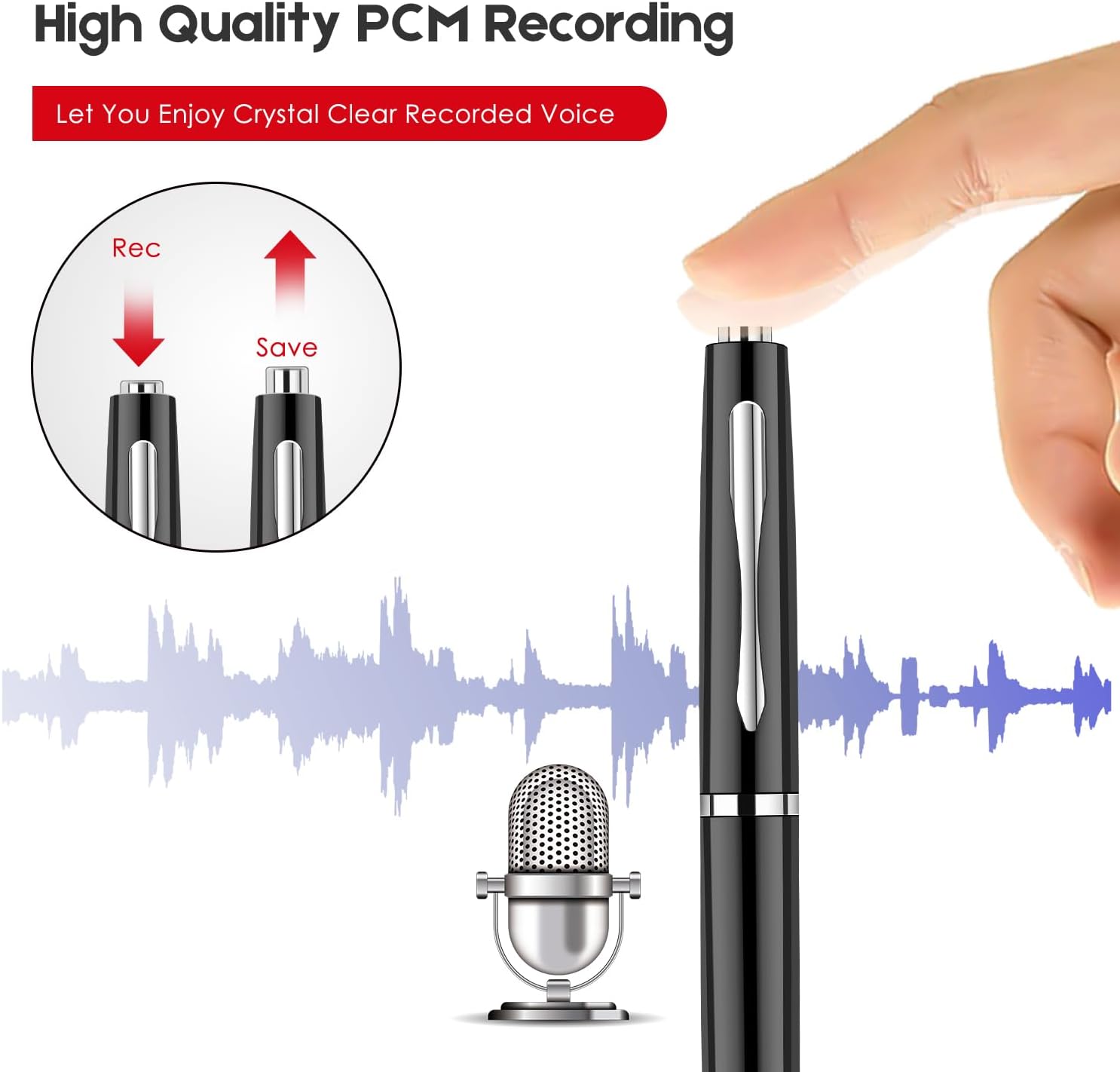
Figure 2: Recording and Saving Mechanism. The image illustrates how to twist the pen tip to initiate recording ('Rec') and twist it back to save ('Save'), indicating a simple, intuitive operation.
Setup
1. Charging the Device
Before first use, fully charge the voice recorder. A full charge takes approximately 1.5 hours and provides up to 8 hours of recording time.
- Connect the small end of the supplied USB cable to the charging port on the recorder.
- Connect the large end of the USB cable to a USB power adapter (not included), a computer USB port, or a power bank.
- The indicator light will show charging status (refer to device specific light behavior, typically red for charging, off or blue for full).

Figure 3: Charging Options. This image illustrates the flexibility of charging the device using a wall adapter, a personal computer, or a portable power bank.
2. Connecting to a Computer
The recorder is compatible with both Windows PCs and Mac computers for file transfer.
- Ensure the recorder is powered off.
- Connect the recorder to your computer using the supplied USB cable.
- The device will appear as a removable disk drive.
- You can then drag and drop recorded files to your computer. For Mac users, VLC Media Player is recommended for playback if default players encounter issues.
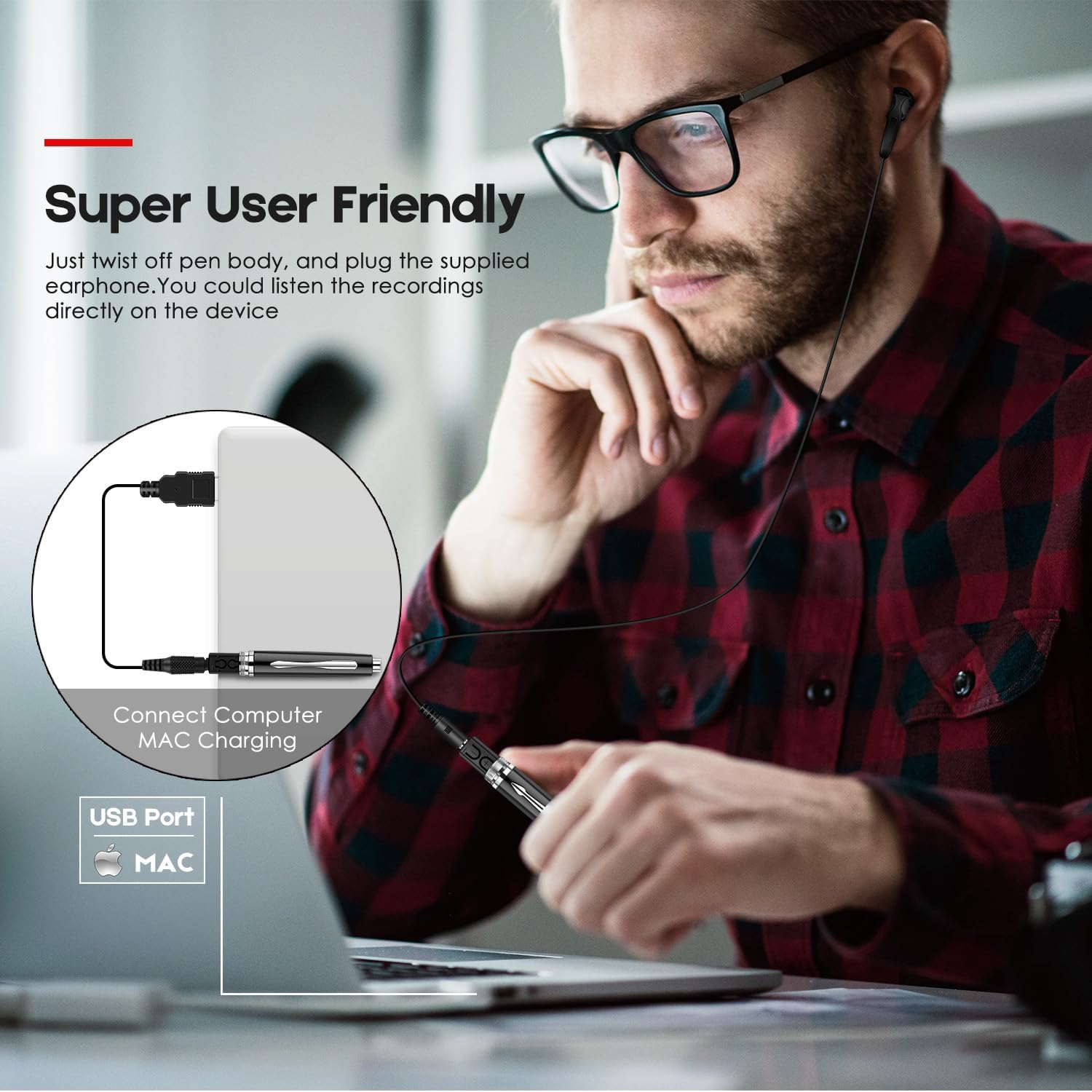
Figure 4: Connecting to a Computer. This image demonstrates the process of connecting the voice recorder to a laptop for data transfer and charging, highlighting its compatibility with Mac systems.
Operating Instructions
1. Power On/Off
The device powers on automatically when recording is initiated and powers off when recording is stopped and saved, or after a period of inactivity.
2. Recording
The EVIDA recorder supports both continuous and voice-activated recording.
One-Button Recording:
- To start recording, twist the pen tip to the 'Rec' position (refer to Figure 2). The indicator light will typically flash to confirm recording has started.
- To stop recording and save the file, twist the pen tip back to the 'Save' position. The indicator light will confirm saving.
Voice Activated Recording (VOR):
The voice activated feature allows the recorder to automatically start recording when sound is detected and pause when silence occurs, conserving memory and battery life. This feature works even if the device appears to be off.
- Locate the VOR switch or button on your device (if applicable, some models integrate this into the main switch).
- Activate the VOR mode. When sound is detected, the device will begin recording. When silence is detected, it will pause recording.
- To exit VOR mode and save, follow the standard saving procedure (e.g., twist the pen tip to 'Save').

Figure 5: Voice Activated Recording. This image visually explains how the voice activation feature works, showing the device's response to sound and silence, and the indicator light for active recording.
3. Playback
You can listen to your recordings directly from the device using the supplied earphones.
- Plug the earphones into the 3.5mm headphone jack on the recorder.
- The device should automatically enter playback mode or require a specific button press (refer to device specific controls for play/pause/next track).
- Alternatively, connect the device to a computer and play files using your computer's media player.
4. MP3 Player Function
In addition to recording, your EVIDA device can also function as an MP3 player.
- Connect the device to your computer.
- Transfer your desired MP3 audio files to the device's internal storage.
- Disconnect from the computer and plug in the earphones. The device should recognize and allow playback of MP3 files.
Maintenance
- Cleaning: Use a soft, dry cloth to clean the exterior of the device. Do not use liquid cleaners or solvents.
- Storage: Store the device in a cool, dry place away from direct sunlight and extreme temperatures. If storing for a long period, ensure the battery is partially charged (around 50%) to prolong its lifespan.
- Data Management: Regularly transfer important recordings to your computer to prevent data loss and free up internal memory. The 64GB internal memory can store approximately 768 hours of recorded files or 20,000 songs.

Figure 6: Internal Memory Capacity. This image visually represents the substantial storage capacity of the 64GB internal memory, highlighting its ability to hold a large volume of audio recordings or music files.
Troubleshooting
| Problem | Possible Cause / Solution |
|---|---|
| Device not turning on/recording. | Battery may be depleted. Charge the device fully. Ensure the pen tip is twisted to the 'Rec' position. |
| Poor recording quality. | Ensure the microphone is not obstructed. Record in a quiet environment. Keep the device close to the sound source. |
| Cannot transfer files to computer. | Ensure the USB cable is securely connected. Try a different USB port or cable. Restart your computer. For Mac users, ensure VLC Media Player is installed if experiencing playback issues. |
| Voice Activated Recording not working. | Ensure VOR mode is correctly activated. Check the sensitivity settings (if adjustable on your model). Ensure there is sufficient ambient sound to trigger recording. |
| Device not recognized as MP3 player. | Ensure MP3 files are transferred to the correct directory on the device (usually the root directory or a designated 'MUSIC' folder). Ensure earphones are properly plugged in. |
Specifications
| Feature | Detail |
|---|---|
| Brand | EVIDA |
| Model | B0F5WR94S2 |
| Memory Storage Capacity | 64GB (approx. 63.99 GB usable) |
| Recording Format | WAV (192Kbps PCM) |
| Microphone Form Factor | Built-In |
| Headphones Jack | 3.5 millimeters |
| Hardware Interface | USB 2.0 |
| Compatible Devices | Personal Computer (Windows, Mac) |
| Battery Type | Rechargeable (1 C battery required, likely internal) |
| Battery Life (Recording) | Up to 8 hours (approx. 7.99 Hours) |
| Charging Time | Approx. 1.5 hours |
| Item Weight | 1.76 ounces (approx. 50 Grams) |
| Package Dimensions | 6.81 x 3.19 x 0.98 inches |
| Manufacturer | EVIDA |
| Country of Origin | China |
Warranty and Support
EVIDA offers an 18-month warranty for this product. If you encounter any issues or have questions regarding your EVIDA Digital Voice Recorder, please contact the seller or EVIDA customer support for assistance. Your satisfaction is our priority.
For further support, please refer to the contact information provided with your purchase or visit the official EVIDA website.