
1. Introduction
The Winnes 64 GB Portable Voice Recorder is a compact and versatile device designed for high-quality audio recording. It features an enhanced noise reduction microphone, a professional recording chip, and a strong built-in magnet for convenient placement. This device also functions as an MP3 player and a USB flash drive, offering 64 GB of storage capacity. It is ideal for recording meetings, lectures, interviews, and personal notes.
The recorder supports voice-activated recording, automatically starting when sound is detected and pausing during silence, optimizing storage and battery life. Its mini design and lightweight construction make it highly portable.

This image demonstrates various practical applications for the Winnes voice recorder, including recording lectures in a classroom, discussions in a meeting room, interviews, personal speech practice, and enjoying music playback.
2. Package Contents
Please check the package contents upon unboxing to ensure all items are present:
- 1 x Winnes Voice Recorder
- 1 x Wired Headphones
- 1 x USB Data Cable (Type-C)
- 1 x Apple OTG Adapter
- 1 x Type-C OTG Adapter
- 1 x Lanyard
- 1 x User Manual
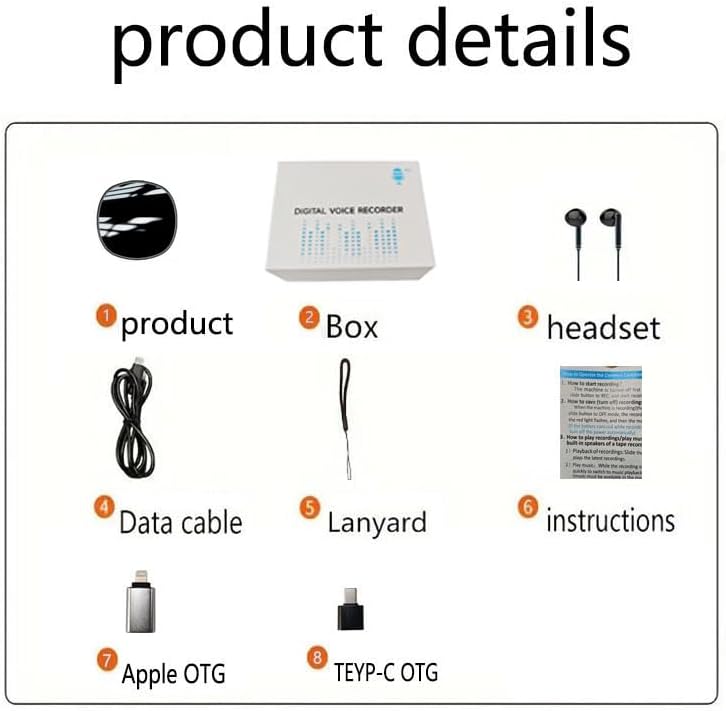
This image displays the complete package contents of the Winnes voice recorder, including the device itself, its packaging box, wired headphones, a USB data cable, a lanyard, a user manual, an Apple OTG adapter, and a Type-C OTG adapter.
3. Product Overview
The Winnes voice recorder is designed for portability and ease of use. It features a compact, mini design with a built-in magnet for versatile placement.
Physical Characteristics:
- Dimensions: Approximately 4.2 x 4.2 x 1.3 cm (1.6 x 1.6 x 0.5 inches)
- Weight: Approximately 45 g (0.8 ounces)
- Magnetic Design: Integrated magnet allows attachment to metal surfaces.

The Winnes voice recorder's compact and portable design makes it easy to carry in a pocket or place discreetly in various environments, such as a car interior.
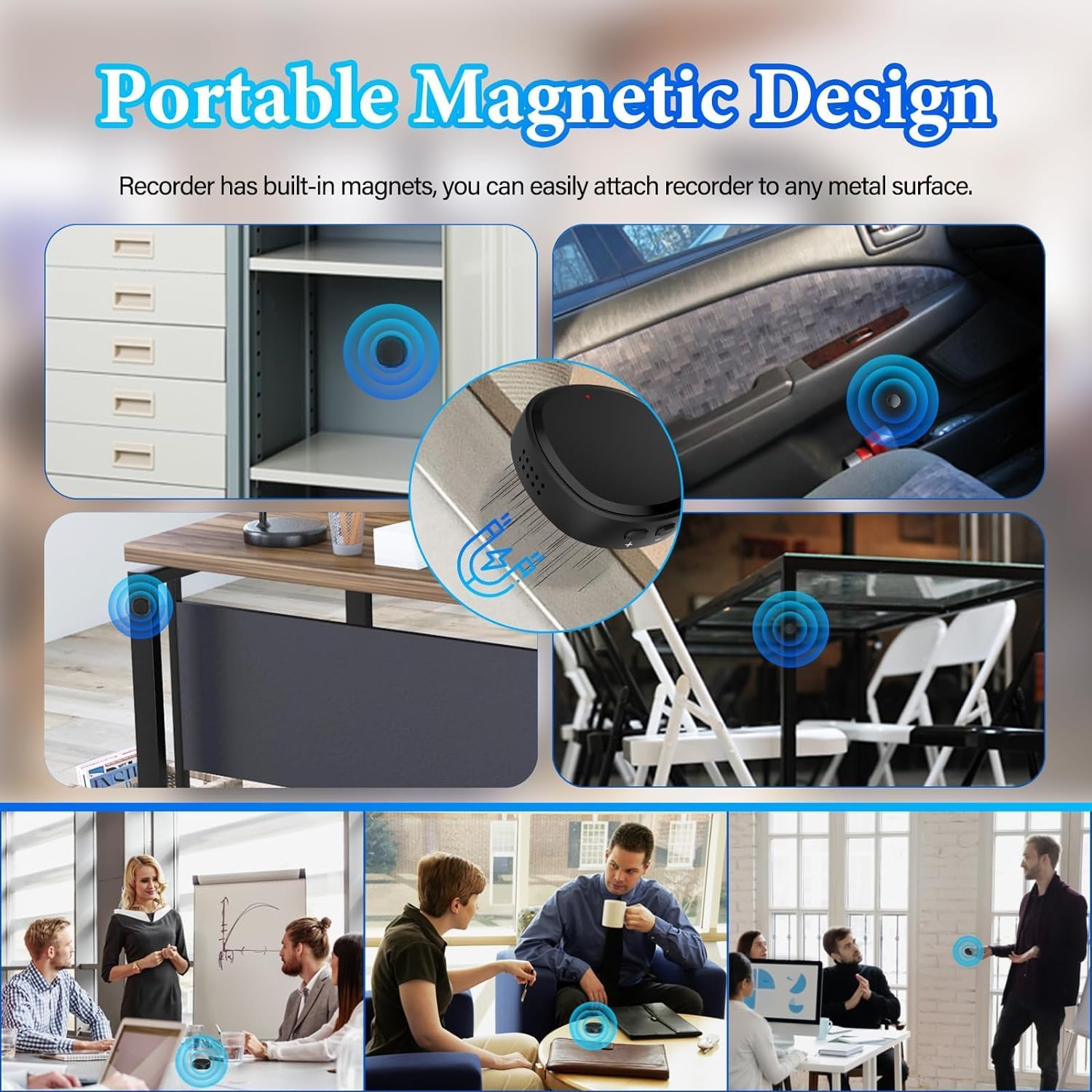
The voice recorder incorporates a strong built-in magnet, allowing it to be easily attached to any metallic surface for discreet placement or secure storage.
4. Setup
4.1 Initial Charging
Before first use, fully charge the device. Connect the voice recorder to a computer's USB port or a USB wall adapter using the provided Type-C USB cable. The charging time is approximately 50 minutes for a full charge.
4.2 Power On/Off
Locate the power switch (usually labeled ON/OFF or REC/OFF). Slide the switch to the 'ON' or 'REC' position to power on the device. Slide it to 'OFF' to power off.
5. Operating Instructions
5.1 Basic Recording
- Ensure the device is charged.
- Slide the power switch to the 'REC' position. The device will typically indicate recording status with an LED light (e.g., a red light flashing or solid).
- To stop recording, slide the switch to the 'OFF' position. The recording will be automatically saved.
5.2 Voice-Activated Recording (VOR)
The voice-activated recording function is disabled by default. To activate and configure it:
- Connect the recorder to a computer using the USB cable.
- Access the device's storage. Locate the configuration file (refer to the full manual for specific file name and location).
- Edit the configuration file to enable VOR and set the desired decibel sensitivity level (1 to 7, where 1 is 15 dB and 7 is 55 dB). The device will record automatically when sound exceeds the set threshold (e.g., 25 dB for level 3) and pause when silence occurs.
- Save the changes and safely eject the device from the computer.
- When the battery level drops below 5%, the device will automatically save any ongoing recording before powering off.

The voice recorder supports voice-activated recording with 7 adjustable sensitivity levels, ranging from 15 dB to 55 dB. This feature allows the device to automatically start recording when sound is detected above a set threshold and pause when silence occurs.
5.3 Playback
The Winnes voice recorder offers multiple playback options:
- Speaker Playback: The device has a built-in speaker for direct audio playback.
- Headphone Playback: Connect the included special wired headphones to the device for private listening. The headphones allow control over audio playback (play/pause, volume up/down, track change).
- Mobile Phone Playback: Use the provided Apple OTG or Type-C OTG adapter to connect the recorder to your smartphone for file management and playback.
- Computer Playback: Connect the recorder to a computer via the USB cable to access and play recordings or music files.

The Winnes voice recorder features a built-in speaker for instant playback of recordings or music. Users can listen directly from the device, making it convenient for reviewing audio in various settings.

The recorder offers multiple playback options: directly through its built-in speaker, via wired headphones, or by connecting to a mobile phone or computer for file management and listening.
5.4 Transferring Files
To transfer recordings or other files to/from the device:
- Connect the voice recorder to your computer using the provided USB cable.
- The device will appear as a removable disk drive.
- Open the drive to access your recorded files (typically in WAV format) or to drag and drop music files (WAV, MP3, FLAC) onto the device.
- Always safely eject the device from your computer before disconnecting to prevent data corruption.
5.5 Using as MP3 Player and USB Drive
The recorder can store and play music files (WAV, MP3, FLAC) and also function as a standard USB flash drive for general data storage and backup. Its 64 GB memory can store approximately 750 hours of recordings or a large volume of other files.
6. Maintenance
- Cleaning: Use a soft, dry cloth to clean the device. Avoid using liquid cleaners or solvents.
- Storage: Store the device in a cool, dry place away from direct sunlight and extreme temperatures.
- Battery Care: To prolong battery life, avoid fully discharging the battery frequently. Charge the device regularly, even if not in use for extended periods.
- Headphones: The included headphones are special. Store them carefully to prevent damage or loss.
7. Troubleshooting
7.1 Device Not Turning On
- Ensure the battery is charged. Connect to a power source and allow it to charge for at least 10 minutes before attempting to power on again.
- Check the power switch position.
7.2 Cannot Record
- Verify that the device has sufficient storage space. Connect to a computer to check available memory.
- Ensure the battery is not critically low.
- Check if the device is in the correct recording mode (e.g., not in playback mode).
7.3 Poor Recording Quality
- Ensure the microphone is not obstructed.
- Record within the optimal distance (approximately 8 meters for normal voice).
- Reduce background noise in the recording environment.
7.4 Cannot Connect to Computer/Smartphone
- Try a different USB port or cable.
- Ensure the OTG adapter is correctly connected when using with a smartphone.
- Restart your computer or smartphone.
- Ensure your operating system (Windows XP/7/8/10) is supported.
8. Specifications
| Brand | Winnes |
| Model Number | 25A02003 |
| Storage Capacity | 64 GB |
| Recording Format | WAV |
| Playback Formats | WAV, MP3, FLAC |
| Battery Type | 150mAh 3.7V Lithium Battery |
| Battery Life (Recording) | Approx. 30 hours |
| Charging Time | Approx. 50 minutes |
| Transmission Interface | TYPE-C |
| Supported Systems | WINDOWS XP/7/8/10 |
| Operating Temperature | 0~45℃ |
| Product Dimensions | 43 x 43 x 12 mm (1.6 x 1.6 x 0.5 inches) |
| Product Weight | 45 g (0.8 ounces) |
| Recording Distance | Approx. 8 meters (for normal voice) |

This image illustrates the compact dimensions of the Winnes voice recorder, measuring 1.6 x 1.6 x 0.4 inches and weighing only 0.8 ounces (45g). Key specifications like 64 GB memory, 750 hours recording capacity, 30 hours battery life, and approximately 50 minutes charging time are also highlighted.
9. Warranty and Support
For any questions regarding the use of your Winnes voice recorder, please contact customer service. Detailed instructions are included with the product.
Customer Service Contact: +86 18874732403
A reliable solution will be provided within 24 hours.