
bakepart#351108
Replacement Bake Element User Manual
For GE JBP Series Ovens - Part #bakepart#351108
Product Overview
This document provides essential information for the installation and maintenance of the replacement bake element, part number HE-WB44T10011 (also referred to as bakepart#351108). This component is designed to restore the heating function of your oven's lower heating element, ensuring proper baking performance. It is crucial to verify compatibility with your specific oven model before proceeding with installation.
Compatibility
This replacement bake element is compatible with various GE oven models. Please ensure your oven's model number matches one of the following or is cross-referenced with part number HE-WB44T10011:
- GE JBP66WB4WW
- GE JBP66BB1WH
- GE JBP30WB1WW
- GE JBP66CK4CC
- GE JBP78BB4BB
- And other models compatible with part number HE-WB44T10011 / bakepart#351108
Always cross-reference the part number and visually compare the new element with your original one to confirm compatibility before installation.
Safety Precautions
Prior to any installation or maintenance, observe the following safety guidelines:
- Disconnect Power: Always unplug the oven from the electrical outlet or turn off the circuit breaker supplying power to the oven before beginning any work. Failure to do so can result in electric shock or serious injury.
- Cool Down: Ensure the oven is completely cool before handling any internal components. Hot surfaces can cause severe burns.
- Wear Protective Gear: Consider wearing work gloves to protect your hands from sharp edges or debris.
- Handle with Care: The bake element can be fragile. Handle it carefully to avoid bending or damaging the heating coils.
- Professional Assistance: If you are unsure about any step or uncomfortable performing the repair, consult a qualified appliance technician.
Tools Required
The following tools are typically required for replacing an oven bake element:
- Screwdriver (Phillips head or flathead, depending on oven model)
- Work gloves (recommended)
- Flashlight (optional, for better visibility)
Installation Guide
Follow these steps carefully to replace the bake element in your GE oven:
- Prepare the Oven: Ensure the oven is completely cool and disconnected from power. Remove oven racks to provide clear access to the bake element.
- Locate the Element: The bake element is typically located at the bottom of the oven cavity.
- Remove Mounting Screws: Using a screwdriver, carefully remove the screws that secure the bake element to the back wall of the oven. There are usually two screws.
- Gently Pull Element Forward: Once the screws are removed, gently pull the element forward a few inches. This will expose the electrical terminals at the back.
- Disconnect Wires: Carefully disconnect the two electrical wires from the terminals of the old element. Note their position if necessary, though they are usually straightforward. Be careful not to let the wires retract into the back wall of the oven. If they do, you may need to access them from the back of the oven.
- Remove Old Element: Once the wires are disconnected, remove the old bake element from the oven cavity.
- Install New Element: Connect the electrical wires to the terminals of the new bake element. Ensure a secure connection.
- Position and Secure: Carefully push the new element back into place, aligning the mounting brackets with the screw holes. Reinstall the mounting screws to secure the element firmly.
- Final Check: Ensure the element is securely mounted and the wires are properly connected. Replace oven racks.
- Restore Power: Plug the oven back into the electrical outlet or turn on the circuit breaker. Test the oven's bake function to ensure the new element heats properly.
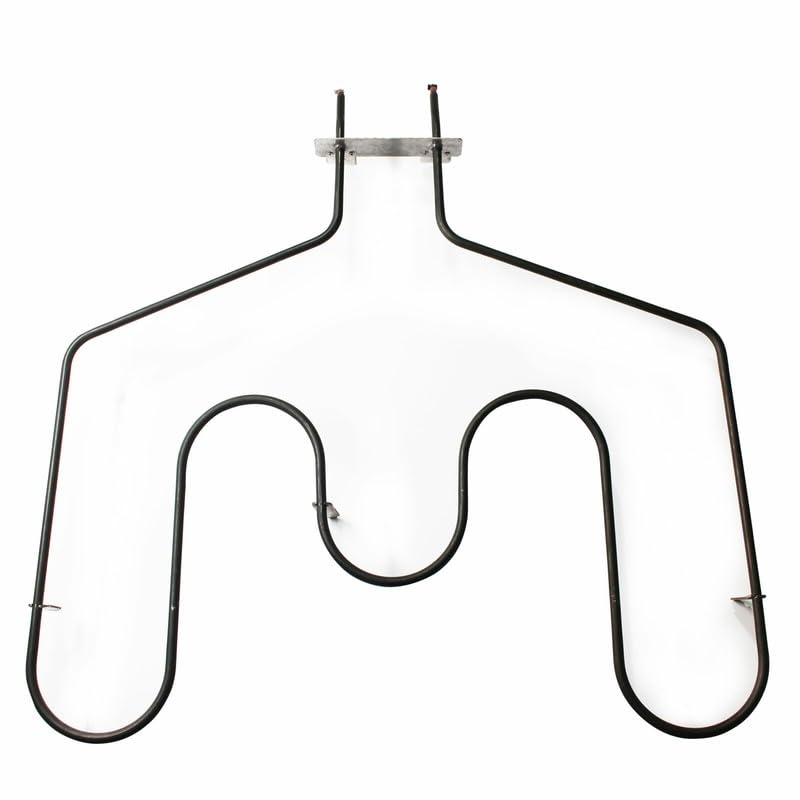
An image showing the U-shaped replacement bake element, designed for compatibility with various GE oven models. This element features two terminal prongs at the top for electrical connection and mounting brackets on the sides.
Troubleshooting
If the oven does not heat after replacing the bake element, consider the following:
- No Power: Double-check that the oven is fully plugged in and the circuit breaker is on.
- Loose Connections: Disconnect power again and verify that the electrical wires are securely attached to the element's terminals.
- Wire Retraction: Ensure the wires did not retract into the oven wall, preventing a proper connection.
- Other Components: If the element still does not heat, the issue might be with another oven component, such as the oven control board or thermostat. In such cases, professional diagnosis is recommended.
Specifications
| Part Number: | HE-WB44T10011 (bakepart#351108) |
| Manufacturer: | Generic |
| Item Package Quantity: | 1 Set ONLY |
| Compatible Brands: | GE (General Electric) |
Customer Support
For further assistance, questions regarding compatibility, or troubleshooting beyond the scope of this manual, please contact the seller or manufacturer directly. Refer to your purchase documentation for specific contact information.
Always provide your product's model number and the part number (HE-WB44T10011 or bakepart#351108) when seeking support.
Ask a question about this manual
Ask about setup, troubleshooting, compatibility, parts, safety, or missing instructions. Manuals+ will review the question and use this page’s manual context to help answer it.