
1. Important Safety Instructions
Please read all instructions carefully before using this appliance. Failure to follow these instructions may result in electric shock, fire, or serious injury.
- This appliance is for household use only. Do not use outdoors or on wet surfaces.
- Do not allow children to operate the vacuum cleaner. Close supervision is necessary when used near children.
- Do not pick up flammable or combustible liquids, such as gasoline, or use in areas where they may be present.
- Do not pick up anything that is burning or smoking, such as cigarettes, matches, or hot ashes.
- Do not use without the dust cup and filters properly installed.
- Turn off the appliance before making any adjustments, changing accessories, or storing the vacuum cleaner.
- Use only the original charging adapter provided with the appliance. Using an improper adapter may cause damage.
- If the roller brush becomes tangled, the vacuum features a built-in safety mechanism that automatically stops the main unit to prevent damage. Promptly remove any tangled hair or debris.
- Do not let debris exceed the 2/3 full mark in the dust cup. Overfilling can reduce suction performance.
2. Package Contents
Verify that all components are present and in good condition upon unpacking.
- 600W Powerful Motor (Main Unit) x1
- 1.8L Dust Cup x1
- Rechargeable Storage Mount x1
- HEPA Filter Replacement x1
- Floor Brush x1
- 2-in-1 Crevice Brush x1
- Flat Head Brush x1
- Adjustable Telescopic Tube x1
- Clean Hook x1
- Charging Adapter x1
- User Manual x1

Image: All components included with the VBUOO Cordless Vacuum Cleaner, including the main unit, various brushes, and charging accessories.
3. Setup and Assembly
3.1. Initial Charging
Before first use, fully charge the battery. Connect the charging adapter to the battery pack or the main unit via the wall mount. A full charge takes approximately 5.5 hours. Ensure to use only the original adapter marked "Vacuum TV105S".

Image: Illustration of the detachable battery pack and various charging options, including direct charging and charging via the wall mount.
3.2. Assembly
- Attach the Dust Cup: Ensure the HEPA filter is installed onto the motor inlet first, then attach the dust cup to the main unit.
- Connect the Telescopic Tube: Insert one end of the adjustable telescopic tube into the main unit until it clicks into place.
- Attach the Floor Brush: Connect the floor brush to the other end of the telescopic tube. For handheld use, attach accessories directly to the main unit.
- Install Wall Mount (Optional): Secure the rechargeable storage mount to a wall using appropriate hardware. This allows for convenient storage and charging.
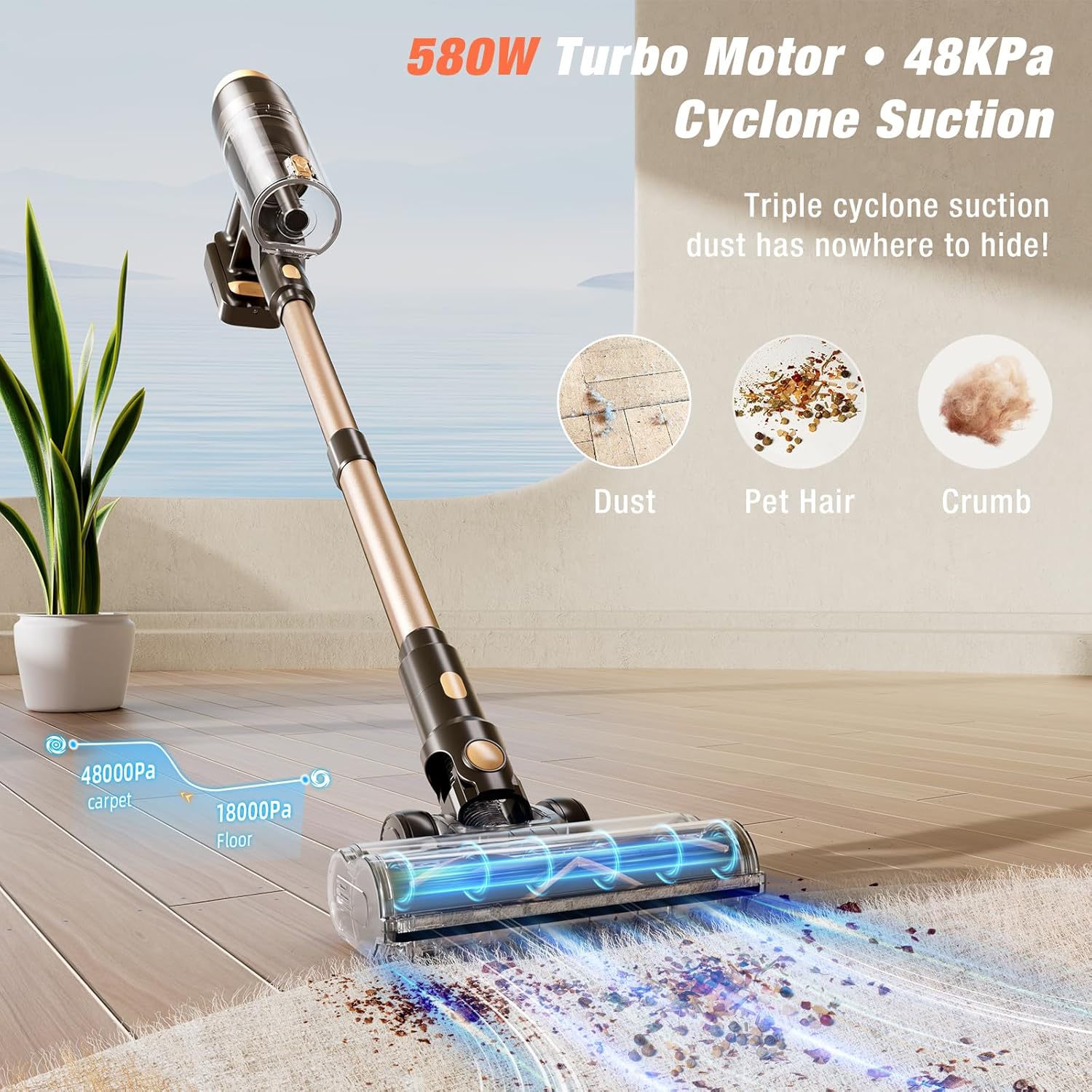
Image: Exploded view of the VBUOO Cordless Vacuum Cleaner showing how different parts like the main unit, telescopic tube, and floor brush connect.
4. Operating Instructions
4.1. Power On/Off and Suction Modes
Press the power button to turn the vacuum on. The LED smart touch screen will display the current battery level and suction mode. Use the "Gear Shift Button" on the touch screen to cycle through the three suction modes:
- Min Mode (18 KPa): Up to 70 minutes runtime, suitable for light dust and small particles on tile or hard floors.
- Mid Mode (30 KPa): 40-45 minutes runtime, ideal for larger particles like kitty litter on wooden floors.
- Max Mode (50 KPa): 20-25 minutes runtime, for deep cleaning plush carpets and tackling pet hair.

Image: Visual representation of the vacuum's three suction modes (Min, Mid, Max) and their corresponding runtimes and cleaning applications.
4.2. LED Smart Touch Screen
The integrated LED touch screen provides real-time information and control:
- Remaining Battery Power: Displays the current battery percentage.
- Dust Full Indicator: Illuminates when the dust cup needs emptying.
- Floor Brush Blocked Indicator: Alerts if the floor brush is obstructed.
- Motor or Battery Fault Indicator: Indicates a system error.
- Gear Shift Button: Tap to change suction power levels.
Note:
- Do not use sharp objects to scratch the screen.
- Indicators for dust cup fullness and brush blockage only light up when an issue arises.

Image: Close-up of the vacuum's LED smart touch screen, detailing indicators for battery, dust cup, brush blockage, and fault, along with the gear shift button.
4.3. Using Attachments
The VBUOO Cordless Vacuum Cleaner comes with several attachments for versatile cleaning:
- Floor Brush: Equipped with LED illumination and a V-shaped anti-tangle design, suitable for all floor types including hardwood, tile, and carpet. The brush head offers 90° and 180° rotation for maneuverability.
- 2-in-1 Crevice Brush: Ideal for cleaning tight corners, edges, and narrow gaps.
- Flat Head Brush: Designed for delicate surfaces, upholstery, and car interiors.
To change attachments, press the release button on the main unit or telescopic tube and swap the desired tool.

Image: The main floor brush head with LED lighting, demonstrating its flexibility for cleaning under furniture and around obstacles.

Image: The long flat nozzle attachment, suitable for cleaning narrow spaces like keyboards, storage racks, and car interiors.

Image: The wide head brush attachment, useful for sweeping dust from curtains, upholstery, and air conditioners.
5. Maintenance
5.1. Emptying the Dust Cup
The dust cup has a 1.8L capacity. Empty the dust cup when the "Dust Full Indicator" lights up on the LED screen, or when debris reaches the 2/3 full mark. Overfilling can significantly reduce suction performance.
- Detach the dust cup from the main unit.
- Position the dust cup over a trash bin.
- Press the release button to open the bottom flap and empty the contents.
- Close the flap securely and reattach the dust cup to the main unit.

Image: Diagram illustrating the process of emptying the 1.8L dust cup and a warning about not overfilling.
5.2. Filter Cleaning
The vacuum features a 6-stage HEPA Pro System. Regular cleaning of the filters is essential for maintaining optimal suction and air quality. Clean the HEPA filter every 2-3 weeks, or when the "Floor Blocked Alerts" light up.
- Remove the filter unit from the dust cup.
- Wash the filters with cold water. Do not use detergent.
- Allow filters to air dry completely for at least 24 hours before reinstallation. Ensure they are completely dry to prevent damage to the motor.
- Reinstall the HEPA filter onto the motor inlet first, then attach the dust cup. Ensure proper alignment of the dust cup's air outlet.

Image: Step-by-step guide on how to remove, wash, and dry the vacuum's filters for proper maintenance.
5.3. Brush Roller Cleaning
If the roller brush becomes tangled with hair or debris, it may trigger the safety mechanism and stop the vacuum. Clean the brush roller regularly, especially if cleaning pet hair.
- Turn off the vacuum and detach the floor brush.
- Press the release button to remove the brush roller.
- Use the provided clean hook tool or scissors to remove any tangled hair or debris from the brush roller and the brush window.
- If necessary, flush the brush roller with water and allow it to air dry completely for at least 24 hours before reinstallation.

Image: Instructions for removing and cleaning the brush roller, including using the cleaning tool to remove tangled hair.
6. Troubleshooting
Refer to the table below for common issues and their solutions.
6.1. General Troubleshooting

Image: A table outlining common problems, their reasons, and corresponding solutions for the vacuum cleaner.
6.2. Error Code Explanations
If an error code appears on the LED display, consult this table for its meaning and resolution.
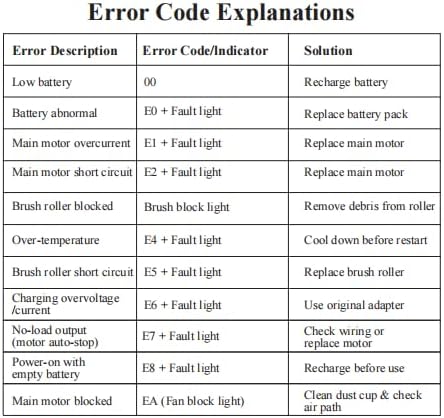
Image: A table listing various error descriptions, their corresponding error codes or indicators, and recommended solutions.
7. Specifications
| Feature | Detail |
|---|---|
| Brand | VBUOO |
| Model Name | TV105S |
| Special Feature | Cordless, Self-Standing, Touch Screen |
| Filter Type | HEPA Filter |
| Motor Power | 600W (550W brushless motor + 30W floor brush) |
| Suction Power | Up to 50 KPa |
| Battery Life | Up to 70 minutes (Min mode) |
| Battery Type | 8x2600 mAh Lithium-ion |
| Dust Cup Capacity | 1.8 Liters |
| Product Dimensions | 17.32"L x 10.24"W x 6.1"H |
| Item Weight | 8.42 pounds |
| Color | Black |
| UPC | 726384900773 |
8. Warranty and Support
For warranty information, technical support, or to inquire about replacement parts, please contact VBUOO customer service. Refer to the contact information provided in your product packaging or on the official VBUOO website.
Important: Please retain your proof of purchase for any warranty claims.