
Lisowod L03Pro
Lisowod L03Pro Smart Portable Projector
User Manual
Introduction
Thank you for choosing the Lisowod L03Pro Smart Portable Projector. This device is designed to provide a comprehensive home theater experience with advanced features such as AI Auto-Setup, a vast streaming system, and superior audio-visual performance. This manual will guide you through the setup, operation, and maintenance of your new projector to ensure optimal performance and enjoyment.

Image: The Lisowod L03Pro Smart Portable Projector, showcasing its compact design and the user interface with Netflix and other streaming options.
Setup
1. Unboxing and Components
Carefully remove all components from the packaging. Ensure the following items are present:
- Lisowod L03Pro Projector
- Power Adapter
- Remote Control
- User Manual (this document)
2. Placement
Position the projector on a stable, flat surface. The L03Pro features an AI Auto-Setup System that allows flexible placement, even upside down for ceiling projection. Ensure there are no obstructions in front of the lens.
3. Power Connection
Connect the power adapter to the projector's power input port and then plug it into a wall outlet. The projector will power on automatically or can be turned on using the power button on the device or remote control.
4. Initial Setup and AI Auto-Setup System
Upon first power-on, the projector's AI Auto-Setup System will automatically adjust the image for optimal viewing. This system includes:
- Auto Focus: Automatically sharpens the image.
- Auto Keystone Correction: Corrects trapezoidal distortion to create a perfect rectangular image.
- Auto Obstacle Avoidance: Adjusts the projection to avoid objects in the projection path.
- Auto Screen Alignment: Optimizes the image to fit the screen area.
- Automatic Placement Adjustment: Corrects image orientation regardless of projector position.
This process typically completes within 5 seconds. Simply power on the device, and it handles the rest.
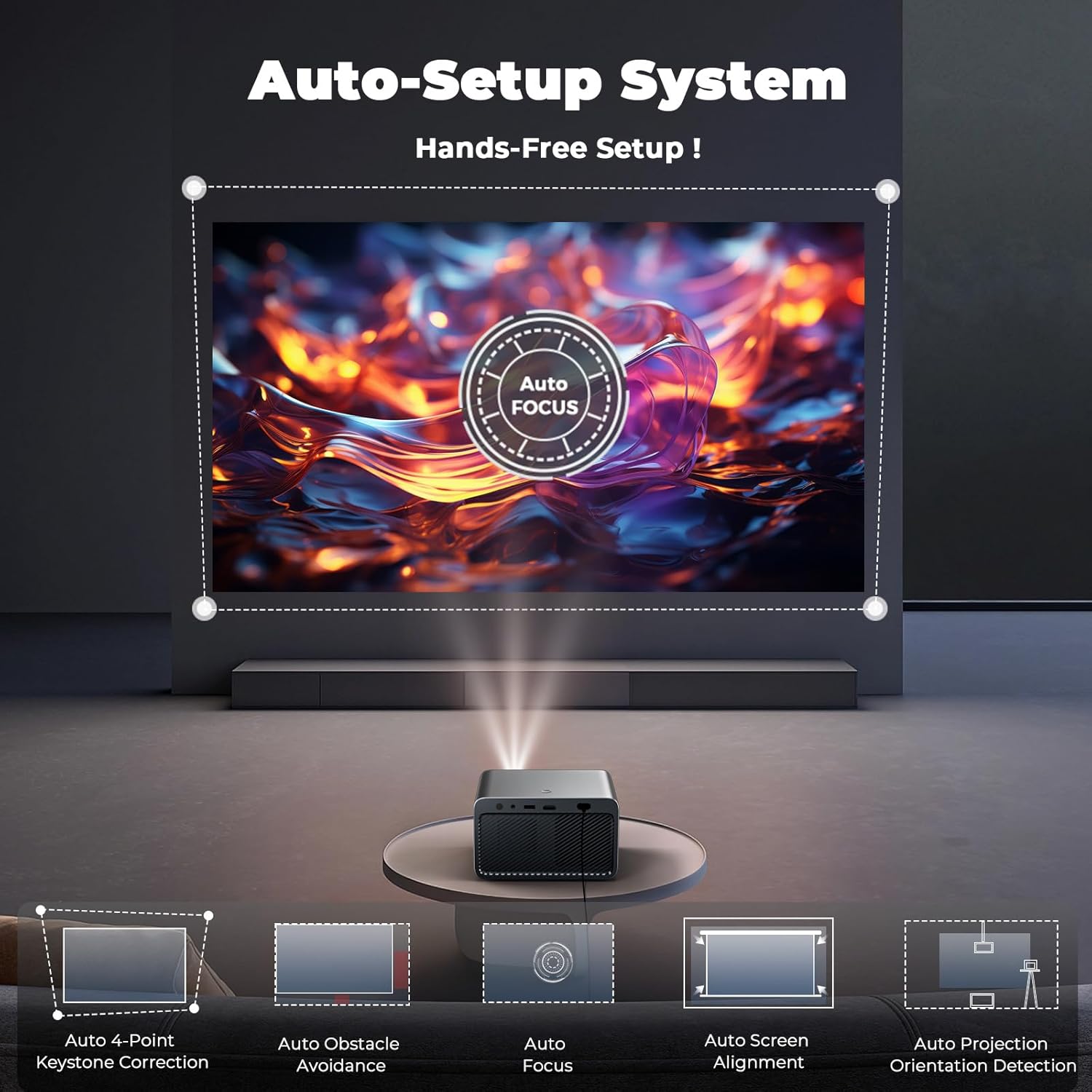
Image: Diagram illustrating the AI Auto-Setup System features including Auto Focus, Auto 4-Point Keystone Correction, Auto Obstacle Avoidance, Auto Screen Alignment, and Auto Projection Orientation Detection.
5. Network and Bluetooth Connectivity
The L03Pro supports WiFi 6 for ultra-fast streaming and Bluetooth 5.2 for lag-free audio. Navigate to the settings menu to connect to your wireless network and pair Bluetooth devices such as speakers or headphones.
- WiFi Connection: Select your network from the list and enter the password.
- Bluetooth Pairing: Enable Bluetooth on the projector and your device, then select your device from the available list to pair. The projector features automatic Bluetooth volume sync.
Operating Instructions
1. Power On/Off
Press the power button on the projector or the remote control to turn the device on or off. A short press will put the projector into standby mode, while a long press will fully shut it down.
2. Navigating the CinemOS Interface
The L03Pro operates on the CinemOS system, offering a smooth and responsive user interface. Use the remote control's directional buttons and OK button to navigate through menus and select options. The LX3 AI chip ensures smartphone-like responsiveness.
For enhanced control, you can scan a QR code displayed on the projector screen to turn your smartphone into a touchpad, allowing for easier browsing and navigation.
3. Streaming Content
The projector comes with an Endless Streaming System, compatible with Netflix, YouTube, Prime Video, Apple TV, and more. Access over 800 applications through the open app store.

Image: The projector displaying a wide selection of over 800 applications available for download, including popular streaming services.
Additionally, enjoy over 1,000 exclusive live TV channels with no ads, logins, or fees, covering sports, shows, and news. You can save your favorite Live TV channels for one-click access.

Image: A user viewing Live TV content projected by the Lisowod L03Pro, demonstrating the ad-free and subscription-free live television feature.
4. Media Playback and Visual Quality
The L03Pro supports true 1080P native resolution and 4K playback without conversion. It delivers 1000 ANSI lumens brightness and 98% NTSC color coverage, enhanced by LCD Pro wide color gamut and AI image boost for sharp details.

Image: Visual representation highlighting the projector's True 1080P Full HD and 4K Ultra HD support for ultra-clear picture quality.
5. Audio Experience
Equipped with Dolby Audio technology, the L03Pro provides cinema-grade sound. Connect external speakers or headphones via Bluetooth 5.2 for an immersive audio experience. The Bluetooth volume sync feature automatically matches speaker and projector volume levels.

Image: An illustration depicting the projector's Bluetooth and Dolby Audio capabilities, showing sound waves emanating from the device and connecting to external speakers and headphones.
6. Smart Features
- Built-in Browser: Use the integrated browser for full-screen web browsing.
- Customizable Screensaver: Personalize your sleep screensaver.
- Quick-Setting Buttons: Adjust picture and sound settings without interrupting your viewing experience.
- CEC Control: Control connected devices like TV sticks or gaming consoles with the projector's remote.
Maintenance
1. Cleaning
To maintain optimal performance, regularly clean the projector's exterior with a soft, dry cloth. For the lens, use a specialized lens cleaning cloth and solution to avoid scratches. Do not use abrasive cleaners or solvents.
2. Software Updates
The CinemOS system receives regular updates to enhance performance and add new features. Ensure your projector is connected to the internet and check for available updates periodically through the system settings menu.
3. Light Source Lifespan
The L03Pro features an advanced light source with an estimated lifespan of 100,000 hours, providing over 20 years of use at typical daily usage (e.g., 3 movies a day). This long lifespan minimizes the need for lamp replacement.
4. Temperature Management
The projector includes a smart temperature display to monitor internal conditions and ensure long-lasting performance. Ensure adequate ventilation around the projector to prevent overheating.
Troubleshooting
If you encounter issues with your Lisowod L03Pro projector, refer to the following common problems and solutions:
| Problem | Possible Cause / Solution |
|---|---|
| No Power | Ensure the power adapter is securely connected to both the projector and a working power outlet. Try a different outlet. |
| No Image / Blurry Image |
|
| No Sound |
|
| Wi-Fi / Bluetooth Connectivity Issues |
|
| Slow Performance / Unresponsive UI | While the LX3 AI chip ensures smooth performance, if you experience sluggishness, try restarting the projector. Ensure the system is updated to the latest firmware. |
Specifications
| Feature | Detail |
|---|---|
| Model | Lisowod L03Pro |
| Display Resolution | Native 1920 x 1080 (True 1080P), 4K Supported |
| Brightness | 1000 ANSI Lumens |
| Color Coverage | 98% NTSC |
| Connectivity Technology | Wi-Fi 6, Bluetooth 5.2, 3.5mm Jack, USB, IR |
| Operating System | CinemOS (Netflix Certified, 800+ apps, 1000+ Live TV channels) |
| Processor | Flagship LX3 Chip |
| Special Features | AI Auto-Setup System (Auto Focus, Auto Keystone, Obstacle Avoidance, Screen Alignment, Placement Adjustment), Dolby Audio, CEC Control, Built-in Browser, Customizable Screensaver, Phone as Touchpad via QR code. |
| Light Source Lifespan | 100,000 hours |
| Dimensions (L x W x H) | 8.3 x 7.4 x 7.0 inches |
| Weight | 3.5 lbs |

Image: A detailed view of the Lisowod LX3 Ultra-Fast Chip, emphasizing its role in providing lag-free performance for the projector.
Warranty and Support
Lisowod is committed to providing ongoing support and assistance for your L03Pro projector. While specific warranty details are not provided in this manual, please refer to your purchase documentation or the official Lisowod website for comprehensive warranty information.
For technical support, troubleshooting assistance, or any inquiries regarding your product, please contact Lisowod customer service. Our team is dedicated to ensuring your experience remains efficient and seamless.
Note: Product specifications and features are subject to change without prior notice.
Related documentsL03Pro


Ask a question about this manual
Ask about setup, troubleshooting, compatibility, parts, safety, or missing instructions. Manuals+ will review the question and use this page’s manual context to help answer it.