
Tengsen B0F5TDWTCH
Tengsen MP3 Player User Manual
Model: B0F5TDWTCH
Introduction
This manual provides comprehensive instructions for the operation, maintenance, and troubleshooting of your Tengsen MP3 Player. Please read this manual thoroughly before using the device to ensure proper functionality and to maximize your user experience.
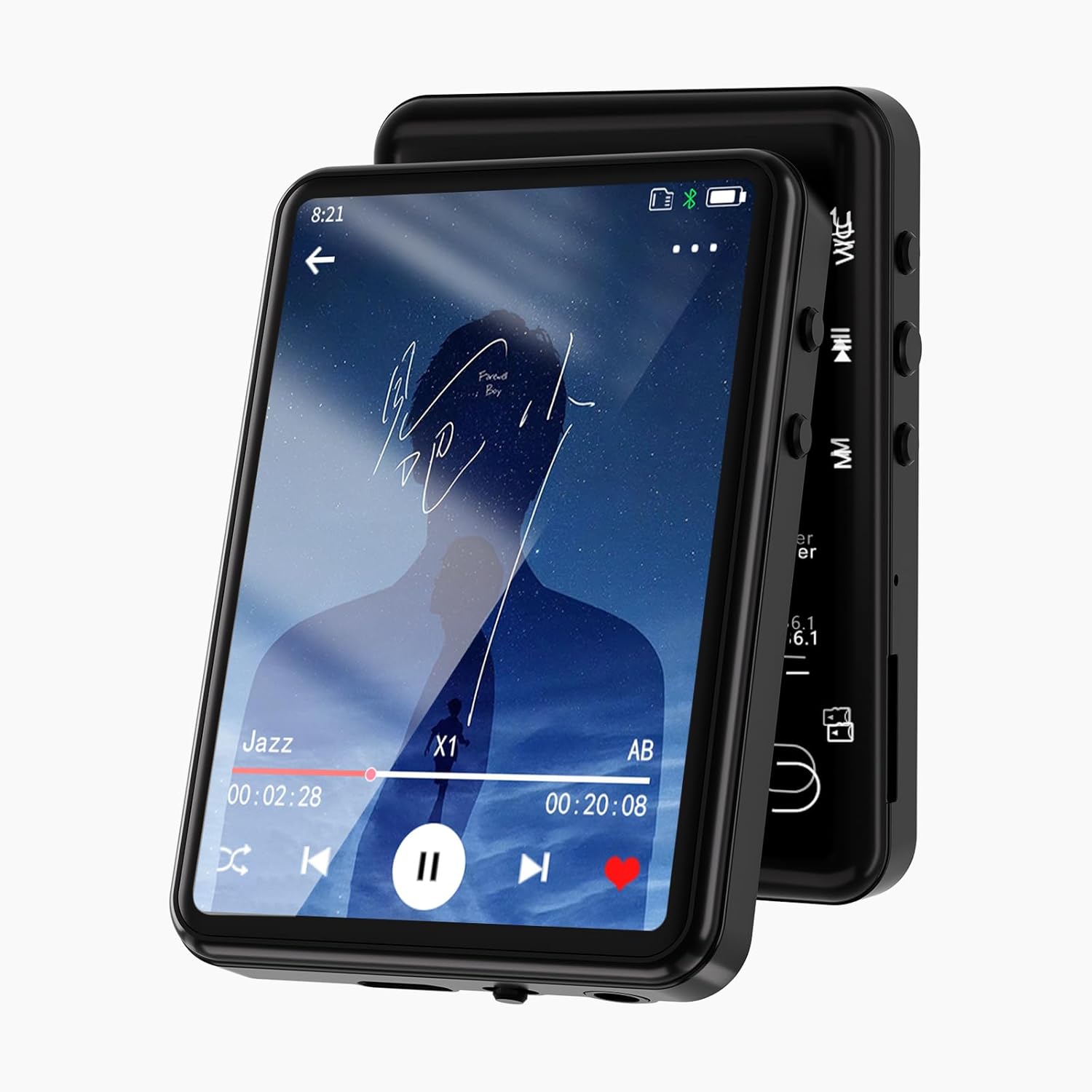
Image: Front view of the Tengsen MP3 Player displaying a music playback screen. The device features a sleek black design with a large touch screen.
Package Contents
Upon opening the package, verify that all components are present:
- 1 x Tengsen MP3 Player
- 1 x USB Cable (Type-C)
- 1 x Earphones
- 1 x User Manual
Device Overview
Familiarize yourself with the physical components and interface of your MP3 player.
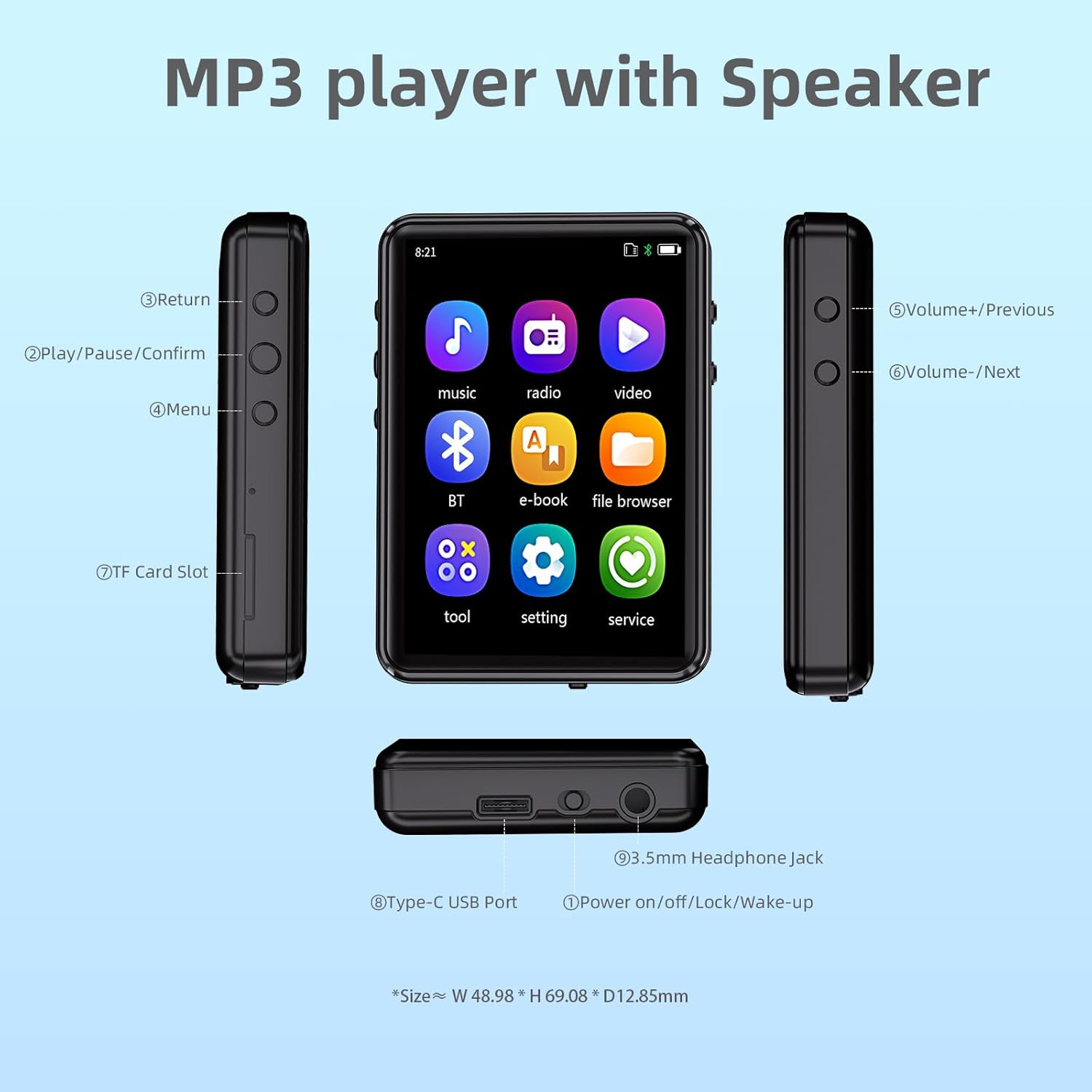
Image: Diagram illustrating the various buttons, ports, and features of the MP3 player, including the Type-C USB Port, 3.5mm Headphone Jack, Power button, Volume/Navigation buttons, Return button, Play/Pause/Confirm button, Menu button, and TF Card Slot.
- Return Button: Navigates back to the previous screen.
- Play/Pause/Confirm Button: Controls media playback and confirms selections.
- Menu Button: Accesses menu options.
- Volume+/Previous Button: Increases volume or navigates to the previous track.
- Volume-/Next Button: Decreases volume or navigates to the next track.
- TF Card Slot: For inserting a MicroSD card (up to 128GB, not included).
- Type-C USB Port: For charging and data transfer.
- Power on/off/Lock/Wake-up Button: Controls power and screen lock.
- 3.5mm Headphone Jack: For wired headphone connection.
Setup
Charging the Device
Before first use, fully charge the MP3 player. Connect the provided USB Type-C cable to the device's Type-C USB Port and the other end to a USB power adapter (not included) or a computer's USB port. The charging indicator will show progress. A full charge typically takes approximately 2 hours.

Image: The MP3 player being charged via its Type-C port, highlighting its built-in 32GB storage and support for up to 128GB TF card expansion.
Inserting a MicroSD Card
To expand storage, insert a MicroSD card (TF card) into the TF Card Slot until it clicks into place. The device supports cards up to 128GB. Ensure the card is inserted correctly to avoid damage.
Transferring Music and Files
Connect the MP3 player to your computer using the provided USB cable. The device will appear as a removable disk. You can then drag and drop music files (MP3, WMA, APE, FLAC, WAV, M4A), videos, and e-books into the appropriate folders on the device or MicroSD card.
Operating Instructions
Power On/Off and Screen Lock
- Power On: Press and hold the Power button until the screen lights up.
- Power Off: Press and hold the Power button, then select "Power Off" on the screen.
- Screen Lock/Wake-up: Briefly press the Power button to lock or wake up the screen.
Navigating the Interface
The device features a 2.4-inch full touch screen for intuitive navigation. Swipe to browse through menus and tap icons to select functions.

Image: A finger touching the screen of the MP3 player, demonstrating its full touch screen functionality and ease of operation.
Music Playback
From the main menu, tap the "Music" icon. You can browse by song category, create playlists, view lyrics, and use the equalizer. The player supports MP3, WMA, APE, FLAC, WAV, and M4A formats.
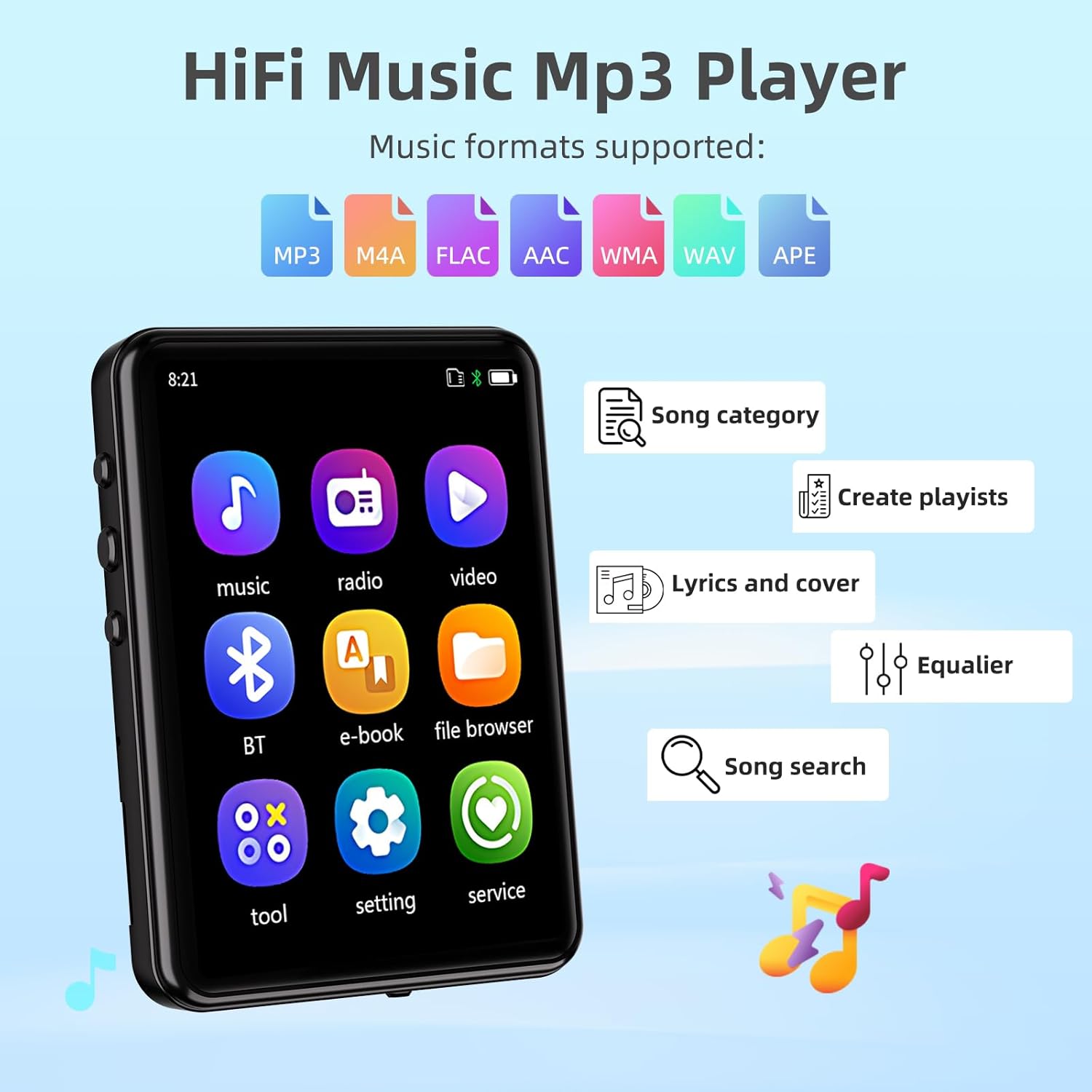
Image: The MP3 player's screen displaying music-related features such as song category, playlist creation, lyrics, equalizer, and song search, along with icons for supported audio formats (MP3, M4A, FLAC, AAC, WMA, WAV, APE).
Playback modes include sequential play, list repeat, single repeat, and shuffle-play. Adjust volume using the physical Volume buttons on the side.
Bluetooth Connectivity
The MP3 player features Bluetooth 5.3 for stable and faster connections to Bluetooth headphones or speakers. To connect:
- Go to the "Bluetooth" menu.
- Turn on Bluetooth.
- Select "Search for device" to find available Bluetooth devices.
- Select your desired device from the list to pair.
Note: This device does not support pairing with mobile phones or computers via Bluetooth.

Image: The MP3 player displaying its Bluetooth connectivity feature, showing connections to a Bluetooth speaker, Bluetooth earbuds, and a Bluetooth headset.
Other Functions
The MP3 player includes various other functions accessible from the main menu:
- FM Radio: Listen to FM radio stations. Requires wired headphones to act as an antenna.
- Recording: Use the built-in microphone to record audio.
- E-books: Read text files (TXT format).
- Calendar: View the current date.
- Alarm: Set alarms.
- Stopwatch: Use as a stopwatch.
- Photos: View image files (JPG, BMP).
- Video Playback: Play video files (MP4 format).
- Built-in Speaker: Enjoy music without headphones.
- Timing Shutdown: Set a timer for automatic power off.
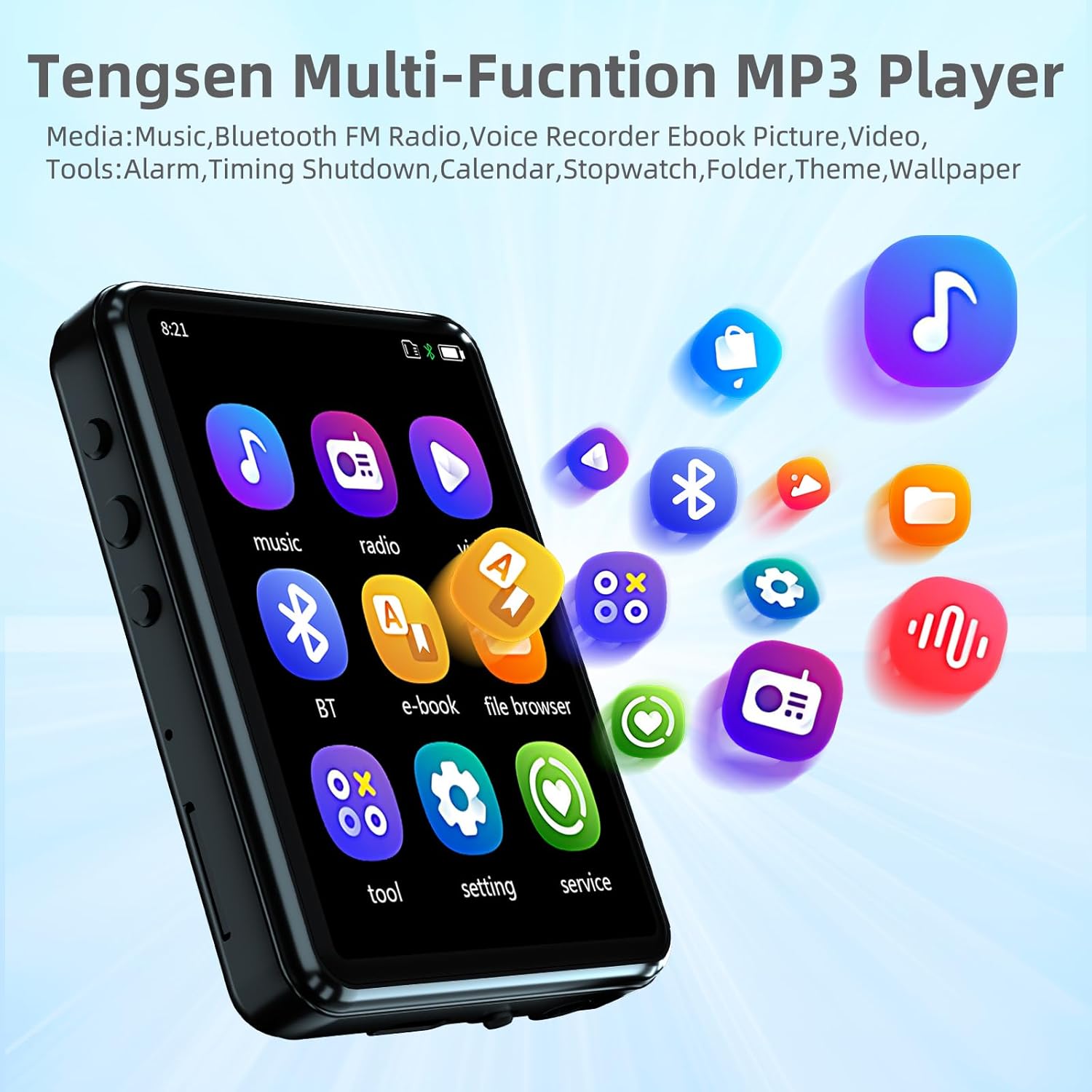
Image: The MP3 player's home screen showing icons for Music, Radio, Video, Bluetooth, E-book, File Browser, Tools, Settings, and Service, indicating its multi-functional capabilities.
Maintenance
- Keep the device dry. Avoid exposure to moisture or liquids.
- Clean the screen and body with a soft, dry cloth. Do not use abrasive cleaners.
- Avoid extreme temperatures.
- Do not disassemble the device. This will void the warranty.
- Store the device in a clean, dust-free environment when not in use.
Troubleshooting
| Problem | Possible Cause | Solution |
|---|---|---|
| Device does not power on. | Low battery; System crash. | Charge the device fully. If unresponsive, press and hold the power button for 10-15 seconds to force a restart. |
| Cannot connect to Bluetooth device. | Bluetooth not enabled; Device out of range; Incompatible device. | Ensure Bluetooth is on for both devices. Move devices closer. Remember, the MP3 player does not pair with phones/computers. |
| No sound from headphones. | Headphones not properly connected; Volume too low; Corrupt audio file. | Ensure headphones are fully plugged in. Increase volume. Try a different audio file. |
| Cannot transfer files. | USB cable issue; Driver issue; Device not recognized. | Try a different USB port or cable. Ensure the device is connected as a storage device. Restart computer and MP3 player. |
| Screen unresponsive. | Temporary software glitch. | Restart the device by holding the power button. |
Specifications
| Feature | Detail |
|---|---|
| Model | B0F5TDWTCH |
| Brand | Tengsen |
| Display | 2.4-inch Full Touch Screen, LCD |
| Internal Storage | 32 GB |
| Expandable Storage | Micro SD Card up to 128 GB (not included) |
| Connectivity | Bluetooth 5.3, Aux (3.5mm headphone jack), USB Type-C |
| Supported Audio Formats | MP3, WMA, APE, FLAC, WAV, M4A |
| Supported Video Formats | MP4 |
| Supported Image Formats | JPG, BMP |
| Supported E-book Formats | TXT |
| Special Features | Built-in Speaker, FM Radio, Voice Recorder, Equalizer, Timing Shutdown, Calendar, Alarm, Stopwatch |
| Battery | 1 Lithium Ion battery (included) |
| Product Dimensions | 2.72 x 1.89 x 0.49 inches |
| Item Weight | 3.52 ounces |

Image: The MP3 player highlighting its long battery life, with estimates of 15 hours for music with Bluetooth, 19 hours for music with speaker, and 25 hours for music with headphones.
Warranty and Support
For warranty information and technical support, please refer to the contact details provided with your purchase or visit the official Tengsen website. Keep your purchase receipt as proof of purchase for warranty claims.
For further assistance, you may also refer to the "service" section within the device's menu.
Ask a question about this manual
Ask about setup, troubleshooting, compatibility, parts, safety, or missing instructions. Manuals+ will review the question and use this page’s manual context to help answer it.