
JolyWell JW-CL003
JolyWell Baby Night Light User Manual
Model: JW-CL003
Brand: JolyWell
Introduction
Thank you for choosing the JolyWell Baby Night Light. This manual provides detailed instructions for the safe and effective use of your new night light. Please read this manual thoroughly before use and keep it for future reference. This night light is designed to provide gentle illumination for nurseries, offering both warm light and a variety of colors, with easy tap control and a built-in timer.
Important Safety Instructions
- This product is not a toy. Keep out of reach of infants and young children unless under direct adult supervision.
- Do not disassemble, repair, or modify the product. This may cause malfunction and void the warranty.
- Keep the product away from water and high humidity environments.
- Use only the provided USB-C cable or a certified equivalent for charging.
- Do not expose the product to extreme temperatures (hot or cold) or direct sunlight.
- If the product is damaged, discontinue use immediately.
- Dispose of the product and its battery responsibly according to local regulations.
What's in the Box
- JolyWell Baby Night Light
- USB-C Charging Cable
- User Manual
Product Overview
The JolyWell Baby Night Light is crafted from soft, BPA-free silicone, making it safe for babies to touch and handle. Its intuitive design allows for easy control of light modes and brightness through simple taps or squeezes.

Image: The JolyWell Baby Night Light, illuminated in warm white, resting on a textured blanket. A small color palette icon is visible in the top right corner, indicating its multi-color capability.
Components
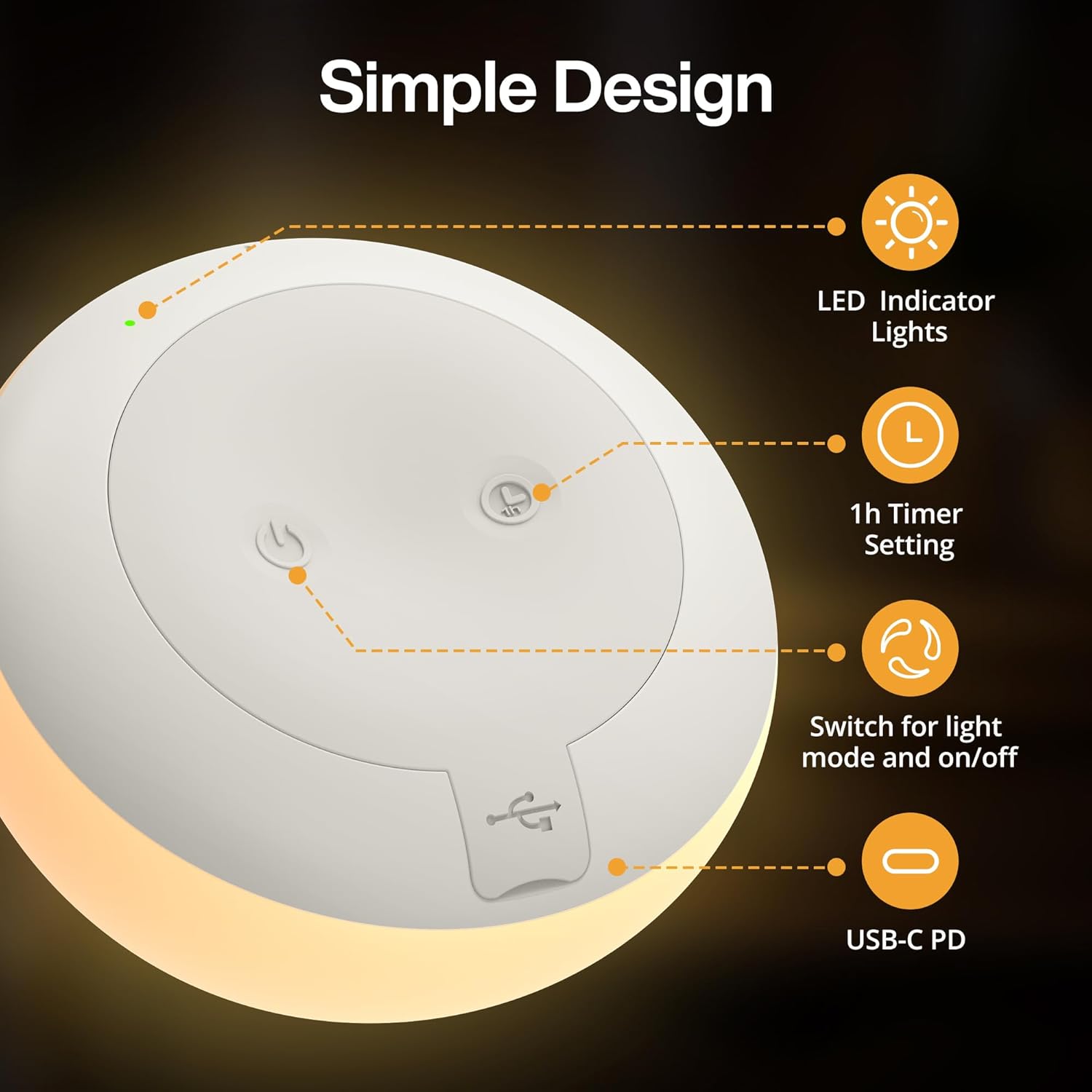
Image: An overhead view of the JolyWell Baby Night Light's base, showing the various control points and ports. Labels indicate the LED Indicator Lights, 1h Timer Setting button, Switch for light mode and on/off, and the USB-C PD port.
- LED Indicator Lights: Shows charging status and timer activation.
- 1h Timer Setting: Button to activate the 1-hour automatic shut-off timer.
- Switch for light mode and on/off: Main power and mode selection button.
- USB-C PD Port: For charging the device.
Setup
Charging the Night Light
Before first use, fully charge the night light. Connect the provided USB-C cable to the USB-C PD port on the base of the light and plug the other end into a compatible USB power adapter (not included). The LED indicator light will show charging status.
- A full charge provides up to 100 hours of light on the dimmest setting or 10 hours on the brightest setting.
- The light can be used while charging.
Operating Instructions
The JolyWell Baby Night Light features intuitive tap and squeeze controls for various functions.

Image: A four-panel diagram detailing how to control the night light. It shows actions for Power ON/OFF (long press 1.5s), Turn Light ON/OFF (squeeze twice), Switch Light Mode (short press 0.5s after turning on), Activate 1Hr Timer (short press 0.5s, green indicator light on), and 4 Brightness Levels & 8 Color Cycles (squeeze once or press surface).
Power On/Off
- To Turn On/Off: Long press the power button on the base for 1.5 seconds.
- To Turn Light On/Off (after initial power on): Gently squeeze the silicone surface twice.
Adjusting Brightness (Warm Light Mode)
The night light offers 4 adjustable warm light levels.
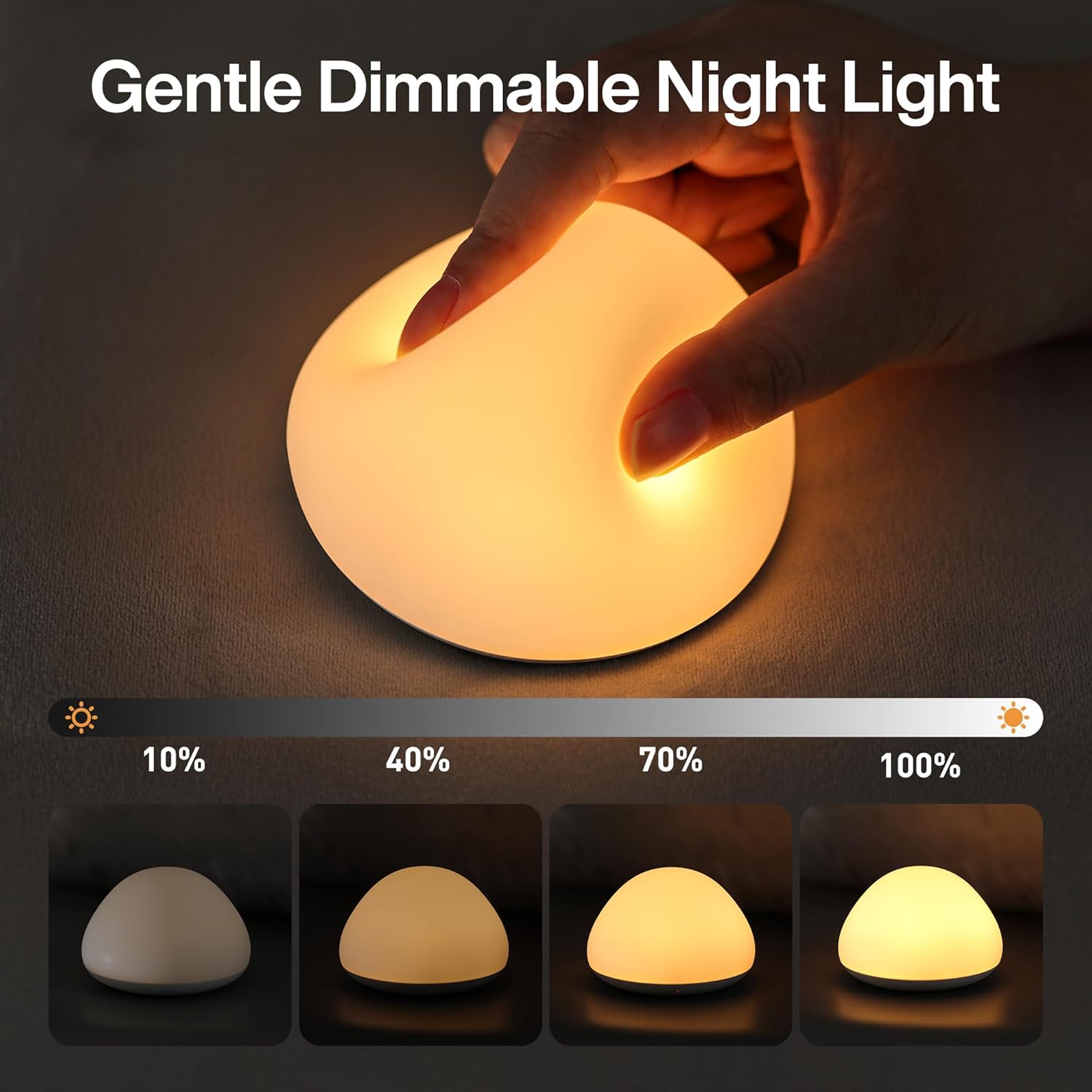
Image: Four instances of the JolyWell Baby Night Light demonstrating 10%, 40%, 70%, and 100% brightness levels in warm white mode, with a hand gently pressing the silicone surface.
- To Adjust Brightness: In warm light mode, gently squeeze or tap the silicone surface once to cycle through the 4 brightness levels (10%, 40%, 70%, 100%).
Changing Colors (RGB Mode)
The night light features 8 vibrant colors with a calming rainbow cycle.

Image: A young child sitting on a rug, interacting with three JolyWell Baby Night Lights, which are illuminated in yellow, pink, and green, demonstrating the multi-color feature. A color bar at the bottom indicates 8 available colors.
- To Switch Light Mode (Warm Light / RGB): After turning the light on, short press the power button on the base for 0.5 seconds.
- To Change Colors: In RGB mode, gently squeeze or tap the silicone surface once to cycle through the 8 colors and the rainbow cycle.
Activating the 1-Hour Timer
- To Activate Timer: Short press the 1h Timer Setting button on the base for 0.5 seconds. A green indicator light will turn on, confirming the timer is active. The light will automatically turn off after 1 hour.
Memory Function
The night light remembers your last brightness and color setting when turned off and on again.
Care and Maintenance
- Cleaning: Wipe the silicone surface with a soft, damp cloth. Do not use abrasive cleaners or immerse the product in water.
- Storage: Store the night light in a cool, dry place when not in use for extended periods.
- Battery Care: To prolong battery life, avoid fully discharging the battery frequently. Charge the device regularly, even if not in constant use.
Troubleshooting Guide
| Problem | Possible Cause | Solution |
|---|---|---|
| Light does not turn on. | Battery is depleted. | Charge the night light using the USB-C cable. |
| Light does not respond to tap/squeeze. | Not powered on or incorrect tapping method. | Ensure the light is powered on (long press base button). Try a firmer tap or squeeze. |
| Timer not activating. | Button not pressed correctly. | Ensure a short press (0.5s) on the timer button. Look for the green indicator light. |
| Light flickers or dims unexpectedly. | Low battery. | Recharge the night light. |
Product Specifications
| Feature | Detail |
|---|---|
| Model Number | JW-CL003 |
| Dimensions | 9 x 9 x 7.8 cm |
| Weight | 160 g |
| Material | BPA-Free Silicone, Plastic |
| Light Modes | 4-Level Warm Light, 8 Colors + Rainbow Cycle |
| Control Type | Tap Control, Squeeze Control, Base Buttons |
| Battery Type | Lithium Polymer (included) |
| Charging Port | USB-C |
| Battery Life | Up to 100 hours (dimmest setting), 10 hours (brightest setting) |
| Timer Function | 1-Hour Automatic Shut-off |
Warranty and Customer Support
JolyWell products come with a standard manufacturer's warranty. For detailed warranty information, please refer to the warranty card included with your purchase or visit the official JolyWell website.
If you encounter any issues or have questions regarding your JolyWell Baby Night Light, please contact our customer support team. We are committed to providing excellent service and support.
Customer Support Contact:
Please refer to the contact information provided on the product packaging or the official JolyWell website for the most up-to-date support channels.
Related documentsJW-CL003


Ask a question about this manual
Ask about setup, troubleshooting, compatibility, parts, safety, or missing instructions. Manuals+ will review the question and use this page’s manual context to help answer it.