
GoolRC FS-G11P Transmitter
GoolRC Flysky FS-G11P 2.4GHz 11CH Radio Transmitter User Manual
Model: FS-G11P Transmitter with FS-R11P Receiver
Brand: GoolRC
Introduction
This manual provides comprehensive instructions for the setup, operation, maintenance, and troubleshooting of your GoolRC Flysky FS-G11P 2.4GHz 11CH Radio Transmitter and FS-R11P Receiver. Please read this manual thoroughly before using the product to ensure safe and optimal performance.

Image: The GoolRC Flysky FS-G11P radio transmitter shown alongside its accompanying FS-R11P receiver.
Product Features
- High-Brightness IPS Display: Equipped with a 3.5-inch 320*480 full-dot color IPS screen, ensuring excellent visibility even under intense sunlight. Peak brightness of 2000 nits.
- Dual Antennas and Adaptive Frequency Hopping: Omni-directional dual antennas and adaptive frequency hopping technology enhance signal stability and anti-interference performance for uninterrupted control.
- Versatile Controls and 11-Channel Flexibility: Features 11 channels, multiple switches (self-locking, touch reset, rocker), and adjustable triggers, catering to diverse remote control cars or boats and precise manipulation.
- Ergonomic Grip and Extended Battery Life: Innovative rubberized grip design with enlarged finger rest areas ensures comfort, while dual 2600mAh batteries deliver ultra-long standby time (up to 14 hours).
- GPS and Multi-Sensor Compatibility: Supports real-time GPS feedback (speed, altitude, coordinates) and integrates with i-BUS sensors (voltage, temperature) for advanced model monitoring and control.
- Multi-functional Type-C Data Interface: Supports firmware upgrades, model data backup, 2s lithium battery charging, and USB emulator functions.
- New Aesthetic Design: Smooth overall lines with a classic Kevlar-patterned exterior finish.

Image: The 3.5-inch IPS high-brightness non-touch display of the FS-G11P transmitter, designed for clear visibility outdoors.

Image: Diagram illustrating the omni-directional dual antennas and adaptive frequency hopping technology for enhanced signal stability.

Image: Visual representation of the innovative rubberized grip design, highlighting the enlarged middle-finger grip area for improved comfort and stability.
Package Contents
Upon opening the package, please verify that all the following items are included and in good condition:
- FS-G11P Radio Transmitter
- FS-R11P Receiver
- USB Type-C Cable
- Handle (metal)
- Screen Protector
- Springs (for trigger adjustment)
- Quick Start Guide
- Other accessories as pictured

Image: A complete view of the GoolRC Flysky FS-G11P product packaging and its contents, including the transmitter, receiver, cables, and accessories.
Setup
1. Battery Installation
The FS-G11P transmitter requires two 2600mAh 18650 batteries (not included, or pre-installed depending on package). Ensure correct polarity when inserting batteries into the compartment located at the base of the handle. The transmitter supports charging via the USB Type-C port.

Image: The multi-functional Type-C data interface on the transmitter, used for charging, firmware upgrades, and data backup.
2. Transmitter Components Overview
Familiarize yourself with the various buttons, switches, and ports on the FS-G11P transmitter.

Image: Detailed diagram showing the front and side views of the FS-G11P transmitter, labeling the display, buttons (K1-K5, K7), switches (SW1, SW2, SW3, SW4), trims (TR1, TR2, TR3, TR4), and knobs (VR1, VR2).

Image: Diagram illustrating the adjustable throttle trigger (CH2) and steering wheel (CH1) components, including tension and travel adjustments, along with various ports like USB Type-C and 3.5mm Audio Jack (DSC).
3. Receiver Overview (FS-R11P)
The FS-R11P receiver is designed to work seamlessly with the FS-G11P transmitter. Understand its layout for proper connection to your RC model.

Image: Diagram of the FS-R11P receiver, detailing its channel ports (CH1-CH11), SENS connector, SERVO connector, LED, Antenna, BIND button, and VCC/BVD power supply pins.
4. Binding the Transmitter and Receiver
To establish communication between the transmitter and receiver, a binding process is required. The FS-G11P supports two pairing modes: Routine and Fast, selectable based on application scenarios.

Image: Screenshots from the transmitter display showing the "Routine" and "Fast" binding modes, indicating options for RF System, RF Standard, RX Type, Output, Frequency, and Bind initiation.
Refer to the on-screen instructions on the transmitter's IPS display for detailed steps on initiating the binding process. Ensure the receiver is powered on and in binding mode before proceeding.
5. Ergonomic Adjustments
The transmitter features adjustable handwheel travel distance and trigger return force/position for personalized comfort and control.

Image: Diagrams illustrating the physical adjustment points for the handwheel's travel distance (up to 32 degrees maximum stroke) and the trigger's return force and position (up to 20 degrees maximum stroke).
Operating Instructions
1. Basic Controls and Functions
The FS-G11P offers a variety of controls for precise operation of your RC model.
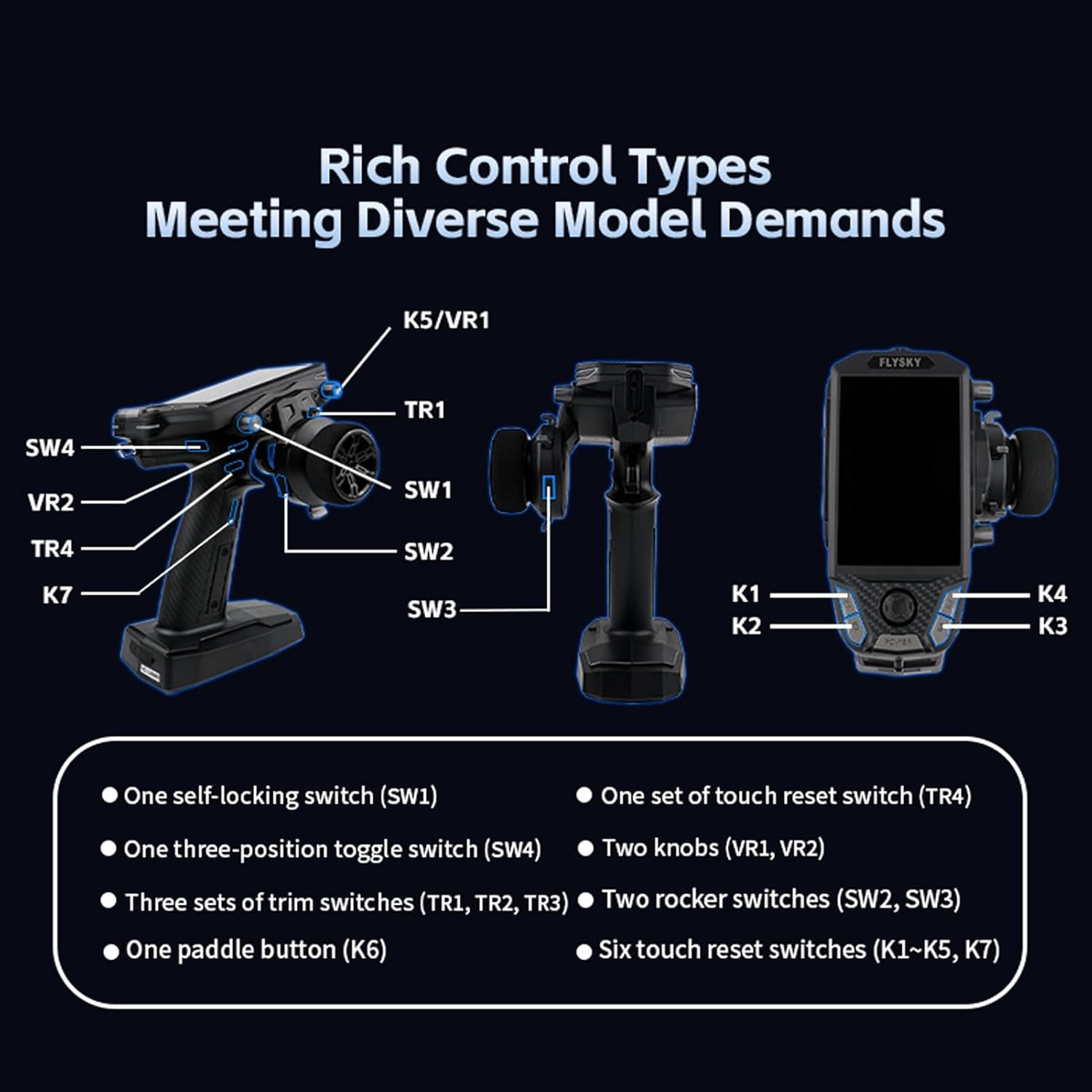
Image: A visual guide to the various control types on the FS-G11P transmitter, including self-locking switch (SW1), three-position toggle switch (SW4), trim switches (TR1, TR2, TR3), paddle button (K6), touch reset switch (TR4), knobs (VR1, VR2), rocker switches (SW2, SW3), and touch reset switches (K1-K5, K7).
- Steering Wheel (CH1): Controls the steering of your RC vehicle.
- Throttle Trigger (CH2): Controls the speed and direction (forward/reverse) of your RC vehicle.
- Switches (SW1, SW2, SW3, SW4): Assignable for various functions such as lights, auxiliary channels, or special modes.
- Trims (TR1, TR2, TR3, TR4): Used for fine-tuning channel outputs.
- Knobs (VR1, VR2): Provide proportional control for assigned functions.
- Buttons (K1-K5, K7, K6): Multi-functional buttons for menu navigation and quick access to features.
2. Display Navigation and Settings
The 3.5-inch IPS display provides access to all transmitter settings and real-time data. Use the navigation buttons (K1-K4) and the five-way switch to browse menus and adjust parameters.
- Model Selection: Supports up to 40 sets of model groups, allowing you to save configurations for different RC vehicles.
- Channel Configuration: Supports up to 11 channels, enabling complex control setups.
- Throttle Curve Settings: Flexible and versatile throttle curve settings with three modes (EXP, CRV, ARC) and five adjustable throttle points for precise control.

Image: Screenshots demonstrating the multi-channel display (up to 11 channels) and the model selection interface, showing support for up to 40 model groups.

Image: Visual representation of the three throttle curve modes (ST Exp, CRV, ARC) available on the transmitter, allowing for customized throttle response.
3. GPS and Sensor Integration
The FS-G11P supports real-time GPS feedback and is compatible with various i-BUS sensors for enhanced monitoring.
- GPS Feedback: Obtain real-time information such as speed, altitude, coordinates, and distance.
- i-BUS Sensors: Compatible with sensors for voltage, temperature, and other parameters.

Image: Screenshots showing the GPS settings interface on the transmitter display and various i-BUS compatible sensors, including those for height, voltage, temperature, speed, and GPS.
Maintenance
1. Firmware Updates
The FS-G11P supports firmware updates via its USB Type-C interface. Regularly check the official GoolRC or Flysky website for the latest firmware versions to ensure optimal performance and access to new features. Follow the instructions provided with the firmware update package carefully.
2. Battery Care
- Charge batteries using the provided USB Type-C cable or a compatible charger.
- Avoid overcharging or completely discharging the batteries to prolong their lifespan.
- Store the transmitter in a cool, dry place when not in use, especially for extended periods.
3. Cleaning and Storage
- Use a soft, dry cloth to clean the transmitter and receiver.
- Avoid using harsh chemicals or abrasive materials.
- Store the unit in its original packaging or a protective case to prevent damage.
Troubleshooting
This section addresses common issues you might encounter. If you experience problems not covered here, please refer to the official PDF manual or contact customer support.
| Problem | Possible Cause | Solution |
|---|---|---|
| Transmitter does not power on. | Low or dead batteries; incorrect battery installation. | Charge or replace batteries; ensure correct polarity. |
| No response from RC model. | Transmitter and receiver not bound; receiver not powered; out of range. | Perform binding procedure; check receiver power connection; operate within specified range. |
| Intermittent signal loss. | Interference; antenna obstruction; low transmitter/receiver battery. | Move to an area with less interference; ensure antennas are clear; charge batteries. |
| Controls are not precise. | Trims or calibration issues; mechanical linkage problems on model. | Adjust trims on transmitter; recalibrate channels if necessary; check model's servo linkages. |
Specifications
Transmitter Specifications (FS-G11P)

Image: Table detailing the technical specifications of the FS-G11P transmitter, including product model, compatible receiver, compatible RC model, number of channels, number of bands, RF, maximum power, RF protocol, resolution, data connector, input power, distance, antenna, display, firmware update support, temperature range, humidity range, color, language, weight, dimensions, charging jack, and certifications.
| Parameter | Value |
|---|---|
| Product Model | FS-G11P |
| Compatible Receiver | FS-R11P and other receivers with ANT protocol |
| Compatible RC Model | Cars or boats |
| Number of Channels | 11 |
| Number of Bands | 133 |
| RF | 2.4GHz ISM |
| Maximum Power | < 20dBm (e.i.r.p.) (EU) |
| RF Protocol | ANT |
| Resolution | 4096 |
| Data Connector | USB Type-C, 3.5mm Audio Jack (DSC), SD card slot |
| Input Power | 6.9V DC, 18650*2PCS/2S LiPo |
| Distance | No less than 300m (Ground distance without interference) |
| Antenna | Two built-in antennas |
| Display | 3.5 inch 320*480 full dot color non-touch IPS screen |
| Firmware Update | Supported |
| Temperature Range | -10°C ~ +60°C |
| Humidity Range | 20% - 95% |
| Color | Black |
| Language | Chinese or English |
| Weight | 371g |
| Dimensions | 150.0*120.8*197.1mm |
| Charging Jack | Yes (Type-C Port) |
| Certifications | CE, FCC ID: 2A2UNFSG11P00 |
Receiver Specifications (FS-R11P)
| Parameter | Value |
|---|---|
| Product Model | FS-R11P |
| Compatible Transmitter | FS-G11P and other transmitters with ANT protocol |
| Compatible RC Model | Cars or boats |
| Number of Channels | 11 |
| RF | 2.4GHz ISM |
| Maximum Power | < 20dBm (e.i.r.p.) (EU) |
| RF Protocol | ANT |
| Resolution | 4096 |
| Data Output | PWM/PPM/i.BUS/S.BUS |
| Operating Voltage | 3.5-9V DC |
| Distance | No less than 300m (Ground distance without interference) |
| Antenna | External single antenna |
| Display | LED |
| Firmware Update | Supported |
| Temperature Range | -10°C ~ +60°C |
| Humidity Range | 20% - 95% |
| Color | Black |
| Weight | 10g |
| Dimensions | 37.0*25*13.3mm |
| Waterproof | PPX4 |
| Certification | CE, FCC ID: 2A2UNR11P00 |
Support and Warranty
For further assistance or detailed information, please refer to the official user manual PDF or contact GoolRC customer support.
- Official User Manual (PDF): Download PDF
- Manufacturer: GoolRC
- Warranty Information: Please refer to the product packaging or the official GoolRC website for specific warranty terms and conditions.
Related documentsFS-G11P Transmitter


Ask a question about this manual
Ask about setup, troubleshooting, compatibility, parts, safety, or missing instructions. Manuals+ will review the question and use this page’s manual context to help answer it.