
1. Introduction
Thank you for choosing the Ayybboo Digital Kids Sport Watch Model 8206B. This watch is designed for children, offering a range of useful functions including time display, date, day of the week, alarm, stopwatch, and a vibrant 7-color LED backlight. Its durable and water-resistant design makes it suitable for daily activities. Please read this manual carefully to understand how to operate and maintain your watch.
2. Safety Information
- Water Resistance: This watch is 30M water resistant, suitable for splashes, rain, and hand washing. DO NOT press any buttons underwater. Avoid hot water, steam, or prolonged submersion.
- Battery: The watch uses a non-standard battery. Battery replacement should be performed by a qualified technician to ensure water resistance is maintained.
- Cleaning: Clean the watch with a soft, dry cloth. Avoid harsh chemicals.
- Temperature: Avoid exposing the watch to extreme temperatures (hot or cold) for extended periods.
- Impact: While durable, avoid strong impacts or dropping the watch.
3. Product Overview
Familiarize yourself with the watch's buttons and display features.

Figure 3.1: Watch Button Layout and Display Features
This image illustrates the main buttons and display segments of the Ayybboo Digital Kids Sport Watch. The buttons are labeled: LIGHT (top left), MODE (bottom left), RESET (bottom right), and START (top right). The display shows areas for the day of the week (SMTWTFS), seconds, main time, and an alarm indicator.
- LIGHT Button (A): Activates the 7-color LED backlight.
- MODE Button (B): Cycles through different display modes (Time, Alarm, Stopwatch, Date). Also used to enter setting modes.
- RESET Button (C): Used to reset the stopwatch, adjust values during setting, or confirm settings.
- START Button (D): Used to start/stop the stopwatch, or increase values during setting.

Figure 3.2: Luminous Display Feature
This image demonstrates the watch's 7-color LED backlight. The top row shows the watch display in different colors, while the bottom row compares the normal display (left) with the LED illuminated display (right), highlighting the enhanced visibility in low light conditions.
4. Setup and Initial Configuration
4.1 Setting Time and Date
- From the normal time display, press the MODE (B) button three times to enter time setting mode. The seconds will start flashing.
- Press the RESET (C) button to set the seconds to zero.
- Press the START (D) button to move to the hour setting. The hour digits will flash.
- Press the RESET (C) button to adjust the hour. Note the 'A' (AM) or 'P' (PM) indicator for 12-hour format, or 'H' for 24-hour format.
- Press the START (D) button to move to the minute setting. The minute digits will flash.
- Press the RESET (C) button to adjust the minutes.
- Continue pressing the START (D) button to cycle through month, date, and day of the week settings, adjusting each with the RESET (C) button.
- Once all settings are complete, press the MODE (B) button to exit the setting mode and return to the normal time display.
4.2 12/24 Hour Format Selection
While in time setting mode (seconds flashing), press the START (D) button until the hour digits are flashing. Press the MODE (B) button to toggle between 12-hour (A/P indicator) and 24-hour (H indicator) formats.
5. Operating Instructions
5.1 Using the LED Backlight
Press the LIGHT (A) button to illuminate the display with a 7-color LED backlight. The light will stay on for a few seconds. This feature is useful for reading the time in low-light conditions.
5.2 Setting and Using the Alarm
- From the normal time display, press the MODE (B) button once to enter Alarm mode.
- Press the RESET (C) button to select the hour to set. The hour digits will flash.
- Press the START (D) button to adjust the hour.
- Press the RESET (C) button again to select the minute to set. The minute digits will flash.
- Press the START (D) button to adjust the minutes.
- Press the MODE (B) button to exit Alarm setting mode.
- To turn the alarm ON/OFF: In Alarm mode, press the START (D) button to toggle the alarm icon (bell symbol) on or off. When the alarm is on, the bell icon will be displayed.
- When the alarm sounds, press any button to stop it.
5.3 Using the Stopwatch
- From the normal time display, press the MODE (B) button twice to enter Stopwatch mode. The display will show "00:00:00".
- Press the START (D) button to begin timing.
- Press the START (D) button again to pause timing.
- Press the RESET (C) button to reset the stopwatch to "00:00:00".
- To resume timing after pausing, press the START (D) button.
- Press the MODE (B) button to exit Stopwatch mode and return to the normal time display.

Figure 5.1: Stopwatch Function in Use
This image illustrates the stopwatch function of the watch, showing the display set to "00:00:00" and a child running on a track, symbolizing its use for timing activities.
5.4 Viewing Date and Day of the Week
From the normal time display, press the MODE (B) button to cycle through the display modes. The date and day of the week will be shown in their respective modes.
6. Maintenance
6.1 Cleaning Your Watch
Wipe the watch regularly with a soft, dry, lint-free cloth to remove dirt and smudges. For stubborn dirt, a slightly damp cloth can be used, followed by drying immediately. Avoid using abrasive cleaners or solvents.
6.2 Battery Replacement
The watch is powered by a non-standard battery. When the display becomes dim or functions become unreliable, the battery may need replacement. It is recommended to have the battery replaced by a professional watch technician to ensure the water resistance seal is properly maintained.
7. Troubleshooting
| Problem | Possible Cause | Solution |
|---|---|---|
| Display is blank or dim. | Low battery. | Replace the battery (see Section 6.2). |
| Time is incorrect. | Time needs to be set. | Follow instructions in Section 4.1 to set the time. |
| Water inside the watch. | Buttons pressed underwater, or watch exposed to hot water/steam. | Immediately take the watch to a professional for inspection and repair. Avoid further water exposure. |
| Alarm does not sound. | Alarm is not activated or set incorrectly. | Ensure the alarm is set and the alarm icon is displayed (see Section 5.2). |
8. Specifications
| Feature | Detail |
|---|---|
| Model Number | 8206B |
| Brand | Ayybboo |
| Display Type | Digital |
| Special Features | 7-Color LED Backlight, Alarm, Stopwatch, Date, Day of Week, 12/24 Hour Format |
| Water Resistance | 30 Meters (Splash/Rain/Hand Wash Resistant) |
| Power Source | Battery Powered (1 non-standard battery) |
| Case Material | Stainless Steel (back) |
| Dial Window Material | Resin (Acrylic, scratch-resistant) |
| Band Material | Silicone / TPU Plastic |
| Clasp Type | Tang Buckle |
| Case Diameter | 3.2 cm (1.26 inches) |
| Case Thickness | 1.2 cm |
| Band Width | 1.4 cm (0.55 inches) |
| Band Length | 22.5 cm (8.85 inches) |
| Item Weight | 21 Grams |
| Age Range Description | Child (4-14 years) |
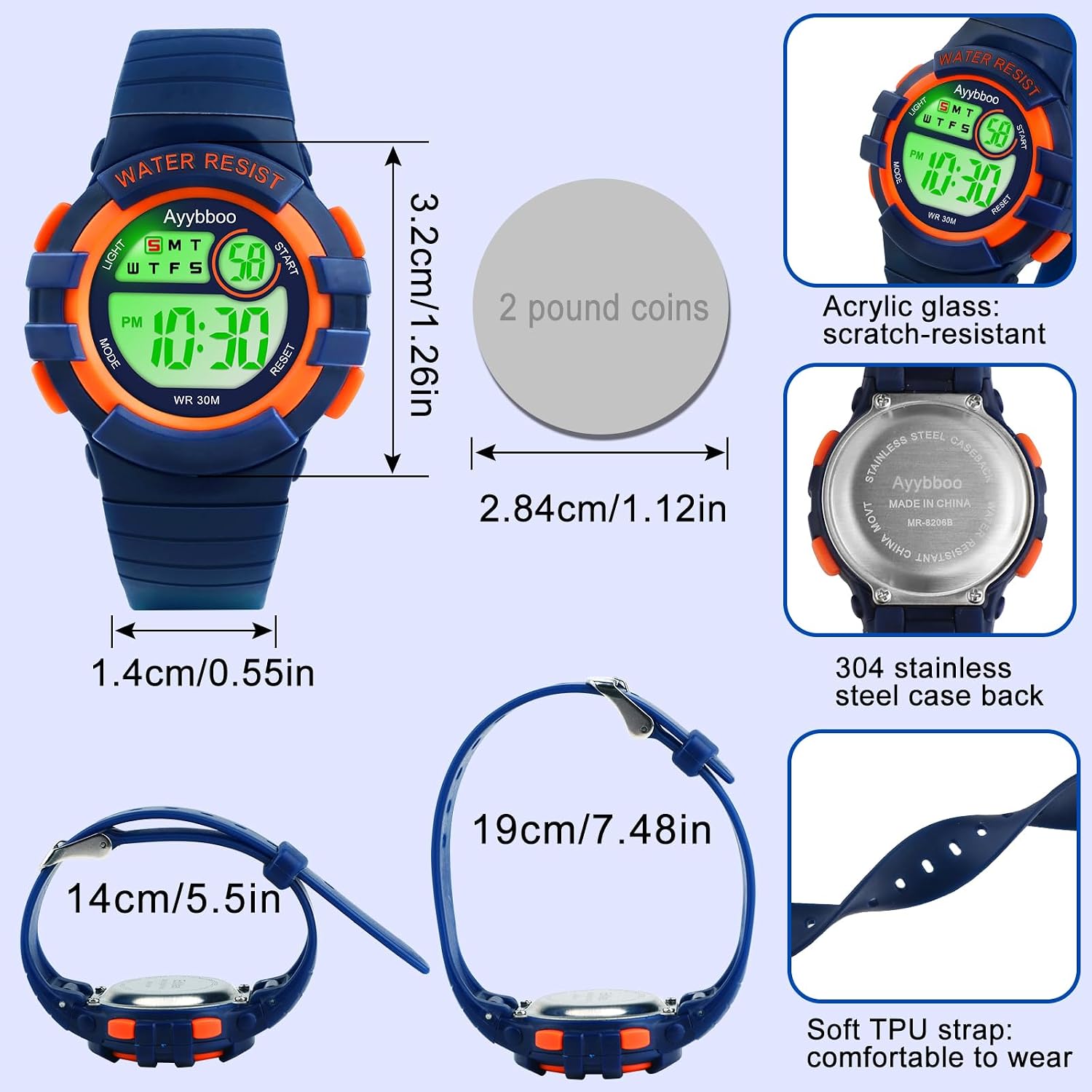
Figure 8.1: Watch Dimensions and Materials
This image provides a visual representation of the watch's dimensions, including case diameter, band width, and total length. It also highlights key materials such as the acrylic glass and 304 stainless steel case back, and the soft TPU strap.
9. Warranty and Support
For warranty information or technical support, please refer to the seller's policy on the platform where the product was purchased. Keep your purchase receipt as proof of purchase. For general inquiries, you may contact the manufacturer Ayybboo through their official channels if available.