Introduction
This manual provides instructions for the VINABTY replacement remote control, designed specifically for the LONPOO LP-099 DVD/CD Player. This remote offers full functionality, replicating the original remote's features for seamless operation of your device. Please read this manual carefully to ensure proper use and maintenance.
Setup
1. Battery Installation
The remote control requires two AAA batteries (not included). Follow these steps to install them:
- Locate the battery compartment on the back of the remote control.
- Slide the battery compartment cover downwards to open it.
- Insert two AAA batteries, ensuring the positive (+) and negative (-) terminals align correctly with the markings inside the compartment.
- Slide the battery compartment cover back into place until it clicks securely.

Image: Back view of the remote control with the battery compartment. The compartment is located at the bottom of the remote and slides open for battery insertion.
2. Initial Use
Once batteries are installed, the remote control is ready for use. No programming or pairing is required. Point the remote directly at your LONPOO LP-099 DVD/CD Player and press the desired function button.
Operating Instructions
This section details the functions of the buttons on your VINABTY remote control. Refer to the image below for button layout.
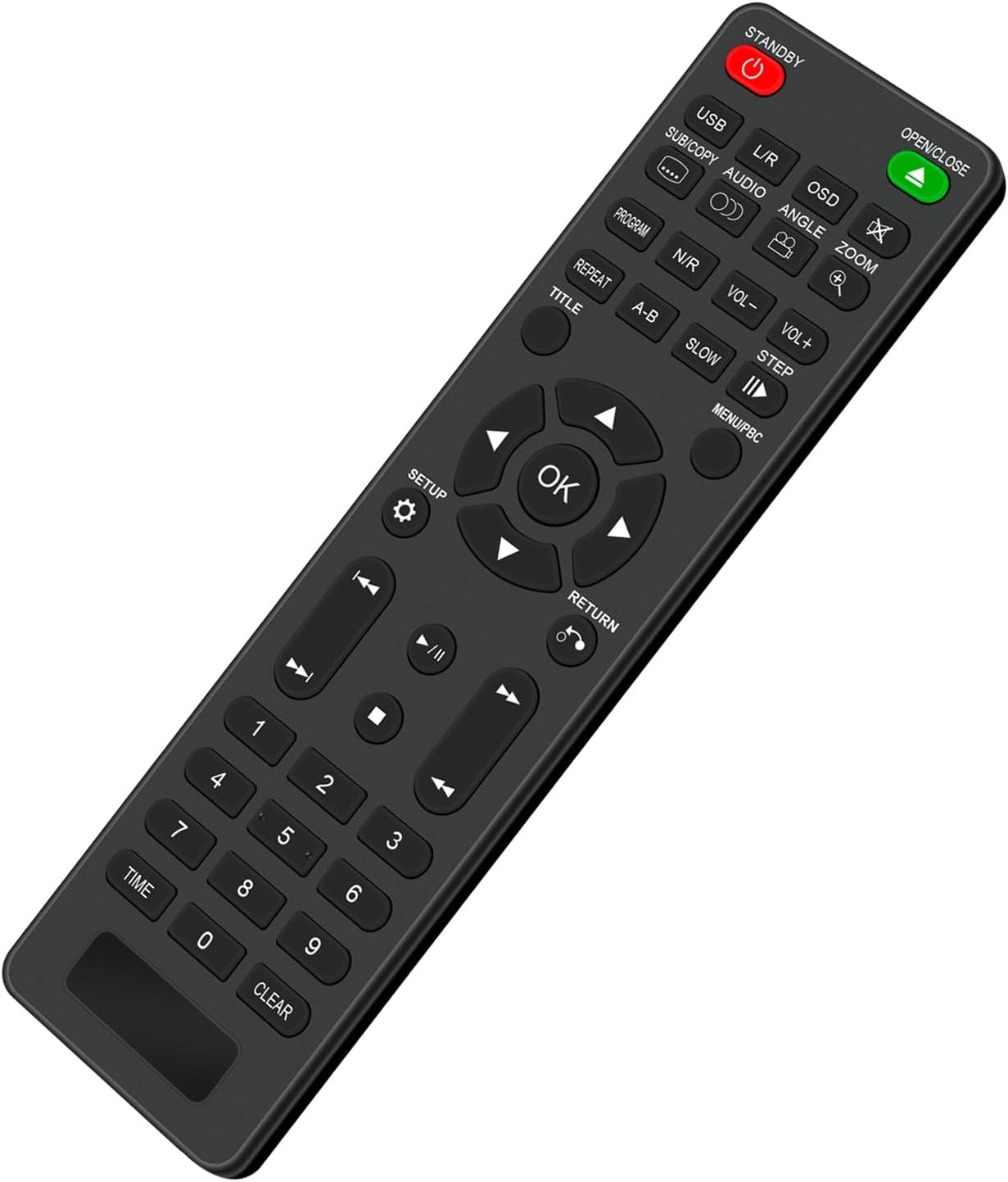
Image: Front view of the remote control, displaying all buttons and their respective labels for various functions.
- STANDBY (Red Power Icon): Powers the DVD/CD player on or off.
- OPEN/CLOSE (Green Icon): Opens and closes the disc tray.
- USB: Selects the USB input source.
- L/R / AUDIO: Changes audio tracks or channels.
- OSD: Displays on-screen information.
- SUB/COPY: Selects subtitle options or initiates copy function.
- ANGLE: Changes camera angles during DVD playback (if available).
- ZOOM: Zooms in or out on the screen.
- PROGRAM: Accesses the program playback menu.
- N/R: Activates or deactivates noise reduction.
- VOL- / VOL+: Decreases or increases the volume.
- REPEAT: Repeats the current track, chapter, or entire disc.
- A-B: Sets and repeats a specific segment between two points (A and B).
- SLOW: Activates slow-motion playback.
- STEP: Advances playback frame by frame.
- TITLE: Accesses the DVD title menu.
- MENU/PBC: Accesses the main menu or Program Block Control.
- SETUP: Enters the system setup menu.
- Directional Buttons (Up, Down, Left, Right): Navigates through menus and options.
- OK: Confirms selections.
- RETURN: Goes back to the previous menu or screen.
- Playback Controls (◀◀ Previous, ▶▶ Play/Pause, ▶▶ Next, ■ Stop, ◀◀ Rewind, ▶▶ Fast Forward): Standard media playback controls.
- Number Buttons (0-9): Direct selection of tracks, chapters, or inputting numbers.
- TIME: Displays or sets time-related functions.
- CLEAR: Clears current input or selection.
Maintenance
Cleaning the Remote Control
To maintain the remote control's appearance and functionality:
- Wipe the surface with a soft, dry cloth.
- Do not use abrasive cleaners, solvents, or alcohol, as these can damage the finish or internal components.
- Avoid getting liquids inside the remote control.
Battery Care
- Replace batteries when the remote's response becomes sluggish or inconsistent.
- Remove batteries if the remote control will not be used for an extended period to prevent leakage.
- Dispose of used batteries according to local regulations.
Troubleshooting
- Remote Control Not Responding:
- Ensure batteries are inserted correctly with the correct polarity (+/-).
- Replace old batteries with new ones.
- Check for any obstructions between the remote control and the DVD/CD player's infrared sensor.
- Ensure you are within the effective range and pointing the remote directly at the player.
- Specific Buttons Not Working:
- This remote is a direct replacement. If a specific button does not work, ensure the corresponding function is supported by your LONPOO LP-099 DVD/CD Player.
- Clean the remote control surface, especially around the non-working button, to ensure no debris is interfering.
Specifications

Image: Front view of the remote control with its length (6.89 inches) and width (1.77 inches) clearly indicated.
| Brand | VINABTY |
| Model Number | LP-099 |
| Compatible Devices | LONPOO LP-099 DVD/CD Player |
| Product Dimensions | 5 x 1 x 0.5 inches (approx. 12.7 x 2.54 x 1.27 cm) |
| Item Weight | 1.9 ounces (approx. 53.86 grams) |
| Power Source | 2 x AAA Batteries (not included) |
| Special Feature | Ergonomic design |
Warranty and Support
For information regarding warranty coverage or technical support, please refer to the documentation provided with your original purchase or contact the seller directly. As a replacement remote, specific warranty terms may vary.


