
1. Product Overview
The Rfiver Swivel Floor TV Stand with Mount is a versatile and space-saving solution designed to securely hold flat or curved televisions ranging from 32 to 60 inches, with a maximum weight capacity of 88 pounds. This stand features a height-adjustable design and a sturdy wooden base, providing both stability and aesthetic appeal. Its integrated shelf offers convenient storage for media devices, and the swivel functionality ensures optimal viewing angles from various positions in your room.

Figure 1.1: Front view of the Rfiver Swivel Floor TV Stand with a television mounted.
2. Key Features
- Wide TV Compatibility: Supports 32-60 inch flat/curved TVs with VESA patterns from 100x100mm to 400x400mm and a maximum load of 88 lbs.
- 70° Swivel Function: Allows for a ±35° swivel range, providing flexible viewing angles and reducing glare.
- Height Adjustment: Offers multiple height settings to achieve an optimal eye-level viewing experience.
- Stable & Safe Wooden Base: Features a compact 16.7 × 11.8-inch wooden base, reinforced with steel and two 45-degree rear stabilizers for enhanced stability and safety, especially in homes with children or pets.
- Adjustable Media Shelf: Includes an 11 lbs capacity adjustable shelf for soundbars, game consoles, or streaming devices.
- Integrated Cable Management: Designed with cable routing features to keep wires organized and out of sight.
- Space-Saving Design: Ideal for corners or small spaces, offering a drill-free assembly that protects walls.

Figure 2.1: Illustration of the stand's tipping-proof design, highlighting its stability compared to less secure alternatives.

Figure 2.2: The adjustable shelf can support up to 22 lbs and offers 360-degree rotation for optimal positioning.
3. Setup and Assembly
The Rfiver Swivel Floor TV Stand is designed for straightforward assembly. All necessary accessories are pre-categorized, and clear instructions are provided to guide you through the process. Assembly typically takes approximately 15 minutes.
3.1 Before You Begin
- Verify all parts are present according to the packing list.
- Ensure your TV's size, weight, and VESA pattern are compatible with the stand's specifications (32-60 inches, up to 88 lbs, VESA 100x100mm to 400x400mm).
- Prepare a clean, flat surface for assembly.
3.2 Assembly Steps
Follow the step-by-step instructions included in the product packaging. The process involves attaching the main support column to the wooden base, securing the TV mounting bracket, and installing the adjustable media shelf. Ensure all screws are tightened securely to maintain stability.
For detailed visual guidance, refer to the assembly diagrams in your physical manual.
4. Operating Instructions
4.1 Swivel Function
The TV stand allows for a smooth 70° swivel (35° left and 35° right). To adjust the viewing angle, gently grasp the sides of your television and rotate it to the desired position. This feature is useful for optimizing viewing from different areas of a room or for reducing screen glare.

Figure 4.1: Demonstrating the 70° swivel capability for optimal viewing.
4.2 Height Adjustment
The stand offers flexible height adjustment to suit various viewing scenarios and personal comfort. To adjust the height, you will need to temporarily remove the TV from the mount and reposition the mounting arms on the central column to a different set of holes. This allows you to set the TV at your preferred eye level for activities such as watching movies, gaming, or exercising.

Figure 4.2: The stand offers multiple height settings for customized viewing comfort.
4.3 Cable Management
Utilize the integrated cable management system to route and conceal power cords and AV cables. This helps maintain a clean and organized appearance, preventing clutter and potential tripping hazards.
5. Maintenance
To ensure the longevity and optimal performance of your Rfiver TV stand, follow these simple maintenance guidelines:
- Cleaning: Wipe down the stand with a soft, dry cloth. For stubborn marks, a slightly damp cloth can be used, followed by immediate drying. Avoid abrasive cleaners or solvents, as they may damage the finish.
- Regular Checks: Periodically inspect all screws and connections to ensure they remain tight and secure. Over time, vibrations or movement may cause fasteners to loosen.
- Weight Capacity: Do not exceed the maximum weight capacity of 88 lbs for the TV or 11 lbs for the shelf. Overloading can compromise the stand's stability and safety.
- Environmental Conditions: Avoid placing the stand in direct sunlight or in areas with extreme temperature fluctuations or high humidity, which could affect the wood base.
6. Troubleshooting
If you encounter any issues with your Rfiver Swivel Floor TV Stand, please refer to the following common troubleshooting tips:
- Stand Feels Wobbly:
- Ensure all assembly screws are fully tightened.
- Check that the stand is placed on a flat, level surface. Uneven flooring can cause instability.
- Verify that the TV weight does not exceed 88 lbs and is centered on the mount.
- TV Not Swiveling Smoothly:
- Ensure no cables are obstructing the swivel mechanism.
- Check for any debris or foreign objects around the swivel joint.
- Difficulty Adjusting Height:
- Ensure the TV is removed from the mount before attempting to adjust the height of the mounting arms on the central column.
- Follow the instructions for re-attaching the TV at the new height setting.
- Cables Not Staying Organized:
- Re-route cables through the designated cable management channels.
- Use cable ties or wraps (not included) for additional organization if needed.
If these steps do not resolve your issue, please contact Rfiver customer service for further assistance.
7. Specifications
| Feature | Specification |
|---|---|
| Brand | Rfiver |
| Model | 1 Shelf |
| Compatible TV Sizes | 32 - 60 Inches |
| Maximum TV Load Capacity | 88 lbs (40 kg) |
| VESA Compatibility (Min) | 100x100mm |
| VESA Compatibility (Max) | 400x400mm |
| Swivel Range | ±35° (Total 70°) |
| Adjustable Shelf Load Capacity | 11 lbs (5 kg) |
| Base Dimensions | 16.7 × 11.8 inches |
| Material | Alloy Steel, Wood |
| Color | Black |
| Item Weight | 15.07 pounds |
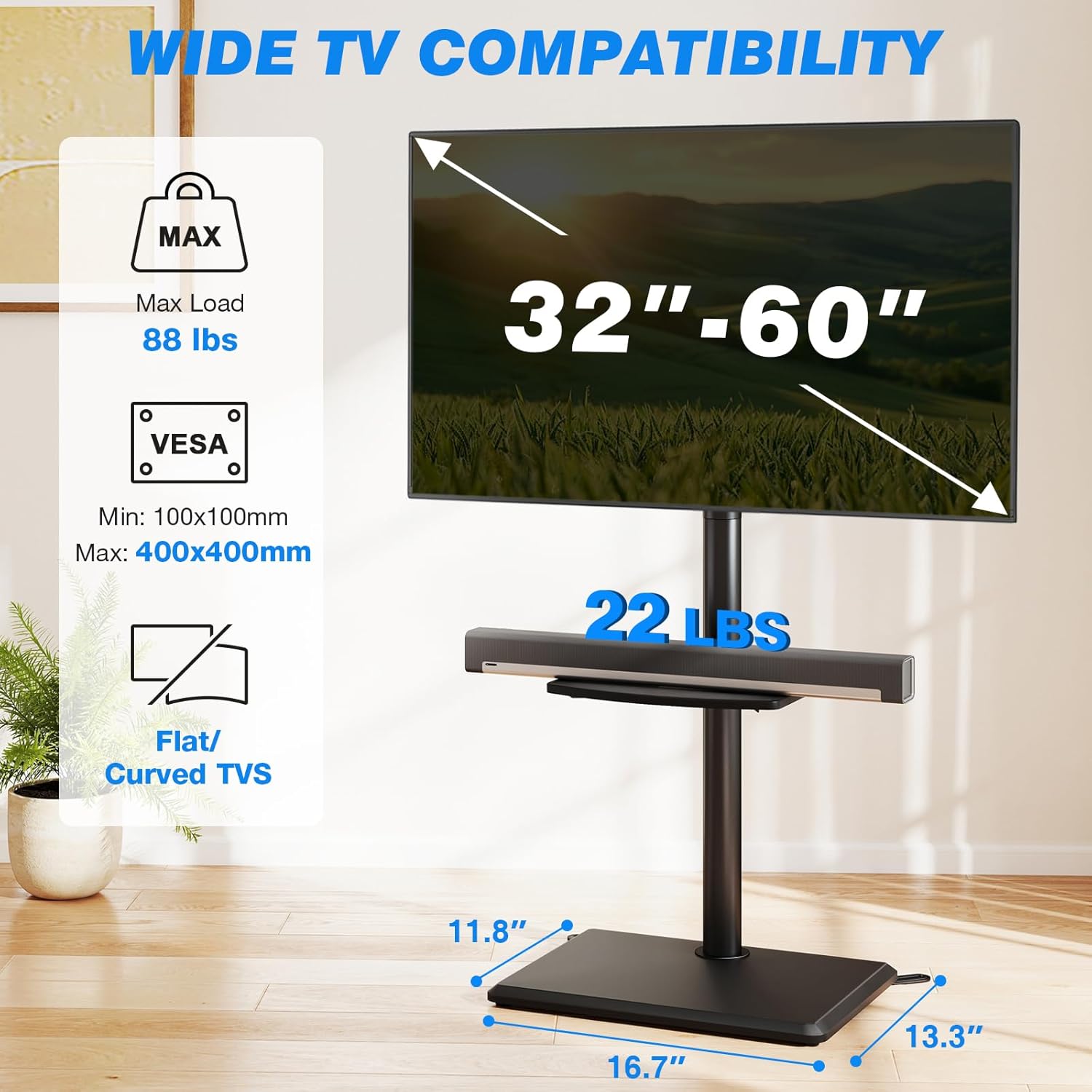
Figure 7.1: Compatibility details for TV size, weight, and VESA patterns.
8. Warranty and Support
For warranty information and customer support, please refer to the documentation included with your purchase or visit the official Rfiver website. If you encounter any problems during the installation or use of your TV stand, the Rfiver customer service team is available to provide assistance.
No official product videos from the seller were found in the provided data to embed in this manual.

