
Important Safety Information
Always wear eye protection and gloves when operating the string trimmer. Be aware of flying debris during use. Keep children and pets away from the operating area to prevent accidents. Read and understand all safety warnings and instructions before operating this tool.
Product Overview
The MZK 20V 12'' Cordless String Trimmer is designed for efficient lawn care, offering both trimming and edging capabilities. It features an upgraded motor for high-speed cutting and an automatic line feed system for continuous operation. Its lightweight design and ergonomic handle aim to reduce user fatigue.
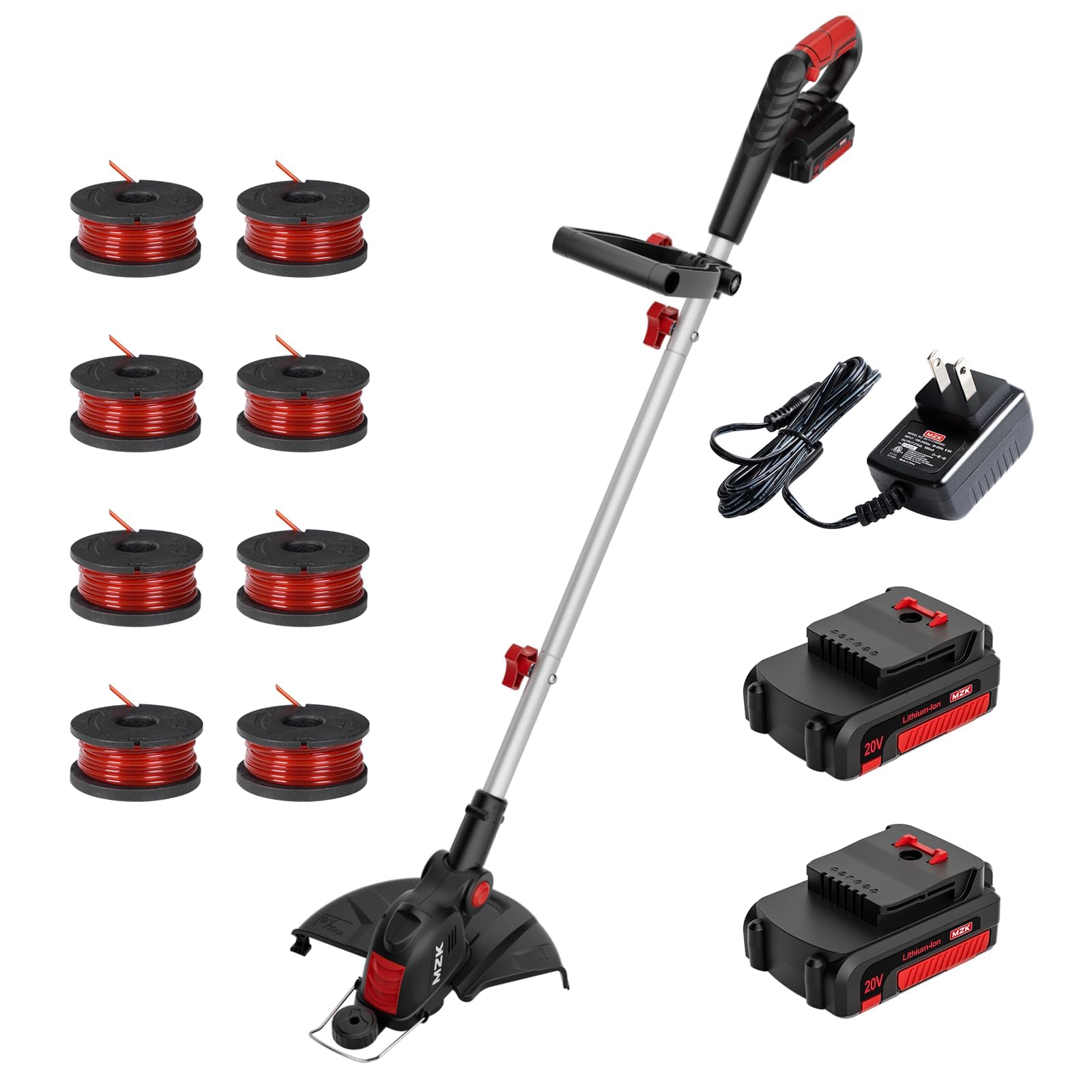
Image: The MZK 20V 12'' Cordless String Trimmer in action, highlighting its versatile 2-in-1 design for both trimming and edging.
Key Features
- Upgraded Motor: Features a high speed of 8000 RPM for efficient cutting and trimming.
- 12-inch Cutting Diameter: Provides larger coverage with an automatic line feed system, eliminating manual adjustments.
- Lightweight Design: Weighs only 6.3 lbs with an ergonomic adjustable handle for comfortable operation.
- Extended Usability: Includes one built-in spool and four additional replacement spools for prolonged use.

Image: A visual comparison demonstrating the MZK's automatic line feed system against a manual push-button system, emphasizing ease of use.

Image: A user holding the MZK string trimmer, illustrating its lightweight nature for reduced user fatigue.

Image: A diagram showcasing the adjustable comfort grip, allowing users to customize the handle position for optimal comfort and control.
Components Included
- MZK 20V 12'' Cordless String Trimmer Unit
- 20V Lithium-ion Battery (2 included)
- Battery Charger
- Safety Guard
- Adjustable Auxiliary Handle
- Pre-installed String Spool
- 8 Replacement Spools
- Instruction Manual
Setup Instructions
- Attach the Safety Guard: Secure the safety guard to the trimmer head using the provided fasteners. Ensure it is firmly in place to protect against debris.
- Assemble the Shaft: Connect the two sections of the trimmer shaft. Ensure the locking mechanism clicks into place for a secure connection.
- Install the Auxiliary Handle: Slide the adjustable auxiliary handle onto the shaft and tighten it to a comfortable position for your height and grip.
- Insert Battery: Ensure the battery is fully charged. Slide the 20V Lithium-ion battery into the battery compartment on the main handle until it locks securely.
- Adjust Trimmer Head Angle: Press the red button near the trimmer head to adjust its angle for either trimming or edging.
Video: A seller-provided video demonstrating the assembly and initial setup of the MZK 20V 12'' Cordless String Trimmer, including attaching components and inserting the battery.
Operating Instructions
- Starting the Trimmer: To start, press and hold the safety switch located on the main handle, then squeeze the trigger. Release the safety switch once the trimmer is running.
- Trimming: Hold the trimmer firmly with both hands. Maintain a comfortable distance from your body. Move the trimmer in a sweeping motion, keeping the cutting line parallel to the ground.
- Edging: To switch to edging mode, press the red button near the trimmer head and rotate the head 90 degrees. Use the integrated wheel to guide the trimmer along edges for a clean finish.
- Automatic Line Feed: The trimmer features an automatic line feed system. If the line becomes too short, the system will automatically release more line during operation.
- Stopping the Trimmer: Release the trigger to stop the trimmer. Always remove the battery when not in use or before performing any maintenance.
Video: A seller-provided video demonstrating the MZK 20V 12'' Cordless String Trimmer in action, showing both trimming and edging functions.
Maintenance
- Cleaning: After each use, remove the battery and clean the trimmer head, guard, and shaft with a damp cloth. Remove any grass clippings or debris to ensure proper function.
- String Replacement: When the pre-installed string spool is empty, replace it with one of the provided replacement spools. Refer to the detailed instructions in the manual for proper installation.
- Battery Care: Store batteries in a cool, dry place away from direct sunlight. Do not expose batteries to extreme temperatures. Charge batteries fully before storage and periodically during long periods of inactivity.
- Inspection: Regularly inspect the trimmer for any signs of damage, loose parts, or wear. Ensure the safety guard is intact and securely fastened.
Troubleshooting
- Trimmer Not Starting: Ensure the battery is fully charged and properly inserted. Check that the safety switch is pressed before squeezing the trigger.
- Line Not Feeding Automatically: Verify that the string spool is correctly installed and not tangled. Ensure the line is not jammed or broken inside the head.
- Reduced Cutting Performance: The string may be worn or too short. Replace the string spool if necessary. Ensure the trimmer head is clean and free of debris.
- Excessive Vibration: Check for any loose components or damaged parts. Ensure the string is evenly wound on the spool.
Specifications
| Specification | Value |
|---|---|
| Brand | MZK |
| Power Source | Battery Powered (20V Lithium-ion) |
| Cutting Width | 12 Inches |
| Speed | 8000 RPM |
| Item Weight | 6.91 pounds (3.14 Kilograms) |
| Product Dimensions | 39"L x 13"W |
| Assembly Required | Yes |
| Model Number | G-DC2505-2 |
| UPC | 199284776890 |
Warranty and Support
For warranty information and customer support, please refer to the contact details provided in your product packaging or visit the official MZK website. Keep your purchase receipt as proof of purchase for any warranty claims.
MZK is committed to providing the best shopping experience. If you have any questions or problems with your MZK tool, please feel free to contact us. We are always here to help you solve any problems you may encounter.