
1. Introduction
Thank you for choosing the VOKSUN Wireless Weather Station. This device provides accurate indoor and outdoor temperature and humidity readings, along with a 12-hour weather forecast, comfort indicator, alarm clock, calendar, time, and moon phase display. Please read this manual carefully before use to ensure proper operation and to maximize the product's lifespan.

Image 1.1: The VOKSUN Wireless Weather Station main unit and its accompanying outdoor sensor.
2. Product Overview
2.1 Main Features
- Indoor and Outdoor Temperature & Humidity Monitoring
- 12-Hour Weather Forecast based on atmospheric pressure changes
- Comfort Indicator (Humid, Good, Dry)
- Alarm Clock with Snooze Function
- Calendar and Time Display
- Moon Phase Display and Tide Indicator
- DCF Radio Controlled Clock for automatic time synchronization
- Adjustable Backlight with 4 brightness levels
- Supports up to 3 remote outdoor sensors (one included)
- Two Power Supply Methods: DC adapter or AA batteries

Image 2.1: Visual representation of the weather station's key functions, including temperature, calendar, weather forecast, moon phase, alarms, humidity, sunrise/sunset times, alerts, comfort index, and atmospheric pressure.
2.2 Components
The package includes:
- 1 x VOKSUN Wireless Weather Station (Main Unit)
- 1 x Wireless Outdoor Sensor
- 1 x DC Power Adapter
- 1 x User Manual
2.3 Main Unit and Sensor Layout

Image 2.2: Detailed diagram showing the labeled parts of the main unit's LCD display (A) and back panel (B).
Part A - Positive LCD Display:
- Outdoor wireless channel and receiving icon
- Indoor Temperature
- Indoor Humidity
- Indoor comfort indicator
- Time
- Month and date
- Week
- Weather forecast
- Outdoor Temperature
- Atmospheric pressure
- Outdoor Humidity
- Histogram of historical pressure trends
- Outdoor comfort indicator
- Sunrise time
- Moon phase
- Selected city
- Tide level
- Sunset time
Part B - Back Button and Power:
- "/zZ" Touch field
- Support frame
- Battery compartment
- Hanging hole
- "▼" Button
- "▲/☀" Button
- "▲" Button
- "◎" Button
- """ Button
- "DC" Button
- Power supply socket
- USB charger output socket

Image 2.3: Detailed diagram showing the labeled parts of the wireless remote sensor (C).
Part C - Wireless Remote Sensor:
- LCD display - Temperature
- LCD display - Humidity
- Transmit signal LED
- "°C/°F" button
- "TX" button
- "CHANNEL 1 or 2 or 3" switch
- Battery compartment
3. Setup
3.1 Powering the Devices
The weather station main unit and the outdoor sensor can be powered in two ways:
- Main Unit: Use the included DC power adapter for continuous backlight, or 2 x AA batteries (not included) for temporary backlight (15 seconds after touch).
- Outdoor Sensor: Requires 2 x AA batteries (not included).
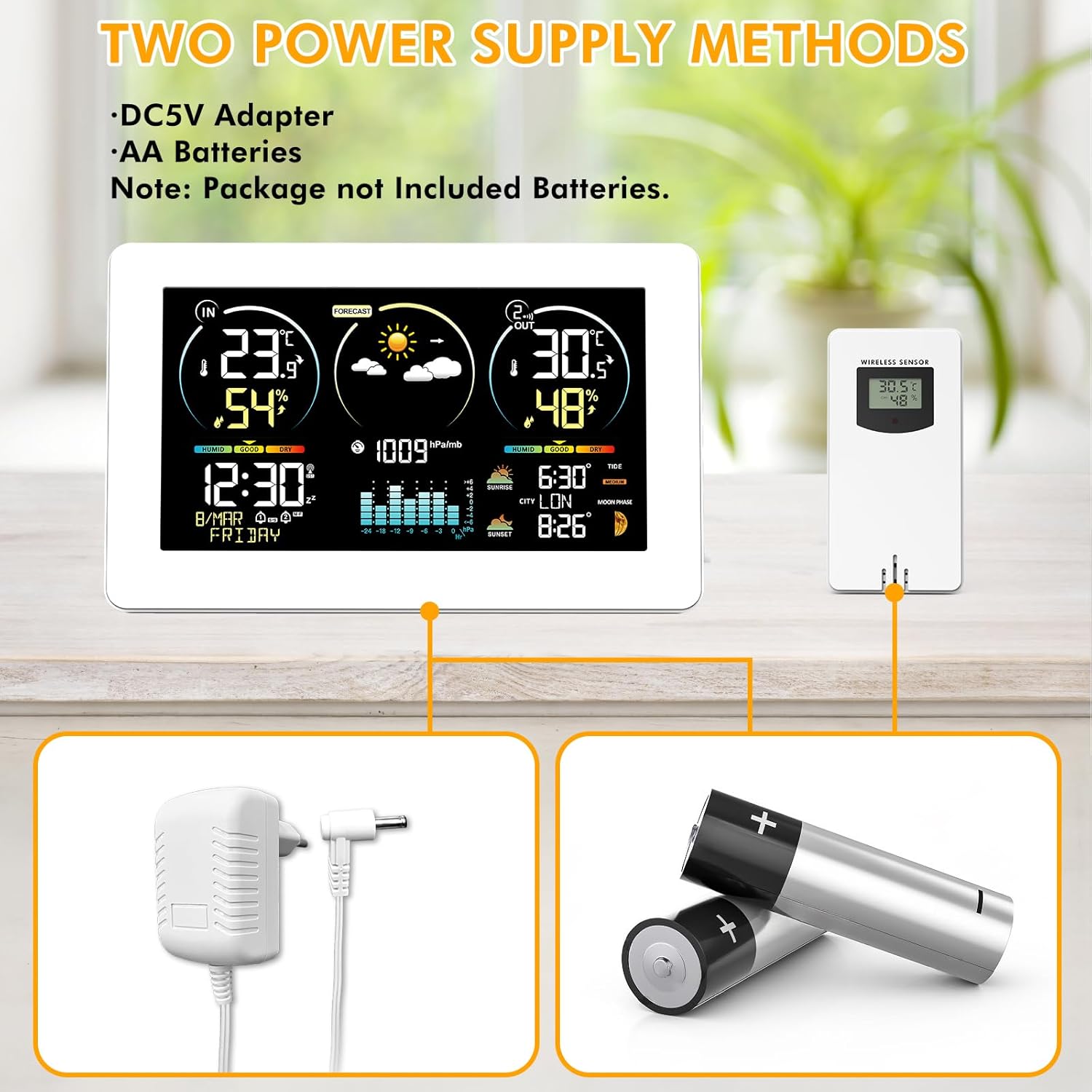
Image 3.1: Illustration of the two power supply methods: DC5V adapter for the main unit and AA batteries for both the main unit and the wireless sensor.
Installation Steps:
- Insert 2 x AA batteries into the outdoor sensor, ensuring correct polarity. Select a channel (1, 2, or 3) using the switch inside the battery compartment.
- Insert 2 x AA batteries into the main unit (optional, for backup power) or connect the DC power adapter to the main unit.
- The main unit will automatically search for the outdoor sensor signal. The outdoor temperature and humidity should appear on the main unit's display within a few minutes.
3.2 Sensor Placement
Place the outdoor sensor in a shaded, dry location away from direct sunlight and precipitation to ensure accurate readings. The wireless sensors have a transmission range of 200ft/60m in open spaces.

Image 3.2: Examples of suitable locations for the outdoor sensor, such as under an eave, near a window, or in a garden shed, demonstrating its 60m/200ft transmission range.
3.3 Main Unit Placement
The main unit can be placed on a desk using its integrated stand or mounted on a wall using the hanging hole on the back.

Image 3.3: The weather station can be conveniently placed on a desk or mounted on a wall.
4. Operating Instructions
4.1 Automatic Time Synchronization (DCF)
The weather station features a DCF radio-controlled clock function. It automatically synchronizes the time daily or upon power-up to ensure accuracy. The DST (Daylight Saving Time) function is also supported.

Image 4.1: The weather station automatically synchronizes its clock with the radio signal, ensuring precise timekeeping across various regions.
If the DCF signal is weak in your location, you can disable this function and set the time manually.
4.2 Setting Time and Date Manually
Refer to the detailed instructions in the included paper manual for specific button presses to manually set the time, date, and other parameters.
4.3 Weather Forecast
The weather station calculates 12-hour weather forecasts based on outdoor sensor data and atmospheric pressure changes. During initial use, the device requires a 7-day learning and calibration period for accurate personalized forecasts.

Image 4.2: The weather station displays various weather conditions, including sunny, partly cloudy, cloudy, rainy, stormy, and snowy.
4.4 Comfort Indicator
The comfort indicator provides a quick reference to the indoor environmental comfort level based on humidity:
- DRY: Humidity 1-35% RH
- GOOD: Humidity 35-44% RH
- COMFORT: Humidity 45-65% RH
- WET: Humidity 66-80% RH
- TO WET: Humidity 80-99% RH

Image 4.3: The comfort indicator provides an easy-to-read display of current indoor comfort conditions.
4.5 Alarm Clock
The weather station includes two independent alarms that can be set for weekdays, weekends, or both. A snooze function is available, adjustable from 5 to 60 minutes.

Image 4.4: The dual alarm feature allows for flexible scheduling, ensuring you wake up on time.
4.6 Moon Phases and Tide Indicator
The display shows 12 different moon phases and 3 types of tide phases based on the programmed calendar.

Image 4.5: The weather station provides detailed moon phase information and a tide level indicator.
4.7 City Selection for Sunrise/Sunset Times
Press the "City" button on the side of the weather station to enter city selection mode. Sunrise and sunset times will be automatically calculated and displayed based on your selected city's location, time zone, and current time.

Image 4.6: Manually select your city to display accurate sunrise and sunset times.
5. Maintenance
- Clean the display and casing with a soft, dry cloth. Avoid abrasive cleaners or solvents.
- Ensure the outdoor sensor is kept dry and protected from extreme weather conditions.
- Replace batteries in both units when the low battery indicator appears on the display.
- If the unit will not be used for an extended period, remove the batteries to prevent leakage.
6. Troubleshooting
| Problem | Possible Cause | Solution |
|---|---|---|
| No outdoor temperature/humidity reading | Sensor not paired or out of range; low sensor battery. | Ensure sensor is within 60m/200ft of the main unit. Press the TX button on the sensor. Replace sensor batteries. Re-pair by removing batteries from both units, then reinserting into sensor first, then main unit. |
| Inaccurate temperature/humidity | Sensor exposed to direct sunlight or moisture; ventilation issues. | Relocate the outdoor sensor to a shaded, dry area. Ensure proper air circulation around both units. |
| Time not synchronizing (DCF) | Weak DCF signal; interference. | Move the main unit to a location with better signal reception (e.g., near a window). If signal remains weak, disable DCF and set time manually. |
| Display backlight turns off quickly | Unit is running on batteries. | This is normal behavior to conserve battery power. For continuous backlight, use the DC power adapter. |
7. Specifications
- Item Model Number: 3378YC
- Brand: VOKSUN
- Display Type: Color Display
- Connectivity Technology: Wireless
- Sensor Technology: Wireless
- Power Source: AC/DC Adapter or Battery (2 x AA for main unit, 2 x AA for sensor)
- Temperature Accuracy: ±1 °C
- Indoor Temperature Range: -9.9°C (+14°F) to +50°C (+122°F)
- Outdoor Temperature Range: -50°C (-58°F) to +70°C (+158°F)
- Humidity Range (Indoor & Outdoor): 20%RH to 95%RH
- Wireless Range: 60m / 200ft (open space)
- Included Components: Instruction Manual
- Package Dimensions: 22.7 x 15.5 x 7.4 cm; 600 grams
- Batteries Included?: No
8. Warranty and Support
For warranty information and technical support, please refer to the contact details provided with your purchase or visit the official VOKSUN website. Keep your purchase receipt as proof of purchase.


