
Fotopro X-Aircross Lite Grey with Mount Ring X-Rotator 75 Grey
Fotopro X-Aircross Lite Grey with Mount Ring X-Rotator 75 Grey User Manual
Model: X-Aircross Lite Grey with Mount Ring X-Rotator 75 Grey
1. Introduction
This manual provides comprehensive instructions for the safe and effective use of your Fotopro X-Aircross Lite Grey Tripod with X-Rotator 75 Grey Mount Ring. Please read this manual thoroughly before operation to ensure optimal performance and longevity of your equipment.
The Fotopro X-Aircross 3 Lite is an ultra-lightweight and compact carbon fiber camera tripod designed for travel. It features an innovative locking system for rapid deployment and a professional panoramic ball head for versatile shooting angles. The included X-Rotator 75 lens ring offers a unique crescent-shaped design for seamless horizontal to vertical shooting transitions without obstructing ports.
2. Product Overview
The Fotopro X-Aircross Lite system consists of a carbon fiber tripod and the X-Rotator 75 mount ring, designed for stability and flexibility in various photographic scenarios.

Figure 2.1: Fotopro X-Aircross Lite Tripod with X-Rotator 75 Mount Ring. This image displays the complete product, including the tripod with its carbon fiber legs and the separate X-Rotator 75 mount ring.

Figure 2.2: Close-up view of the Fotopro X-Rotator 75 Mount Ring. This image highlights the unique crescent-shaped design and the mounting mechanism of the X-Rotator 75.
Components:
- Tripod Legs: Carbon fiber construction for lightweight durability.
- Ball Head: Professional panoramic ball head with 360-degree rotation.
- Quick Locking System: Patented leg locking mechanism for rapid deployment.
- X-Rotator 75 Mount Ring: Innovative 1/4-circle crescent-shaped lens ring for vertical shooting.
3. Setup
Follow these steps to set up your Fotopro X-Aircross Lite Tripod and attach the X-Rotator 75.
3.1 Tripod Leg Deployment:
- Grasp a tripod leg and locate the quick locking system.
- Turn the locking mechanism to the left to unlock the leg sections.
- Pull the leg sections downward to extend them to the desired height.
- Turn the locking mechanism to the right to securely lock the leg sections in place. Ensure all sections are firmly locked before mounting equipment.

Figure 3.1: Illustration of the innovative quick locking system for tripod legs. This image demonstrates the three steps: turn left to unlock, pull downward to extend, and turn right to lock.
3.2 Attaching the X-Rotator 75 Mount Ring:
The X-Rotator 75 is designed to attach to your camera's lens, providing a stable platform for vertical shooting without traditional L-plates.
- Ensure your camera lens has a diameter of less than 65mm for optimal fit with the X-Rotator 75.
- Align the X-Rotator 75 with your camera lens and secure it according to its specific mounting mechanism.
- Once attached to the lens, the X-Rotator 75 can be mounted onto the tripod's ball head quick release plate.
4. Operating Instructions
Learn how to effectively use your Fotopro X-Aircross Lite Tripod and X-Rotator 75 for various shooting needs.
4.1 Using the Panoramic Ball Head:
The professional panoramic ball head allows for precise camera positioning and smooth adjustments.
- Adjusting Angle: Loosen the main locking knob on the ball head to adjust the camera's angle. Tighten the knob to secure the position.
- Panoramic Rotation: The ball head features a separate panoramic base lock. Loosen this lock to rotate the camera 360 degrees horizontally for panoramic shots.
- Leveling: Utilize the integrated leveling bubble on the ball head to ensure your camera is perfectly horizontal, especially when shooting on uneven ground.

Figure 4.1: Demonstration of the ball head's smooth damping and integrated leveling bubble. This image shows the tripod set up with a camera, illustrating both horizontal and vertical shooting orientations and pointing out the leveling bubble.
4.2 Vertical Shooting with X-Rotator 75:
The X-Rotator 75 simplifies switching between horizontal and vertical orientations while maintaining the visual center.
- With the X-Rotator 75 attached to your lens and mounted on the tripod, you can rotate the camera assembly to achieve a vertical shot.
- The 1/4-circle design ensures that the camera's visual center remains consistent, avoiding shifts common with traditional L-plates.
- This design also prevents blocking of camera ports, allowing for seamless access to cables and accessories during vertical shooting.
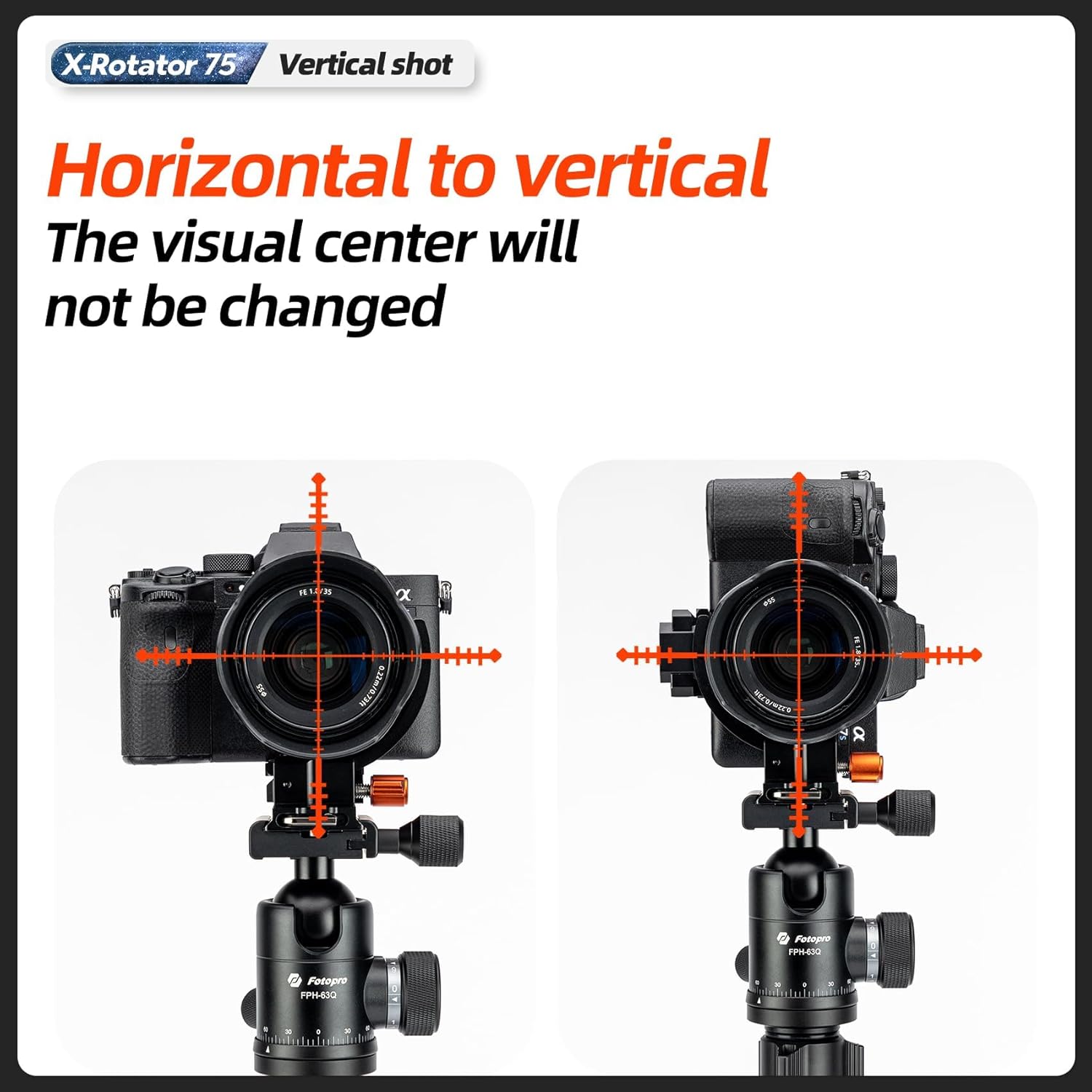
Figure 4.2: Comparison of horizontal and vertical shooting using the X-Rotator 75, demonstrating that the visual center remains unchanged. The image shows two camera setups, one horizontal and one vertical, with crosshairs indicating the consistent optical axis.

Figure 4.3: Illustration of the X-Rotator 75's 1/4 circle design, which avoids blocking camera wiring openings. The image shows a camera mounted with the X-Rotator 75, highlighting the clearance around the camera's side ports.
5. Maintenance
Proper maintenance ensures the longevity and optimal performance of your Fotopro X-Aircross Lite Tripod.
- Cleaning: After use, especially in dusty or sandy environments, wipe down the tripod legs and ball head with a soft, dry cloth. For stubborn dirt, a slightly damp cloth can be used, followed by immediate drying.
- Lubrication: Periodically check the leg locking mechanisms and ball head for smooth operation. If necessary, apply a small amount of silicone-based lubricant to moving parts, avoiding excessive application.
- Storage: Store the tripod in a clean, dry place, away from extreme temperatures and humidity. Ensure all locks are disengaged or lightly tightened to prevent strain on components during storage.
- Inspection: Regularly inspect all screws, bolts, and connections to ensure they are tight. Do not overtighten.
6. Troubleshooting
This section addresses common issues you might encounter with your Fotopro X-Aircross Lite Tripod.
| Problem | Possible Cause | Solution |
|---|---|---|
| Tripod legs not extending/retracting smoothly. | Dirt or debris inside leg sections; locking mechanism not fully disengaged. | Clean leg sections thoroughly. Ensure locking mechanisms are fully turned to the unlock position before extending/retracting. |
| Ball head not holding position. | Main locking knob not tightened sufficiently; excessive load. | Ensure the main locking knob is fully tightened. Verify that the camera and lens weight does not exceed the tripod's maximum load capacity. |
| X-Rotator 75 not fitting lens or blocking ports. | Lens diameter too large; incorrect alignment. | Confirm lens diameter is less than 65mm. Re-align the X-Rotator 75 carefully to ensure proper fit and port clearance. |
7. Specifications
- Model: Fotopro X-Aircross Lite Grey with Mount Ring X-Rotator 75 Grey
- Material: Carbon Fiber (Tripod Legs)
- Weight: 1.78 lbs (0.81 kg)
- Maximum Load Capacity: 11.02 lbs (5 kg)
- Single Tripod Section Load Capacity: 22 lbs (10 kg)
- Folded Height: 15.74 inches
- Ball Head: Professional Panoramic Ball Head
- X-Rotator 75 Compatibility: Lenses with diameter less than 65mm
- ASIN: B0F5PQPRSJ
- Date First Available: April 21, 2025
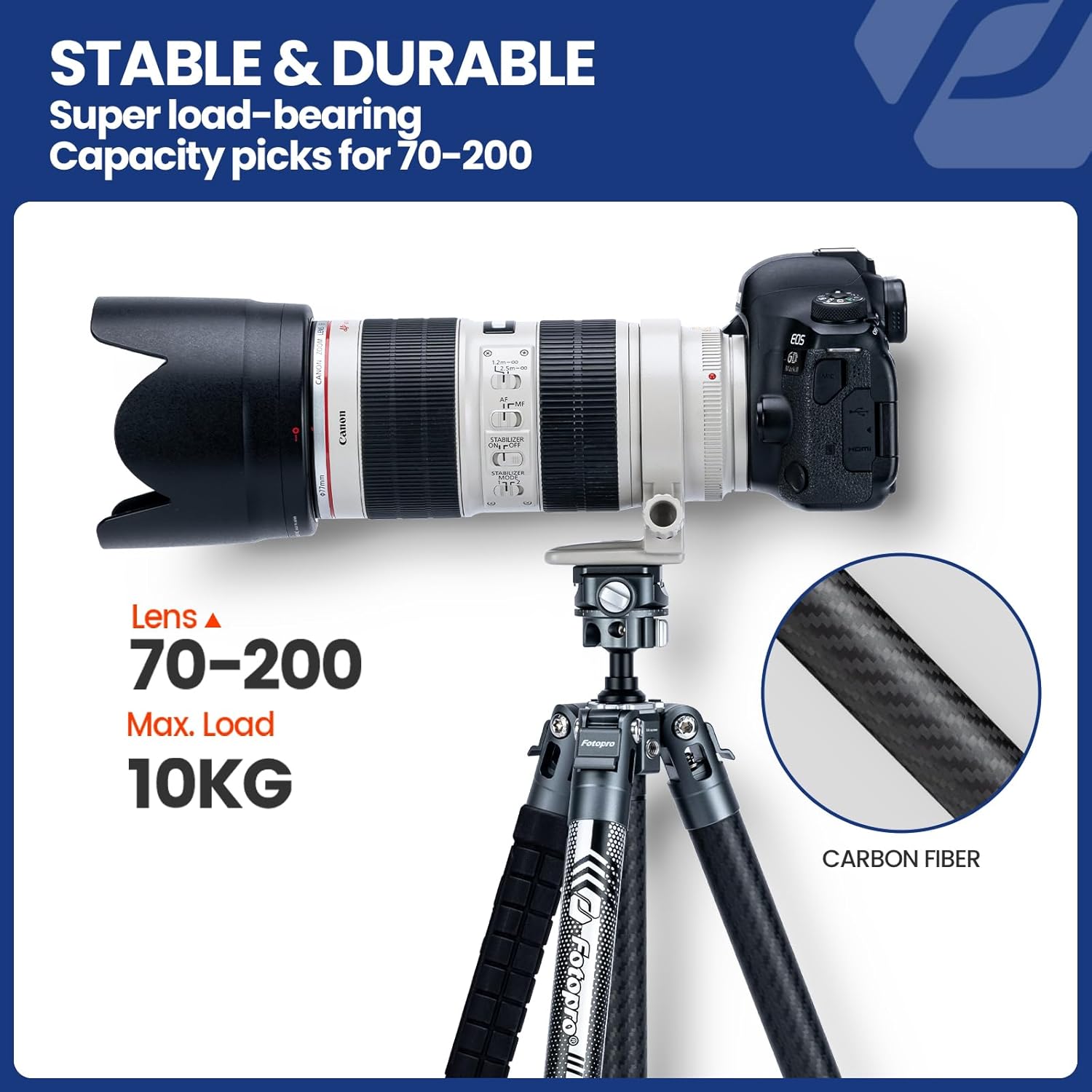
Figure 7.1: Image illustrating the stable and durable nature of the tripod, highlighting its super load-bearing capacity for lenses like a 70-200mm. The image shows a camera with a large lens mounted on the tripod, with text indicating a max load of 10KG (22lbs) and carbon fiber construction.

Figure 7.2: Image demonstrating the lightweight nature of the Fotopro X-Aircross Lite tripod, showing it on a kitchen scale with a weight reading of 0.810 kg (1.78 lbs). The image emphasizes its portability for travel.
8. Warranty and Support
Fotopro products are manufactured to high-quality standards. For warranty information, technical support, or service inquiries, please refer to the official Fotopro website or contact their customer service.
You can visit the official Fotopro store for more information: Fotopro Official Store
Related documentsX-Aircross Lite Grey with Mount Ring X-Rotator 75 Grey

Ask a question about this manual
Ask about setup, troubleshooting, compatibility, parts, safety, or missing instructions. Manuals+ will review the question and use this page’s manual context to help answer it.