
Introduction
This manual provides instructions for the proper installation, use, and maintenance of your WUNIAK Premium Leather Folio Stand Cover for the Teclast P50 2025 Tablet 11 inch. Please read these instructions carefully before use to ensure optimal performance and longevity of the product.

Image: The case is designed to offer all-round protection for your tablet.
Package Contents
- 1 x WUNIAK Premium Leather Folio Stand Cover (Black)
Note: The Teclast P50 2025 Tablet 11 inch is not included.
Setup: Installing the Tablet Case
- Prepare Your Tablet: Ensure your Teclast P50 2025 Tablet 11 inch is clean and free of dust or debris.
- Align the Tablet: Gently align your tablet with the hard shell frame of the case. Ensure all ports, buttons, and camera cutouts on the case match those on your tablet.
- Insert the Tablet: Carefully press the tablet into the case, starting from one corner and working your way around. Apply gentle, even pressure until the tablet is securely seated within the case. Do not force the tablet into the case.
- Verify Fit: Once installed, check that the tablet is snug and that all edges are protected. Confirm that all ports, speakers, and buttons are accessible and functional.

Image: The case provides full access to all tablet features, including speakers, cameras, and ports, once the tablet is installed.
Operating Instructions
1. Stand Function
The case features a triple-fold design that allows for multiple viewing angles. To use the stand function:
- Viewing Angle (65 degrees): Fold the front cover into a triangular stand. This angle is suitable for watching videos, presentations, or general viewing.
- Typing Angle (30 degrees): Fold the front cover into a lower triangular stand. This angle is ideal for comfortable typing or drawing.
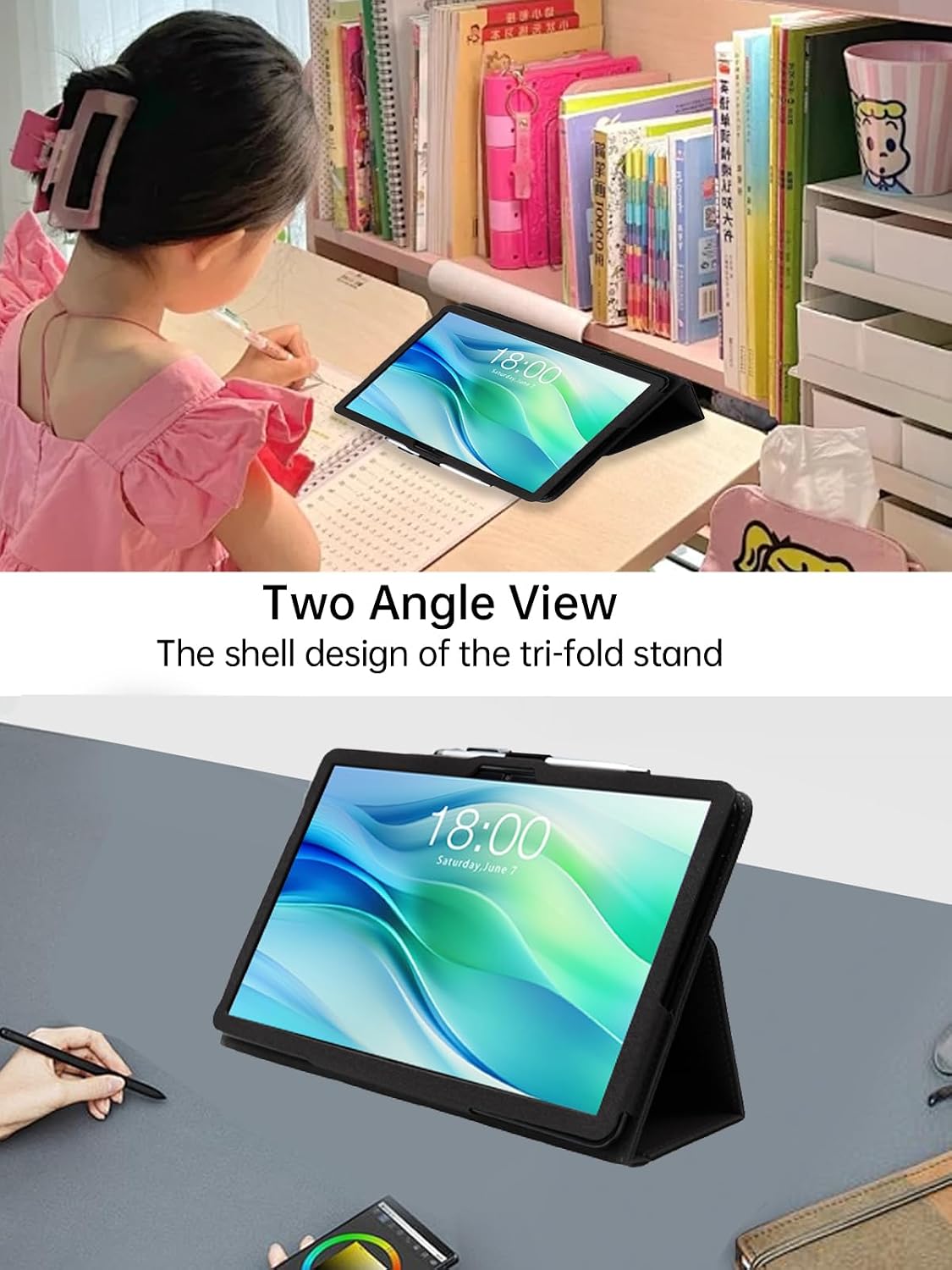
Image: The foldable cover offers sturdy stand positions for both viewing (65 degrees) and typing (30 degrees).
2. Hand Strap
A built-in leather hand strap is provided on the back of the case for secure one-handed operation. Slide your hand through the strap to hold the tablet firmly, reducing the risk of accidental drops.

Image: The back handle enhances convenience and ease of handling for the tablet.
3. Auto Wake/Sleep Function
The case supports the tablet's auto wake/sleep feature. Opening the cover will automatically wake your tablet, and closing it will put your tablet to sleep. This helps conserve battery power and extends standby time.

Image: The auto wake/sleep feature provides an immediate response, saving battery power and extending standby time.
4. Magnetic Closure
The case features a magnetic buckle and external elastic band to ensure the cover remains securely closed when not in use, providing enhanced protection for your tablet screen.
Maintenance and Care
To maintain the quality and appearance of your WUNIAK Premium Leather Folio Stand Cover, follow these guidelines:
- Cleaning: Wipe the faux leather surface with a soft, damp cloth. Avoid using harsh chemicals, abrasive cleaners, or solvents, as these can damage the material.
- Stain Removal: For stubborn stains, use a mild soap solution on a soft cloth and gently rub the affected area. Wipe clean with a damp cloth and allow to air dry completely.
- Storage: Store the case in a cool, dry place away from direct sunlight and extreme temperatures to prevent material degradation.
- Avoid Sharp Objects: Keep the case away from sharp objects to prevent scratches or punctures.
Troubleshooting
- Tablet Does Not Fit: Ensure you have the correct model (Teclast P50 2025 Tablet 11 inch). This case is specifically designed for this model and may not fit others.
- Auto Wake/Sleep Not Working: Check if your tablet's settings have the "Smart Cover" or "Magnetic Cover" feature enabled. Ensure the case is properly aligned and fully closed.
- Stand is Unstable: Ensure the folds are properly creased and the tablet is placed securely in the stand position on a flat, stable surface.
Specifications
| Feature | Detail |
|---|---|
| Brand | WUNIAK |
| Model Number | P50 |
| Compatible Device | Teclast P50 2025 Tablet 11 inch |
| Material | High quality durable PU leather (Faux Leather) |
| Color | Black |
| Form Factor | Folio Case |
| Shell Type | Soft |
| Special Features | Triple-fold stand, Built-in hand strap, Auto Wake/Sleep, Magnetic closure, Full body protection |
| Item Dimensions (L x W x H) | 0.04 x 0.1 x 0.1 inches (Note: These dimensions may refer to packaging or internal components, not the full case size.) |
Warranty and Support
WUNIAK products are designed for durability and performance. For any questions, technical support, or warranty inquiries, please contact our customer service team. We are committed to providing timely assistance and ensuring customer satisfaction.
Please refer to your purchase documentation or the seller's contact information for specific warranty terms and support channels.
Safety Information
- Keep the case away from extreme heat sources or open flames.
- Do not attempt to modify or disassemble the case.
- Keep out of reach of small children to prevent choking hazards from small parts.