
1. Introduction
Thank you for purchasing the XDOBO Dolby Atmos 7.1.4 Surround Sound System. This manual provides essential information for setting up, operating, and maintaining your new audio system. Please read it thoroughly before use to ensure optimal performance and safety.
2. Product Features
- Dolby Atmos 7.1.4 Channel System: Delivers a revolutionary, immersive sound experience with overhead audio effects.
- 360° Surround Sound: Creates a wide soundstage for enhanced immersion, reproducing environmental sounds with precision through left/right sky channels (up-firing speakers), a center speaker, and left/right surround channels.
- 8-inch Wireless Subwoofer: Provides powerful, deep bass, covering frequencies down to 40Hz for impactful audio.
- Bluetooth 5.3 EDR: Ensures stable, high-speed wireless connectivity for seamless audio streaming.
- 500W Peak Output: Delivers overwhelming power for a truly moving audio experience.
- DSP Digital Tuning Technology: Optimizes sound sources and adjusts the sound field for enhanced spatial presence.
- Wireless Speaker Connectivity: All speakers connect wirelessly, allowing for flexible placement with only power connections required.
- Multiple Connection Options: Supports HDMI ARC, HDMI IN, Bluetooth, USB, Optical, and Coaxial inputs for versatile connectivity.
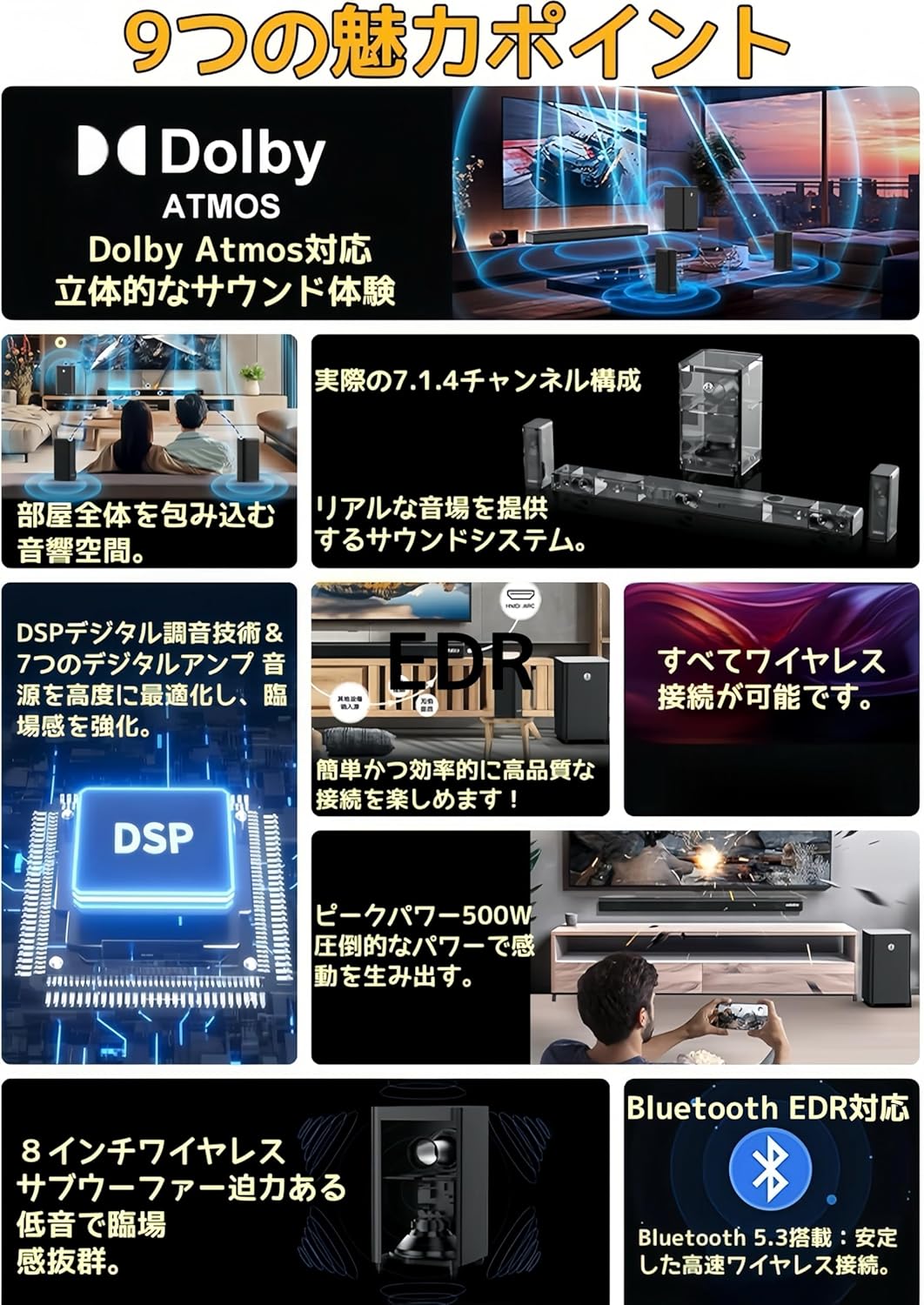
Image: Overview of the system's key features, including Dolby Atmos, 7.1.4 channel configuration, wireless connectivity, DSP technology, 500W peak power, 8-inch wireless subwoofer, and Bluetooth 5.3 EDR.

Image: Illustration of the DSP (Digital Signal Processor) technology, highlighting its role in optimizing Dolby Atmos content and enhancing the sound field.

Image: Close-up view of an up-firing speaker, demonstrating how it reflects sound off the ceiling at a 20-degree angle to create a three-dimensional audio space.
3. Package Contents
Please check that all items are present in the package:
- Soundbar x 1 (with Power Cable x 1)
- Surround Speakers x 2 (with Power Adapters x 2, Wall Mount Brackets x 2)
- Subwoofer x 1 (with Power Cable x 1)
- Remote Control x 1
- Mounting Screw Set x 1
- Instruction Manual x 1
4. Setup
4.1 Speaker Placement
The XDOBO 7.1.4 system consists of a soundbar, two surround speakers, and a subwoofer. All speakers are wireless, offering flexibility in placement.
- Soundbar: Place the soundbar centrally below your TV. Ensure there are no obstructions in front of the up-firing speakers on top of the soundbar.
- Surround Speakers: Position the two surround speakers behind or to the sides of your listening position. They should be equidistant from the main listening area for optimal surround sound. Wall mounting is also an option using the included brackets.
- Subwoofer: The wireless subwoofer can be placed anywhere in the room where it provides the best bass response. Experiment with different locations to find the ideal spot.

Image: Diagram showing the layout of the soundbar, subwoofer, and left/right surround speakers, illustrating the 7.1.4 channel configuration with left/right, center, left/right surround, and left/right sky channels.

Image: An example setup showing a soundbar and two wireless surround speakers positioned around a TV and sofa, demonstrating the flexibility of wireless placement for an immersive experience.
4.2 Power Connection
Connect the provided power cables to the soundbar, subwoofer, and surround speakers, then plug them into appropriate power outlets. The speakers will automatically pair upon powering on.
5. Operating Instructions
5.1 Power On/Off
Press the Power button on the soundbar or the remote control to turn the system on or off.
5.2 Input Selection
Use the 'Input' button on the remote control or the soundbar to cycle through available input sources: HDMI ARC, HDMI IN, Bluetooth, USB, Optical, Coaxial, and AUX.
5.3 Volume Control
Adjust the volume using the Volume Up (+) and Volume Down (-) buttons on the remote control or the soundbar.
5.4 Bluetooth Pairing
- Select 'Bluetooth' as the input source on the soundbar. The soundbar will enter pairing mode.
- On your mobile device, enable Bluetooth and search for available devices.
- Select "XDOBO Draco Mini" (or similar) from the list to connect.
- Once connected, you can stream audio from your device to the sound system.
6. Connections
The soundbar offers various connection options for different audio sources.
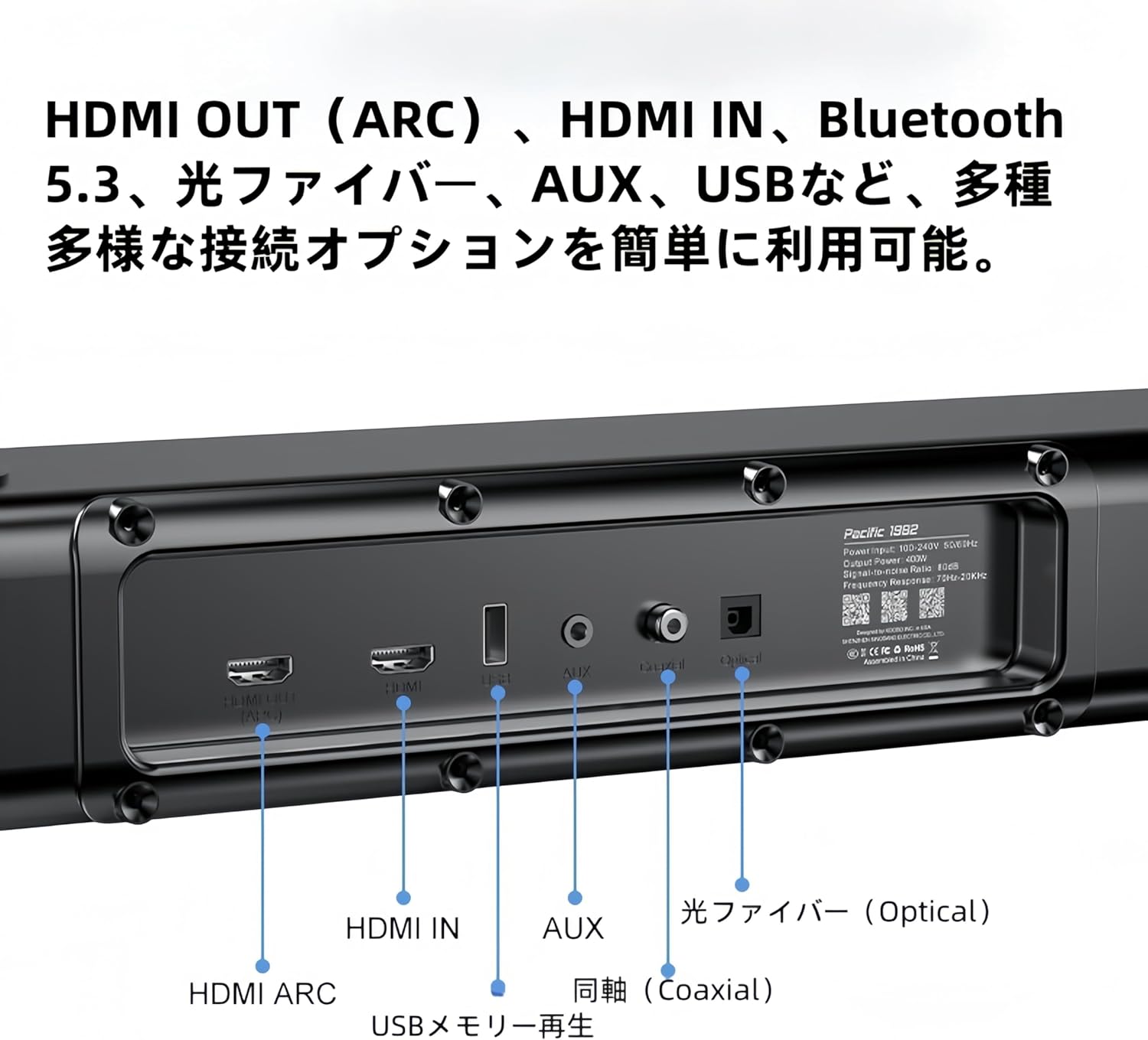
Image: Detailed view of the soundbar's rear panel, showing various input ports including HDMI ARC, HDMI IN, USB, AUX, Optical, and Coaxial connections.
- HDMI ARC: Connect to your TV's HDMI ARC port for high-quality audio transmission and control.
- HDMI IN: Connect external devices like Blu-ray players or game consoles.
- Bluetooth: For wireless audio streaming from compatible devices (refer to 5.4 Bluetooth Pairing).
- USB: Insert a USB memory stick for direct audio playback.
- Optical: Connect to your TV or other audio sources using an optical cable.
- Coaxial: Connect to compatible audio sources using a coaxial cable.
- AUX: Use a 3.5mm audio cable to connect to devices with an analog audio output.
7. Maintenance
To ensure the longevity and optimal performance of your sound system, follow these maintenance guidelines:
- Cleaning: Use a soft, dry cloth to wipe the surfaces of the speakers. Do not use liquid cleaners, aerosols, or abrasive materials, as they may damage the finish.
- Ventilation: Ensure proper ventilation around all speaker units. Do not block any ventilation openings.
- Storage: If storing the system for an extended period, disconnect it from power and store it in a cool, dry place away from direct sunlight and extreme temperatures.
8. Troubleshooting
If you encounter any issues with your XDOBO sound system, please refer to the following common problems and solutions:
| Problem | Possible Cause | Solution |
|---|---|---|
| No power | Power cable not connected; Power outlet faulty | Ensure all power cables are securely connected and the power outlet is functional. |
| No sound | Incorrect input selected; Volume too low; Cables not connected properly | Select the correct input source. Increase the volume. Check all audio cables for secure connections. |
| Bluetooth pairing fails | Device too far; Soundbar not in pairing mode; Interference | Ensure the soundbar is in Bluetooth pairing mode. Move your device closer to the soundbar. Avoid strong electromagnetic interference. |
| Surround speakers or subwoofer not connecting wirelessly | Power issue; Out of range; Interference | Ensure all wireless speakers are powered on. Place them within range of the soundbar. Restart the soundbar and speakers. |
9. Specifications
| Feature | Detail |
|---|---|
| Model Name | Draco Mini |
| Speaker Type | Soundbar |
| Surround Sound Channel Configuration | 7.1.4 |
| Product Dimensions (Soundbar) | 5D x 110W x 6H cm |
| Product Dimensions (Subwoofer) | 240 x 240 x 420 mm |
| Product Dimensions (Surround Speakers) | 228 x 114 x 72 mm |
| Wireless Communication Technology | Bluetooth 5.3 + EDR |
| Frequency Response Range | 50Hz ~ 18KHz |
| Output Sound Pressure Level | >80dB |
| Distortion Rate | <10% |
| Speaker Max Output | 500 Watts |
| Connectivity Technology | HDMI ARC, Bluetooth, USB, Optical Fiber, Coaxial |
| Audio Output Mode | Surround |
| Mounting Type | Wall, Tabletop |

Image: A table summarizing the product specifications for the XDOBO Draco Mini, including model number, dimensions, Bluetooth version, frequency range, and interface types.
10. Safety Information
Please observe the following safety precautions to prevent damage to the product and ensure your safety:
- Do not expose the unit to rain, moisture, or extreme temperatures.
- Do not place the unit near heat sources such as radiators, heat registers, stoves, or other apparatus (including amplifiers) that produce heat.
- Do not place objects filled with liquids, such as vases, on the unit.
- Do not block any ventilation openings. Install in accordance with the manufacturer's instructions.
- Protect the power cord from being walked on or pinched, particularly at plugs, convenience receptacles, and the point where they exit from the apparatus.
- Only use attachments/accessories specified by the manufacturer.
- Unplug this apparatus during lightning storms or when unused for long periods of time.
11. Warranty and Support
XDOBO products are designed and manufactured to the highest quality standards. For information regarding warranty coverage, technical support, or service inquiries, please refer to the warranty card included in your package or contact XDOBO customer support through the retailer where you purchased the product.


