
Introduction
The VOOPOO ARGUS G3 is an advanced pod system designed for a superior vaping experience. It features the innovative iCOSM CODE 2.0 technology within its new ARGUS Top Fill Cartridge V2, ensuring stable flavor delivery from start to finish while minimizing leaks. This versatile device supports both Mouth-to-Lung (MTL) and Restricted Direct-to-Lung (RDL) vaping styles. The ARGUS G3 is equipped with a built-in 1500mAh battery and offers adjustable power output from 5W to 30W. Its 0.96-inch color screen can be customized with three different themes and two UI animations. Operation is simplified with an auto-draw mechanism, activating automatically upon inhalation. The kit includes two 3ml capacity cartridges (0.4Ω and 0.7Ω) and maintains compatibility with the original ARGUS Pod series, making it an ideal upgrade for existing users.
Package Contents
Please verify that all items listed below are included in your package:
- ARGUS G3 Device x1
- ARGUS Top Fill Cartridge V2 0.4Ω (3ml) x1
- ARGUS Top Fill Cartridge V2 0.7Ω (3ml) x1
- USB Type-C Cable x1
- Lanyard x1
- User Manual x1
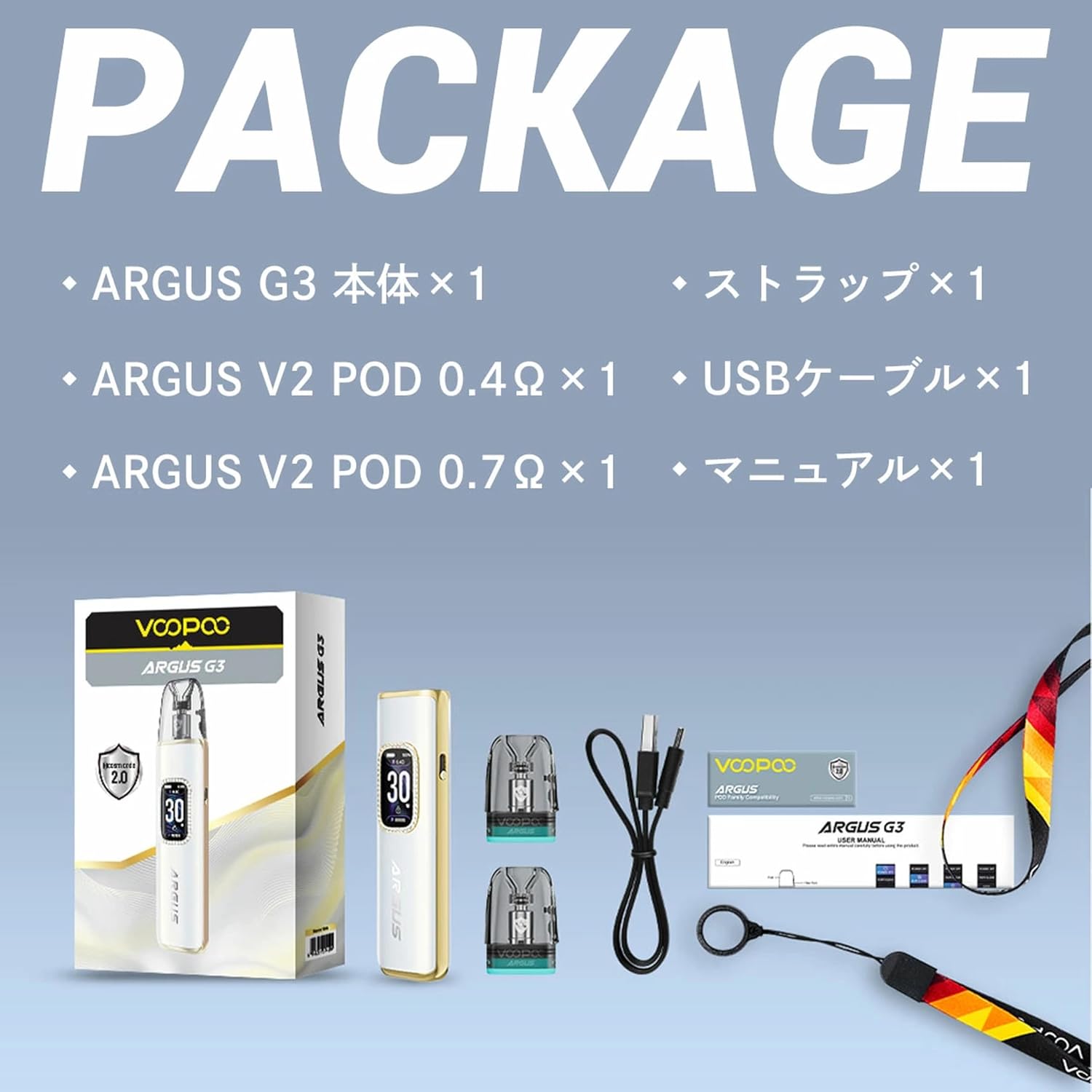
Image: Contents of the VOOPOO ARGUS G3 Pod Kit package, including the device, two cartridges, USB-C cable, lanyard, and user manual.
Product Overview
The ARGUS G3 features a sleek design with advanced technology for an optimized vaping experience.

Image: The VOOPOO ARGUS G3 device in Midnight Black, showcasing its elegant design and display.

Image: Diagram highlighting the iCOSM CODE 2.0 technology and large coil design for enhanced flavor.

Image: Illustration of the 1500mAh battery capacity and maximum 30W output capability of the device.

Image: Detailed view of the Golden Cotton and MEGA-CORE cotton within the cartridge, emphasizing leak prevention.

Image: Examples of the three customizable UI themes (SMART, SPORT, MUSIC) available on the color screen.

Image: Comparison of the two included cartridge types: 0.4Ω V2 (18-30W, more vapor) and 0.7Ω V2 (14-18W, flavor-focused).
Setup
1. Charging the Device
Before first use, fully charge the ARGUS G3 device. Connect the provided USB Type-C cable to the charging port on the device and plug the other end into a suitable USB power source (5V/2A recommended). The screen will indicate the charging status.
2. Filling the Cartridge
- Remove the cartridge from the device.
- Locate the silicone plug on the top of the cartridge.
- Carefully open the silicone plug to expose the filling port.
- Insert the nozzle of your e-liquid bottle into the filling port and slowly fill the cartridge. Avoid overfilling.
- Securely close the silicone plug to prevent leaks.
- After filling a new cartridge, wait at least 5-10 minutes before vaping to allow the e-liquid to fully saturate the coil. This prevents dry hits and extends coil life.
3. Installing the Cartridge
Insert the filled cartridge firmly into the device. It is held in place by magnets. Ensure it is seated correctly.
Operating Instructions
1. Power On/Off
The ARGUS G3 typically powers on automatically when a cartridge is inserted or when you take a puff. To manually power on/off, press the main button (if present, or refer to specific device instructions for buttonless models) five times rapidly.
2. Vaping
The device uses an auto-draw activation system. Simply inhale from the mouthpiece to activate the device and produce vapor.
3. Adjusting Wattage
The ARGUS G3 allows for wattage adjustment between 5W and 30W. Use the adjustment buttons (if available, or refer to the manual for screen-based adjustment) to increase or decrease the power output to your preferred level. The recommended wattage for each cartridge type is:
- 0.4Ω V2 Cartridge: 18W - 30W (for more vapor)
- 0.7Ω V2 Cartridge: 14W - 18W (for enhanced flavor)
4. Changing UI Themes and Modes
The 0.96-inch color screen offers customization options:
- UI Themes: Choose from three distinct themes (SMART, SPORT, MUSIC). Refer to the device interface for navigation and selection.
- Modes: The device supports SMART, SUPER, and ECO modes. These modes optimize performance based on your preferences. Consult the on-screen menu for mode selection.
Maintenance
1. Cleaning the Device
Regularly clean your ARGUS G3 device to ensure optimal performance and longevity:
- Wipe the device body with a soft, dry cloth.
- Clean the connection area between the device and the cartridge with a cotton swab to remove any e-liquid residue.
- Ensure the charging port is free of dust and debris.
2. Replacing the Cartridge
When the flavor diminishes, vapor production decreases, or you experience a burnt taste, it's time to replace the cartridge:
- Pull the old cartridge firmly out of the device.
- Dispose of the used cartridge responsibly.
- Install a new, filled cartridge as described in the "Setup" section.
3. Preventing Leaks
While the ARGUS G3 cartridges are designed to be leak-resistant, proper handling can further prevent issues:
- Ensure the silicone plug is fully sealed after filling.
- Avoid overfilling the cartridge.
- Do not leave the device in direct sunlight or extreme temperatures.
- Store the device upright when not in use.
Troubleshooting
If you encounter issues with your ARGUS G3, refer to the following common troubleshooting steps:
| Problem | Possible Cause | Solution |
|---|---|---|
| Device not firing / No vapor | Low battery; Cartridge not properly installed; Coil not saturated; Device off. | Charge the device; Reinstall cartridge; Wait 5-10 mins after filling new cartridge; Power on device (5 clicks). |
| Burnt taste | Coil is dry or worn out; E-liquid level too low. | Refill cartridge; Replace cartridge. |
| Leaking | Silicone plug not sealed; Overfilled cartridge; Worn-out cartridge. | Ensure plug is sealed; Do not overfill; Replace cartridge. |
| Weak flavor / Low vapor | Low wattage setting; Worn-out cartridge; Low battery. | Increase wattage; Replace cartridge; Charge device. |
If the problem persists after trying these solutions, please contact customer support.
Specifications
| Feature | Detail |
|---|---|
| Dimensions | 120 x 26.4 x 15.1mm (with 3ml pod) |
| Weight | Approx. 65g |
| Battery Capacity | 1500mAh (Built-in) |
| Output Power | 5W - 30W |
| Output Voltage | 3.3V - 4.35V |
| Resistance Range | 0.4Ω - 3.0Ω |
| Charging | USB Type-C (5V/2A) |
| Display | 0.96-inch TFT Color Screen (3 themes, 2 animations) |
| Activation | Auto-draw |
| Modes | SMART / SUPER / ECO |
| Compatible Cartridges | ARGUS Top Fill Cartridge V2 / ARGUS Pod (V1) |
| Cartridge Capacity | 3ml |
| Special Feature | Leak-proof design |
Safety Information
Please read and follow these safety guidelines to ensure safe operation of your VOOPOO ARGUS G3 Pod Kit:
- Keep the device out of reach of children and pets.
- Do not expose the device to extreme temperatures (hot or cold), direct sunlight, or high humidity.
- Use only the provided USB Type-C cable for charging.
- Do not use the device if it is damaged or has been submerged in water.
- Avoid disassembling the device or attempting to repair it yourself.
- Dispose of the device and cartridges responsibly according to local regulations.
- This product is intended for adult smokers and vapers. It is not recommended for non-smokers, pregnant or breastfeeding women, or individuals with heart conditions, diabetes, or other health issues.
Warranty and Support
VOOPOO products are manufactured to the highest quality standards. For warranty information, please refer to the warranty card included in your package or visit the official VOOPOO website. If you experience any issues with your device or require technical assistance, please contact the retailer where you purchased the product or VOOPOO customer support directly. Please have your proof of purchase and product serial number ready when contacting support.


