
TOOLTOP TT-ET15S+Macro lens
TOOLTOP ET15S Professional Thermal Imager Camera & Digital Multimeter User Manual
Model: TT-ET15S+Macro lens
Introduction
This manual provides comprehensive instructions for the operation, maintenance, and troubleshooting of your TOOLTOP ET15S Professional Thermal Imager Camera with integrated Digital Multimeter. Please read this manual thoroughly before using the device to ensure safe and efficient operation.
The TOOLTOP ET15S is an industrial-grade thermal camera combined with a high-precision digital multimeter, designed for various applications including PCB inspection, HVAC repair, and general electrical measurements.
Key Features
- 256x192 Resolution Thermal Imaging Sensor: Provides clear thermal images with a 25Hz refresh rate.
- 19,999 Counts Digital Multimeter: High-precision measurements for voltage, current, resistance, capacitance, diode, frequency, NCV, and temperature.
- 3.5-inch IPS Screen: Large, high-definition display for clear viewing of thermal images and multimeter readings.
- Waveform Graph Visualization: Multimeter measurement results can be displayed as waveform graphs for data trend analysis.
- Optional Macro Lens: Captures small details (1mm x 1mm) for precise inspections like smartphone or PCB repairs.
- Multi-language Support: Available in 11 languages.
- Long Battery Life: Detachable 18650 lithium battery provides up to 8 hours of runtime.
- PC Software Support: Allows transfer and analysis of multimeter data charts and thermal images.
Package Contents
Verify that all items are present in the package:
- ET15S Thermal Imager & Multimeter Unit
- Macro Lens (if purchased with this option)
- Product Manual
- Instrument Storage Bag
- Multimeter Probes
- USB Data Cable

Figure 1: Included components of the ET15S package.
Setup
1. Battery Installation and Charging
The ET15S is powered by a detachable 18650 lithium battery. Ensure the battery is fully charged before first use.
- Locate the battery compartment on the device.
- Insert the 18650 battery, observing the correct polarity (+/-).
- Close the battery compartment securely.
- Connect the device to a USB power source using the provided USB data cable for charging. The charging indicator will show the charging status.
2. Macro Lens Installation (Optional)
If your model includes the optional macro lens, follow these steps for installation:
- Identify the macro lens attachment point on the top of the ET15S unit.
- Carefully align the macro lens with the attachment point.
- Gently slide or click the macro lens into place until it is secure.
- When using, the macro lens can be moved left and right to adjust focus for optimal small detail capture.

Figure 2: Installation and adjustment of the optional macro lens.
Operating Instructions
1. Powering On/Off
Press and hold the power button (usually located on the side or front) to turn the device on or off.
2. Navigating the Interface
The ET15S features a 3.5-inch IPS screen. Use the navigation buttons (e.g., directional pad, SELECT, MENU) to move through menus and select options.

Figure 3: ET15S display and control layout.
3. Thermal Imaging Mode
To activate thermal imaging:
- Select the "IR Camera" mode from the main menu.
- Point the camera lens towards the object or area you wish to inspect.
- The screen will display the thermal image with temperature readings.
- Adjust emissivity (0.1 – 0.99, default 0.95) as needed for accurate temperature measurements based on the material being inspected.
- Choose from various color palettes (e.g., White Heat, Black Heat, Rainbow, Iron Red) to visualize temperature differences effectively.

Figure 4: Thermal imaging display showing temperature distribution.
4. Digital Multimeter Mode
The ET15S integrates a full-featured digital multimeter. To use:
- Connect the multimeter probes to the appropriate input jacks (COM, VΩ, 10A MAX).
- Select the "Multimeter" mode from the main menu.
- Choose the desired measurement function (e.g., DCV, ACV, Resistance, Capacitance, Diode, Frequency, NCV).
- The device supports both manual and automatic ranging.
- For waveform visualization, select the appropriate option within the multimeter interface to view data trends.
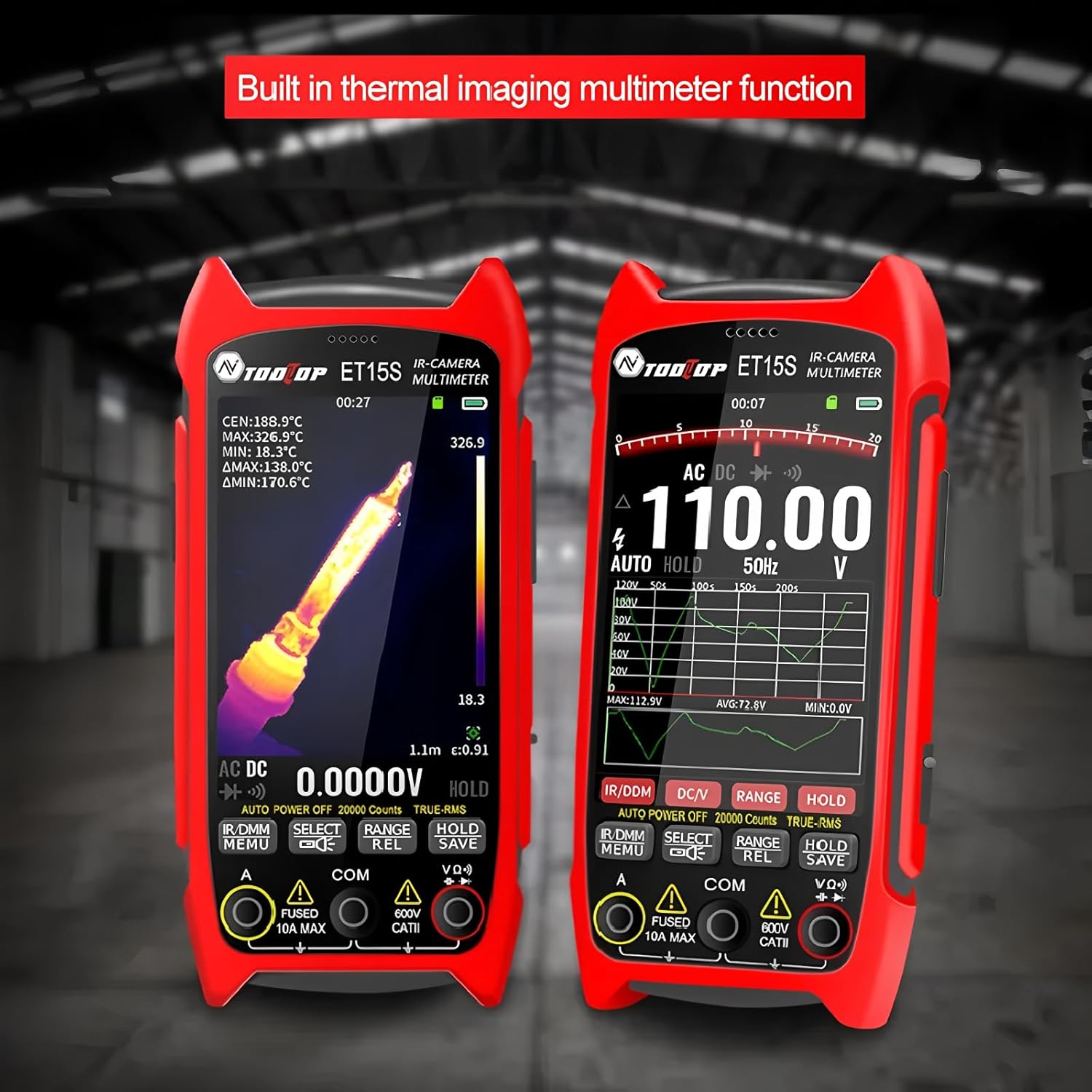
Figure 5: Multimeter interface showing voltage measurement and waveform graph.
5. Data Storage and PC Connectivity
The ET15S allows for saving thermal images and multimeter data. To transfer data to a PC:
- Connect the ET15S to your computer using the USB data cable.
- The device should appear as a removable storage device.
- Access saved images and data files.
- Use the dedicated PC software (available for download from the manufacturer's website) for advanced analysis of multimeter data charts and thermal images.

Figure 6: Connecting the ET15S to a PC for data transfer and analysis.
Maintenance
1. Cleaning the Device
Regular cleaning helps maintain the device's performance and longevity.
- Use a soft, dry cloth to wipe the exterior of the device.
- For the screen and lens, use a microfiber cloth specifically designed for optics. Avoid abrasive materials or harsh chemicals.
- Ensure the device is powered off before cleaning.
2. Battery Care
- Store the device and battery in a cool, dry place when not in use.
- Avoid fully discharging the battery frequently.
- If storing for extended periods, charge the battery to approximately 50% to prolong its lifespan.
3. Storage
When not in use, store the ET15S in its provided instrument storage bag to protect it from dust, moisture, and physical damage.
Troubleshooting
| Problem | Possible Cause | Solution |
|---|---|---|
| Device does not power on. | Battery is discharged or incorrectly installed. | Charge the battery. Ensure the battery is inserted with correct polarity. |
| Thermal image is blurry or unclear. | Lens is dirty; incorrect focus (with macro lens); object is out of range. | Clean the lens. Adjust the macro lens position. Ensure the object is within the optimal working distance. |
| Multimeter readings are inaccurate. | Probes are not properly connected; incorrect measurement function selected; battery low. | Check probe connections. Select the correct measurement mode. Charge the battery. |
| Cannot connect to PC. | USB cable issue; driver not installed; device not in data transfer mode. | Try a different USB cable/port. Install necessary drivers (if prompted). Ensure the device is in USB mode. |
Specifications
Thermal Imaging Parameters
- Sensor: Vanadium oxide (VOx)
- Image Capture Frequency: 25Hz
- Thermal Imaging Pixels: 256x192
- Display Image Resolution: 427 x 320
- Field of View (FOV): 50.0°(H) × 37.2°(V)
- Emissivity: 0.1 – 0.99 adjustable (0.95 by default)
- Temperature Range: -20℃ ~ +550℃
- Accuracy: ±2℃ or ±2%
- Measurement Resolution: 0.1℃/0.1℉
- Color Palettes: White Heat, Black Heat, Fusion 1, Rainbow, Fusion 2, Iron Red 1, Iron Red 2, Dark Brown, Color 1, Color 2, Ice Fire, Rain, Green Heat, Red Heat, Deep Blue
- Macro Lens Working Distance: Approximately 5cm (Optional)
Multimeter Parameters
- Display: 19999 counts, Updates 3/sec
- DC Maximum Input Voltage: 1000V
- AC Maximum Input Voltage: 750V
- Maximum Current Measurement: 10A
- Maximum Resistance: 99.99MΩ
General Specifications
- Model Number: TT-ET15S+Macro lens
- Brand: TOOLTOP
- Item Weight: 1 Kilograms
- Package Dimensions: 7.87 x 5.91 x 3.94 inches
- Country of Origin: China
- Certifications: CE, RoHS
Warranty Information
TOOLTOP provides a limited warranty for the ET15S Professional Thermal Imager Camera & Digital Multimeter. Please refer to the warranty card included with your product or visit the official TOOLTOP website for detailed warranty terms and conditions. This warranty typically covers manufacturing defects and material flaws under normal use.
EU Spare Part Availability Duration: 1 Year
Customer Support
For technical assistance, product inquiries, or service requests, please contact TOOLTOP customer support through the following channels:
- Website: Visit the official TOOLTOP website for FAQs, software downloads, and contact forms.
- Email: Refer to your product packaging or the official website for customer service email addresses.
- Phone: Contact numbers may be available on the official website for your region.
When contacting support, please have your product model number (TT-ET15S+Macro lens) and purchase information ready.
Ask a question about this manual
Ask about setup, troubleshooting, compatibility, parts, safety, or missing instructions. Manuals+ will review the question and use this page’s manual context to help answer it.