
1. Product Overview
The Reencle Gravity is a household food waste disposer that utilizes a hybrid bio-drying method to efficiently process organic waste. It is designed for quiet operation and features an advanced deodorization system to maintain a fresh environment in your kitchen.
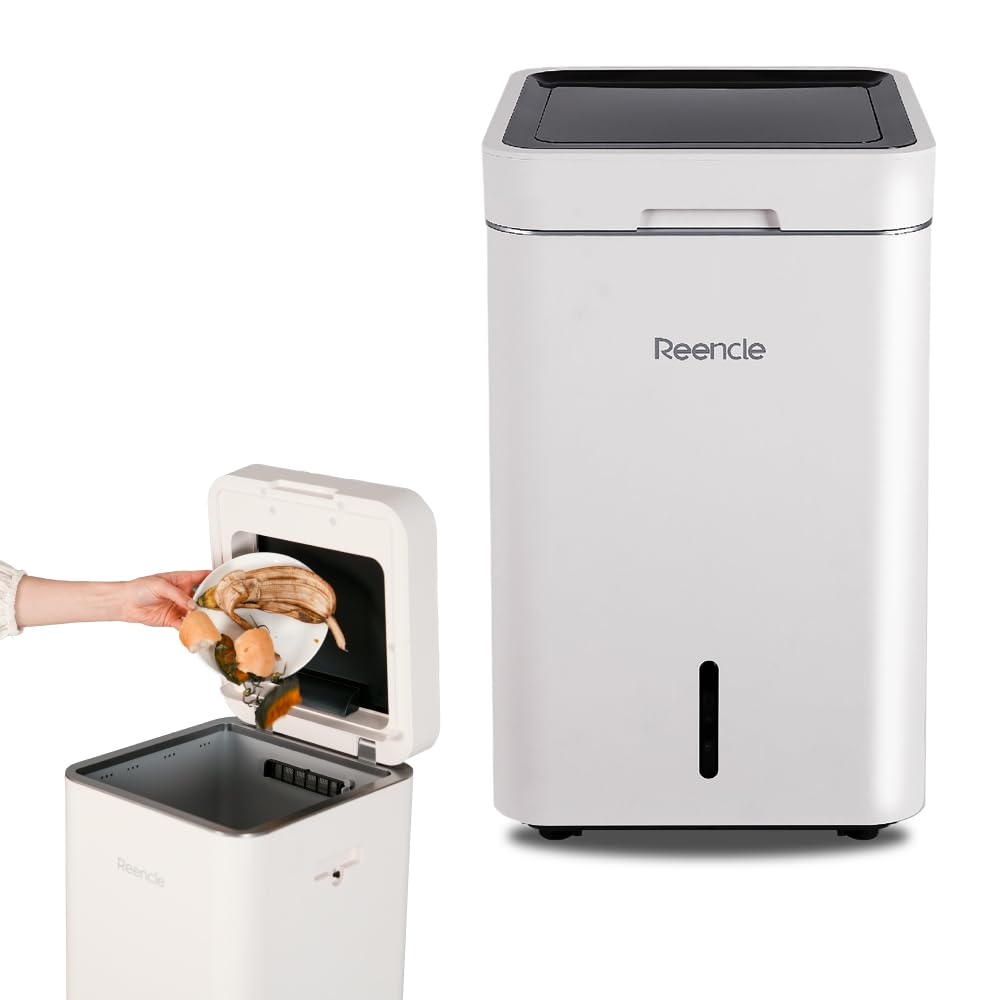
Image: The Reencle Gravity food waste disposer, a compact and modern appliance.

Image: Diagram illustrating the hybrid bio-drying processing method.
2. Safety Information
Please read all safety instructions carefully before operating the Reencle Gravity food waste disposer. Failure to follow these instructions may result in injury or damage to the appliance.
- Ensure the appliance is placed on a stable, level surface.
- Do not immerse the appliance in water or other liquids.
- Keep hands and foreign objects away from the processing chamber during operation.
- Unplug the appliance before cleaning or performing any maintenance.
- Do not attempt to repair the appliance yourself. Contact qualified service personnel for assistance.
- Keep out of reach of children and pets.
3. Package Contents
Verify that all items are present in the package:
- Reencle Gravity Main Unit
- Compost Starter (Bioflake)
- Bioflake Booster
- Activated Carbon Filter (pre-installed or separate)
- User Manual
4. Specifications
| Feature | Specification |
|---|---|
| Model | Gravity |
| Dimensions (D x W x H) | 33.8 cm x 31.8 cm x 52.2 cm |
| Height (Lid Open) | 81.5 cm |
| Weight | 11.3 kg |
| Processing Method | Hybrid (Bio x Drying) |
| Max Processing Capacity | 2.5 kg/day |
| Noise Level | Under 24 dB |
| Deodorization Method | Metal Ion Oxidation Catalyst, Activated Carbon Filter, UV-C |
| Power Consumption | 47 W |

Image: Illustration highlighting the 47W energy-saving design.

Image: Visual comparison showing the quiet operation of the unit at 24dB, quieter than a refrigerator.
5. Setup
5.1 Unpacking and Placement
- Carefully remove the Reencle Gravity from its packaging.
- Place the unit on a flat, stable, and dry surface in your kitchen or utility area. Ensure there is adequate space around the unit for ventilation.
- Avoid placing the unit near heat sources or in direct sunlight.

Image: The Reencle Gravity food waste disposer placed in a kitchen environment.
5.2 Initial Bioflake and Filter Installation
- Open the lid of the Reencle Gravity.
- Locate the processing chamber. Pour the entire bag of Compost Starter (Bioflake) into the chamber.
- Ensure the activated carbon filter is correctly installed in its designated compartment. Refer to the diagram for proper orientation.
- Close the lid securely.

Image: Packaging for the Bioflake compost starter, essential for the unit's operation.
5.3 Power Connection
- Plug the power cord into a grounded electrical outlet.
- The unit will power on, and the display will activate.
6. Operating Instructions
6.1 Adding Food Waste
The Reencle Gravity features an automatic lid sensor for convenient waste disposal. Simply approach the unit, and the lid will open automatically.
- Approach the front of the unit to activate the automatic lid sensor. The lid will open.
- Carefully place food waste into the processing chamber.
- Step away from the sensor, and the lid will close automatically after a few seconds.
- The unit will begin processing the waste. Processing typically takes approximately 24 hours.

Image: A user demonstrating the automatic lid opening feature via sensor.

Image: Visual representation of food waste being processed over time, showing reduction.
6.2 Acceptable and Unacceptable Waste
To ensure optimal performance and longevity of your Reencle Gravity, only dispose of acceptable food waste.
Acceptable Waste
- Vegetables and Fruits
- Juice and Rice
- Bread and Noodles
- Drinks
- Sweets and Eggs
- Fish and Meat (small bones acceptable)
- Pet waste (feces)
- Butter, Konjac, Tea leaves, Paper products (small amounts)
Unacceptable Waste
- Large animal bones (beef, pork)
- Hard seeds (e.g., avocado pits)
- Plastic, Vinyl, Glass
- Rubber, Cans, Metal
- Batteries
- Tobacco, Detergents
- Large amounts of oil, Gasoline
- Medicines

Image: Illustration showing that pet waste can also be processed by the Reencle Gravity.
6.3 Display Information
The unit's display provides important information:
- Time Display: Shows the elapsed time since the last waste input (up to 24 hours). This resets when the lid is opened and closed again.
- Input Amount: Displays the weight of the waste added. For accurate measurement, ensure the unit is on a level surface. The weight is displayed on the touch panel approximately 1 minute after the lid closes.

Image: Close-up of the Reencle Gravity's display panel showing time and input weight.
7. Maintenance
7.1 Activated Carbon Filter Replacement
The activated carbon filter is crucial for effective deodorization and should be replaced periodically, typically every 3-6 months depending on usage.
- Unplug the unit from the power outlet.
- Locate the filter compartment, usually on the side or back of the unit.
- Remove the old activated carbon filter.
- Insert a new activated carbon filter, ensuring it is correctly seated.
- Close the filter compartment cover.

Image: Diagram showing the process of installing or replacing the activated carbon filter.
7.2 Adding Bioflake Booster
The Bioflake Booster helps maintain the activity of the microorganisms in the processing chamber, enhancing decomposition and deodorization. Add booster as needed, or if processing efficiency decreases.
- Open the lid of the unit.
- Sprinkle the recommended amount of Bioflake Booster directly into the processing chamber.
- Close the lid.

Image: The Bioflake Booster product, specifically for the Gravity model, designed to activate microorganisms.
7.3 Cleaning the Unit
Periodically clean the exterior and interior of the unit to maintain hygiene.
- Unplug the unit before cleaning.
- Wipe the exterior with a soft, damp cloth. Do not use abrasive cleaners.
- For the interior, remove any large debris. The processing chamber is designed to be largely self-cleaning due to the bio-drying process. If necessary, gently wipe accessible surfaces with a damp cloth. Do not use excessive water.
8. Troubleshooting
If you encounter issues with your Reencle Gravity, refer to the following common problems and solutions:
- Unusual Odor:
- Check if the activated carbon filter needs replacement.
- Ensure the lid is properly closed.
- Avoid adding excessive amounts of highly odorous waste at once.
- Slow Processing / Waste Not Reducing:
- Ensure you are not exceeding the maximum daily processing capacity (2.5 kg/day).
- Add Bioflake Booster to revitalize the microorganisms.
- Verify that only acceptable waste types are being added.
- Unit Not Powering On:
- Check if the power cord is securely plugged into a working outlet.
- Ensure the power switch (if present) is in the 'ON' position.
- Lid Sensor Not Responding:
- Ensure the sensor area is clean and unobstructed.
- Try unplugging and re-plugging the unit to reset.
For issues not listed here or if problems persist, please contact customer support.
9. Warranty and Support
9.1 Product Warranty
The Reencle Gravity food waste disposer comes with a 1-year warranty from the date of purchase. This warranty covers manufacturing defects and malfunctions that occur under normal use. For initial defects or issues within the warranty period, free repair services will be provided.

Image: Graphic indicating a 1-year warranty for the product.
9.2 Customer Support
If you have any questions, require assistance, or need to claim warranty service, please contact Reencle customer support. Refer to the contact information provided in your product packaging or on the official Reencle website.


