
1. Introduction
Thank you for choosing the KAYOTOM AT-600 Global PoC Walkie Talkie. This device is designed for reliable, long-distance communication using Push-to-Talk Over Cellular (PoC) technology, leveraging 4G LTE networks for nationwide coverage. This manual provides essential information for setting up, operating, and maintaining your walkie talkie to ensure optimal performance.
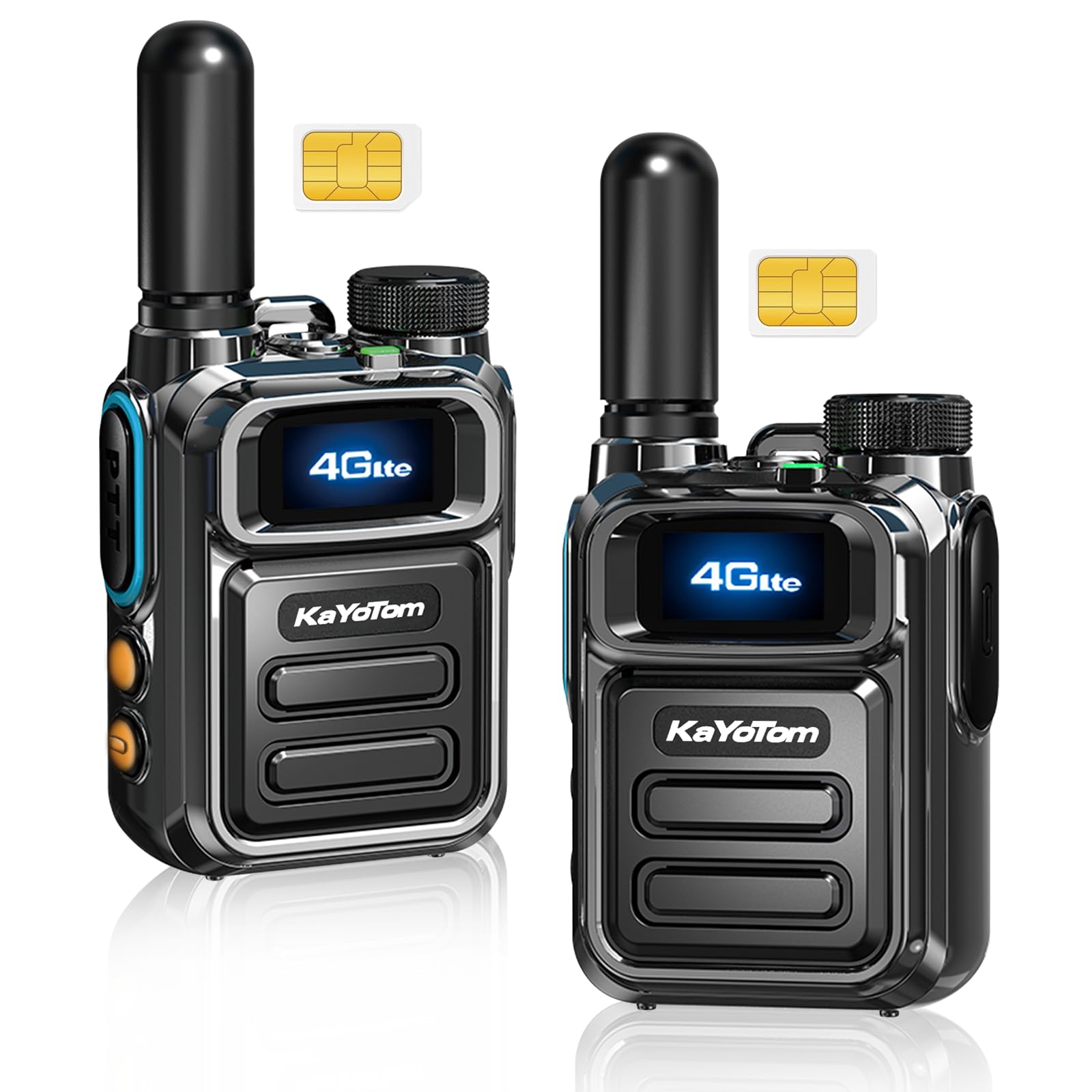
Figure 1: KAYOTOM AT-600 Global PoC Walkie Talkie
2. Product Overview
2.1 Key Features
- PoC Technology: Instant communication over 4G LTE networks for nationwide coverage.
- Lifetime Free SIM Card: Global PTT intercom connectivity without monthly fees or contracts.
- Ruggedized Chassis: Military-grade design with drop resistance and basic dust/water protection.
- Clear Communication: Stable voice quality over extended distances with optimized signal processing.
- Extended Battery: Long-lasting battery for continuous field operations.
- Intuitive Controls: Bright display and simplified button layout for easy access to PTT functions.
- Built-in LED Flashlight: For illumination in low-light conditions.

Figure 2: Global Communication Features Overview
2.2 Package Contents
Verify that all items are present in your package:
- KAYOTOM AT-600 Walkie Talkie Unit (x2)
- Antenna (x2)
- USB-C Charging Cable (x2)
- Power Adapter (x2)
- Belt Clip (x2)
- Wrist Strap (x2)
- User Manual (x2)
- SIM Card (x2)

Figure 3: What's in the Box
2.3 Component Identification
Familiarize yourself with the parts of your walkie talkie:
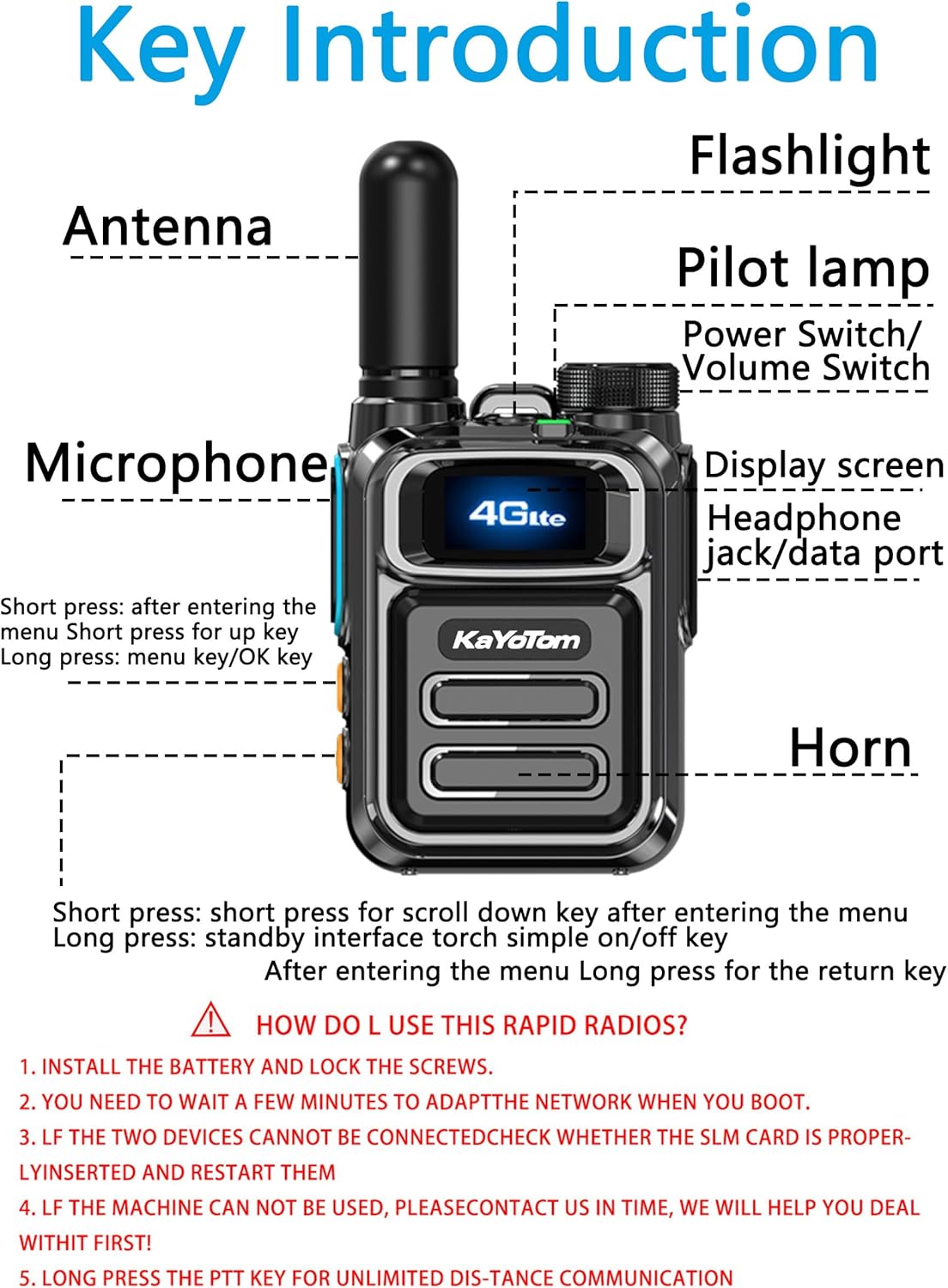
Figure 4: Key Introduction and Components
- Antenna: For signal transmission and reception.
- Flashlight: LED light for illumination.
- Pilot Lamp: Status indicator light.
- Power Switch/Volume Switch: Rotary knob to power on/off and adjust volume.
- Microphone: For voice input.
- Display Screen: Shows status, menu, and call information.
- Headphone Jack/Data Port: For accessories and data transfer.
- Horn: Speaker for audio output.
- PTT Button: Push-to-Talk button for communication.
- A Key (Orange): Short press for menu up, long press for menu/OK.
- B Key (Orange): Short press for menu down, long press for return/flashlight.
3. Setup
3.1 Battery Assembly
- Align the battery pack with the back of the walkie talkie.
- Gently push the battery pack into place until it clicks.
- Secure the battery cover with the provided screws using a screwdriver.
3.2 SIM Card Installation
The walkie talkie uses a pre-installed SIM card for PoC functionality. Ensure the SIM card is properly seated in its slot.

Figure 5: SIM Card Slot Location
3.3 Initial Power On
After battery and SIM card installation, turn on the device using the Power Switch/Volume Switch. Allow a few minutes for the device to adapt to the network.
Video 1: Product Assembly and Basic Operation. This video demonstrates the assembly, basic operation, and key features of the KAYOTOM AT-600 walkie-talkie, including battery installation, power-on sequence, PTT function, and flashlight activation.
4. Operating Instructions
4.1 Power On/Off and Volume Control
- Power On: Rotate the Power Switch/Volume Switch clockwise until the device powers on and the display illuminates.
- Power Off: Rotate the Power Switch/Volume Switch counter-clockwise until the device powers off.
- Volume Adjustment: Rotate the Power Switch/Volume Switch while the device is on to adjust the listening volume.
4.2 Push-to-Talk (PTT) Communication
To initiate communication:
- Ensure the device is powered on and connected to the network.
- Press and hold the PTT button on the side of the device.
- Speak clearly into the microphone.
- Release the PTT button to listen for a response.
4.3 Group and Private Calls
The device supports both group and private calls:
- Hold the A key (orange button) to access the menu.
- Use the A key (short press) and B key (short press) to navigate through the menu options (e.g., GroupList, MemberList, Settings).
- Select 'GroupList' for group communication or 'MemberList' to initiate a private call with a specific contact.
- Confirm your selection and then use the PTT button to communicate.
4.4 LED Flashlight Operation
To activate the built-in flashlight:
- Hold the B key (orange button) to turn the flashlight on or off.

Figure 6: LED Flashlight in Use
5. Maintenance
5.1 Charging the Battery
Use the provided USB-C charging cable and power adapter to charge your walkie talkie. Connect the cable to the device's charging port and the adapter to a power outlet. The pilot lamp may indicate charging status.
5.2 Cleaning
Wipe the device with a soft, damp cloth. Do not use harsh chemicals or abrasive cleaners. Ensure the charging port cover is securely closed to prevent dust and water ingress.
5.3 Battery Care
To prolong battery life:
- Avoid fully discharging the battery frequently.
- Store the device in a cool, dry place when not in use for extended periods.
- Do not expose the battery to extreme temperatures.

Figure 7: Durable Design and Battery Information
6. Troubleshooting
If you encounter issues with your KAYOTOM AT-600, refer to the following common problems and solutions:
- No Connection/Cannot Communicate:
- Check if the SIM card is properly inserted.
- Restart the device.
- Ensure you are within 4G LTE network coverage.
- Device Not Powering On:
- Ensure the battery is fully charged.
- Verify the battery is correctly assembled.
- Poor Audio Quality:
- Adjust the volume.
- Ensure the microphone and horn are not obstructed.
- Move to an area with better network signal.
- General Malfunction:
- If the device cannot be used, please contact customer support for assistance.
7. Specifications
| Feature | Detail |
|---|---|
| Brand | KAYOTOM |
| Model Number | AT-600 |
| Color | Black |
| Number of Channels | 1 |
| Special Feature | Long Range |
| Frequency Range | 450-4900 MHz |
| Talking Range Maximum | Unlimited (via 4G LTE network) |
| Voltage | 4.2 Volts (DC) |
| Water Resistance Level | Not Water Resistant (Basic dust/water protection) |
| Product Dimensions (D x W x H) | 1.22" x 2.08" x 2.83" |
| Item Weight | 0.48 Kilograms |
| Compatible Devices | Headsets, Other KAYOTOM Two-Way Radios |
| Connectivity Protocol | LTE |
| Built-In Media | Antenna |
| Unit Count | 2.0 Count |
| Manufacturer | Kayotom |
8. Warranty and Support
8.1 Warranty Information
The KAYOTOM AT-600 Global PoC Walkie Talkie comes with a 1-year manufacturer's warranty from the date of purchase. This warranty covers defects in materials and workmanship under normal use. It does not cover damage caused by misuse, accidents, unauthorized modifications, or natural disasters.
8.2 Customer Support
For technical assistance, warranty claims, or any questions regarding your KAYOTOM AT-600, please contact KAYOTOM customer support through the retailer where the product was purchased or visit the official KAYOTOM website for contact details.


