
1. Product Overview
The Tapo C460 is a versatile 4K Ultra HD outdoor battery security camera designed for comprehensive home surveillance. It offers crystal-clear imaging, long-lasting battery performance, and smart detection features for enhanced security.

Figure 1: Tapo C460 4K Ultra HD Outdoor Battery Security Camera. This image shows the front view of the white cylindrical camera with its lens and spotlights.
Key Features:
- 4K Ultra HD Resolution: Experience 4x the resolution of 1080p for sharper images and finer details, enhanced by an Edge Improvement algorithm.
- Up to 200-Day Battery Life: Equipped with a 10,000mAh rechargeable battery for extended operation on a single charge.
- Starlight Color Night Vision: Capture clear, full-color images in low light conditions using the F1.6 lens, starlight sensor, and built-in spotlights.
- Free Person/Vehicle Detection: Accurately identifies people and vehicles to reduce false alerts.
- Dual-Band Wi-Fi Connectivity: Supports both 5 GHz and 2.4 GHz Wi-Fi bands for flexible speed and range.
- Magnetic Base for Easy Installation: Offers 100% wireless setup with an adjustable magnetic base for flexible placement.
- IP66 Weatherproof: Built to withstand harsh outdoor conditions, including rain and dust.
- Local & Cloud Storage: Supports up to 512GB microSD card (sold separately) and Tapo Care cloud storage (subscription required).
- Two-Way Audio: Communicate through the camera with built-in microphone and speaker.
- Smart Playback: Quickly locate and download key moments by event type or timeline.
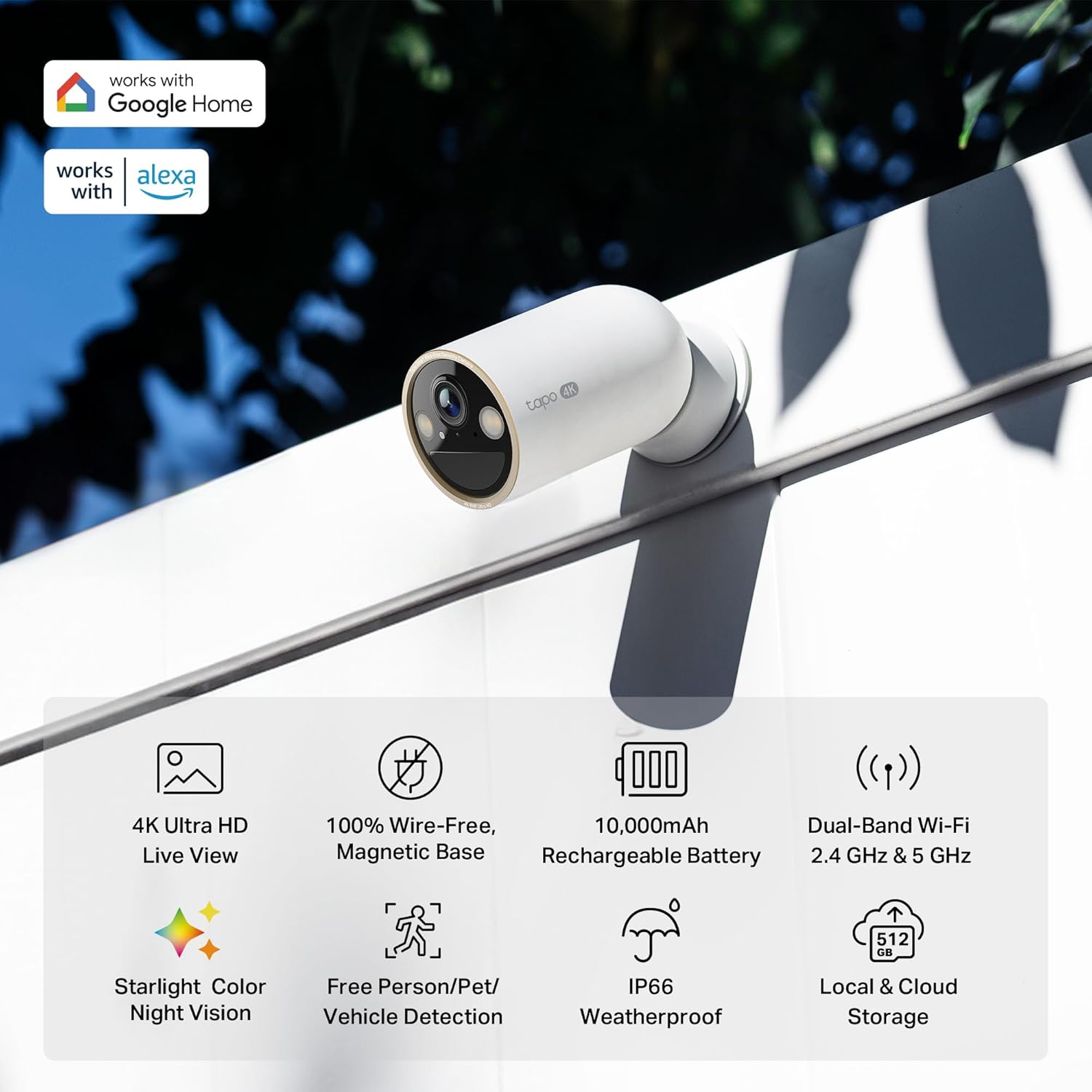
Figure 2: An infographic highlighting the key features of the Tapo C460 camera, including 4K Ultra HD, 100% wire-free magnetic base, 10,000mAh rechargeable battery, dual-band Wi-Fi, starlight color night vision, free person/pet/vehicle detection, IP66 weatherproof rating, and local & cloud storage.
2. Included Components
Verify that all components are present in the package:
- Tapo C460 Camera ×1
- Metal Plate x1
- Magnetic Base x1
- Camera Bracket x1
- Mounting Templates x2
- USB Adapter Cable x1
- Mounting Screws x6
- Mounting Anchors x6
- Quick Start Guide x1
3. Setup Guide
3.1 Pre-installation Checklist
- Charge the Camera: Fully charge the camera using the provided USB adapter cable before initial use. The charging port is located under a protective cover on the camera body.
- Download Tapo App: Download and install the Tapo app from your device's app store.
- Wi-Fi Network: Ensure you have a stable 2.4 GHz or 5 GHz Wi-Fi network available at the installation location.
- MicroSD Card (Optional): If local storage is desired, insert a microSD card (up to 512GB, sold separately) into the designated slot.
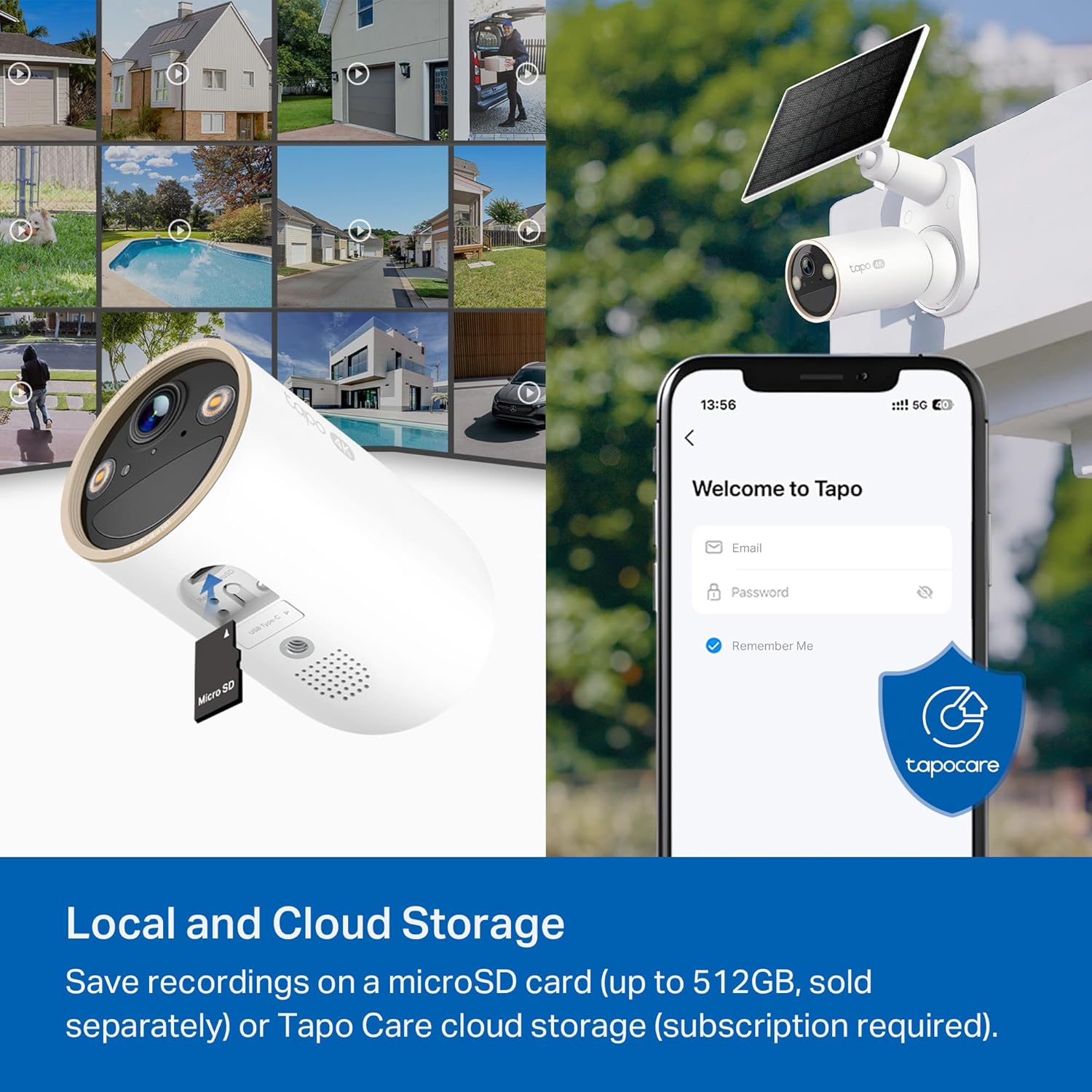
Figure 3: The underside of the Tapo C460 camera showing the microSD card slot and charging port, along with the power button.
3.2 Mounting Options
The Tapo C460 offers flexible mounting solutions:
- Magnetic Mounting: The camera features a strong magnetic base that can attach directly to any metal surface. For non-metal surfaces, use the included metal plate and mounting screws to create a magnetic attachment point.
- Screw Mounting: The camera can be directly screwed onto a wall or ceiling using the provided camera bracket, mounting screws, and anchors. Use the mounting templates for accurate hole placement.
- Tabletop Placement: The camera can also be placed on a flat surface without any mounting hardware.

Figure 4: A hand attaching the Tapo C460 camera to its adjustable magnetic base, demonstrating the ease of installation.

Figure 5: Examples of the Tapo C460 camera installed in different outdoor settings such as a front yard, backyard, and side of a house, showcasing its wire-free versatility.
For optimal performance, consider pairing with the Tapo Solar Panel (sold separately) for continuous power supply, eliminating the need for manual recharging.

Figure 6: The Tapo C460 camera mounted outdoors with an attached solar panel, illustrating the solar charging capability.
3.3 App Setup and Connection
- Open the Tapo app and create an account or log in.
- Tap the "+" icon in the app to add a new device.
- Follow the on-screen instructions to connect the Tapo C460 to your Wi-Fi network. This typically involves powering on the camera, waiting for its indicator light, and selecting your Wi-Fi network within the app.
- Once connected, you can name your camera and customize its settings.

Figure 7: A smartphone screen displaying the Tapo app login interface next to the camera, emphasizing the app-based setup and control.
4. Operating Instructions
4.1 Live View and Playback
- Access the live feed of your camera through the Tapo app.
- Use the smart playback feature to review recorded footage. You can filter by event type (person, vehicle) or navigate using the timeline slider.

Figure 8: A smartphone displaying the Tapo app's live view interface with various control options for the camera.
4.2 Smart Detection and Alerts
- The camera features free person and vehicle detection, minimizing irrelevant alerts.
- Customize activity zones within the app to focus detection on specific areas of interest.
- Receive instant notifications on your smartphone when motion or detected events occur.

Figure 9: Screenshots showing the Tapo C460's ability to accurately identify and differentiate between a person, a vehicle, and a pet within its field of view.

Figure 10: A smartphone displaying a push notification from the Tapo app indicating a person has been detected by the camera.
4.3 Night Vision Modes
The Tapo C460 offers adaptive night vision:
- Black-and-White IR Mode: Standard infrared night vision for clear monochrome footage in complete darkness.
- Full-Color Mode: Automatically switches to color night vision when motion is detected, utilizing the starlight sensor and built-in spotlights for vivid nighttime images.

Figure 11: A nighttime scene captured by the Tapo C460, showing a person walking with clear, full-color visibility due to the starlight sensor and spotlights.
4.4 Two-Way Audio
Utilize the built-in microphone and speaker for two-way communication through the camera. This allows you to speak to visitors or deter intruders directly from your smartphone.

Figure 12: An illustration depicting a user speaking through the Tapo C460 camera to a person at their door, demonstrating the two-way audio feature.
4.5 Smart Home Integration
The Tapo C460 is compatible with Amazon Alexa and Google Home, allowing for voice control and integration into your smart home ecosystem.

Figure 13: A person interacting with an Amazon Echo Show device, displaying the live feed from a Tapo camera, illustrating compatibility with Alexa.
5. Maintenance
5.1 Battery Charging
To recharge the camera, detach it from its magnetic base (if applicable) and connect the provided USB adapter cable to the charging port. A full charge can provide up to 200 days of battery life, depending on usage and settings. For continuous power, consider the Tapo Solar Panel (sold separately).

Figure 14: An illustration showing the internal battery components of the Tapo C460 camera, emphasizing its 10,000mAh capacity and up to 200-day battery life.
5.2 Cleaning and Care
- Regularly wipe the camera lens and body with a soft, damp cloth to remove dust and debris.
- Avoid using harsh chemicals or abrasive cleaners, as these can damage the camera's finish or lens.
- Ensure the charging port cover is securely closed when not charging to maintain IP66 weather resistance.

Figure 15: The Tapo C460 camera being sprayed with water, demonstrating its IP66 weatherproof rating and durability in various conditions.
5.3 Firmware Updates
Keep your camera's firmware updated through the Tapo app to ensure optimal performance, security, and access to the latest features. The app will notify you when updates are available.
6. Troubleshooting
6.1 Connectivity Issues
- No Connection: Ensure the camera is within range of your Wi-Fi router. Try moving the camera closer to the router or using a Wi-Fi extender.
- Frequent Disconnections: Check for Wi-Fi interference from other devices. Ensure your router's firmware is up to date.
- Dual-Band Wi-Fi: If using a dual-band router, try connecting to both 2.4 GHz and 5 GHz bands to see which provides a more stable connection. The 5 GHz band offers faster speeds at shorter distances, while 2.4 GHz provides a longer range.

Figure 16: An illustration showing a house with Wi-Fi signals from a router, demonstrating the coverage of both 2.4 GHz (longer range) and 5 GHz (shorter range, faster speed) bands for the Tapo C460 camera.
6.2 Image Quality Issues
- Blurry Image: Clean the camera lens. Ensure there are no obstructions in the camera's field of view.
- Poor Night Vision: Ensure the spotlights are not obstructed. Check for reflective surfaces near the camera that might interfere with IR illumination.

Figure 17: A side-by-side comparison of 4K Ultra HD and 1080p video quality, highlighting the superior clarity and detail of the 4K resolution for the Tapo C460.
6.3 Battery Draining Quickly
- High Activity: Frequent motion detection, live view access, and two-way audio usage will consume more battery. Adjust activity zones and sensitivity settings to reduce unnecessary recordings.
- Cold Weather: Extreme cold temperatures can reduce battery performance.
- Charging: Ensure the camera is fully charged. Consider the Tapo Solar Panel for continuous charging.
7. Specifications
| Feature | Detail |
|---|---|
| Model Number | Tapo C460 |
| Video Capture Resolution | 4K 8MP (3840 x 2160 px) |
| Field of View | 134° diagonal, 113° horizontal, 59° vertical |
| Frame Rate | 15 frames per second |
| Digital Zoom | 18X |
| Night Vision Range | Up to 49 feet (Infrared Mode) |
| Power Source | Battery Powered (10,000 mAh Lithium Ion battery included) |
| Connectivity Protocol | Wi-Fi (2.4 GHz & 5 GHz) |
| Controller Type | Tapo App, Google Assistant, Amazon Alexa, Android |
| Storage Options | Local (up to 512GB microSD, sold separately), Cloud (Tapo Care subscription) |
| Security Protocols | 128-bit AES Encryption, SSL/TLS WPA/WPA2-PSK |
| Weather Resistance | IP66 |
| Operating Temperature | -4°F to 113°F (-20°C to 45°C) |
| Operating Humidity | 10% to 90% RH (non-condensing) |
| Dimensions (L x W x H) | 2.55 x 2.55 x 4.51 inches (D2.5 x 4.51 in.) |
| Item Weight | 0.73 Pounds (11.7 ounces) |
| Manufacturer | TP-Link |
| UPC | 810142824309 |
8. Warranty and Support
For warranty information and technical support, please refer to the official Tapo website or contact TP-Link customer service. Details are typically provided in the Quick Start Guide included with your product or available online.
Tapo is a signatory of the U.S. Cybersecurity and Infrastructure Security Agency's (CISA) Secure-by-Design pledge, demonstrating a commitment to cybersecurity and privacy.


