
SISESOL 2 Drawer Lateral File Cabinet
SISESOL 2 Drawer Lateral File Cabinet with Lock Instruction Manual
Model: 2 Drawer Lateral File Cabinet
Important Safety Instructions
Always assemble this product with at least two people to prevent injury. Be aware of the weight and potential pinch points when handling. Always follow the assembly instructions and use appropriate safety gear.
Package Contents
Before assembly, verify all components are present and undamaged. Refer to the image below for a visual guide of the parts included.

Image Description: An illustration showing all individual components included in the package, labeled for easy identification.
- Metal Panels (Side, Back, Top, Bottom)
- Drawer Fronts and Sides
- Full-Extension Drawer Slides
- Adjustable Hanging Rods
- Lock and 2 Foldable Keys
- Name Tag Holders
- Screws and Fasteners
Setup and Assembly
This section provides step-by-step guidance for assembling your SISESOL Lateral File Cabinet. For visual assistance, please refer to the embedded video below.
Step 1: Unpacking and Initial Setup
Carefully open the packaging. Remove all components and protective materials. Lay out all parts on a clean, soft surface to prevent scratches.
Step 2: Assembling the Frame
Connect the side panels to the base using the provided screws. Ensure all connections are secure and the frame is stable.
Step 3: Installing Drawer Slides
Attach the drawer slides to the inner sides of the cabinet frame. Ensure they are correctly oriented and securely fastened with the appropriate screws.
Step 4: Assembling Drawers
Assemble each drawer by connecting the front, back, and side panels. Attach the name tag holders to the drawer fronts using the small screws provided.
Step 5: Inserting Drawers and Hanging Rods
Carefully insert the assembled drawers into the cabinet frame, aligning them with the installed slides. Install the adjustable hanging rods inside the drawers for file organization, ensuring they fit securely into the designated slots.
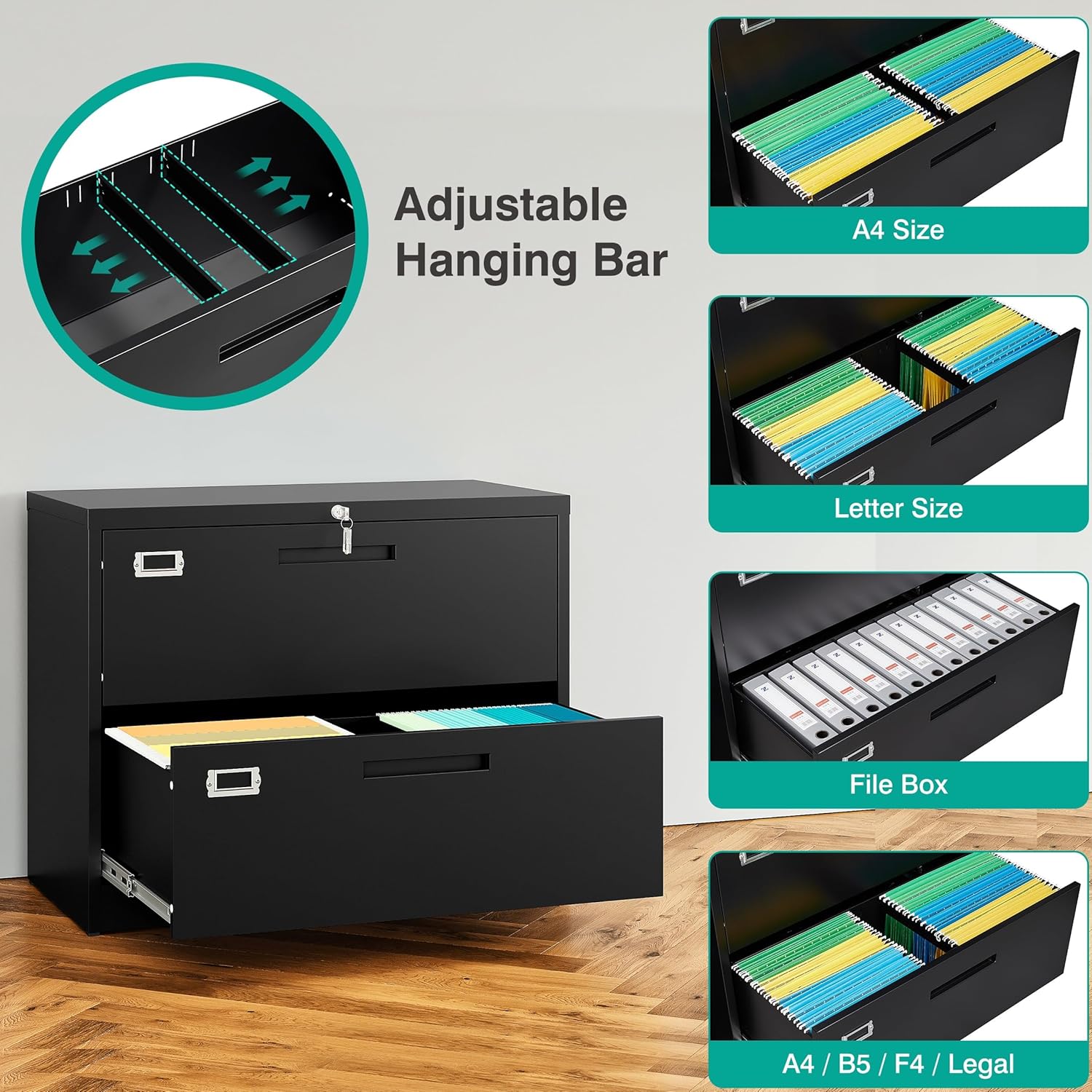
Image Description: A close-up of a drawer with adjustable hanging file rods installed, ready for file folders.
Step 6: Final Checks
Ensure all screws are tightened and the cabinet is stable. Test the drawers for smooth operation and the locking mechanism for proper function.
Video Description: An official SISESOL video demonstrating the step-by-step assembly process for the lateral file cabinet.
Operating Your File Cabinet
Locking Mechanism
The cabinet features a single lock that secures both drawers simultaneously. Insert the key into the lock located on the top drawer and turn to lock or unlock the cabinet. Ensure both drawers are fully closed before attempting to lock.

Image Description: A close-up of the integrated lock on the top drawer, with keys inserted, highlighting the security feature.
Anti-Tilt Mechanism
For safety, the anti-tilt mechanism allows only one drawer to be opened at a time. This prevents the cabinet from tipping forward when drawers are extended, enhancing stability and user safety.

Image Description: An illustration demonstrating the anti-tilt mechanism, showing that only one drawer can be opened at a time for stability.
Drawer Operation
The drawers feature full-extension ball-bearing slides for smooth and quiet operation. To open, pull the integrated handle on the drawer front. To close, push the drawer firmly until it is fully recessed into the cabinet.

Image Description: A SISESOL 2 Drawer Lateral File Cabinet in an office setting, with one drawer open, showcasing its design and functionality.
File Organization
The cabinet is designed to accommodate Letter, Legal, A4, and F4 size documents. Use the adjustable hanging rods to organize your files efficiently within the drawers.
Image Description: Various file sizes (Letter, Legal, A4) organized within the drawer using hanging file folders.
Care and Maintenance
- Regularly wipe the cabinet surfaces with a soft, damp cloth to remove dust and dirt.
- Avoid using abrasive cleaners or harsh chemicals, as these can damage the electrostatic phosphorus-free epoxy spray coating.
- Ensure the cabinet is placed on a level surface to maintain stability and proper drawer alignment.
- Periodically check all screws and fasteners for tightness and re-tighten if necessary to ensure structural integrity.
Troubleshooting Guide
Drawers are difficult to open or close:
- Check if the cabinet is on a level surface. Adjust leveling feet if applicable.
- Ensure drawers are not overloaded beyond the recommended weight capacity.
- Inspect drawer slides for any obstructions or damage.
Lock is not functioning:
- Ensure the key is fully inserted and turned correctly.
- Verify that both drawers are completely closed before attempting to lock the cabinet.
- If issues persist, refer to the Service Guarantee section for support contact information.
Product Specifications
- Brand: SISESOL
- Model Name: 2 Drawer Lateral File Cabinet
- Product Dimensions: 16"D x 35.5"W x 28.7"H
- Color: Black
- Material: Metal
- Weight Limit (Top): 120 Pounds
- Item Weight: 70 pounds
- Special Feature: Heavy Duty, Lockable, Anti-tilt Mechanism
- Assembly Required: Yes
Service Guarantee and Support
SISESOL provides a service guarantee for this product. If you encounter any problems during installation or use, please contact SISESOL customer support for assistance. An installation video is available on the product details page for correct and efficient assembly.
For further inquiries or support, please refer to the contact information provided with your purchase documentation.
Ask a question about this manual
Ask about setup, troubleshooting, compatibility, parts, safety, or missing instructions. Manuals+ will review the question and use this page’s manual context to help answer it.