
1. Introduction
This manual provides detailed instructions for the installation, operation, and maintenance of your visiPower Z17 Smart Electronic Door Lock. Please read this manual thoroughly before installation and use to ensure proper function and security. Keep this manual for future reference.
2. Product Overview
Key Features
- 5-in-1 Keyless Entry: Fingerprint, Passcode, IC Fob/Card, Mechanical Key, and Tuya App (BLE).
- Fast Fingerprint Recognition: Unlocks in under 0.3 seconds with semiconductor biometric technology.
- Automatic Locking: Configurable auto-lock feature from 3 to 900 seconds.
- Anti-Peep Passcode: Supports virtual bit passwords to prevent unauthorized viewing of your code.
- Emergency Power: Type-C interface for external 5V power bank in case of battery depletion.
- Durable Construction: Made from durable Aluminum Alloy material.
- Alarm Functions: Anti-lifting alarm, low-voltage alarm, and trial-and-error alarm.
Included Components
The package includes the following items:
- 14.7CM Lock Body *1
- IC Card *2
- Installation Accessory Kit *1
- Instruction Manual *1
- Mechanical Keys *2

Figure 2.1: Included components and lock dimensions. This image displays the main lock unit (front and back), mounting hardware, two mechanical keys, two IC cards, and the instruction manual. Detailed measurements for the lock body are also provided.

Figure 2.2: Overview of available unlocking methods. This image visually summarizes the six ways to unlock the visiPower Z17 Smart Electronic Door Lock: Fingerprint, Password, IC Card, APP, NFC, and Mechanical Key.
3. Specifications
| Brand | visiPower |
| Model Number | Z17 |
| Lock Type | Biometric |
| Material | Aluminum Alloy, Acrylic Mirror |
| Dimensions (L x W x H) | 10.5 x 2.3 x 2.7 inches (270mm x 62mm x 69mm) |
| Item Weight | 5 pounds |
| Unlocking Methods | Fingerprint, Passcode, IC Card, Mechanical Key, Tuya App (BLE) |
| Passcode Length | 6-12 bits |
| Power Type | 4 x AA Batteries (not included) |
| Emergency Power | Type-C USB (5V) |
| Applicable Door Thickness | 38~55mm |
| Applicable Door Type | Wooden door, Aluminum door |
| Connectivity Protocol | Wi-Fi (via Tuya App) |
4. Setup
4.1 Installation
The visiPower Z17 Smart Electronic Door Lock is designed for easy installation and is suitable for both left and right-handed doors. A Phillips screwdriver is the only tool required for installation. Please refer to the included physical Instruction Manual for detailed step-by-step installation diagrams and instructions specific to your door type.
4.2 App Setup (Tuya Smart App)
- Download the Tuya Smart app from your mobile device's app store (iOS or Android).
- Register or log in to your Tuya Smart account.
- Follow the in-app instructions to add your visiPower Z17 Smart Electronic Door Lock. Ensure your lock is powered on and in pairing mode (refer to the physical manual for specific pairing mode activation).
- Once connected, you can manage and control your lock remotely via the app.
5. Operating Instructions
5.1 Unlocking Methods
The visiPower Z17 offers multiple ways to unlock your door:
- Fingerprint Unlocking: Place your registered fingerprint on the sensor located on the handle. The lock will unlock in approximately 0.3 seconds. The lock utilizes a highly sensitive semiconductor 3D fingerprint sensor for efficient and accurate biometric identification.

Figure 5.1: Semiconductor fingerprint identification. This diagram explains the advanced fingerprint sensor technology used in the lock, emphasizing its speed and accuracy.
- Passcode Unlocking: Enter your 6-12 digit passcode on the touchscreen keypad. The lock supports a 'void bit password' feature, allowing you to enter random digits before or after your actual code to prevent others from observing your password.

Figure 5.2: Void bit password anti-peep feature. This image illustrates how to use the anti-peep function by adding random numbers before and after the actual password.
- IC Card Unlocking: Present a registered IC card to the designated sensor area on the lock.
- Mechanical Key Unlocking: In case of emergency or battery failure, use the provided mechanical keys to unlock the door.
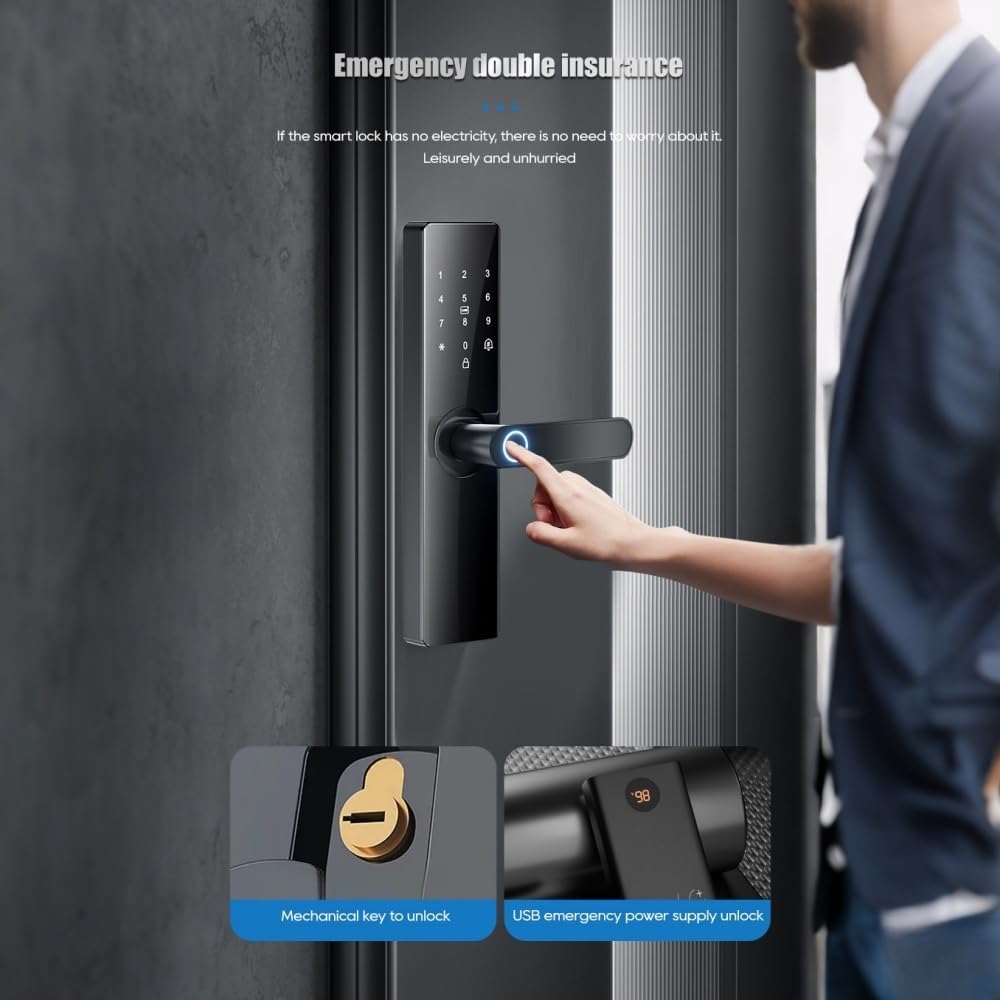
Figure 5.3: Emergency unlocking options. This image shows the mechanical keyhole and the Type-C port for emergency power supply.
- App Unlocking: Use the Tuya Smart app on your smartphone to remotely unlock the door. Note: Remote unlocking via the app is typically initiated when a visitor rings the doorbell. Active remote unlocking without a doorbell trigger may not be supported.
5.2 Automatic Locking
The lock can be configured to automatically secure itself after a set period, ranging from 3 to 900 seconds, once the door is closed.
5.3 User Management and Dual Verification
- Administrator Access: The local administrator has the highest authority, capable of editing and setting lock parameters. Up to 9 administrators (fingerprints, passwords, or cards) can be registered.
- User Capacity: The lock supports a total capacity of 300 users.
- Dual Verification Mode: For enhanced security, you can set up a dual verification mode requiring two users (e.g., two fingerprints, or a fingerprint and a password) to verify simultaneously before the door opens. This mode is suitable for special access requirements.
6. Maintenance
6.1 Power Supply
The lock is powered by 4 AA batteries (not included). Under normal usage, these batteries can last for approximately six months. When the battery level is low, the lock will issue a low-voltage alarm.
6.2 Emergency Power
If the batteries are completely depleted, you can provide emergency power to the lock using a 5V mobile power bank connected via the Type-C interface located at the bottom of the lock.
6.3 Cleaning
Wipe the lock's surface with a soft, dry cloth. Avoid using abrasive cleaners or solvents that could damage the finish or electronic components.
7. Troubleshooting
- Lock Not Responding: Check battery levels. If low, replace batteries or use emergency Type-C power.
- Incorrect Input Alarm: After multiple incorrect fingerprint or passcode attempts, the lock will trigger an alarm and push a notification to your phone. The lock will be temporarily locked for 90 seconds before another attempt can be made.
- Anti-Lifting Alarm: The lock is equipped with an anti-lifting alarm that will activate if tampering is detected.
- Fingerprint Recognition Issues: Ensure your finger is clean and dry. Re-register your fingerprint if issues persist.
- App Connectivity Issues: Ensure your phone's Bluetooth is enabled and the lock is within range. Check your Wi-Fi connection for remote access.
8. Warranty and Support
8.1 Warranty Information
The visiPower Z17 Smart Electronic Door Lock comes with a 1 Year Manufacturer Warranty from the date of purchase. This warranty covers defects in materials and workmanship under normal use.
8.2 Customer Support
For technical assistance, troubleshooting, or warranty claims, please refer to the contact information provided in the original product packaging or on the visiPower official website.