
1. Product Overview
The isinwheel K5 Hoverboard Seat Attachment transforms your compatible hoverboard into a seated go-kart, offering an alternative riding experience. This attachment features a robust design with multiple shock absorbers, dual control options, and an adjustable frame to accommodate various user sizes.
Key Features:
- Innovative Steering Control System: Equipped with a handlebar for steering and foot pedals for control, providing ease of use for beginners and children.
- Triple Shock Absorption System: Features upgraded front and rear shock absorbers for enhanced safety and comfort during rides.
- Colorful Luminous Wheels: Two LED luminous rear wheels provide a smooth gliding experience and increased visibility.
- Limit Device Design: A safety feature that limits the hoverboard's swing range, improving stability and reducing wear.
- Adjustable & Compatible: Designed to fit 6.5" to 10" hoverboards and adjustable for users aged 5 to 55 years.
- Large Seat & High-Quality Construction: Constructed from heavy-duty metal with a reinforced frame, supporting a maximum load capacity of 265 pounds.

Image 1.1: The isinwheel K5 Hoverboard Seat Attachment, showcasing its design and compatibility with a hoverboard.
2. Safety Information
Before operating the isinwheel K5 Hoverboard Seat Attachment, please read and understand all safety instructions. Failure to follow these instructions may result in injury or damage to the product.
- Always wear protective equipment, including a helmet, knee pads, long sleeves, and wrist guards.
- Do not ride with high heels. Always wear properly strapped, closed-toe shoes.
- Do not ride double or carry any passengers.
- When traversing small bumps or uneven terrain, maintain a moderate speed of 2-4 mph (3-6 km/h) and keep your knees bent to absorb shock.
- Do not go too slow or too fast; otherwise, you may lose control and fall.
- Ensure all bolts and straps are securely fastened before each use.
- Supervise children during operation.

Image 2.1: Important safety warm tips displayed on the product packaging.
3. What's in the Box
The package includes the following components:
- 1 x Hoverboard Seat Attachment
- 1 x Tool Kit (includes wrenches and screws)
- 1 x User Manual
- 6 x Adjustable Velcro Straps for Hoverboard Attachment

Image 3.1: All components included in the isinwheel K5 Hoverboard Seat Attachment package.
4. Assembly Instructions
Follow these steps to assemble your isinwheel K5 Hoverboard Seat Attachment. A tool kit with necessary wrenches and screws is included. For a visual guide, please refer to the assembly video below.
Video 4.1: This video provides a visual guide to unboxing the product and assembling the main components of the isinwheel K5 Hoverboard Seat Attachment.
4.1. Attaching the Main Frame
- Connect the front section of the frame to the central pivot mechanism using the provided bolts and secure with the wrench.
- Attach the handlebar assembly to the central pivot, ensuring it is aligned correctly. Secure with bolts and tighten using the provided tools.

Image 4.2: Detailed view of attaching the main frame components and handlebar.
4.2. Installing the Seat and Rear Wheel Assembly
- Secure the seat to the rear frame section using the designated screws and the hex key.
- Attach the rear wheel assembly, which includes the shock absorbers, to the seat frame. Ensure all bolts are tightly secured.

Image 4.3: Close-up of the triple shock absorber system on the rear wheels and seat attachment.
4.3. Connecting Front and Rear Sections
- Slide the front and rear frame sections together.
- Adjust the length to your desired setting (27.5" for small kids to 35" for adults) and secure it with the adjustment knob.

Image 4.4: Demonstrating the adjustable length feature of the attachment.
4.4. Attaching the Hoverboard
- Place your compatible hoverboard (6.5" to 10" wheels, without a central bar) onto the front platform of the attachment.
- Use the provided Velcro straps to securely fasten the hoverboard to the attachment. Ensure the straps are tight and the hoverboard is stable.
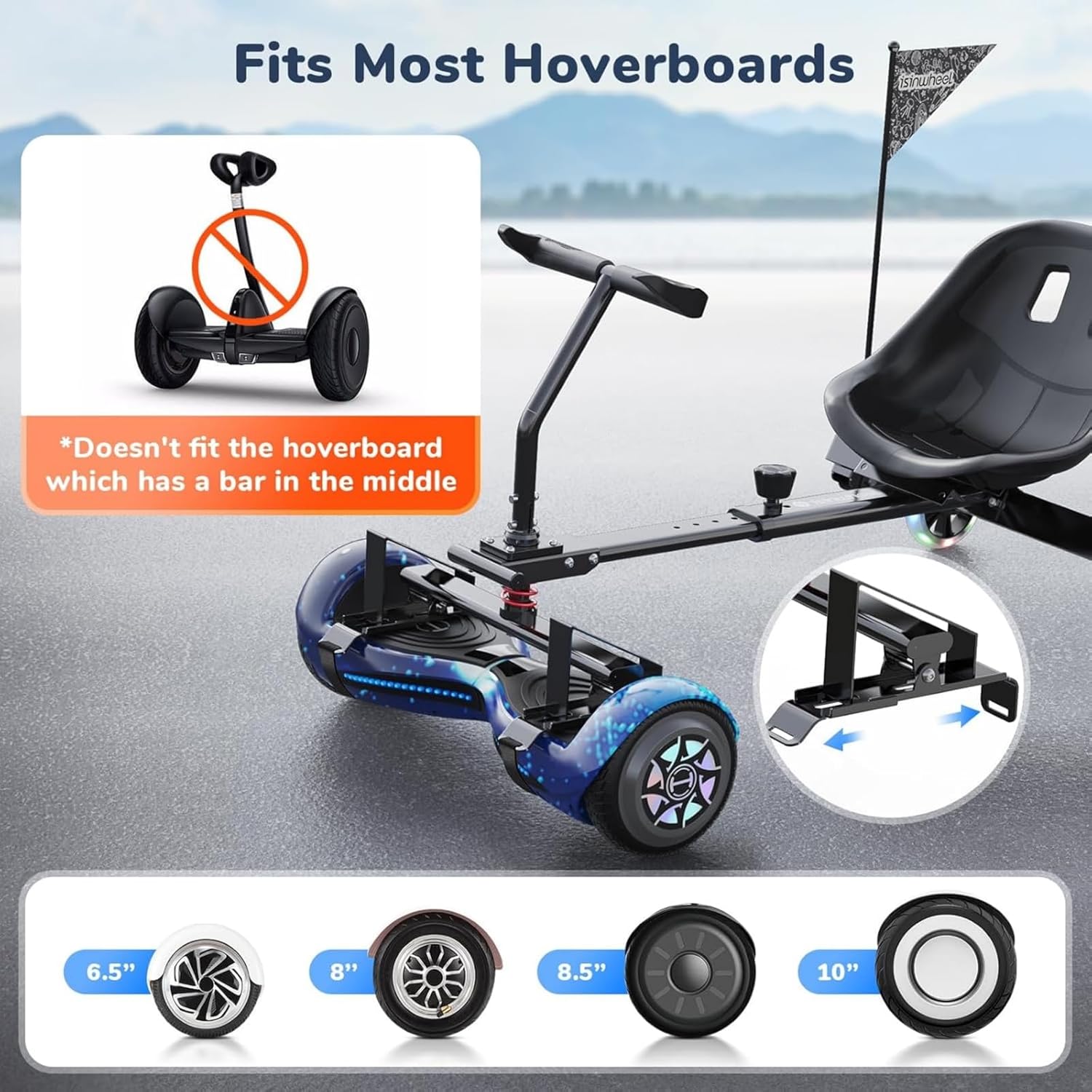
Image 4.5: Illustrates how to attach a hoverboard to the seat attachment and compatible hoverboard sizes.
4.5. Flag Installation
Assemble the flag pole by connecting the segments. Insert the flag onto the pole and then attach the pole to the designated slot on the rear of the seat attachment for increased visibility.
5. Operating Instructions
The isinwheel K5 Hoverboard Seat Attachment offers an intuitive dual control system for a dynamic riding experience.
5.1. Steering and Movement
- Forward: Gently push both handlebars forward simultaneously.
- Backward: Gently pull both handlebars backward simultaneously.
- Turn Left: Push the right handlebar forward while keeping the left handlebar neutral or pulling it slightly back.
- Turn Right: Push the left handlebar forward while keeping the right handlebar neutral or pulling it slightly back.
- Alternatively, use your feet on the hoverboard's footpads to control movement, similar to operating a hoverboard directly.
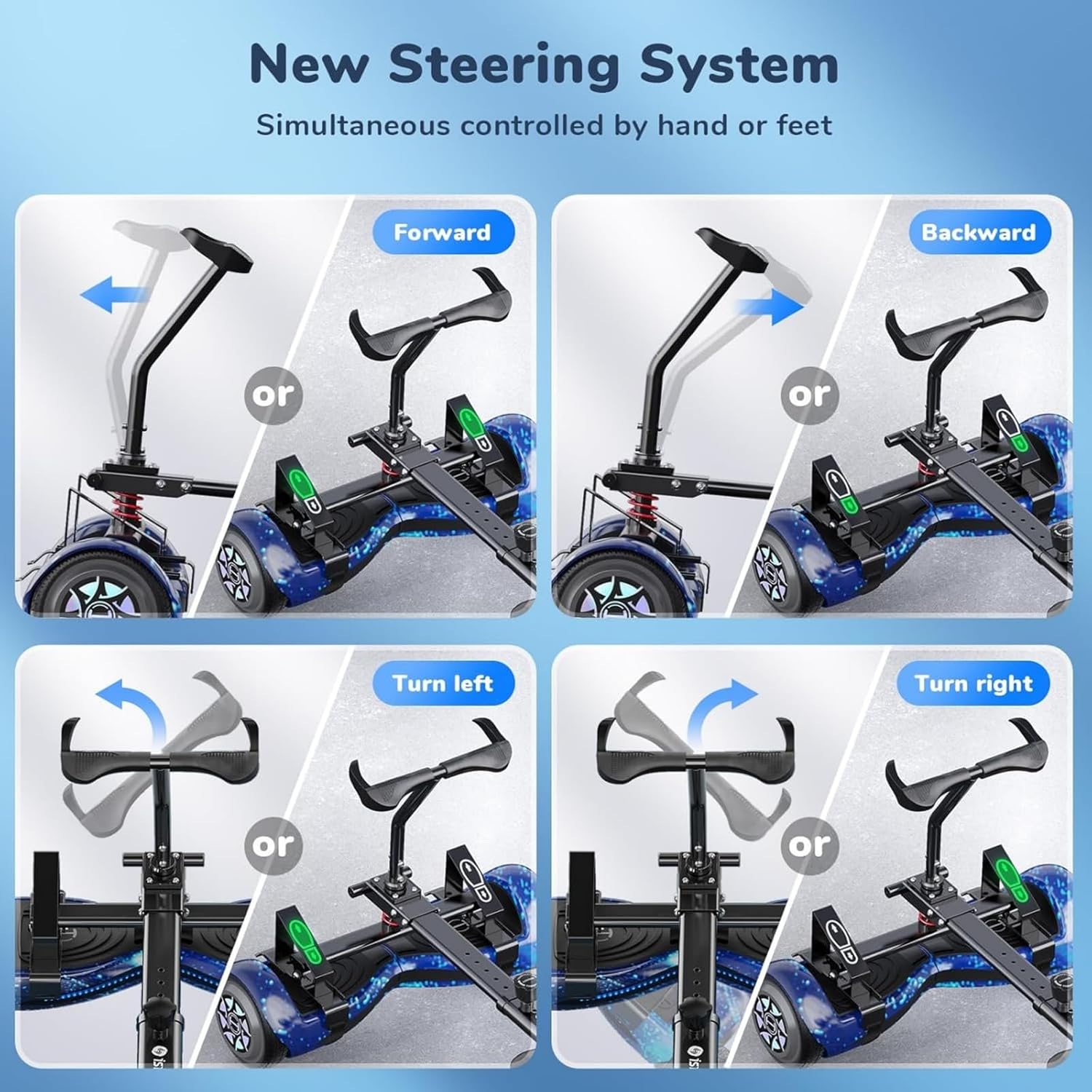
Image 5.1: Visual guide to the dual steering system, showing forward, backward, left, and right turns.
5.2. Riding on Various Terrains
The K5 attachment is designed for stability on various surfaces, including gravel, stone brick pavement, potholes, and deceleration zones, thanks to its wider and thicker four-wheel design and shock absorption system.

Image 5.2: Demonstrates the stability of the attachment across various ground conditions.
6. Maintenance
Regular maintenance ensures the longevity and safe operation of your hoverboard seat attachment.
- Cleaning: Wipe down the frame and seat with a damp cloth after each use. Avoid using harsh chemicals.
- Fasteners: Periodically check all bolts, screws, and straps to ensure they are tight and secure. Tighten as needed.
- Wheels: Inspect the rear wheels for wear and tear. The luminous wheels are equipped with high-quality bearings for extended service life.
- Storage: Store the attachment in a dry, cool place away from direct sunlight and extreme temperatures.

Image 6.1: Detail of the luminous rear wheels and their internal bearings, highlighting durability.
7. Troubleshooting
This section addresses common issues you might encounter with your isinwheel K5 Hoverboard Seat Attachment.
- Issue: Attachment feels unstable or wobbly.
Solution: Check all connection points, especially where the hoverboard attaches and the frame sections connect. Ensure all bolts and straps are securely tightened. Verify that the hoverboard is properly seated on the platform. - Issue: Difficulty in steering or controlling movement.
Solution: Ensure the handlebars are correctly installed and not loose. Practice gentle movements with the handlebars or footpads. Refer to the operating instructions for proper control techniques. - Issue: Rear wheels are not spinning smoothly or making noise.
Solution: Inspect the wheels for any obstructions or damage. Check the bearings for debris. If the issue persists, contact customer support. - Issue: Hoverboard detaches from the attachment during use.
Solution: Immediately stop using the product. Re-attach the hoverboard using all six Velcro straps, ensuring they are extremely tight. Always double-check the security of the hoverboard before each ride.
8. Specifications
| Feature | Detail |
|---|---|
| Product Dimensions | 23.2 x 16.1 x 10.6 inches |
| Item Model Number | K5 |
| Brand | isinwheel |
| Color | Black |
| Age Range (Description) | Kids/Adult |
| Special Feature | Light Up Wheel |
| Max Load Capacity | 265 pounds |
| Compatible Hoverboard Sizes | 6.5" to 10" |

Image 8.1: Diagram illustrating the detailed dimensions of the isinwheel K5 Hoverboard Seat Attachment.
9. Warranty and Support
For warranty information, technical support, or any inquiries regarding your isinwheel K5 Hoverboard Seat Attachment, please contact our customer service team.
- Call Center: 1(888) 293-5788
- Live Chat/Email Support: support@isinwheel.com
- Manufacturer's Store: Visit the isinwheel Store on Amazon for more products and information.

Image 9.1: Customer support details for isinwheel products.