
tianhong G5
G5 Electric Golf Cart User Manual
Model: G5 | Brand: tianhong
1. Introduction
The tianhong G5 Electric Golf Cart is an advanced golf caddy designed to enhance your golfing experience. Featuring auto-follow technology, multiple control modes (remote, APP, and manual), and an anti-tipping design, it provides convenience and stability across various terrains. Its folding design ensures easy transport and storage, making it an ideal companion for any golfer.
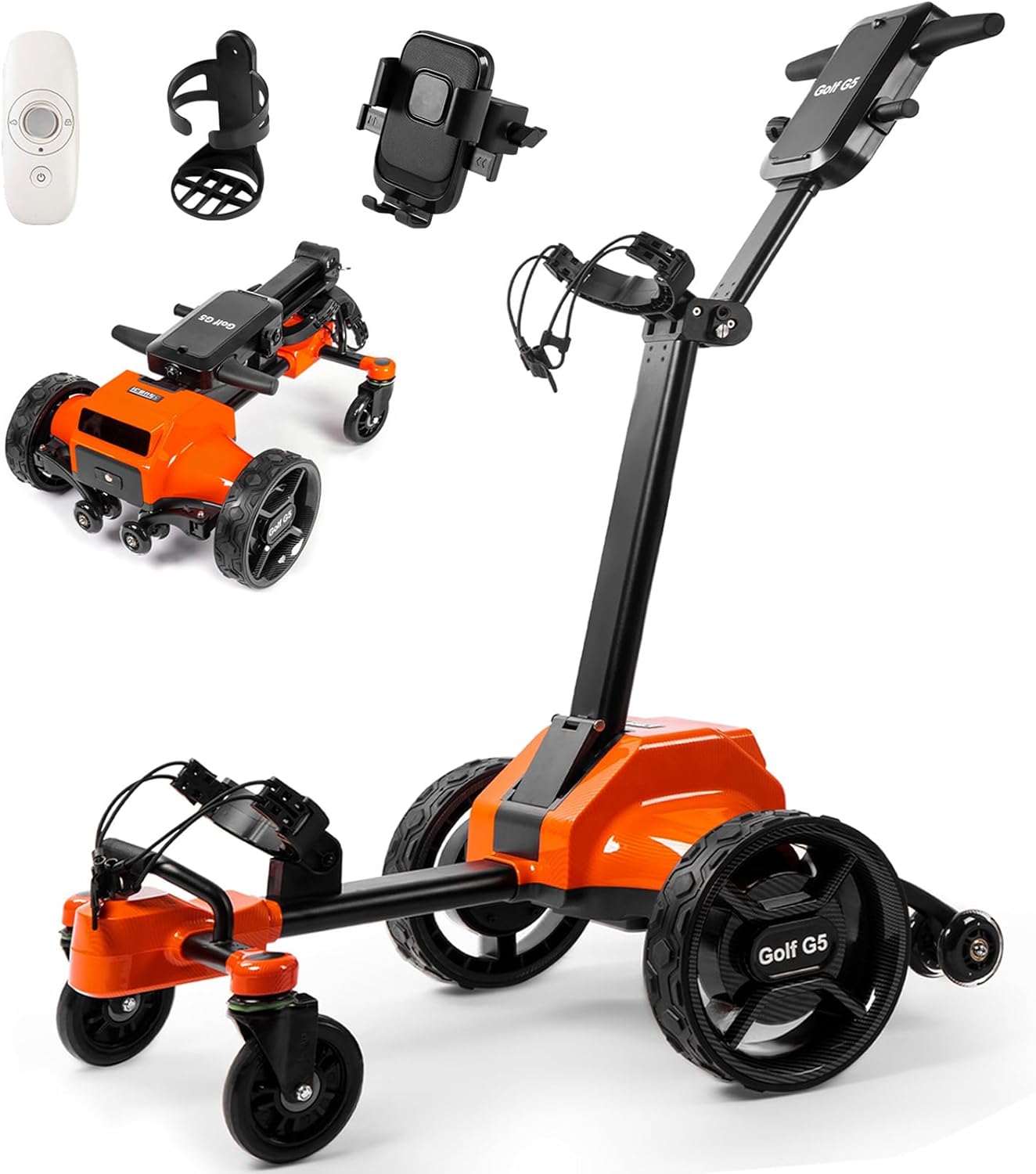
Figure 1.1: The G5 Electric Golf Cart with its included accessories, including a remote control, cup holder, and phone holder.
2. Product Features
- Auto-Follow Technology: The cart can follow you hands-free, allowing you to focus on your game.
- Multiple Control Modes: Seamlessly switch between APP, remote, and manual control for flexible operation.
- Anti-Tipping Design: Equipped with dual anti-tip wheels and all-terrain tires for stability on slopes up to 30°.
- Long Battery Life: A 45H battery provides up to 28 miles of range, suitable for full-day tournaments. Real-time battery monitoring is available via the APP.
- Folding Design: Folds to 28.7×24.8×14.1 inches in 3 seconds without tools or wheel adjustments, fitting easily into SUV/sedan trunks.
- Integrated Accessories: Includes a waterproof phone/GPS mount, insulated drink holder, umbrella clamp, and an 8-ball organizer box.
- Digital Display: Features an LED digital display for monitoring status.
- Adjustable Handle Height: The handle height can be adjusted by 90 degrees to suit users of different heights.
- USB Charging Port: The battery includes a USB socket for charging mobile devices.
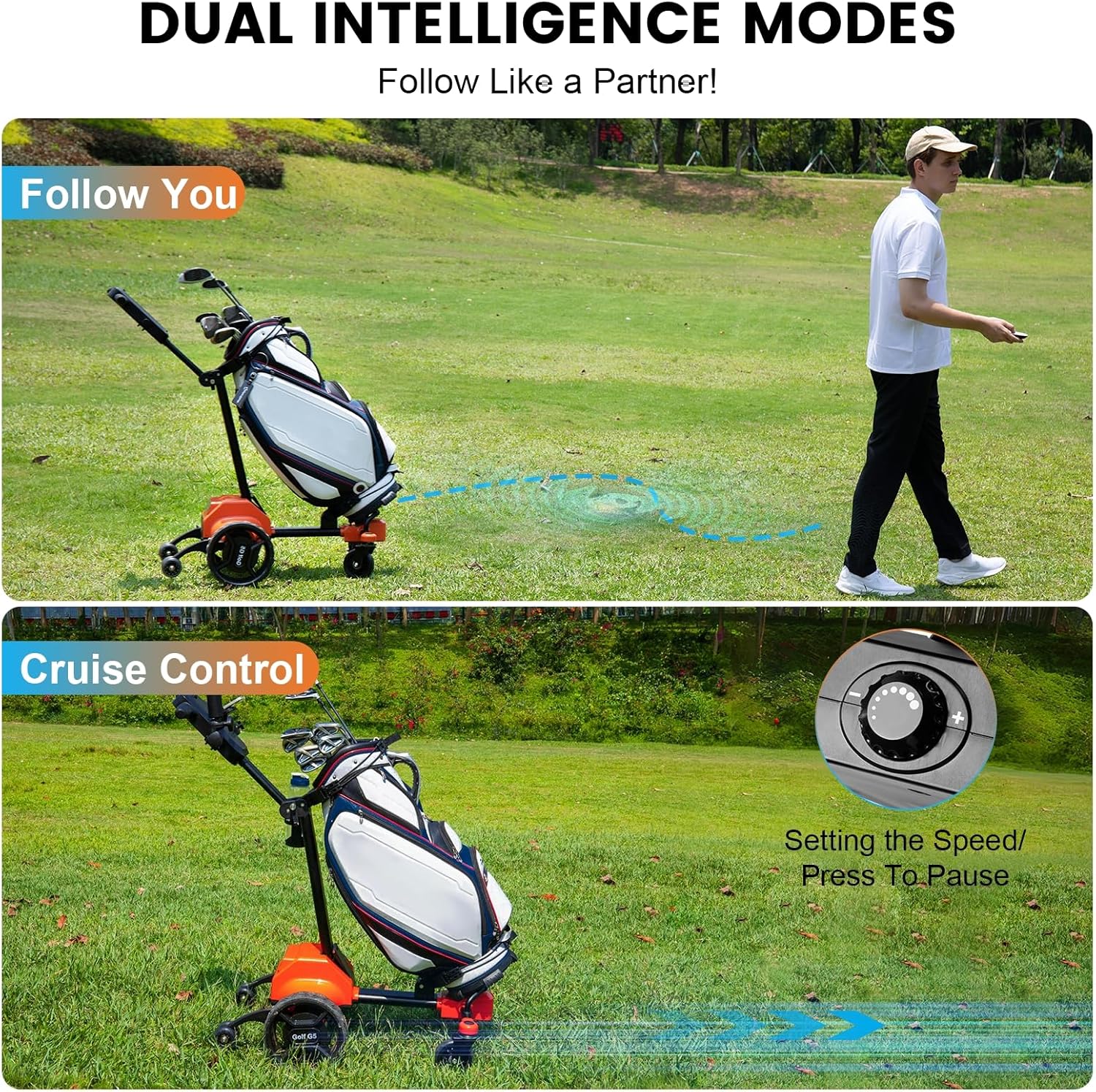
Figure 2.1: Illustration of the cart's dual intelligence modes: 'Follow You' and 'Cruise Control'.
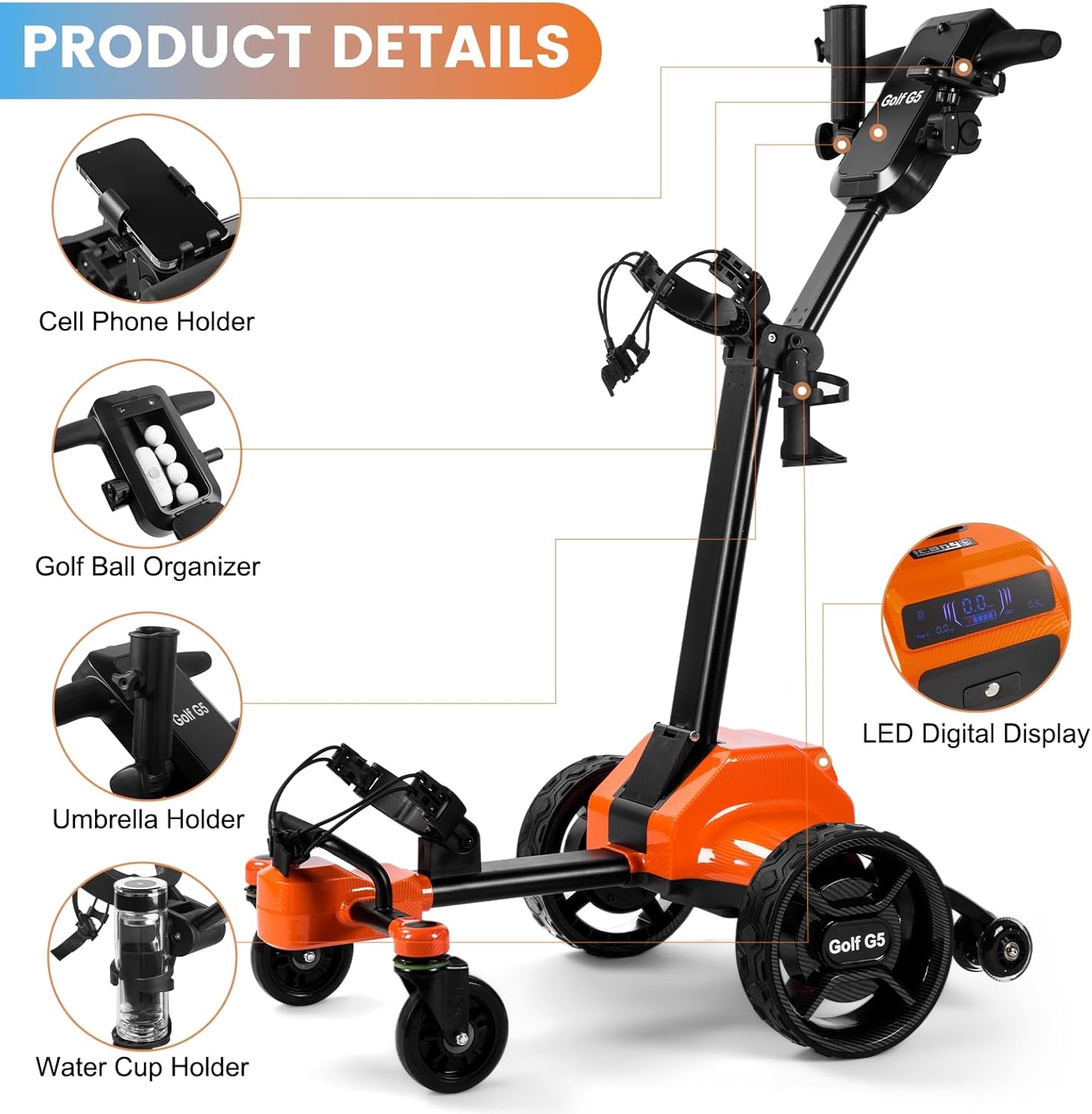
Figure 2.2: Detailed view of the integrated accessories and the LED digital display on the G5 Golf Cart.

Figure 2.3: The anti-tipping support wheels at the back of the cart, designed for stability on any terrain or slope.

Figure 2.4: The removable battery with a USB socket, providing up to 28 miles of range and mobile charging capability.
3. Setup Guide
3.1 Unpacking and Initial Assembly
Carefully remove all components from the packaging. The G5 Electric Golf Cart features a 3-second folding design, requiring no tools for setup. Simply unfold the cart and ensure all locking mechanisms are securely engaged.
3.2 Battery Charging
Before first use, fully charge the battery. Connect the provided charger to the cart's charging port and plug it into a standard electrical outlet. The LED digital display will indicate charging status. A full charge ensures optimal performance and range.
3.3 Attaching Accessories
Attach the phone/GPS mount, insulated drink holder, and umbrella clamp to their designated slots on the cart's handle or frame as needed. The 8-ball organizer box can be placed in a convenient location.
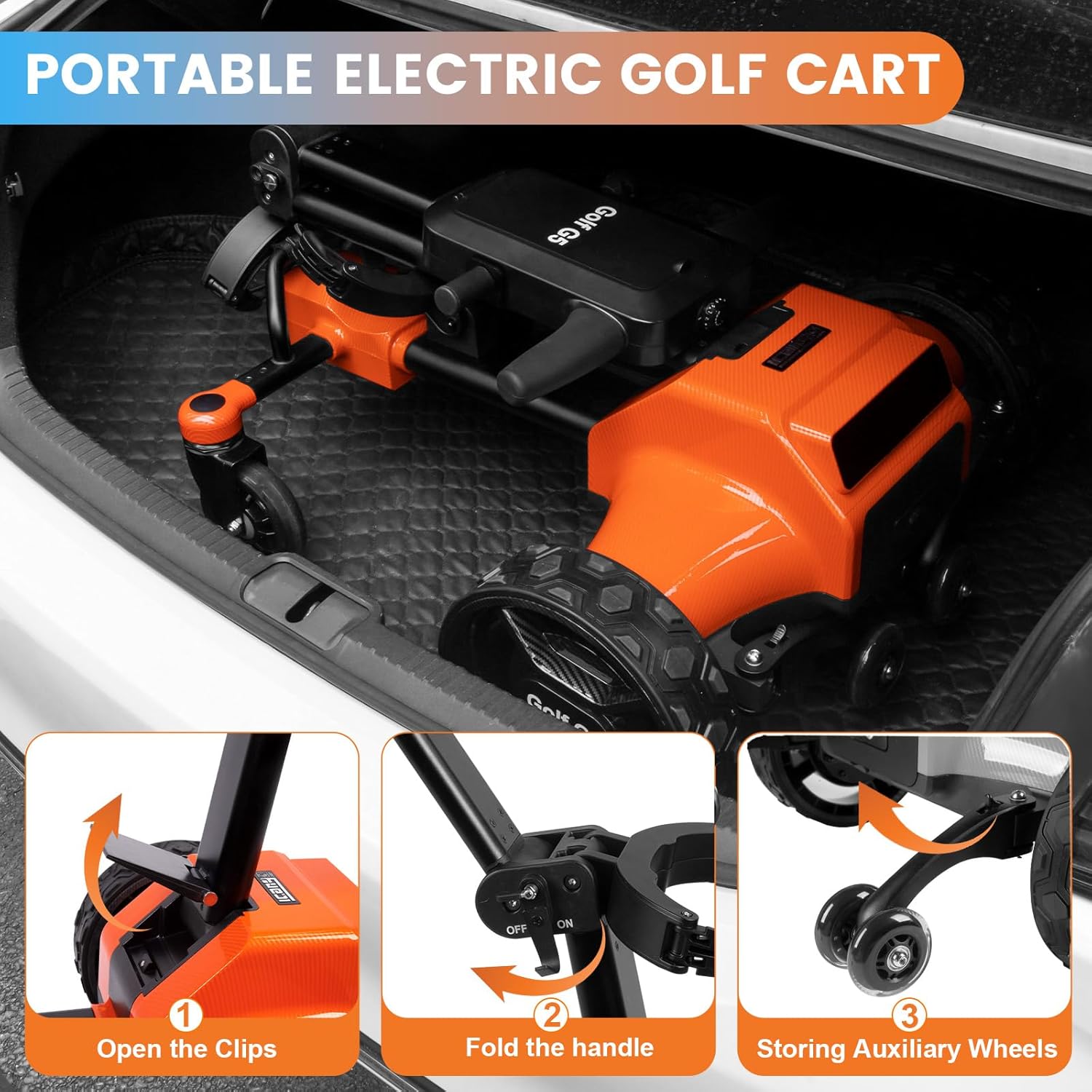
Figure 3.1: Steps for folding the G5 Electric Golf Cart for compact storage and transport.

Figure 3.2: The G5 Electric Golf Cart's compact folded size, allowing it to fit easily into a car trunk.
4. Operating Modes
4.1 Auto-Follow Mode
In Auto-Follow mode, the G5 cart will automatically follow your movements. To activate, ensure the cart is powered on and activate the handheld remote control. For optimal performance, hang the remote on your back waist to prevent signal interference from handheld shaking.

Figure 4.1: Proper remote placement for effective auto-follow functionality.

Figure 4.2: The G5 Electric Golf Cart automatically following a golfer on the course.
4.2 Remote Control Mode
The included remote control allows you to steer the cart directly. Use the joystick or directional buttons to navigate the cart across the course. The remote also features a "one-click summon" function to call the cart to your location and a "drive straight" function.

Figure 4.3: The remote control unit, indicating different operational modes via LED lights.
Video 4.1: Demonstration of the G5 Electric Golf Cart's auto-follow, auto-cruise, and remote quick call features.
Video 4.2: Overview of the G5 Electric Golf Cart's automatic follow, remote driving, and constant cruising capabilities.
4.3 Cruise Control Mode
The cart features a cruise control function. Use the speed adjustment dial on the handle to set a desired constant speed. This allows the cart to maintain a steady pace without continuous input.

Figure 4.4: The speed control dial on the handle for setting constant cruising speed.
4.4 Manual Push Mode
If preferred, the cart can be used in manual push mode. Simply disengage any powered modes and push the cart like a traditional golf push cart. The ergonomic handle provides a comfortable grip.
4.5 APP Control
The G5 Electric Golf Cart can also be controlled via a dedicated mobile application. Download the APP (refer to packaging or manufacturer's website for download instructions) to access additional features and real-time battery monitoring.
5. Maintenance and Care
- Cleaning: Wipe down the cart with a damp cloth after each use to remove dirt and debris. Avoid using harsh chemicals or abrasive cleaners.
- Battery Care: Always store the battery in a cool, dry place. Fully charge the battery before long-term storage and recharge every 2-3 months to maintain its health.
- Wheel Inspection: Regularly check the wheels for any signs of wear or damage. Ensure they are free of debris that could impede movement.
- Storage: When not in use, fold the cart and store it in a dry, protected area to prevent exposure to extreme weather conditions.
6. Troubleshooting
- Cart Not Responding:
- Ensure the cart is powered on.
- Check the remote control battery and ensure it is paired with the cart.
- Verify the main battery is charged and properly connected.
- Auto-Follow Issues:
- Ensure the remote is placed on your back waist as recommended to maintain a stable signal.
- Check for any obstructions between the remote and the cart.
- Reduced Range/Power:
- Fully charge the battery. Battery performance can decrease in extreme temperatures.
- Ensure tires are free of excessive mud or debris that could increase resistance.
For further assistance, please refer to the Warranty & Support section for contact information.
7. Specifications
| Specification | Value |
|---|---|
| Brand Name | tianhong |
| Model | G5 |
| Color | Black + Orange |
| Material | Plastic |
| Package Weight | 50 Pounds |
| Battery Life (Range) | Up to 28 miles (45H Battery) |
| Folded Dimensions | 28.7 × 24.8 × 14.1 inches |
| Suggested Users | Unisex-adult |
8. Warranty and Support
The tianhong G5 Electric Golf Cart comes with a comprehensive warranty to ensure your peace of mind:
- Motor Warranty: 3-year warranty on the motor.
- General Warranty: 6-month warranty on other components.
Our professional after-sales team is available 7 days a week, 24 hours a day, to assist with any product-related issues or inquiries. Please refer to your product packaging or the official tianhong website for specific contact details.
Related documentsG5


Ask a question about this manual
Ask about setup, troubleshooting, compatibility, parts, safety, or missing instructions. Manuals+ will review the question and use this page’s manual context to help answer it.