
1. Introduction
Thank you for choosing the Alpicool MG9 Mini Portable Freezer. This manual provides essential information for the safe and efficient operation of your new appliance. Please read it thoroughly before use and retain it for future reference.
The Alpicool MG9 is a compact and versatile portable freezer designed for various applications, including outdoor activities, camping, RV travel, and truck use. It offers reliable cooling and freezing performance with flexible power options.

Image 1: The Alpicool MG9 Mini Portable Freezer, a compact grey unit with a control panel on the front.
2. Safety Instructions
- Ensure the power voltage matches the specifications before connecting the appliance.
- Do not operate the freezer if the power cord is damaged or if the appliance shows signs of malfunction. Contact customer support.
- Keep the freezer away from heat sources and direct sunlight to ensure optimal performance and prevent damage.
- Maintain adequate ventilation around the unit. Ensure at least 8-10 inches of clear space around all vents for proper airflow.
- Do not immerse the freezer in water or expose it to heavy rain.
- Avoid placing corrosive materials or liquids inside the freezer.
- Always disconnect power before cleaning or performing maintenance.
- This appliance is not intended for use by persons with reduced physical, sensory, or mental capabilities unless supervised or instructed.
3. Product Components
The Alpicool MG9 Mini Portable Freezer package typically includes the following items:
- Alpicool MG9 Car Refrigerator x1
- DC Power Cord (12/24V) x1
- AC Power Cord + Adapter (100-240V) x1
- User Manual x1

Image 2: An illustration showing the Alpicool MG9 unit, a DC power cord, an AC power cord with adapter, and the user manual, indicating what is included in the package.
4. Setup
4.1 Initial Placement
- Place the freezer on a flat, stable surface.
- Ensure proper ventilation by leaving at least 8-10 inches of space around all sides, especially near the vents.
- Avoid placing the unit in direct sunlight or near heat-emitting appliances.
4.2 Power Connection
The Alpicool MG9 supports multiple power supply modes:
- DC 12/24V: Use the provided DC power cable to connect to a car cigarette lighter socket.
- AC 100-240V: Use the provided AC power cable and adapter to connect to a standard home outlet.
- Optional Power Station: The unit can also be connected to a portable power station or solar panel setup (cables for this may be sold separately).

Image 3: An illustration demonstrating the three power supply options: car cigarette lighter (DC 12/24V), home outlet (AC 100-240V), and an optional connection to a solar panel or battery station.
5. Operating Instructions
5.1 Control Panel Overview
The control panel is located on the front of the unit and features a digital display and several buttons for operation.
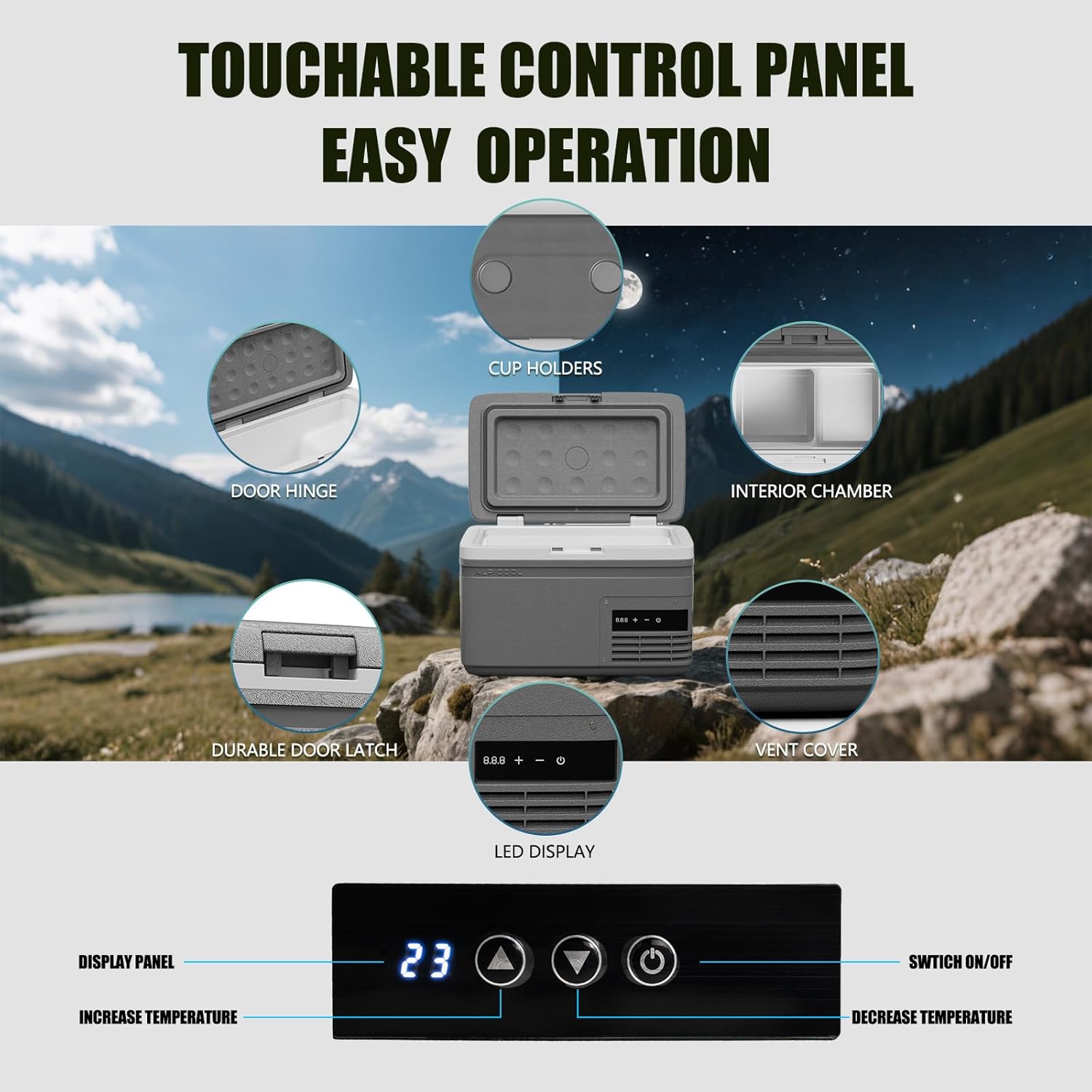
Image 4: A detailed view of the Alpicool MG9's control panel, showing the LED display, power button, and temperature adjustment buttons. Other features like cup holders, door hinge, interior chamber, durable door latch, and vent cover are also highlighted.
- LED Display: Shows the current temperature and settings.
- Power Button (⑂): Press to turn the unit on or off.
- Increase Temperature (+): Press to raise the target temperature.
- Decrease Temperature (-): Press to lower the target temperature.
5.2 Setting Temperature
- Turn on the freezer by pressing the Power button.
- Use the '+' and '-' buttons to adjust the desired temperature. The display will flash the target temperature and then return to the current internal temperature.
- The unit will automatically cool or heat to reach and maintain the set temperature. The cooling range is -4°F (-20°C) to 68°F (20°C).
5.3 Cooling Modes (MAX/ECO)
The Alpicool MG9 offers two cooling modes:
- MAX Mode: Provides fast cooling performance, ideal for quickly reaching the desired temperature. Power consumption is approximately 45W.
- ECO Mode: An energy-saving mode that reduces power consumption, suitable for maintaining temperature over longer periods. Power consumption is approximately 33W.
To switch between modes, press the 'Set' button (often the power button or a dedicated button, refer to specific model instructions if available, otherwise assume power button for simplicity).

Image 5: An illustration comparing MAX mode (45W, quick cooling) and ECO mode (33W, energy saving) for the Alpicool MG9, with a background of mountains and a forest.
5.4 Car Battery Protection
The unit features a 3-level car battery protection system to prevent your vehicle's battery from draining completely.
- H1 (Low): Lowest cut-out voltage, suitable for most vehicles.
- H2 (Medium): Medium cut-out voltage.
- H3 (High): Highest cut-out voltage, recommended for sensitive vehicle batteries or when using the freezer for extended periods without the engine running.
To adjust the battery protection level, press and hold the 'Set' button (or power button) until the display shows the current battery protection level (H1, H2, or H3). Use the '+' or '-' buttons to select the desired level, then wait for the display to return to the temperature reading to confirm the setting.

Image 6: This image displays the dimensions of the Alpicool MG9 (16.2in x 9.8in x 11.1in) and a table detailing the voltage reference for the battery protection modes (L, M, H) for both DC 12V and DC 24V inputs, showing cut-out and cut-in voltages.
6. Maintenance
6.1 Cleaning
- Always disconnect the power supply before cleaning.
- Wipe the interior and exterior surfaces with a damp cloth and a mild detergent. Do not use abrasive cleaners or solvents.
- The door is removable for effortless deep cleaning and hygiene. Gently detach the door as instructed in the diagram (if available, otherwise imply careful removal).
- Ensure the unit is completely dry before reconnecting power.

Image 7: This image highlights the removable door feature for easy cleaning, the vent cover designed for optimal airflow, and the integrated handle for portability, all contributing to the freezer's functionality.
6.2 Ventilation
Regularly check that the ventilation vents are clear of dust and debris to ensure efficient operation and prevent overheating. Maintain clear space around the vents as specified in the setup section.
7. Troubleshooting
If you encounter issues with your Alpicool MG9, please refer to the following common troubleshooting steps:
| Problem | Possible Cause | Solution |
|---|---|---|
| Unit does not turn on | No power supply; Damaged power cord; Blown fuse in vehicle. | Check power connection; Inspect power cord for damage; Check vehicle fuse. |
| Unit not cooling effectively | Insufficient ventilation; Door not sealed properly; Ambient temperature too high; Incorrect temperature setting. | Ensure clear vents; Check door seal; Move unit to cooler area; Adjust temperature setting. |
| Display shows error code | Internal fault; Low voltage. | Refer to specific error code in a more detailed manual (if available); Check power source voltage. |
| Excessive noise | Unit not level; Fan obstructed; Compressor issue. | Place on a level surface; Clear fan area; If noise persists, contact support. |
If the problem persists after attempting these solutions, please contact Alpicool customer support for further assistance.
8. Specifications
Detailed technical specifications for the Alpicool MG9 Mini Portable Freezer:

Image 8: A graphic displaying the Alpicool MG9's specifications, including model name, capacity, cooling range, power source, dimensions, and net weight.
| Feature | Specification |
|---|---|
| Model Name | MG9 |
| Capacity | 8.7 Liters (9 Quart) |
| Cooling Range | -4°F to 68°F (-20°C to 20°C) |
| Power Source | DC 12/24V, AC 100-240V |
| Rated Power | 45W (MAX Mode), 33W (ECO Mode) |
| Product Dimensions | 16.3 x 9.8 x 11.1 inches (41.2 x 25 x 28.2 cm) |
| Net Weight | 13.9 lbs (6.3 kg) |
| Defrost System | Automatic |
| Noise Level | Less than 45dB |
9. Warranty and Support
Alpicool products are designed for reliability and performance. For warranty information, please refer to the warranty card included with your purchase or visit the official Alpicool website. Typically, products come with a limited warranty covering manufacturing defects.
For technical support, troubleshooting assistance, or warranty claims, please contact Alpicool customer service through their official website or the contact information provided in your product packaging. When contacting support, please have your model number (MG9) and purchase details ready.


